RGD—September 14, 2025✓ Verified purchase
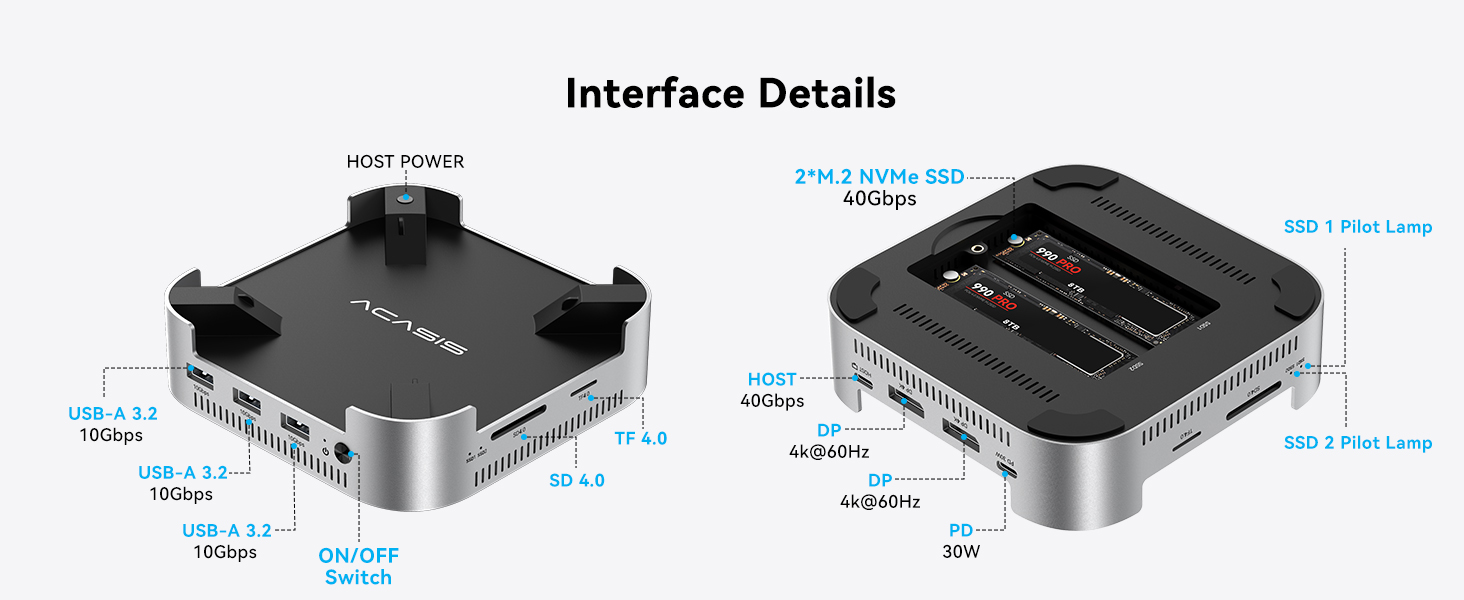
This works exactly how they say it does. Took three attempts to get the two drives to show up because the cards need to be precisely aligned, but other than that, took about 30 minutes to set it all up and its like have an extra 4Tb drive in my Mini, except better, because I bought two identical 4tb cards and mounted them in RAID 1, so they are mirrored to give me protection for my 100,000 photos and hundreds of home movie files going back to 1974 plus documents going back to 1994. Yes, I could have put them on the cloud, but not everyone has 1Tb up and down fibre optic and nor do I need that. I prefer to have my files when I want them rather than waiting with the spinning wheel for them to download. I now have slots for my camera cards, USB A slots for my old DVD/CD player/writer and can use my thumb drives, no awkward adapters necessary or shortage of ports. I could connect another two displays with its HDMI ports but don't need them now. I also have a 4Tb SSD attached as a Time Machine, but will convert that to a NVMe card soon. Very reasonable cost and after a week, I am really happy with this product. No discernible noise and I hope it doesn't overheat but feels pretty cool to touch. I am not sure how I will know which drive has failed if one does because I don't see any lights that came on and I am wondering how I will find out. I am sorry I didn't make a video which may have been helpful to some of you who may have been struggling to decide which of these devices to buy, but I considered them all and what I needed most. They really need one in the future with 3 card slot for the Time Machine but none exist like that yet. Had this a month, still working perfectly, no sign of overheating yet. It's brilliant. I asked the supplier how I could tell which RAID drive had failed, but no way to tell. I will have to cross that bridge when It happens. Its still performing perfectly. Read more
Richard P.—August 15, 2025✓ Verified purchase
I knew when I was looking at the Mac Mini that I wanted a docking station to support it. I watched dozens of Youtube video reviews and impressions before finally coming across this one. So far, it is working flawlessly and seems to be a perfect match to the Mini. Comes loaded with ports and button to turn the Mini on and off is great and works better than I expected. The capability to add SSD drive is great, I opted for a sgl 4Tb. Being a photographer, the slots for the SD standard and SD mini card readers are a huge plus, now I don't have to plug an accessory reader. I haven't noticed any over heating issues nor have I experienced problems with wifi dropping out. All in all, I'm very pleased with this docking station. Read more
asuslow—February 3, 2026✓ Verified purchase
Works good . 2 thinks . It should have included a headphone jack on the backside and have the ability to turn on and off with the turning on and off of the Mac mini . Read more
bobbyinpa—August 25, 2025✓ Verified purchase
Build quality nice, easy to install SDD's. Like the Mac mini sits away from the hub for better airflow. SSD's converted to RAID 0 and they have excellent read and write speeds, but way too hot, unable to hold it in your hands while running, disappointed with purchase Read more
Cdrpilot—December 9, 2025✓ Verified purchase
The item is beautifully designed. I did have to return the first one I ordered as it hummed annoyingly. The replacement is wonderful and silent. Thank you Acasis and Amazon for making the replacement easy. Read more
Mark—December 13, 2025✓ Verified purchase
This is a comparison of two similar docks: the Acasis 40 Gbps M001Pro dock (the base stand, not the mini tower configuration) vs the RayCue 40 Gbps 8 in 1 dock: The Acasis dock features two DP monitor ports and can contain two SSD's, each limited to 20 Gpbs but which can be combined via Raid 0 for a maximum speed of 40 Gbps. The RayCue dock features one DP monitor port and a 40 Gbps USB C port with monitor support (so two monitors can be connected), and can contain one SSD at a maximum speed of 40 Gbps. Both docs also feature SD/TF 4.0 card readers and 2/3 (RayCue/Acasis) additional 10 Gbps USB A ports. Note that both docs use USB4 technology, which is not strictly Thunderbolt, though similar, to achieve their high performance. Also note that for both docks, the 40 Gbps bandwidth is shared between the SSDs and any peripherals attached to it. I had two HD monitors along with their USB 3 hubs connected to each dock, along with a variety of small USB devices attached to the monitor hubs, and a 4 TB USB 3.2 SSD for Time Machine backup. Both docs have continuously running fans. The RayCue fan, while not loud, is however noticeably louder than the Acacias fan and emits a rather annoying whine that contrasts with the silence of the Mac mini. The RayCue fan will turn off when the Mac is turned off, but unfortunately it will continue to spin when the Mac is sleeping, thus emitting a constant whine. The Acasis’ two fans are fairly quiet and emits a “soft" whir that's much more tolerable. The Acasis’ fans continue to spin even when the Mac mini is turned off, unless the Acasis dock is manually turned off. The Acasis dock runs very hot, and the temperature of the SSDs under light load is about 55°C, which is a bit on the hot side. The RayCue dock runs mildly warm – much cooler than the Acasis – and the temperature of the SSD under the same conditions is about 39°C and is about the same as the Mac mini's internal SSD. The RayCue dock runs much cooler than other hubs I used. (Note: After a while, the light load temperature of the RayCue SSD dropped to 37°.) I ran multiple passes of the AmorphousDiskMark suite of tests to test SSD temperatures under load. On the Acasis dock, starting with the SSD’s base temperature of about 55°C under a light load, temperatures gradually climbed and hit 70° near the end of the second pass, peeking at 71°, though I did not see any significant throttling. I only ran two passes. On the RayCue dock, starting with the SSD’s base temperature of about 39°C under a light load, temperatures reached a sustained high temperature of about 44° for the final two passes, for a total of four passes, and occasionally hit a peak of 45°. (I also tested a Ugreen passive 40Gbps enclosure. The SSD's normal temperature there is about 45° and is peak temperature hit 51°.) While the Acasis dock runs pleasantly quiet, I think its cooling solution is inadequate. The Acasis dock also has a quirk: if I connect certain USB devices, for example an external USB SSD drive, to any of the other parts on the Mac mini (note: not the dock), the dock will fail to reconnect to its peripherals (the monitors, SSD's, etc.) when the Mac is restarted or rebooted. I think this is very strange. Power cycling the dock will fix this problem. Oddly, if I connect an externally powered hub to the Mac mini and then connect the device causing problem to the hub, then that will also fix the problem–so that would be a workaround. (But that hub must be externally powered.) I reported this to Acasis, but they have not responded. Running the Blackmagic Disk Speed Test on both docks, I get similar results of about 2490/2890 write/read speeds, which are actually faster than the internal SSD of the base Mac mini. (The SSDs on the Acasis dock were configured as Raid 0 for maximum bandwidth.) Note that the bandwidth of both docks was shared with two HD monitors and various USB devices. Read more
Ramon K—February 19, 2026✓ Verified purchase
Provides an enclosure for 2 NVme boards. Loved the from attach of the power button. Reliable after 4 months. Read more
Miguel Madrid—February 24, 2026✓ Verified purchase
it works perfecly with my new mini M4 Apple .. love it !! Read more