Free shipping over $35 · 60-day returns · Price-watch guarantee

Ventari

v AV Access

AV Access Docking Station Dual Monitor KVM Switch 2 Monitors 2 Computers Laptop Desktop USB-C Charge Ethernet for

$249.99

586+ bought in the past month

About this item

  • Important Notes: Only support mirrored mode on macOS. Another model iDock M10 supports dual-screen extended mode for Apple MacBook. No driver needed, plug and play.
  • Made of All-aluminum Shell, Shockproof, Stable, and Reliable.
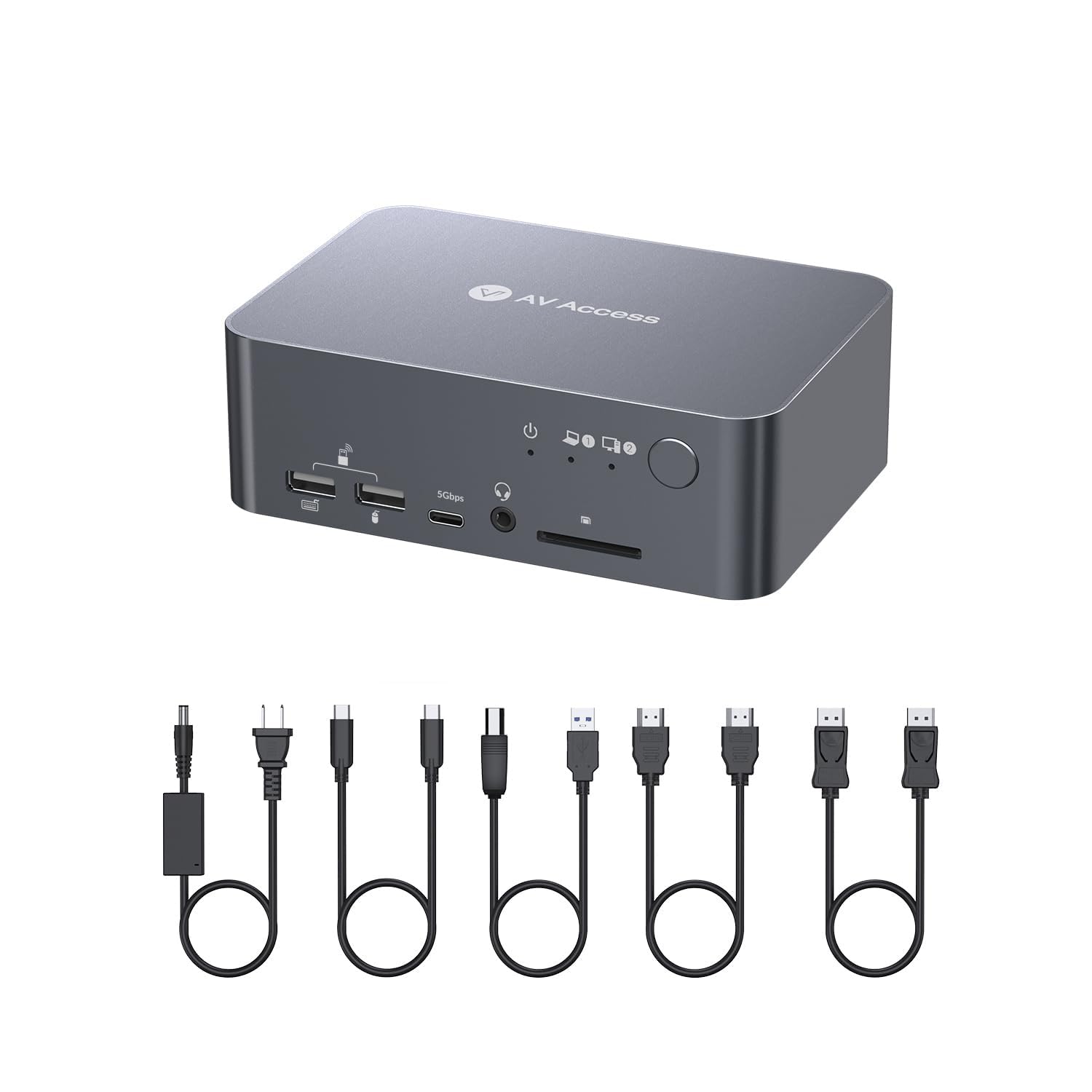
  • Package contents: 1x KVM Switch with Docking Station, 1x Power Adapter (20V/6A), 1x USB-C to USB-C cable (USB 3.2 Gen 2, 3ft), 1x USB-A to USB-B cable (USB 3.0, 5ft), 1x HDMI 2.0 cable (5ft), 1x DisplayPort 1.2a cable (5ft), 1x User Manual.
  • 12-in-1 Docking Station: Your two PCs can share abundant peripheral ports like 3x USB 3.0, 2x USB 2.0, 1x USB-C, 1x SD card, 1x LAN, 1x Toslink out, 1x 3.5mm headset, and two HDMI outputs. Build a powerful workstation at home, with ease. (The LAN port can only provide Internet access for your laptop.)
  • KVM Switch Dual Monitor Design: Built with 1x USB-C (MST) input port for laptop, and 1x integrated HDMI + DisplayPort + USB-B input port for desktop computer. Switch easily between your workstation and gaming PC, and view two monitors at the same time.
  • Full-Featured USB-C: With the 20Gbp/s USB-C port, you can input dual 4K UHD videos and transmit a large amount of data with up to 5Gbp/s. Also, you can charge your laptop with up to 60W.
  • Super Fast Switching: With the automatic PC wake-up function and EDID simulation, it only takes you 2-3 seconds to switch between your PC sources. Just press the front control button to switch effortlessly.
  • Ultra-High Refresh Rate: HDMI 2.0, DisplayPort 1.2 & DisplayPort 1.4a (USB-C) compliant. Supports up to 4K@60Hz 4:4:4. Also supports high refresh rates like 1080P@240Hz/165Hz/144Hz/120Hz, and 2560×1440@144Hz/120Hz, ensuring wonderful gaming experiences.

Key details

Operation Mode
KVM Switch
Current Rating
6 Amps
Contact Type
Hdmi Type-a 19-pin
Connector Type
Displayport, Hdmi, Type-c
Brand
v AV Access

Dimensions and fit

Item dimensions L x W x H
5.5 x 3.7 x 1.9 inches

Technical specifications

Operating Voltage
20 Volts (DC)

Item information

Switch Type
Button Switch
Terminal
Pc, Laptop
Highlights

About this item

  • Important Notes: Only support mirrored mode on macOS. Another model iDock M10 supports dual-screen extended mode for Apple MacBook. No driver needed, plug and play.
  • Made of All-aluminum Shell, Shockproof, Stable, and Reliable.
  • Package contents: 1x KVM Switch with Docking Station, 1x Power Adapter (20V/6A), 1x USB-C to USB-C cable (USB 3.2 Gen 2, 3ft), 1x USB-A to USB-B cable (USB 3.0, 5ft), 1x HDMI 2.0 cable (5ft), 1x DisplayPort 1.2a cable (5ft), 1x User Manual.
  • 12-in-1 Docking Station: Your two PCs can share abundant peripheral ports like 3x USB 3.0, 2x USB 2.0, 1x USB-C, 1x SD card, 1x LAN, 1x Toslink out, 1x 3.5mm headset, and two HDMI outputs. Build a powerful workstation at home, with ease. (The LAN port can only provide Internet access for your laptop.)
  • KVM Switch Dual Monitor Design: Built with 1x USB-C (MST) input port for laptop, and 1x integrated HDMI + DisplayPort + USB-B input port for desktop computer. Switch easily between your workstation and gaming PC, and view two monitors at the same time.
  • Full-Featured USB-C: With the 20Gbp/s USB-C port, you can input dual 4K UHD videos and transmit a large amount of data with up to 5Gbp/s. Also, you can charge your laptop with up to 60W.
  • Super Fast Switching: With the automatic PC wake-up function and EDID simulation, it only takes you 2-3 seconds to switch between your PC sources. Just press the front control button to switch effortlessly.
  • Ultra-High Refresh Rate: HDMI 2.0, DisplayPort 1.2 & DisplayPort 1.4a (USB-C) compliant. Supports up to 4K@60Hz 4:4:4. Also supports high refresh rates like 1080P@240Hz/165Hz/144Hz/120Hz, and 2560×1440@144Hz/120Hz, ensuring wonderful gaming experiences.
Close-up view of the AV Access Docking Station Dual Monitor KVM Switch 2 Monitors 2 Computers Laptop Desktop USB-C Charge Ethernet for
Details

Materials and care

Material
Aluminum

From the brand

Product detailProduct detailProduct detailProduct detailProduct detailProduct detailProduct detailProduct detailProduct detailProduct detailProduct detailProduct detail

Product videos

Product video 1

Customer reviews

199 reviewsPositive

Rated 4.0/5 across 199 reviews — well received overall.

Customers say

Customers find the docking station works flawlessly, particularly with Macbook Pro laptops, and can quickly switch between desktop and laptop computers.

Generated from the text of customer reviews

Reviews with images

Customer review image for Impressive and Compact PerformerCustomer review image for Impressive and Compact PerformerCustomer review image for Impressive and Compact PerformerCustomer review image for Impressive and Compact PerformerCustomer review image for Impressive and Compact PerformerCustomer review image for Impressive and Compact PerformerCustomer review image for Impressive and Compact PerformerCustomer review image for Impressive and Compact Performer
See all photos
★★★★★

Commercial-Grade Docking Station at Personal Pricing

I’ve been using this AV Access docking station/KVM for over a year, and it’s been rock solid. It feels commercial grade. the kind of gear you’d expect in an office setup but at a price that makes sense for home use. Switching between my laptop and desktop is instant, and it drives dual 4K monitors with zero flicker or lag. Gaming runs smooth, work apps are stable, and the 120W power supply keeps everything powered without breaking a sweat. Plenty of ports (USB-C, Ethernet, USBs, audio, SD) so everything stays plugged in — no dongle mess. Reliable, versatile, and no glitches in a full year of daily use. Commercial quality, personal pricing. Read more

Archi_AuVerified purchase
★★★★★

Impressive and Compact Performer

Compact size. 100-240v power supply - great for those of us that move from country to country. Nice and compact. Long power cable for easy reach. Comes with USB cables, 2 HDMI, and 1 DP. The USB-C to USB-C is a little short for one of my laptops, but works great for my HP. It can't be too long due to the standard for video transmission. It works great. I'm really impressed. I use a mouse for gaming and a trackball for everything else. No problem. Running games through it I was still at 265FPS on my 4090. Very convenient. USB devices automatically move to the system you are using. Also convenient. And I can't say how random SD cards just show in my life (usually from family). I don't have to dig through things to find a card reader now. Thank you for that little extra. Read more

Customer review image for Impressive and Compact PerformerCustomer review image for Impressive and Compact PerformerCustomer review image for Impressive and Compact PerformerCustomer review image for Impressive and Compact Performer
RootlessVerified purchase
★★★★

Does the job with minor inconveniences

I've been using this for 3 months now daily for work. I wanted to give it some time before leaving a review and run it through it's paces. The Good 1. Love that it charges the laptop when hooked up. 2. Easy setup and connections without having to use all kinds of adapters. 3. Clean desktop space and easy to switch between computers. The not so Good 1. Sometimes it doesn't recognize the dual monitors and only one registers. You have to shut off the monitor it doesn't recognize and turn it back on, then it works. 2. If the other computer you're not using is on and then goes to sleep, it causes both monitors to black out for about 3 seconds. They then turn right back on with the signal with the computer you are using. Read more

Jennifer DespainVerified purchase
★★★★★

Does what it says it does perfectly

I don't usually write reviews, but for this one I wanted to share my two cents. KVMs and docks, especially at high resolutions and refresh rates, are really finicky and hard to get right. This one works well. It does what it says it does, which for this type of hardware is all you can ask for. To all the people complaining that this doesn't work, at the bandwidth that this device works with (and higher bandwidth devices) you have to remember that the KVM is just one piece of the setup. Let me explain: - You need to make sure the laptop/PC you are plugged into (ports, drivers, GPU, etc) are at the spec. It's valuable to look at the USB port specs on your device. Make sure that you aren't plugging an HDMI 2.0b cable into a lower version, or something like that. Adapters (HDMI to DVI) can also automatically downgrade. With the laptop cable, USB-C is just a port, make sure that all the protocols that need to be implemented are there. - Ensure you have high-quality cables rated for the required specifications. You can't expect HDMI 2.0b resolutions (without issue) if you are using a low-quality cable or an older version cable. It's honestly worth it to go up versions for future proofing and headroom. Cables nowadays are a significant portion of an entire desktop setup and not just as plug-and-play as they used to be. - Make sure the monitors you are using support the specifications too. The whole setup from Monitor -> cable -> kvm -> cable -> laptop/pc has to be up-to-spec and high quality for high-resolution things to work flawlessly now-a-days. Even then, the newer 4K+ monitors, usually only have one port that supports max resolution with all the bells and whistles. Make sure you read the documentation for the monitor. - Another thing to look out for is USB limits. You can only have 5 "hubs" daisy-chained before the USB protocols falls apart. Even then, that's if the cables you have are good enough, they can maintain signal integrity through all of that. Some cables count as hubs, and some devices (like this KVM) count as multiple. The KVM comes with some cables, but honestly, do yourself a favor and buy some high-quality ones that are versions above what you need. I can't stress enough how important cables are now. Take this from someone who runs a 7680x2160@240hz monitor switching between multiple devices that are in entirely different rooms >50 ft away. I use hubs/docks/kvms, most importantly some good fiber optic cables. I bought this device for my wife, and it fits her needs perfectly. Read more


Customer review image for Does what it says it does perfectly
CustomerVerified purchase
Recently Viewed

We use optional analytics cookies to understand how visitors use Ventari and improve the experience. This banner controls analytics measurement only. See our Cookie Policy.