Free shipping over $35 · 60-day returns · Price-watch guarantee

Ventari

Ocypus

Delta EU04 BK Internal USB Hub Expands 4 USB 2 0 Ports for Motherboard 9 Pin Connector Stable

$12.99$18.99

293+ bought in the past month

Sobre este artículo

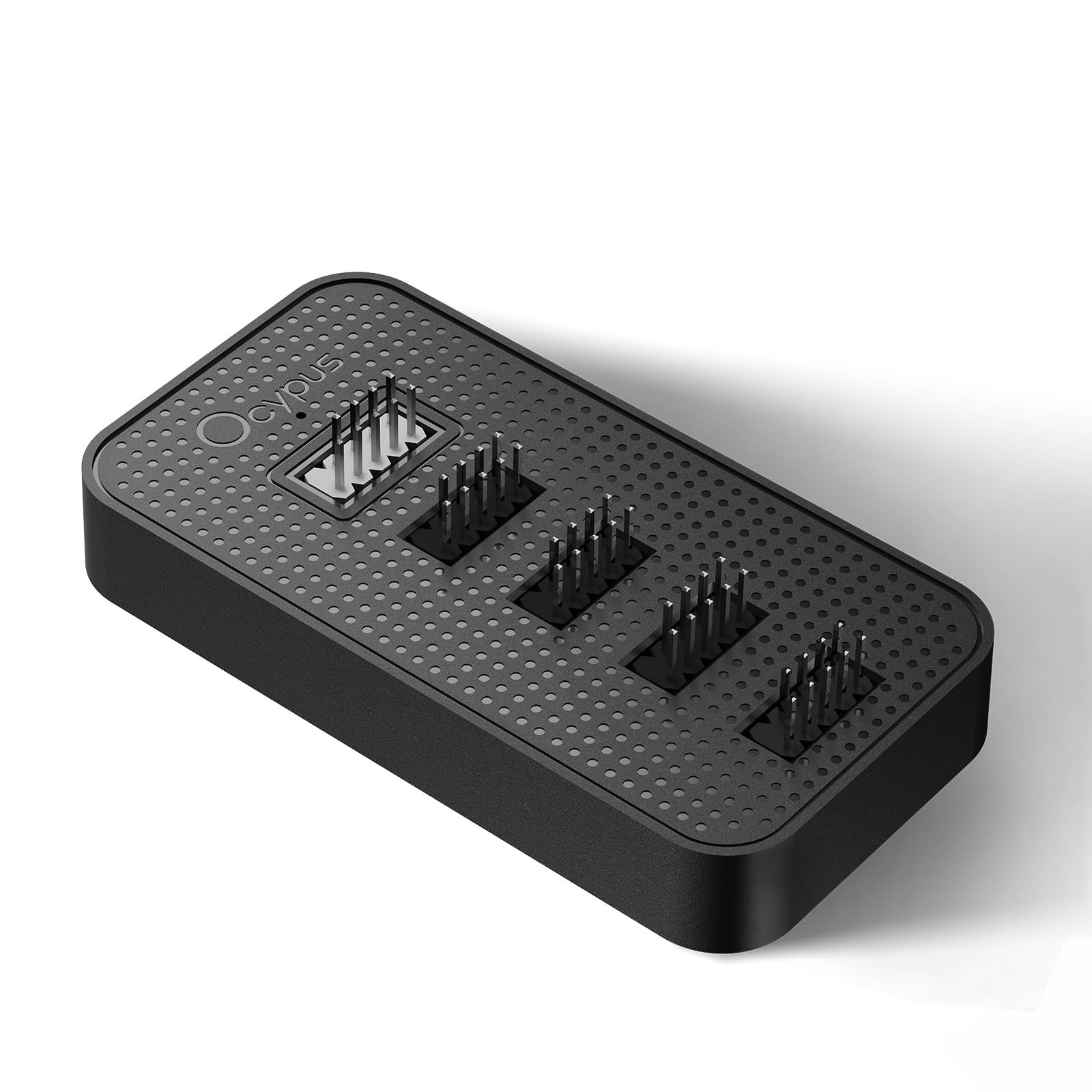
  • 【5-in-1 Port Expansion】Comes with 1 motherboard input port and 4 USB 2.0 9-pin output ports, effortlessly expanding your PC’s connectivity.
  • 【Stable SATA Power Supply】Supports direct connection to the case's SATA power supply, delivering professional-grade stable power output.
  • 【Magnetic Easy Installation】User-friendly installation with magnetic body and 3M dual lock tapes.
  • 【Ultra-Compact Design】Measuring just 3.8*2.3*0.6inch (L×W×H), it fits seamlessly in all types of PC cases.
  • 【Wide Device Compatibility】Specially engineered for internal PC case use, compatible with most PC components and peripherals.
  • Note: Port pins are equipped with protective caps. When you receive the package, please check the pins for completeness. If there is any damage, reach out to the brand for a solution.

Key details

Brand
Ocypus
Compatible Devices
Desktop
Manufacturer
Ocypus
Number of Items
1

Dimensions and fit

Product Dimensions
3.81"L x 2.3"W x 0.62"H

Technical specifications

Power Connector Type
9-Pin
Voltage
5 Volts (DC)
Highlights

About this item

  • 【5-in-1 Port Expansion】Comes with 1 motherboard input port and 4 USB 2.0 9-pin output ports, effortlessly expanding your PC’s connectivity.
  • 【Stable SATA Power Supply】Supports direct connection to the case's SATA power supply, delivering professional-grade stable power output.
  • 【Magnetic Easy Installation】User-friendly installation with magnetic body and 3M dual lock tapes.
  • 【Ultra-Compact Design】Measuring just 3.8*2.3*0.6inch (L×W×H), it fits seamlessly in all types of PC cases.
  • 【Wide Device Compatibility】Specially engineered for internal PC case use, compatible with most PC components and peripherals.
  • Note: Port pins are equipped with protective caps. When you receive the package, please check the pins for completeness. If there is any damage, reach out to the brand for a solution.
Close-up view of the Delta EU04 BK Internal USB Hub Expands 4 USB 2 0 Ports for Motherboard 9 Pin Connector Stable
Details

Materials and care

Material
Magnets, PCB, Plastic

De la marca

Product detailProduct detailProduct detailProduct detailProduct detailProduct detailProduct detail

Customer reviews

127 reviewsPositive

Rated 4.5/5 across 127 reviews — highly regarded by customers.

  • 88% of sampled reviews are from verified purchases.
  • 75% of sampled reviews give 4–5 stars.

Customers say

Customers find the fan hub to be a great budget value.

Generated from the text of customer reviews

Reviews with images

Customer review image for Compact and Handy Little Hub
See all photos
★★★★★

they are swinging for the fence ! this is like DEEPCOOL re-imagined... literally!

TLDR; Ocypus (OH-Siii-pus) is a newish company that debut a few years ago. It was started adn is staffed by industery veterans form places such as DEEPCOOL . Basically after DC got booted out of the US market some of the EXEC's and engineers struck off on their own and started a new a new company, Ocypus . this company has been around for several years internatinally and is now gaining traction in US, UE, and UK markets So if you liked DEEPCOOL products, this company is staffed by some of the people that designed and engineered deepcool products ! ( it is a complety seperate company/manufacturer ) REVIEW: I bought the EH10 pro and comes with 10, 4pin PWM ports and 10, 3 pin RGB ports for a total of 20 ports.. this is basically a fancy splitter.....and it's actually quite cool! THIS IS NOT A REBADGE OF A GENERIC CONTROLLER, it is its own design setup is simple and standard for a PWM/RGB fan controller: 1) Plug it into a 4 pin PWM and RGB header on your MB and then plug the controller into a SATA connecter for power. 2)Then attach a fan ( and RGB) to the #1 header on the controller. that fan in the #1 spot gives the MB the rpm data . all subsiquent fans connected to the controller will mimic fan 3! for speed and RGB color. easy peasy! Whatever your PWM settings are on the motherboard to the fan header your plugged into the controller runs all the fans in unison to. RGB can be controlled VIA popular OEM and MB RGB software OR !!!!!! the PRO model comes with a remote ! If your MB does not have PWM and/or RGB headers ( or they burned out ) you can plug your fans into this controller and power it via the SATA connection and control the colors and set speed ( +/- speed buttons ) via the remote and NOT need to have it plugged into the MB. I personally have my fans plugged into the MB PWM headers but my MB does not have RGB support so I have the 3 pin RGB all plugged into the controller and use the remote to control the RGB the EH10 PRO also supports 5v AND 12v fans . you CAN mix fans of different voltage...it will automatically detect what the voltage requirment is for each header connection. my only CAUTION is to say that if you use fans with different max speeds then the slowest max RPM needs to be in header 1. As I said the header 1 port on the controller feeds the RPM to the MB and the rest are syncronized to that so if you put a 2000 rpm fan on 1 and 1500 rpm fan on 2 -10 then at max speed it will be trying to push the 1500 fan to 2000 because the fan in header 1 reports 2000 as max. anywhoo , fantastic little controller! It is well built in a solid plastic case and is demetionally about the same size as a 2.5" hdd , maybe a smidge thiner. it has magnets inside so it just sticks to the case , they are more than strong enough to hold the controller securely wherever it is placed on the case. my case has 33mm of clearence on the back side and this fits with tons of space to spare. I have so have purchaced RGB and non-RGB PWM fans from Ocypus and have quite satisfied for the price and left a ( FAVORABLE) review on those. I feel like this is a bit of a hidden gem company...a darkhorse at the moment. It has been around several years internationally and have been growing quickly in sales ands reputation. I think we will be seeing more from this brand in the US , EU, and UK as they enter western markets. Read more

Celeste-DestinyVerified purchase
★★★★★

Works Without PWM Connection for an HVAC Booster Fan!

I needed a fan hub that would control fan speeds without the motherboard pwn connection, have a remote that would work without a line of sight and recover to the set fan speed setting on power loss. This hub did all of these! It is a fantastic product. Read more

Danny MacsVerified purchase
★★★★★

Good product!

Nice, works well when limited connections. Used it on my B650 mobo, works great! Good build doesn't feel cheap. Read more

TNapierVerified purchase
★★★★

Compact and Handy Little Hub

This internal USB hub is a solid addition to my PC setup. It’s small but thoughtfully designed — the magnetic mount made installation really easy, and the SATA power keeps everything running smoothly. I used it to add a few internal devices like RGB controllers and extra ports, and it’s been totally stable. The black finish blends right in with my build, and I like that it doesn’t take up much room inside the case. Great for organizing internal connections without clutter. Read more

Customer review image for Compact and Handy Little Hub
LUVLEE17
★★★★★

As advertised

It did everything it was supposed to. Read more

Zachary SimonoffVerified purchase
★★★★★

Great KVM

Well Packed Fast Response Comes with Male to Male USB cables Powered - Powers the USB Drives !!! Would buy again…. Read more

Team2020Verified purchase
★★★☆☆

works

works the argb header on the hub pins on fan 1 are broke if the pins were not broke i would give a 5 star Read more

JeremyVerified purchase
★★★★★

This FAN/ARGB Hub Provides a Better Way of Doing Things - No Bloatware Required

Fan/ARGB hubs are not normally remarkable. I always use them because I deplore the use of motherboard RGB headers and the proprietary garbage software required to use them. These solve that problem. What makes this one extra-special is the fan that the remote allows you to manually control the fans rather than using the motherboard header. I love this and never plan to go back to using the motherboard fan headers. The convenience of changing the fan speeds manually from low to medium or high with the press of a button is far superior to using BIOS fan profiles. If you prefer fans that use a PWM signal and constant change speed based on temperatures you may not like this, but I personally find the manual control using the remote to be a vastly superior option. Read more

Mr. FoxVerified purchase
Recently Viewed

We use optional analytics cookies to understand how visitors use Ventari and improve the experience. This banner controls analytics measurement only. See our Cookie Policy.