MADPWR—November 15, 2025✓ Verified purchase
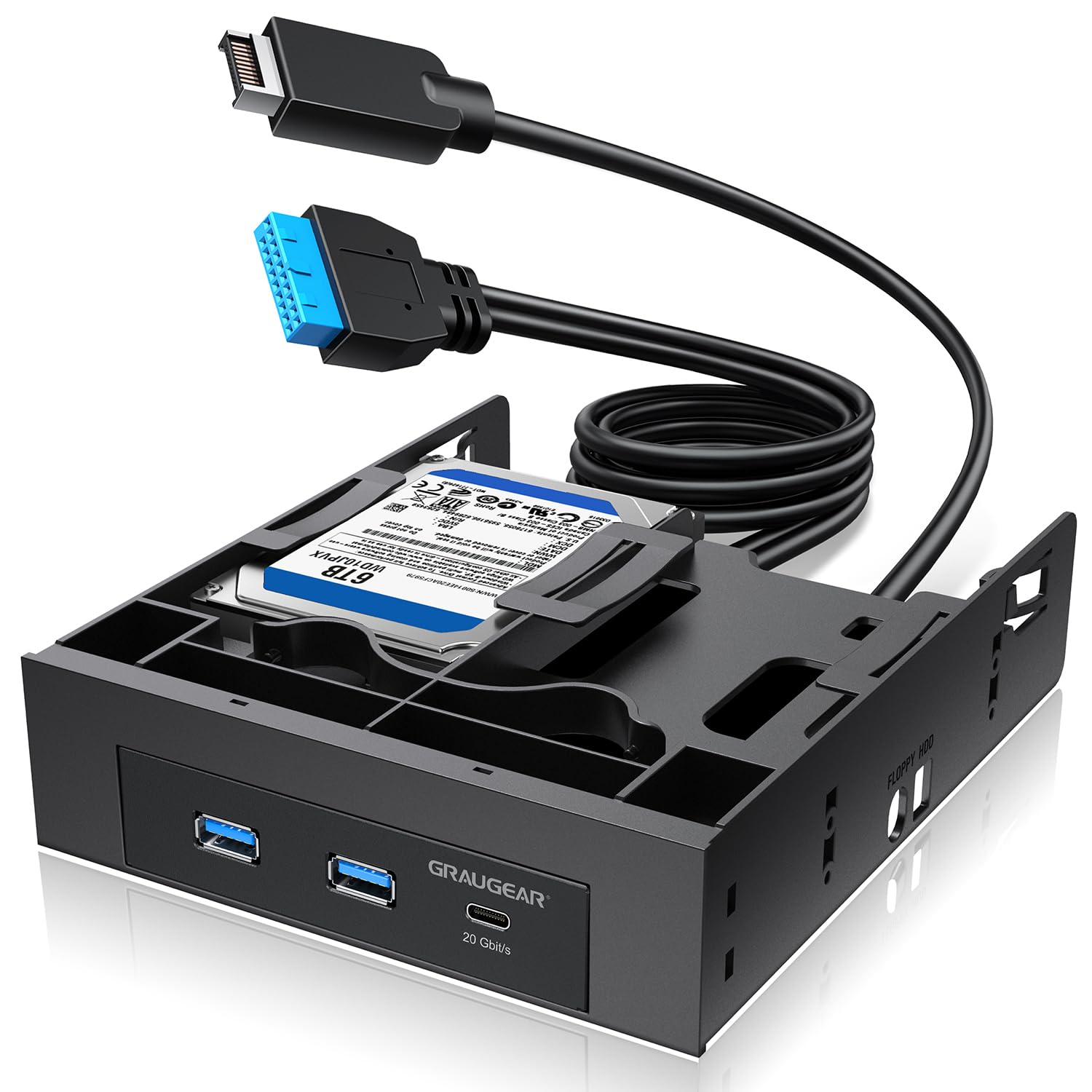
This review is for GRAUGEAR 5.25 Inch Internal USB Hub Front Panel – USB‑C 20Gbps + 2X USB‑A 5Gbps, Dual 2.5″ SSD/HDD Bays, Fits 5.25″ Bay, USB 3.2 A-Key 20-Pin & USB3.0 19‑Pin Headers, PC Case Desktop Expansion. My PC case did not have a USB-C front port, so I needed a front expansion bay to support one. As very few PC cases offer front expansions bays, 5.25" or 3.5". It is becoming more difficult to find solutions and the choices are fewer. I went with this USB hub for a few reasons. I specifically needed a 20Gbps USB-C port, since my motherboard has a header for it. Unfortunately, my motherboard only has a header for 2 x USB-A 3.2 Gen 1, but my PC case supports 4 x USB-A 3.0. So, I liked the idea of having a hub that has 2 x USB-A. This way my live ports would all be in one spot. The USB-A ports on this hub and my motherboard header are 5Gbps, so this hub matches up to what I currently have. All the USB ports work perfectly fine. They also used what I would consider the standard USB ports, and this is a good thing. Pretty much there are standard ports and then there are inferior ports. The standards have the rolled edges that hold up better, which these are. They also properly mounted the ports to the correct depth (I've come across others that had them too far out). The cables are also of good quality and appear to be shielded. The USB-C header plug is surprisingly larger. This is nice for durability but a bit cumbersome for cable management. I would have slightly preferred if the USB-A header plug was black instead of blue, but that is just an aesthetics thing only. The cables are long enough for full tower and smaller cases to be able to do full hidden cable management. I have a super tower case, and they were just long enough to reach without being able to do any real cable management to hide the cables. I like that the entire tray is black since I have a side window. You also have the added benefit of being able to fit 2 x 2.5" drives in this for additional storage. The front face place looks good. The 2.5" body is metal, and the rest is plastic. The plastic body is just slightly longer than my optical drives that sit below it. I would have preferred a flush fit or even shorter. You should also be able to remove the metal 3.5" body from the 5.25" tray if you wanted to install it in a 3.5" front bay. So far, this is the best quality hub of this style that I have seen. Read more
Ikary—December 5, 2025✓ Verified purchase
Work great Read more
O. Allen—September 28, 2025✓ Verified purchase
Device worked as expected. Speed performance is still under review will change rating after verification. Read more
Grabber82—November 17, 2025✓ Verified purchase
Have a class that does not have a usb c front panel connector. This is a great supplement that works just fine. Read more
USABuyer—February 5, 2026✓ Verified purchase
Fits nicely in a 5.25" bay and provides space for 3.5" drives. Perfect for upgrading an older case without USB-C ports. BE SURE your motherboard has a usb-c header or else, you cannot use the usb-c port on this. Read more
Customer—November 16, 2025✓ Verified purchase
Very happy with the fit and finish. Works exactly how it should. Read more
Customer—January 26, 2026
Works great, got 150MB/s transfer rate from the USB 3.0 ports to a flash drive. USB C 20G copy rate was 450MB/sec in a quick test. ps: make sure you plug in the SATA power connector Read more
Nicholas—August 20, 2025
I really like the general idea behind this product, adding additional USB ports to a computer as well as more space for additional hard drives, though limited to 2.5 form factor. I tested the USB ports for their speed, and though I wasn't able to fully confirm their theoretical potential (due to software limitations of the PC I was testing this on) I did find it was very fast and able to write 5GBs of data instantly to a M.2 NVMe drive. A 7200 RPM drive of course was much slower but that is something to keep in mind when buying is if you're hoping to upgrade your read and write speeds from USB but are doing so on a standard mechanical HDD then you're not likely going to see much of a performance boost at no fault of the USB ports. The over call construction is primary plastic and though something like aluminum for a more premium look would be nice it really would depend on your PC case and that might stand out too much in most cases. So for the price and the over all safer bet of fitting most case with a black plastic is more than acceptable imo. How easy it is to install the hub primarily depends on two things: 1. Your PC case 2. Your experience with upgrading/customizing PCs For the latter one, even without experience it is still fairly easy, especially connecting the type-e connector for the USB C port. The connection for the two USB 3.0 ports are 19 pins and it can be easy to accidentally bend the pins if not angled right or not applying even pressure. Also if you have low visibility and one of the pins is already bent/misaligned trying to plug in the connector can just make the problem worse. If you're experienced enough you know all this and it's fairly easy and standard. If you're not it can be a bit difficult but honestly it's still fairly easy. Pros: -Additional drive slots -Fast USB speeds -Moderate to easy install depending on case and experience Cons: -No additional color options to fit with your case Over all I think this is a great addition if you have a PC case sitting around that still has 5.25 front panel bays (make sure your motherboard has a free USB 19 pin connection and 20 type-e/A key port.) With the additional slots for 2.5 drives I think this is also a great consideration if you're converting an old desktop into a server. Read more