Free shipping over $35 · 60-day returns · Price-watch guarantee

Ventari

iDPRT

iDPRT MT610 Pro Portable Thermal Printer 300DPI HD Mobile-Travel-Printers Inkless-Wireless-Small-Printer for Home Use Office Vehicles Bluetooth Printers Supports

$59.99$69.98

921+ bought in the past month

About this item

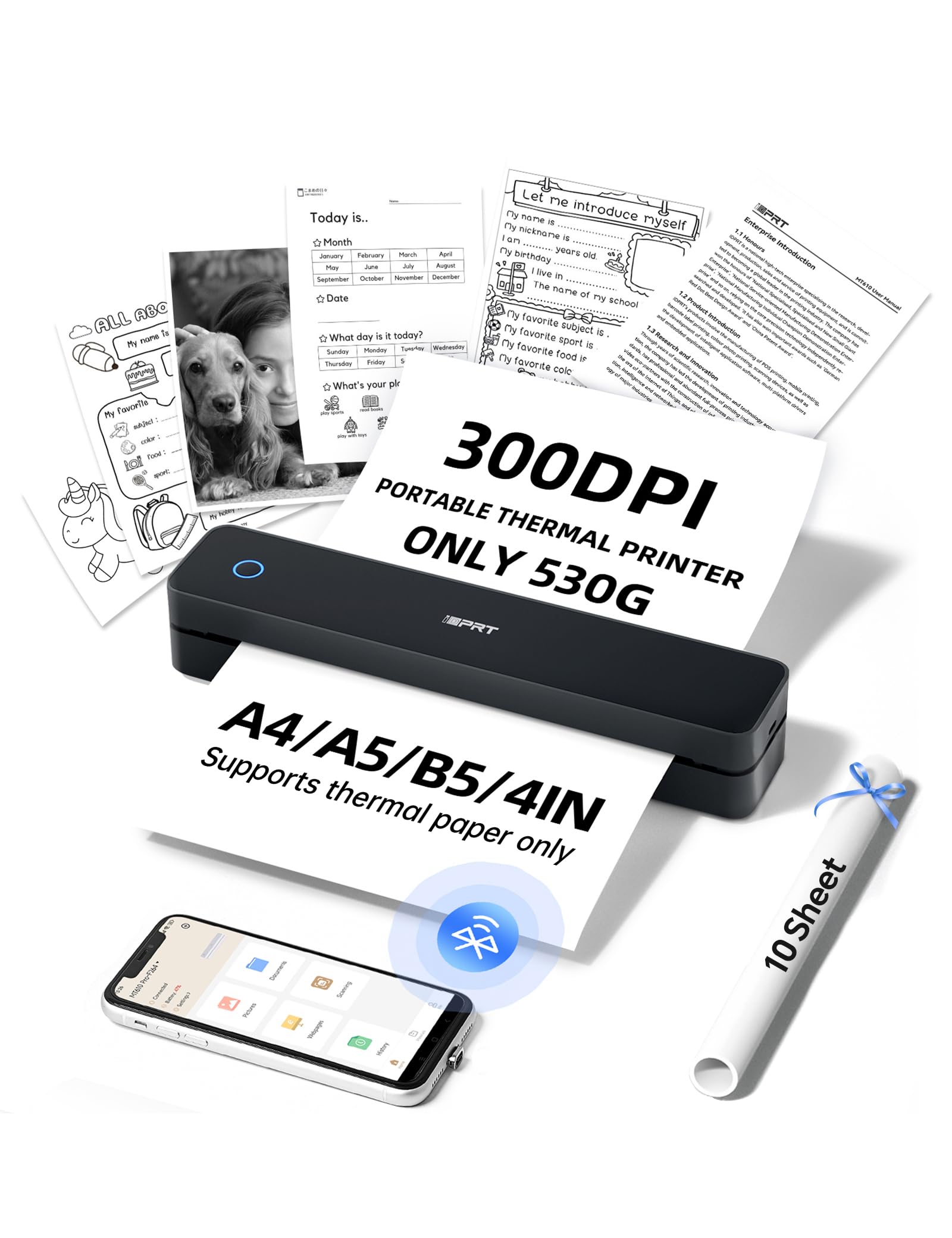
  • ✅PRINT ANYWHERE WITHOUT THE INK HASSLE:Say goodbye to messy ink cartridges. This portable printer creates sharp 300DPI documents faster than you can staple papers – we’re talking 4-6 seconds per A4 page. Whether you’re printing contracts at a coffee shop or boarding passes at the airport, it delivers professional results every time(Supports thermal paper only)
  • ✅TOUGH ENOUGH FOR DAILY USE:Weighing less than a hardcover book (1.1lb/498g), it slides easily into backpacks or tote bags. The textured grip prevents slips, and the matte finish hides scuffs from daily commutes. At 10.2 inches long, it fits neatly beside your laptop in any work bag
  • ✅BATTERY LIFE THAT KEEPS UP WITH YOU:One full charge handles 360 pages – enough to print a 200-page manual plus your weekly meeting notes. The 2000mAh battery lasts through 4 hours of continuous use, though you’ll need to buy thermal paper separately (standard 3.1" width works fine)
  • ✅COMPREHENSIVE COMPATIBILITY:Pair with smartphones via Bluetooth in 90 seconds – no tech degree required. The free HerePrint app lets you print photos directly from Instagram or turn handwritten notes into PDFs. For laptops, just plug in the USB cable: it acts like a regular printer for Word docs, Excel sheets, or even IKEA instruction PDFs(Note: To ensure print quality, do not print images that are entirely black.)
  • ✅FROM OFFICE TO LIFE: Print last-minute permission slips at school pickup Create parking passes for weekend events Keep food truck orders organized with instant receipts Document rental property inspections on-site Make scavenger hunt lists during family trips
  • ✅PHONE START PRINT: Step 1: Download APP "HerePrint"; Step 2: Turn on the MT610 Pro and make a Bluetooth connection in the APP; Step 3: Click the "+" sign to complete the device connection and select the file type to start print
  • ✅COMPUTER-DRIVEN PRINT:Step 1: Connect the MT610 Pro to your computer using a USB-C cable and power it on. Step 2: Download the appropriate driver for your computer's operating system from the brand's official website and install it. Step 3: Load thermal paper into the MT610 printer. On your PC, select the file, set the corresponding paper size, and start printing.

Key details

Brand
iDPRT
Connectivity Technology
Bluetooth
Printing Technology
Thermal
Special Feature
300 DPI HD Print, Energy Star, Lightweight, Portable
Color
Black

Dimensions and fit

Item Weight
1.1 Pounds

Technical specifications

Model Name
MT610 Pro Portable printer
Maximum Print Speed (Color)
25 ppm
Max Printspeed Monochrome
25 ppm

Item information

Printer Output
Monochrome
Highlights

About this item

  • ✅PRINT ANYWHERE WITHOUT THE INK HASSLE:Say goodbye to messy ink cartridges. This portable printer creates sharp 300DPI documents faster than you can staple papers – we’re talking 4-6 seconds per A4 page. Whether you’re printing contracts at a coffee shop or boarding passes at the airport, it delivers professional results every time(Supports thermal paper only)
  • ✅TOUGH ENOUGH FOR DAILY USE:Weighing less than a hardcover book (1.1lb/498g), it slides easily into backpacks or tote bags. The textured grip prevents slips, and the matte finish hides scuffs from daily commutes. At 10.2 inches long, it fits neatly beside your laptop in any work bag
  • ✅BATTERY LIFE THAT KEEPS UP WITH YOU:One full charge handles 360 pages – enough to print a 200-page manual plus your weekly meeting notes. The 2000mAh battery lasts through 4 hours of continuous use, though you’ll need to buy thermal paper separately (standard 3.1" width works fine)
  • ✅COMPREHENSIVE COMPATIBILITY:Pair with smartphones via Bluetooth in 90 seconds – no tech degree required. The free HerePrint app lets you print photos directly from Instagram or turn handwritten notes into PDFs. For laptops, just plug in the USB cable: it acts like a regular printer for Word docs, Excel sheets, or even IKEA instruction PDFs(Note: To ensure print quality, do not print images that are entirely black.)
  • ✅FROM OFFICE TO LIFE: Print last-minute permission slips at school pickup Create parking passes for weekend events Keep food truck orders organized with instant receipts Document rental property inspections on-site Make scavenger hunt lists during family trips
  • ✅PHONE START PRINT: Step 1: Download APP "HerePrint"; Step 2: Turn on the MT610 Pro and make a Bluetooth connection in the APP; Step 3: Click the "+" sign to complete the device connection and select the file type to start print
  • ✅COMPUTER-DRIVEN PRINT:Step 1: Connect the MT610 Pro to your computer using a USB-C cable and power it on. Step 2: Download the appropriate driver for your computer's operating system from the brand's official website and install it. Step 3: Load thermal paper into the MT610 printer. On your PC, select the file, set the corresponding paper size, and start printing.

From the brand

Product detailProduct detailProduct detailProduct detailProduct detailProduct detailProduct detailProduct detailProduct detailProduct detailProduct detailProduct detail

Product videos

Product video 1

Customer reviews

578 reviewsPositive

Rated 4.4/5 across 578 reviews — well received overall.

  • 88% of sampled reviews are from verified purchases.
  • 88% of sampled reviews give 4–5 stars.

Customers say

Customer summary is not available yet.

★★★★★

Small portable lightweight

Impressed this worked! Although it’s black and white, it’s very portable and potentially I could use it in my car! I have used it once and it was easy to set up! Read more
Melissa AbbottVerified purchase
★★★★★

Small but mighty

What an incredible product! Not even a foot long, about 2-2 1/2 inches square, truly portable along with your phone! Buy the thermal paper (not the cheapie kind for best thickness), and you can print anything! Love it! Read more

Elaine E.Verified purchase
★★★★★

Easy to use...

Works great...easy set up and easy to use. Just remember to buy thermal paper, it comes with 10 sheets....does not use regular paper... Read more

Evelyn ShibleVerified purchase
★★★★★

Love this thing

I only need to print very seldomly, usually when im returning something and i live in a rural area with no print store anywhere near so when I need to print I really need it but only 2 or 3 times a year probably. Igot tired of buying new ink for my ink jet printer only for it to dry up after only a few uses so I found this printer. I think its awesome, so small and works just perfectly for what I need. I would definitely recommend and wish id known about these printers sooner. Read more

KkVerified purchase
★★★★

Good printer

Work's well for printing black print only copies Read more

JimVerified purchase
★★★★★

Ease of use printer.

We’re using this on our boat. Once I figured out how to place the paper on the correct side, it has been great to print items on the boat. Read more

DeniseVerified purchase
★★★★★

No ink printer

Love the printer. Read more

RoseVerified purchase
★★★★★

This is such a great printer

These inkless printers are so great. It’s nice if you have a business. After you do a job for someone you can print them and official receipt right then, and be able to give it to them. You can hook it up to your phones “internet hotspot “ and use it to print. It so nice that you can have a printer anytime that you want. Who would’ve thought that someday you would be able to carry your printer with you wherever you go. It can literally fit in your purse, and you can carry it with you. Another great thing about it is that it NEVER EVER RUNS OUT OF INK, The only thing is you have to use a special kind of paper to print on. It will not print on regular printing paper. It does cost more, but it’s worth the cost Read more
Rena Clark
Recently Viewed

We use optional analytics cookies to understand how visitors use Ventari and improve the experience. This banner controls analytics measurement only. See our Cookie Policy.