Free shipping over $35 · 60-day returns · Price-watch guarantee

Ventari

CHEERKONTEK

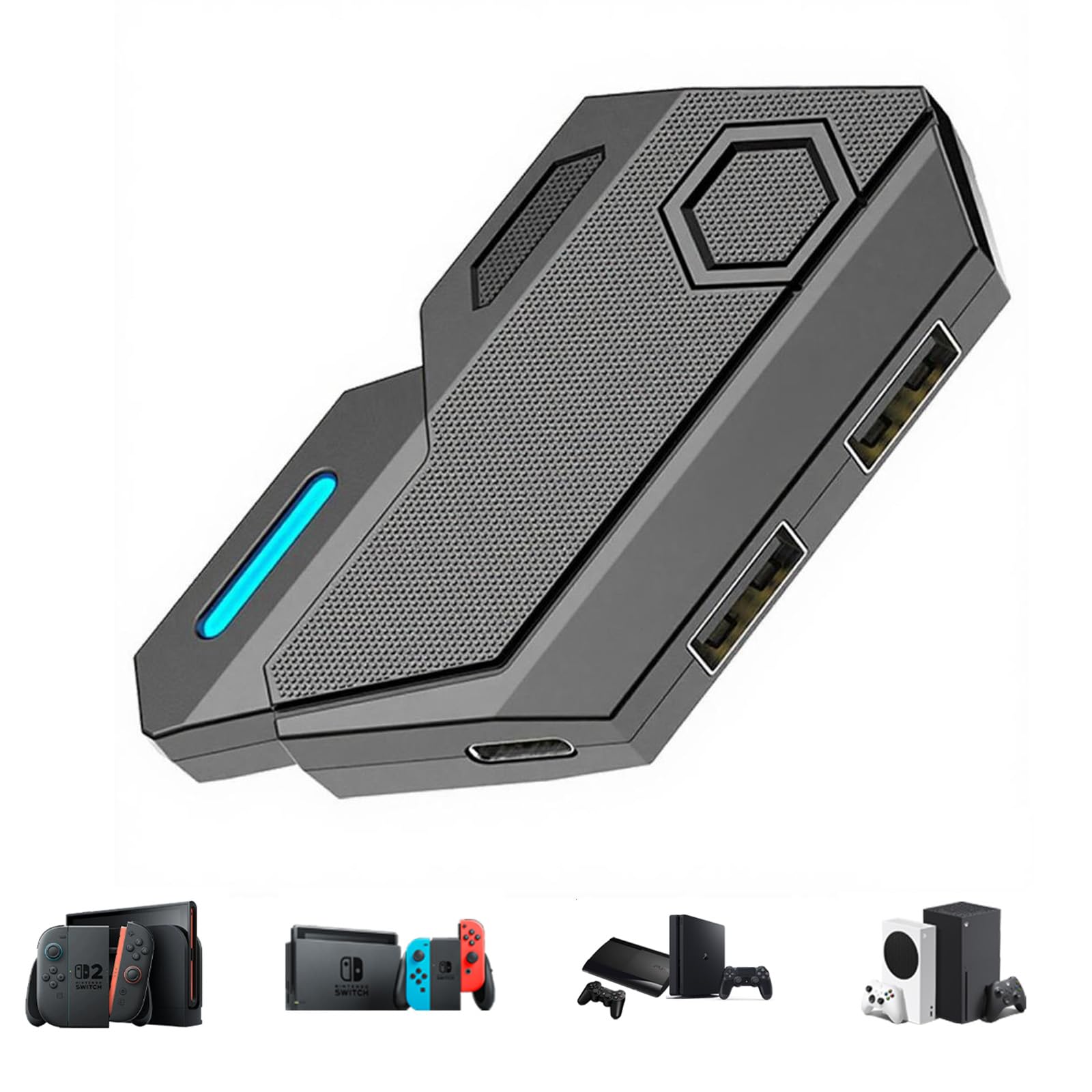
Keyboard and Mouse Adapter for Nintendo Switch PS4 PS3 Xbox One Xbox 360 Console Converter - Custom Key

4.3(22)
$18.99$19.99

329+ bought in the past month

Sobre este artículo

  • 🎮 Plug and Play: The BLADER keyboard mouse adapter offers a plug-and-play setup, light weight and small enough to fit in a backpack, making it easy to connect your keyboard and mouse to your Xbox, Nintendo Switch, or PlayStation console. Connecting to the game console requires the corresponding original controller, No complicated installation or additional software required
  • 🎮 Multi-platform compatibility: The CHEERKONTEK BLADER keyboard and mouse adapter is compatible with Nintendo Switch 2, NS, Xbox One, Xbox Series X/S, PS 4. The BLADER simulate keyboard and mouse inputs as controller signals, providing you with more flexible control on gaming consoles
  • 🎮 Shortcut key mapping and sensitivity: With shortcut key customization and sensitivity adjustment, this keyboard and mouse adapter allows you to personalize your gaming experience and improve game accuracy. Enjoy improved precision, speed, and control for FPS, TPS, and RTS games. Please refer to the manual or video tutorial for details on the mapping editing function
  • 🎮 Read before Use: 1. BLADER does not support mice that require driver installation. 2. Please note that after the controller is connected to the console through the blader, the 3.5mm headphone jack on the controller will become invalid
  • 🎮 Additional Requirements: 1. The mouse switching technology of BLADER will assume that the "view sensitivity" and other related options are maximized in your gameplay settings. In any case, it must be turned up to maximize your aiming performance. 2. Connecting to the game console requires the corresponding original controller, and the authorized controller is not supported

Key details

Brand
CHEERKONTEK
Color
Black
Hardware Interface
USB
Compatible Devices
Gaming Console
Total USB Ports
3

Dimensions and fit

Product Dimensions
3.2"L x 1.8"W x 0.5"H
Item Weight
0.05 Pounds

Item information

Number of Ports
4
Manufacturer
cheerkontek
Highlights

About this item

  • 🎮 Plug and Play: The BLADER keyboard mouse adapter offers a plug-and-play setup, light weight and small enough to fit in a backpack, making it easy to connect your keyboard and mouse to your Xbox, Nintendo Switch, or PlayStation console. Connecting to the game console requires the corresponding original controller, No complicated installation or additional software required
  • 🎮 Multi-platform compatibility: The CHEERKONTEK BLADER keyboard and mouse adapter is compatible with Nintendo Switch 2, NS, Xbox One, Xbox Series X/S, PS 4. The BLADER simulate keyboard and mouse inputs as controller signals, providing you with more flexible control on gaming consoles
  • 🎮 Shortcut key mapping and sensitivity: With shortcut key customization and sensitivity adjustment, this keyboard and mouse adapter allows you to personalize your gaming experience and improve game accuracy. Enjoy improved precision, speed, and control for FPS, TPS, and RTS games. Please refer to the manual or video tutorial for details on the mapping editing function
  • 🎮 Read before Use: 1. BLADER does not support mice that require driver installation. 2. Please note that after the controller is connected to the console through the blader, the 3.5mm headphone jack on the controller will become invalid
  • 🎮 Additional Requirements: 1. The mouse switching technology of BLADER will assume that the "view sensitivity" and other related options are maximized in your gameplay settings. In any case, it must be turned up to maximize your aiming performance. 2. Connecting to the game console requires the corresponding original controller, and the authorized controller is not supported

De la marca

Product detailProduct detailProduct detail

Product videos

Product video 1

Customer reviews

22 reviewsPositive

Rated 4.3/5 across 22 reviews — well received overall.

  • 67% of sampled reviews give 4–5 stars.

Customers say

Customer summary is not available yet.

Reviews with images

Customer review image for Very cheap feeling
See all photos
★★★★★

Great hub for all major consoles

Awesome peripheral accessory if you prefer keyboard and mouse, like if you normally prefer to game on a PC. It comes pre-programmed with keymappings for every major console type, so it's just plug and play. It does have a macro programming function, but I haven't had a chance to test that yet and am just using the default keybinds. No input lag, extremely responsive, total gamechanger if you're used to PC gaming or just prefer the keyboard and mouse over thumbstick controllers. Read more

JustSomeGuy
★★★★

Works well, but not for everyone

I picked up this adapter to try using a keyboard and mouse on my console, and overall it does what it promises. Setup was genuinely plug-and-play, and once connected it made certain games (especially shooters or menu-heavy titles) feel much more natural compared to a controller. The compact size is also a plus — easy to toss in a bag or keep tucked behind the console. My main caveat is that performance can vary depending on the game. Some titles don’t fully support this style of input, and you may need to tweak sensitivity settings to get things feeling right. Also, if you’re expecting true PC-level precision, it’s close, but not quite identical. Still, if you want a flexible way to use keyboard/mouse on a console without a complicated setup, this is a solid option. Read more

Justin
★★★★★

Great for FPS Games

This keyboard and mouse adapter for my consoles mainly to play first-person shooters, and it’s been a total game-changer. The setup was straightforward, and it recognized my keyboard and mouse right away without any hassle. Within a few minutes, I was up and running. It is compatible with all modern consoles, and it even has the option of macro programming. I have not set up this, but plan to do so in the future. The biggest difference is the precision. Aiming with a mouse feels so much more natural and accurate than using a controller, especially in FPS games where quick reactions and fine adjustments really matter. Tracking targets, flick shots, and making small corrections is just easier and more consistent. My movement with the keyboard also feels faster and more deliberate compared to thumbsticks. Input lag has been minimal (if any), and everything feels responsive and smooth. Build quality is solid, and it’s been working reliably across different games and sessions. If you play shooters on console and want that PC-style control and accuracy, this adapter is absolutely worth it. It seriously improved my experience and performance. Read more

JohnnySJ
★★★★★

Works well with older systems. No lag time using wireless.

This adapter is useful for many older systems. We tried to use the device for several different systems and they all worked well; Switch, PS3, PS4, Xbox One, and Xbox 360. We used a wired keyboard and mouse, and we used a plug and play wireless keyboard and mouse. To use the wireless keyboard and mouse, they must have a plug and play dongle. If they require any kind of configuration, then they will not work with this adapter. The games we tired showed no lag time, even with the wireless keyboard. Some people love using a keyboard instead of a controller, but I still prefer a controller, but there are some games I will use a keyboard for, and this device makes it easy and possible. We still use older consoles, so this is a great adapter to have for older consoles. This adapter is a good value. Read more

Wedway
★★★☆☆

Very cheap feeling

Flimsy feeling hub, you can probably buy something like this with similar price, and achive the samething, overall just a cheap piece of plastic with 2 usb port on it, I will recommend somthing else if you are getting it for the switch due to lack of ports. Read more

Customer review image for Very cheap feeling
ray
★★★★★

Useful KB/Mouse adapter for NS2 and others

Item: CHEERKONTEK Keyboard and Mouse Adapter for Nintendo Switch/PS4/PS3/Xbox One/Xbox 360 Console Converter - Custom Key Mapping, Plug and Play Hookup was easy, just have to remember to set the NS2 for a wired connection to the Pro Controller. Once done and with the mouse and keyboard attached, I was able to control the Switch. Everything that I tested worked fine, now I just need to find a game that would really benefit from controls. I tested it with a standard keyboard and it worked flawlessly and there was no lag that I could detect when using the controls. Now, I did notice an issue with my mechanical RGB keyboard. It causes the lighting to misbehave and randomly cycle. I'm guessing that enough power is not making it to the keyboard. Even with that, the keyboard still functions as expected through the CHEERONTEK adapter as mentioned above because I had no issue controlling the NS. Read more

Browsing
Recently Viewed

We use optional analytics cookies to understand how visitors use Ventari and improve the experience. This banner controls analytics measurement only. See our Cookie Policy.