Free shipping over $35 · 60-day returns · Price-watch guarantee

Ventari

Amazon Renewed

Logitech MX Master 2S Bluetooth Edition Wireless Mouse Use on Any Surface Hyper-Fast Scrolling Ergonomic Rechargeable Control Up

4.4(48)
$52.95

50+ bought in the past month

Key details

Brand
Logitech
Color
Black
Connectivity Technology
Bluetooth
Special Feature
Hyper-Fast Scrolling, Ergonomic, Rechargeable
Movement Detection Technology
Optical

Dimensions and fit

dimensions
4.96 x 3.37 x 1.91 inches
weight
7.8 ounces
product_dimensions
4.96 x 3.37 x 1.91 inches
item_weight
7.8 ounces

Technical specifications

item_model_number
MX Master 2S

Item information

best_sellers_rank
#556 in Computer Mice
date_first_available
June 6, 2024
manufacturer
Logitech

Product videos

Product video 1

Customer reviews

48 reviewsPositive

Rated 4.4/5 across 48 reviews — well received overall.

  • 88% of sampled reviews give 4–5 stars.

Customers say

Customers find the mouse's battery life positive, with one mentioning its lasting charge. Customers like the scrolling speed, with one mentioning it's great for Excel and doc editing.

Generated from the text of customer reviews

Reviews with images

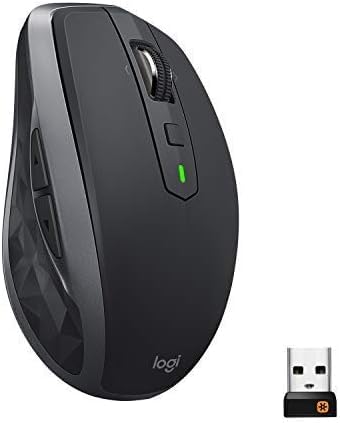
Customer review image for Buttons still in good place—identical to Master MX.
See all photos
★★★★★

Buttons still in good place—identical to Master MX.

This mouse has 7 progammable buttons: left click right click scroll wheel click (scroll wheel) behind scroll wheel button 2 button on the side (side scroll wheel) and under thumb button The first thing I love about this mouse is the position of the buttons. The side scroll wheel, the thumb buttons—1 below, 2 on the side are angled so you can feel which is which are great. The orginal MX Master had this. They changed the layout of the Mx Master 3. They moved the bottom button to the front of the side, so it’s harder to reach in a gaming emergency situation. (I play a retro MMO RPG called Clan Lord, and the bottom button is my chain button.) With the button below the thumb, I don’t have to change my grip. With the MX Master 3 the forward further away from the thumb, which requires you to change your grip. The result is sometimes to fall while changing your grip. So, the MX 3 is a no go, the MX 2 is just right. I have 2 other mice, one an 11 button wireless, 502 Lightspeed Logitech, and a portable Razer, small mouse. While the MX Master 2 is less than the Lightspeed, the light speed retail price is almost twice the price (retail) than the MX 2. What else is good/great about this mouse? The all buttons are programmable with Logitech’s GHub software. The GHub can also configure other Logitech mice, and keyboards. It is also really easy to map a button. You simply select the button you want in a graphical display of the mouse. Click in the mapped window next to the button, and then press whatever key you want or other behavior from a pull down menu. The biggest plus is you can have different button mapping for each application, besides the default mapping you set. This is a HUGE plus. The next plus is the scroll wheel. if you don’t map the button behind the scroll wheel, then pressing it switched between ratcheted scrolling where the wheel clicks, to smooth scrolling that you can free spin and keeps going after you spill it to quickly scroll a window a lot further. The Next plus is the Side Scroll wheel. It is ratcheted, and by default it switches between pages if you don’t reprogram it. I remapped it to switch between chosen morphs (in CL) using 2 Fkeys as the equivalent buttons. The side scroll wheel by default switches between pages, and window views (what ever sights you visited). This could potentially be a problem, but luckily the side scroll wheel is out of the way of your thumb. So you have to raise your thumb to touch it. (In this case that's good, and you don’t have to change your grip much [at all really] compared to a MX 3's forward button.) Okay so how is the mouse move? Smooth, accurate. It also works on glass surfaces. The last thing is you can switch between which up to 3 computers by pressing a button on the underside. To program it you just hold down the button, then connect to which computer you want it to control. Bottom Line: This mouse is pretty awesome. Less buttons than some gaming mice, but a good number of them (7 +2 wheels). It is accurate, has good battery life, its buttons work and easy to program, looks good! I would buy this again. Read more

Customer review image for Buttons still in good place—identical to Master MX.
M
★★★★★

Fantastic mouse - just bought my second one for home!

I love these mice. I have bought my second one for home. You can set buttons to whatever function you want, which is great. the scrolling side to side is great for excel and doc editing. I set the scroll wheel click to paste, which is so awesome. the only thing is I find myself clicking the wheel on other mice when I dint have this one, which is a hard habit to break. Hence, the second one for home. Battery life is great - I've never had an issue with needing to replace one (not sure how to do that even? or if I can replace it, but it lasts for several months with daily use and leaving it on all the time. Read more

S. Perry
★★★★★

Why did I wait so long to buy this?

Great mouse for my new Mac Mini, not sure why i waited so long. Great response, programmable buttons, long lasting charge Read more

Kindle Customer
★★★★★

MX Master Wireless Mouse

Love the comfort, ease of use, and rechargability Read more

William J. Amos
★★★★★

Best mouse ever!

Best mouse ever! Read more

Charles Sharon
★★★★★

Fast scrolling

Fast scrolling and multiple functions Read more

Evoke
★★☆☆☆

NOT THE BEST

Mouse was not functioning when received. I cleaned with an alcohol pad because it was pretty dirty and kind of banged up. I found a large piece of debris stuck in the eye of the mouse about a quarter of an inch big that completely blocked the eye. Once the mouse was cleaned and debris removed it functions fine. I have had this mouse before new and everything was much smother. If I was doing it again I would pay the extra 30 bucks and get a new one Read more

Raymond F. Brown Jr.
★★★★★

The best mouse I've ever had

This is my second mouse of this model, the other is still perfectly functional and I already have 4 years of daily use. It's perfect because it doesn't tire the hand despite intensive use. Read more

Ge E.
Recently Viewed

We use optional analytics cookies to understand how visitors use Ventari and improve the experience. This banner controls analytics measurement only. See our Cookie Policy.