Free shipping over $35 · 60-day returns · Price-watch guarantee

Ventari

Zinweyton

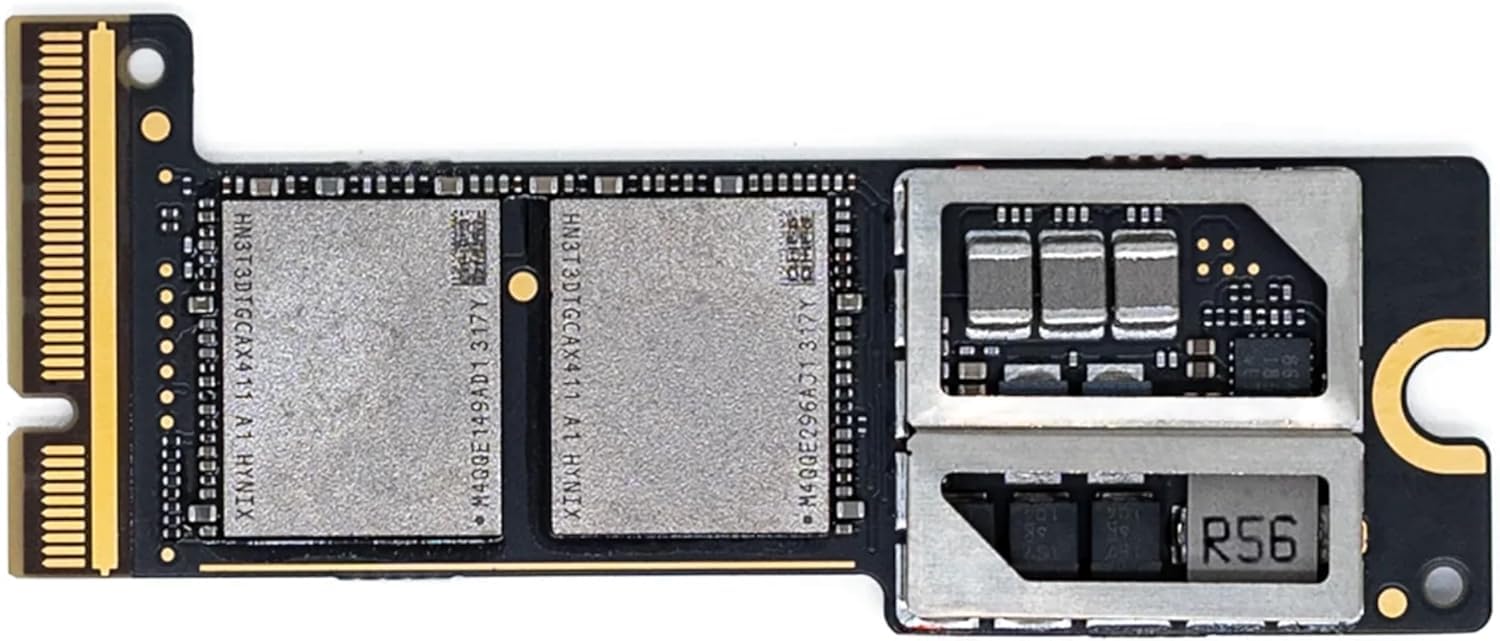
M4 Pro Mac mini SSD 2TB Hard Disk Storage Upgrade for Mac mini M4 pro

4.4(21)
$406.68

161+ bought in the past month

Sobre este artículo

  • Perfect Compatibility with Macmini M4 Pro: This internal hard drive is designed specifically for the Macmini m4 pro and is perfectly compatible with it for easy installation.
  • Reliability & Stability: Our hard drive has been fully tested for 1 month without any speed drop and maintains a stable performance.
  • Capacity: With this SSD internal hard drive, you can expand the storage space of your Macmini M4 Pro to store more photos, videos, documents and apps.
  • High-speed Performance: With read/write speeds of up to 3300 MB/s, this internal hard drive dramatically reduces computer startup time, application launch and file transfer times.
  • M4 Macmini SSD internal hard drive

Key details

Digital Storage Capacity
2 TB
Hard Disk Interface
eSATA
Connectivity Technology
eSATA
Brand
Zinweyton
Special Feature
Data Recovery Service

Dimensions and fit

Hard Disk Size
2 TB

Item information

Hard Disk Form Factor
2.5 Inches
Hard Disk Description
Solid State Drive
Compatible Devices
Mac mini m4
Installation Type
Internal Hard Drive
Highlights

About this item

  • Perfect Compatibility with Macmini M4 Pro: This internal hard drive is designed specifically for the Macmini m4 pro and is perfectly compatible with it for easy installation.
  • Reliability & Stability: Our hard drive has been fully tested for 1 month without any speed drop and maintains a stable performance.
  • Capacity: With this SSD internal hard drive, you can expand the storage space of your Macmini M4 Pro to store more photos, videos, documents and apps.
  • High-speed Performance: With read/write speeds of up to 3300 MB/s, this internal hard drive dramatically reduces computer startup time, application launch and file transfer times.
  • M4 Macmini SSD internal hard drive

Product videos

Product video 1

Customer reviews

21 reviewsPositive

Rated 4.4/5 across 21 reviews — well received overall.

  • 100% of sampled reviews are from verified purchases.
  • 75% of sampled reviews give 4–5 stars.

Customers say

Customers find the SSD drive works great and is easy to install.

Generated from the text of customer reviews

Reviews with images

Customer review image for This SSD is must have upgrade for your Mac Mini M4Customer review image for This SSD is must have upgrade for your Mac Mini M4Customer review image for This SSD is must have upgrade for your Mac Mini M4
See all photos
★★★★★

This SSD is must have upgrade for your Mac Mini M4

This was a great purchase. It came with all the tools you need to get into the Mac mini, the pick was a must have for sure. The SSD itself looks just like an Apple SSD, it’s even black. I had a hard time telling them apart. I had no issues with the install, and restoring the computer worked the first time with no issues. For the DFU restore, I used an Apple Thunderbolt 3 cable, and I avoided issues entirely. It’s super fast, hitting write speeds of 3000mb/s and read speeds of around 2400. The packaging was also great as well with clear instructions. The fit was perfect. I would buy again. I started with 1TB, and I might go up to 2TB in the future. I was nervous to purchase this drive on Amazon with how important it would be, and I chose this listing as it seemed the best. I have no regrets. If you’re on the fence, do it! Read more

Customer review image for This SSD is must have upgrade for your Mac Mini M4Customer review image for This SSD is must have upgrade for your Mac Mini M4Customer review image for This SSD is must have upgrade for your Mac Mini M4
That Techy GuyVerified purchase
★★★★★

Worked for my Mac Mini M4

It's been several weeks and it has worked Flawless. Install was not bad, just take your time. Read more

NochassaVerified purchase
★★★★

Instructions almost resulted in a return, so do your homework first.

This ultimately worked. However the instructions miss the most critical part - no matter what I did, using several different Macs to try and reload the firmware & OS via DFU, I would get the (21) error. Different cables (both USB-C and Thunderbolt), different types of Mac (M4, M1 Silicon, Intel) it would always give me the same error. What no one clarifies is that you apparently MUST connect a keyboard, mouse, and HDMI monitor to the Mini during the restore process. It only worked when I did that…. Then it worked. Even the online videos don’t specifically state or show that - I guess they assume you would connect all that by default, but I didn’t initially, and thus spent an extra day trying to make it work with several iterations. So it all works great - just ensure you have a keyboard, mouse, and monitor attached when you do the restore action. Also realize there is NO OTHER WAY to do a restore without another Mac. Read more

Simon G.Verified purchase
★★★★★

Extra speed just what I need!

Excellent product does exactly what it says and more. Very easy to set up also Read more

losVerified purchase
★★★★★

It’s legit!

It’s legit! Works great. When you do the replacement, DO NOT try to unplug the power button. It will break! And it’s totally unnecessary. Read more

NateVerified purchase
★★★★★

This Is An Awesome Deal!

Compared to buying a storage upgrade from Apple, this thing is an awesome deal! Installation was easy, once I got the bottom off of the Mini. I also helped that I had magnetic screwdrivers to hold those tiny tiny screws. Highly recommended! Read more

R. GaleVerified purchase
☆☆☆☆

not working

I looked for another Mac with Apple Silicon, but I couldn't get it to work. Read more

Hugo Bautista PeraltaVerified purchase
★★★★★

Excelente adquisición

Excelente producto para reemplazar sad interno de Mac mini M4. Deben ver el video oficial en youtube para la configuración. Read more

Milton SalcedoVerified purchase
Recently Viewed

We use optional analytics cookies to understand how visitors use Ventari and improve the experience. This banner controls analytics measurement only. See our Cookie Policy.

