Compact, quick, and surprisingly well built. I picked this up for use with my tablet and gaming on the go. The footprint is small and the layout keeps essentials close, but it’s the responsiveness that stands out. Wired mode feels instant, and the wireless options are solid when I want to go wireless. The sound profile leans toward soft clacks which makes long sessions easier on the ears. Battery life has been more than enough for my daily use, and the side-printed legends glow cleanly without looking tacky, even if they can be sometimes hard to read. Pros: Adjustable actuation for fine-tuned keystrokes; fast trigger behavior that makes inputs feel immediate; tri‑mode connectivity for easy device switching, solid build with sound dampening; RGB that’s tasteful yet customizable. Cons: Arrow keys are non-existent; the web-based driver is convenient but not ideal I need to get around to seeing if i can map arrow keys as well as setting actuation to a lighter touch for games, and a slightly deeper press for writing. Wireless at 2.4 GHz has been stable and quick enough for everyday play, while USB-C delivers that extra snap when I want more consistency. If you’re looking for a compact board that can swing between productivity and play, this could be the one if you don't mind overlooking the missing arrow keys. Read more
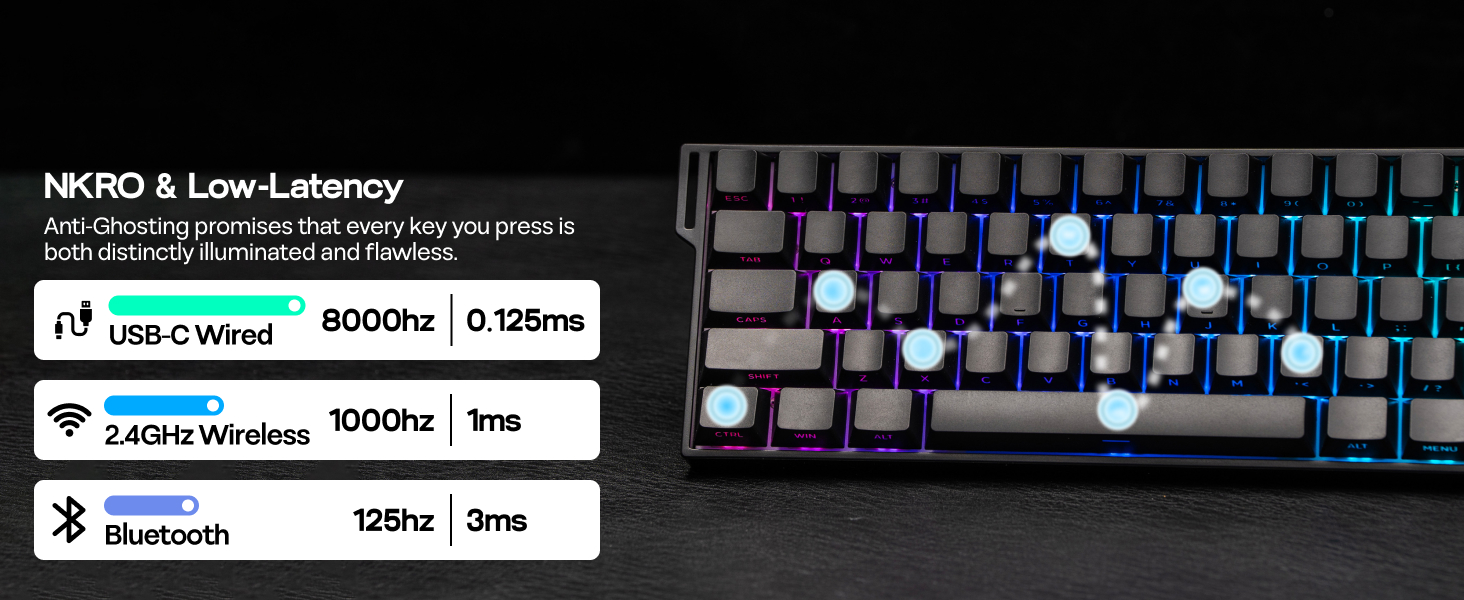
This is a review for the MechLands Aula Mini60 HE Pro, a 61-key Hall Effect keyboard. It’s a compact 60 percent layout with the usual minimalist look. The enclosure is plastic but feels sturdy, and it doesn’t sound hollow when typing. The sound is pleasantly muted, more of a soft clack than a sharp one, and the stabilizers don’t rattle. The RGB lighting is bright and even, and the side-lit keycaps make it look clean and modern. The tri-mode connection is one of the most welcome features. It supports Bluetooth, 2.4 GHz wireless, and USB-C, which is rare for a Hall Effect board in this price range. The included dongle has a small silicone holder that loops onto the side of the keyboard, which was a thoughtful touch, but I still wish they had built in a proper slot or magnetic dock for it. If you’re serious about polling performance, skip Bluetooth altogether. The 2.4 GHz dongle will give you around 1,000 Hz, which feels fast and stable for everyday use and gaming. But if you actually want the full 8,000 Hz rate, you’ll need to stay wired over USB-C. The biggest surprise, and not in a good way, is that there are no arrow keys. Not dedicated ones, not even pre-programmed on the function layer. The usual WASD combo doesn’t work because those are reserved for Bluetooth and OS switching, and the IJKL keys don’t work either. In the default layout, I was assigned to Scroll Lock, J was unassigned, K was assigned to Home, and L was assigned to End. So unless there happens to be some super-secret key assignment for the arrow keys that I don’t know about, this keyboard comes with no arrow keys. Do they really think people don’t use arrow keys? That part had me super confused. I finally connected to the AULA WebDriver through Chrome and confirmed that there were no arrow mappings, so I had to add my own. Fn + ? is now my up arrow, Fn + Right Alt is left, Fn + Menu (Super) is down, and Fn + Right Ctrl is right. I also remapped a few extras: Fn + U and Fn + N for brightness up and down, Fn + H and Fn + J for lighting speed, Fn + P for print screen, and reassigned Home, End, Page Up, and Page Down to function combos that made sense to me. It’s now much cleaner and easier to use. While I was still in the WebDriver, I decided to get familiar with the light-effect options, and after a few minutes decided to leave them as is. I also checked the Performance tab, which is where the actuation and trigger settings are located. It’s set to 1.2 millimeters by default. I’d already been typing and didn’t notice anything off, so I left it there too. I didn’t set up any macros but might later. Overall, the tool was easy to use and not clunky at all. Changes were live as soon as I programmed them. The only real drawback is that there’s no simple reset button to restore the default layout. The way I ended up resetting was by holding Function and Escape for a few seconds, which resets the keyboard. After refreshing the WebDriver page, everything was restored to factory settings. The WebDriver also includes controls for RS Monitoring, SOCD, DKS, TGL, and other gaming features, all of which can be managed directly from the same interface. At $50, it’s a fair price for a Hall Effect keyboard with 8K polling, tri-mode connectivity, and quiet performance. It’s baffling that they left out arrow key support by default, and I almost dropped a star for that, but since it’s fixable through remapping, I let it slide. Still, it’s an odd oversight on an otherwise well-designed keyboard. Read more