Free shipping over $35 · 60-day returns · Price-watch guarantee

Ventari

metapen

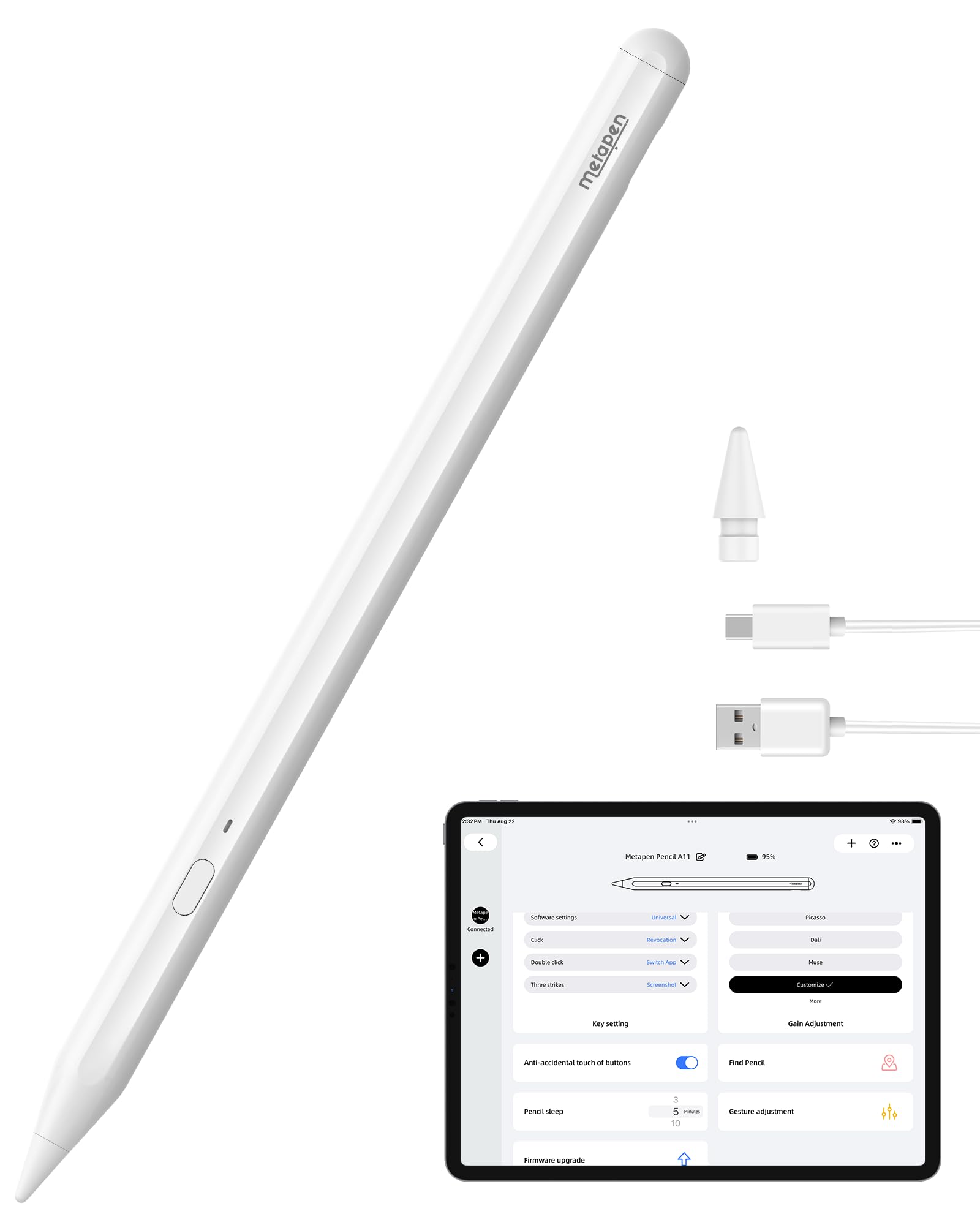
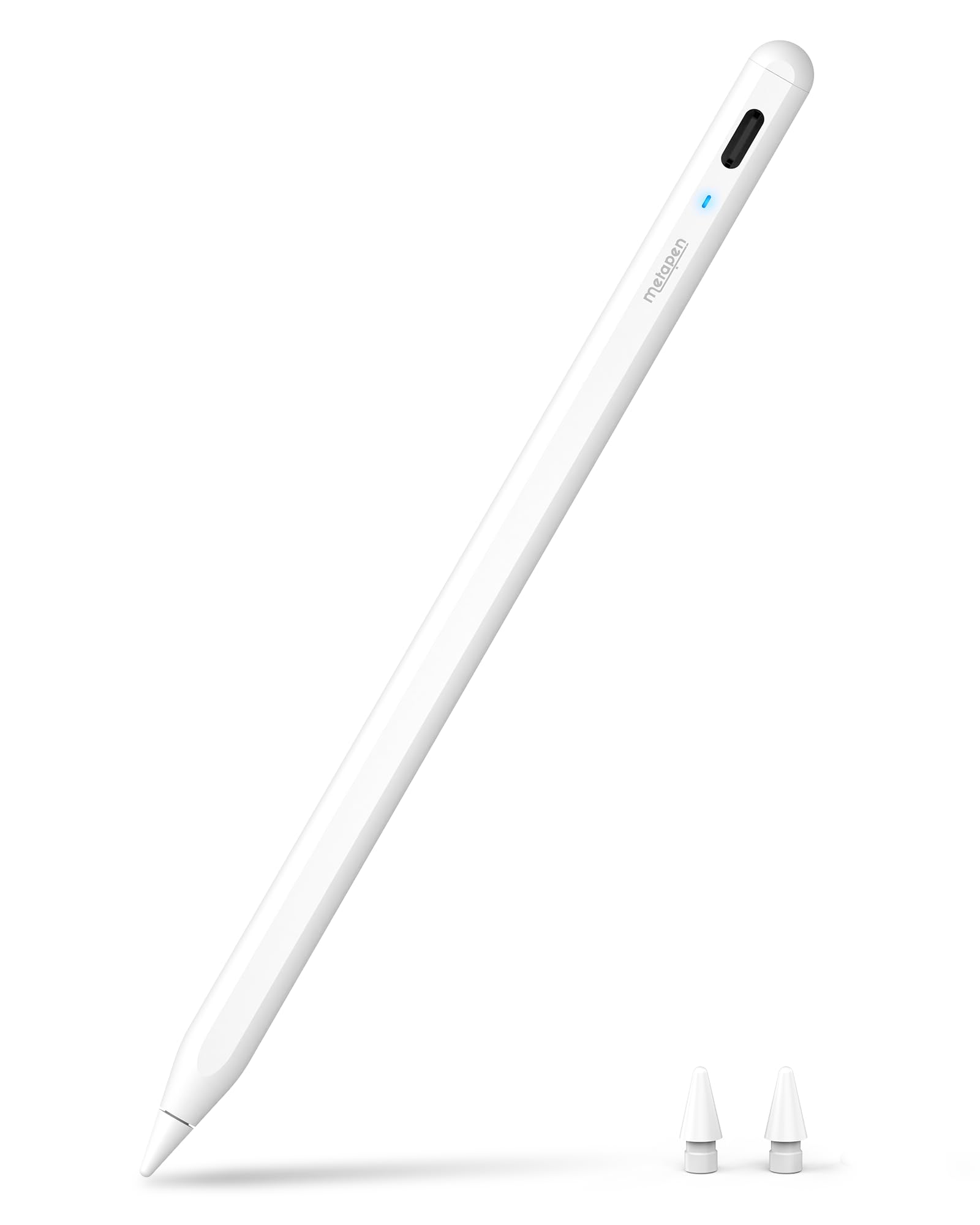
Metapen Stylus Pen M2 for Surface Premium 4096 Finest Control Eraser End - Compatible with Surface Pro 7

$36.99$76.87

904+ bought in the past month

Sobre este artículo

  • 【Fast Charge & Longer Standby, No Panic】Enjoy Metapen’s leading USB-C fast charging and extended battery life. The M2 takes only 1 hour to fully charge, providing up to 100 hours of use. Charge 5 mins = work 24+ hours of standby time, outperforming most brands on Amazon. Perfect for creators, business professionals, and students who need to take notes or draw frequently
  • 【4096 Finest Control & Tail Eraser】With 4096 levels of pressure sensitivity, the Metapen Stylus M2 is ideal for artists, photographers, and designers. Accurately draw, write, or annotate in any supported app. The eraser on the tail end quickly removes mistakes, allowing you to edit with ease — just like using a traditional graphite pencil. Windows Ink lets you create sticky notes, capture ideas instantly, and even take and edit screenshots with a single click
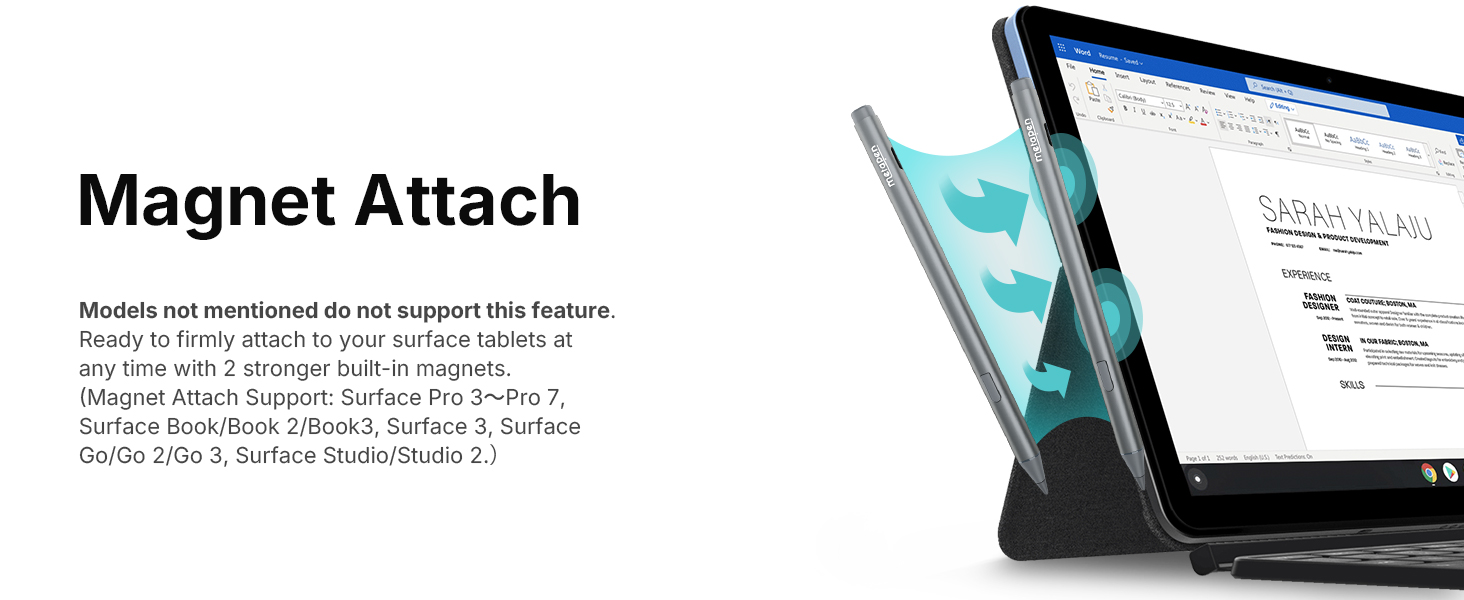
  • 【Powerful Magnetic Attachment, Never Lose Again】The Metapen M2 firmly attaches to your Microsoft Surface tablets with two stronger built-in magnets, so it’s always ready when inspiration strikes. [Supported Magnetic Attachment Models] Surface Pro 3–Pro 11, Surface Book / Book 2 / Book 3, Surface 3, Surface Go / Go 2 / Go 3, Kobo Libra Colour, Kobo Sage, Kobo Elipsa, Kobo Elipsa 2E
  • 【Advanced Cone-Shaped Tip & Premium Feel】Unlike old-fashioned styluses with tubular tips, the Metapen M2 features a cone-shaped tip for stronger signal detection and a streamlined design. The aluminum-alloy body with a rounded-square shape offers a comfortable grip and prevents it from rolling on your desk
  • 【Tilt Function & Palm Rejection】The Metapen M2 accurately reproduces both the finest lines and the broadest brush strokes. Tilt the tip up to ±55° to add artistic shading to your drawings. With palm rejection technology, you can rest your hand naturally on the screen without fatigue or accidental touches — and enjoy smooth, uninterrupted writing or drawing
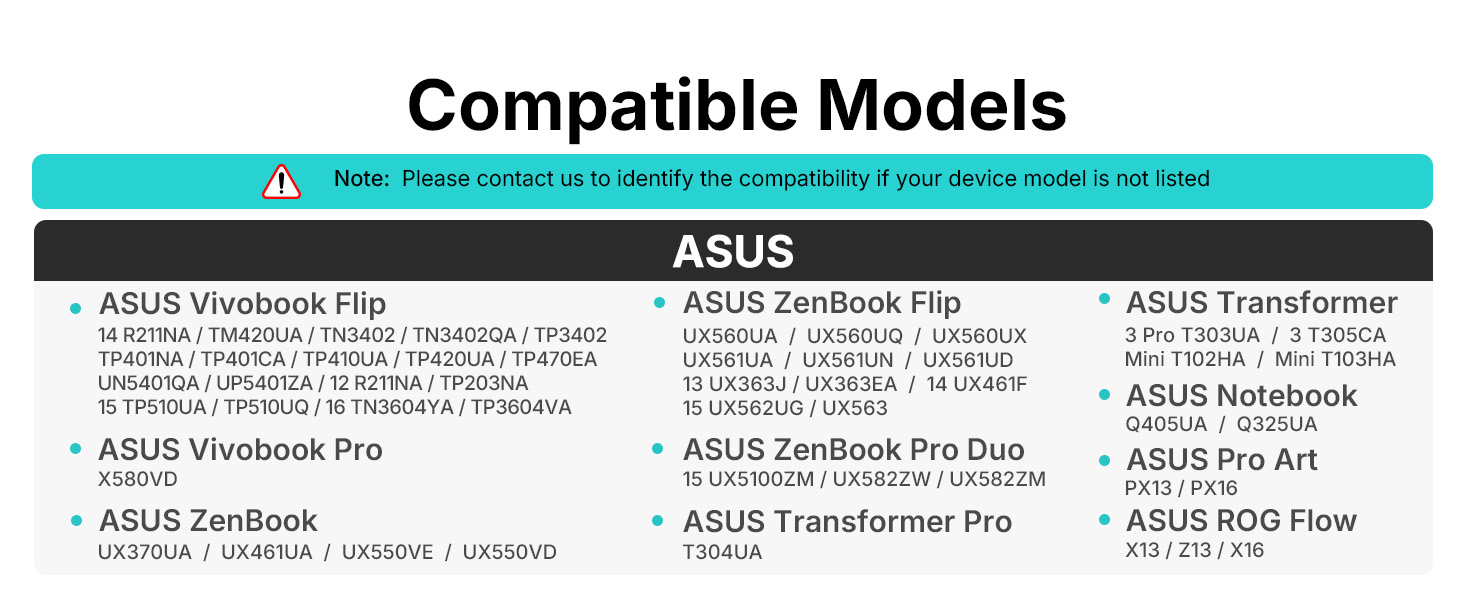
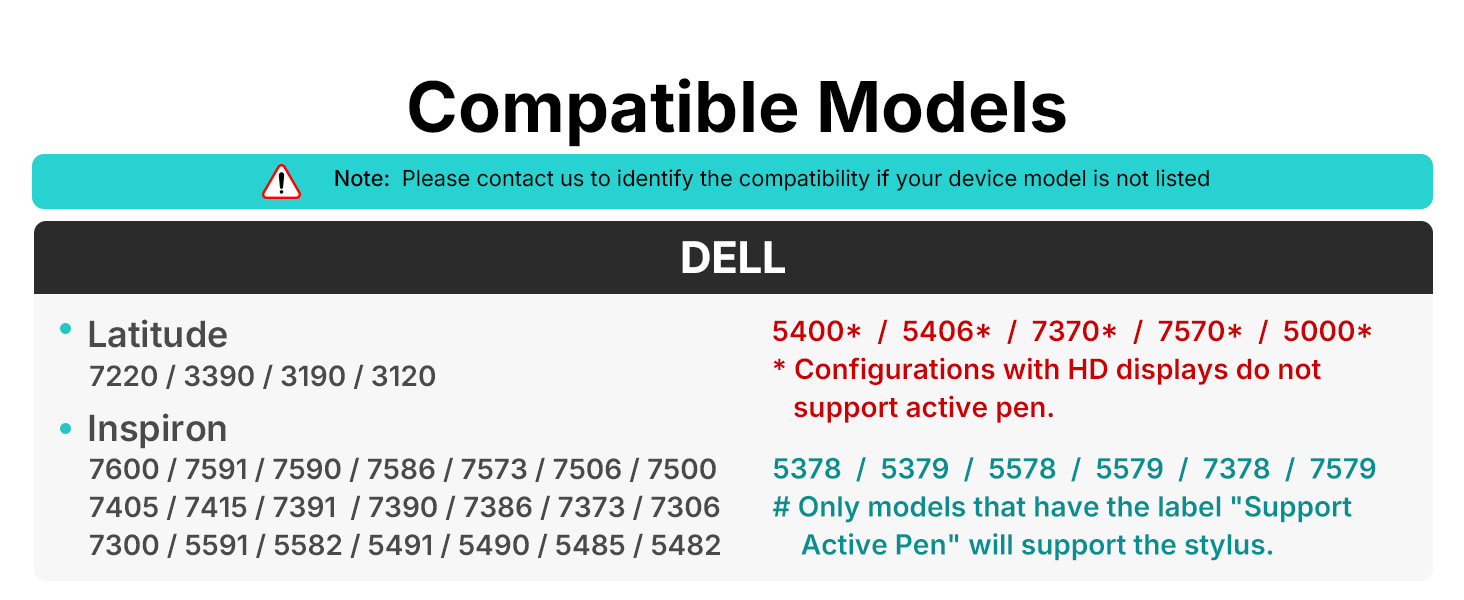
  • 【Wide Compatibility】Contact us at support@metapen.com if you are unsure about compatibility. The M2 supports up to the MPP2.0 protocol, compatible with most Microsoft Surface devices and select models from HP, ASUS, Dell, Acer, Sony, and ViewSonic. [Surface Model List] ✔Surface Pro 3/Pro 4/Pro(5th Gen)/Pro 6/Pro 7/Pro 7+/Pro 8/Pro X, ✔Surface Book/Book 2/Book 3, ✔Surface Laptop/Laptop 2/Laptop 3/Laptop 4/Laptop Studio, ✔Surface 3, ✔Surface Go/Go 2/Go 3, ✔Surface Studio/Studio 2

Key details

best_sellers_rank
#965 in Video Games ( See Top 100 in Video Games ) #4 in Nintendo 3DS & 2DS Stylus Pens
type_of_item
Personal Computers
manufacturer
metapen
batteries
1 Lithium Metal batteries required. (included)
date_first_available
May 16, 2022

Dimensions and fit

dimensions
7.36 x 2.32 x 0.67 inches; 0.49 ounces
weight
0.494 ounces
package_dimensions
7.36 x 2.32 x 0.67 inches; 0.49 ounces
item_weight
0.494 ounces

Technical specifications

item_model_number
ME-MPP702
Highlights

About this item

  • 【Fast Charge & Longer Standby, No Panic】Enjoy Metapen’s leading USB-C fast charging and extended battery life. The M2 takes only 1 hour to fully charge, providing up to 100 hours of use. Charge 5 mins = work 24+ hours of standby time, outperforming most brands on Amazon. Perfect for creators, business professionals, and students who need to take notes or draw frequently
  • 【4096 Finest Control & Tail Eraser】With 4096 levels of pressure sensitivity, the Metapen Stylus M2 is ideal for artists, photographers, and designers. Accurately draw, write, or annotate in any supported app. The eraser on the tail end quickly removes mistakes, allowing you to edit with ease — just like using a traditional graphite pencil. Windows Ink lets you create sticky notes, capture ideas instantly, and even take and edit screenshots with a single click
  • 【Powerful Magnetic Attachment, Never Lose Again】The Metapen M2 firmly attaches to your Microsoft Surface tablets with two stronger built-in magnets, so it’s always ready when inspiration strikes. [Supported Magnetic Attachment Models] Surface Pro 3–Pro 11, Surface Book / Book 2 / Book 3, Surface 3, Surface Go / Go 2 / Go 3, Kobo Libra Colour, Kobo Sage, Kobo Elipsa, Kobo Elipsa 2E
  • 【Advanced Cone-Shaped Tip & Premium Feel】Unlike old-fashioned styluses with tubular tips, the Metapen M2 features a cone-shaped tip for stronger signal detection and a streamlined design. The aluminum-alloy body with a rounded-square shape offers a comfortable grip and prevents it from rolling on your desk
  • 【Tilt Function & Palm Rejection】The Metapen M2 accurately reproduces both the finest lines and the broadest brush strokes. Tilt the tip up to ±55° to add artistic shading to your drawings. With palm rejection technology, you can rest your hand naturally on the screen without fatigue or accidental touches — and enjoy smooth, uninterrupted writing or drawing
  • 【Wide Compatibility】Contact us at support@metapen.com if you are unsure about compatibility. The M2 supports up to the MPP2.0 protocol, compatible with most Microsoft Surface devices and select models from HP, ASUS, Dell, Acer, Sony, and ViewSonic. [Surface Model List] ✔Surface Pro 3/Pro 4/Pro(5th Gen)/Pro 6/Pro 7/Pro 7+/Pro 8/Pro X, ✔Surface Book/Book 2/Book 3, ✔Surface Laptop/Laptop 2/Laptop 3/Laptop 4/Laptop Studio, ✔Surface 3, ✔Surface Go/Go 2/Go 3, ✔Surface Studio/Studio 2

De la marca

Product detailProduct detailProduct detailProduct detailProduct detailProduct detailProduct detailProduct detailProduct detailProduct detailProduct detailProduct detail

Product videos

Product video 1

Customer reviews

2,073 reviewsPositive

Rated 4.4/5 across 2,073 reviews — well received overall.

  • 75% of sampled reviews give 4–5 stars.

Customers say

Customers find the stylus works well with various devices, including Kobo Libra, Surface Duo, and OneNote, and appreciate its rechargeable battery and strong magnetic attachment.

Generated from the text of customer reviews

Reviews with images

Customer review image for Works great for Surface Go 2, possibly better than the MS Surface PenCustomer review image for Works great for Surface Go 2, possibly better than the MS Surface PenCustomer review image for Works great for Surface Go 2, possibly better than the MS Surface Pen
See all photos
★★★★★

Works great for Surface Go 2, possibly better than the MS Surface Pen

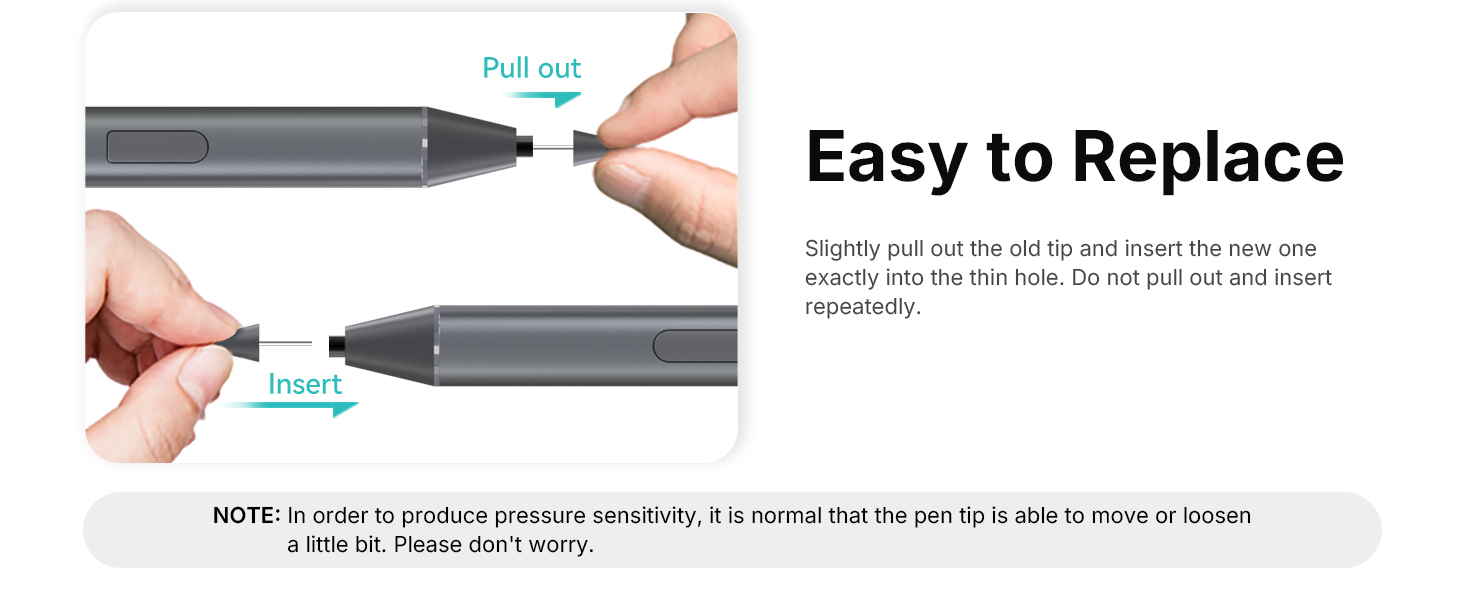
I've been using this pen for several months now and I can definitely say this is a VERY good pen. The M2 feels quite comfortable in hand much like an apple pencil and writes with no lag. The nibs are solid plastic, but not too hard where it'd damage the screen and they rotate on the head of the pen to "roll" across the screen to reduce friction. However, using a "paperlike" or textured screen protector REALLY wears down the nibs fast, so stick with a bare screen or regular glass protector if you'd like to have some longevity to your pen nibs. Switching nibs is pretty easy, just pull em out and pop them in. The M2 also has a stronger magnet than the normal Microsoft surface pen to keep it attached to the device (mine usually stays mounted firmly on the side when not in use). No software or drivers needed to get things going, just hover it over the screen and it's good to go. While it would be nice to have some software to adjust things like pen pressure or remap the eraser/side button, it overall functions just fine for my needs. It charges via USB-C and I typically top off the battery between drawing or while taking a break, typically less than 15-30mins at a time. I typically use my surface for drawing and animating on the go rather than just taking notes, so having a good pen is very important to make the experience more comfortable and to maintain decent workflow for art purposes. One thing I CANNOT stand from most non-wacom styluses is lag and poor accuracy, so the responsiveness of this pen is notably very good for an MMP device. Attached are a couple of doodles I've made with the M2 and my "set up" with the Go and M2 for size comparison. While tools don't make the artist, they certainly can help and this pen makes my drawings on my travel device near indiscernible from quick sketches made on my wacom display tablet and desktop set up. I'd argue this pen is even better than the standard surface pen, especially for the price point. Bonus, it comes with a few extra nibs and some metapen stickers lol Read more

Customer review image for Works great for Surface Go 2, possibly better than the MS Surface PenCustomer review image for Works great for Surface Go 2, possibly better than the MS Surface PenCustomer review image for Works great for Surface Go 2, possibly better than the MS Surface Pen
PG
★★★★★

Better than the MS Surface Pen Slim and HP Active Tilt MPP Pen 2, and way less expensive!!!

I bought a MS Surface Pro 11 and put a screen protector on it. I tried 3 different pens on it: the MS Surface Pen Slim, which was $100 on sale, and the HP Active Rechargeable Tilt Pen MPP 2, which is normally $70, but I got for $50, and this one, which I got for $34. Both the HP and the MS pens felt VERY rough when writing on the Surface Pro with a screen protector, to the point that I hated using them! The Metapen was smooth as silk! And the functionality is seamless; there is no setup! You just start writing on the screen and it works! Flip it around and it works as an eraser! The button is used as a "right click". WAY cheaper AND better user experience! It's a no-brainer! Read more

Lick-T
★★★★

5/5 for the price, with minor gripes

Really great stylus. It makes me wonder why there aren't more competitive options in this price range. I've been using it on my HP Omnibook X Flip for a couple weeks now. While this laptop isn't officially supported, it uses the MPP protocol and is therefore compatible. There are just issues with magnet alignment, so I can't securely attach the pen to the side of the laptop like usual. (this laptop has so many magnets that I could slap it anywhere though) As for the pen itself, it works wonderfully. I havent had any issues with drawing or notetaking apps struggling to recognize it--pressure sensitivity, eraser, and all. Battery life has also been fairly reasonable. The only time I've had to charge it was when I first got it, and I'd say it's gotten a good 20-30 hours of use so far. It's hard to give an exact estimate because it automatically turns off. Also, I think the side button requires a bit too much actuation force. It's not a big deal, but it means I have to tense my hand more often than I'd like. My only feasible gripes are the lack of included nibs and how easily the paint finish gets chipped by metal. It already has a couple of scratches on the ends from sitting in my bag with my laptop, which isn't the end of the world, but it stands out against the dark gray color. Either way, this was a way better deal than HP's $80 pen or whatever. Good stuff, please keep it up. Read more

Garfield Man
★★★★★

Works with Linux!

Worked well! I use Ubuntu 25 and have a computer with touch screen. Doesn’t take Bluetooth and is pressure sensitive. I use a framework computer so finding something that will connect is hard. I recommend for a cheap but good stylus Read more

Jacqueline Arnold
★★★★★

It works

Good quality stylus. Works great with my surface. Read more

Max R Bondi
★★★★★

Works great with my Asus Zenbook!

Works great with my Asus Zenbook! Charged it up and worked quickly. Easy to install, and the erase button function on the back is quite a nice little feature. Read more

Mike T.
★★★★★

Works as described

Works great connected with no issues. Read more

Customer
★★★☆☆

Had promise, but disappointing.

I pencil seemed promising, but felt lacking and not 100% satisfactory. The weight of the pencil is rather light, making it not feel “quality” as I’m used to in a stylus pencil. When using it, there were moments where the input didn’t register while I was drawing. Also, the dot that appears when the pencil is hovering over the screen is laggy, making the experience less favorable. Read more

TNT
Recently Viewed

We use optional analytics cookies to understand how visitors use Ventari and improve the experience. This banner controls analytics measurement only. See our Cookie Policy.