Yan Ho—July 29, 2025✓ Verified purchase
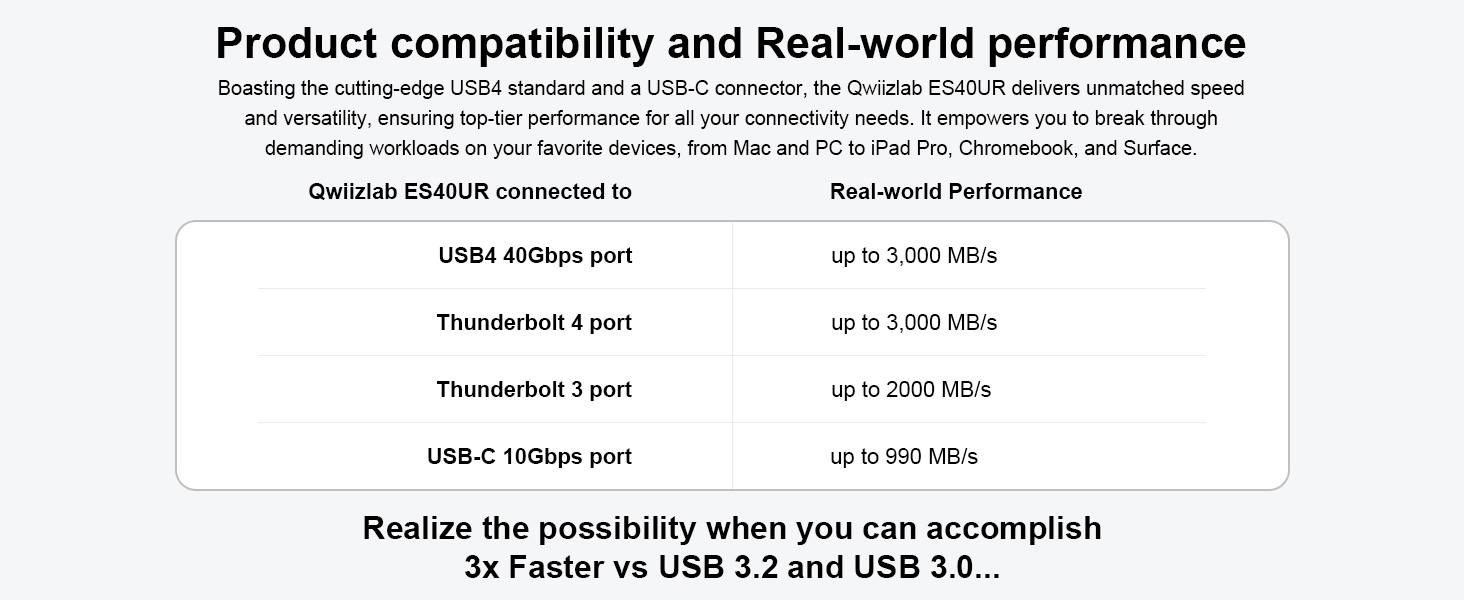
The UH60 U4 (model name of the dock) is a wonderful companion for your Mac Mini, seamlessly enhancing its functionality. It tackles some of the M4’s biggest limitations with a sleek, integrated design and useful features: 1. Convenient Power Button Access – No more fumbling behind your Mac Mini; the dock provides easy front-facing power button access. 2. 3.5mm Audio Jack – A dedicated rear port for headphones or speakers keeps your setup clean and clutter-free. 3. Three USB-A Ports – Connect your keyboard, mouse, and other peripherals without sacrificing precious ports. But the real standout is the M.2 SSD slot, supporting NVMe drives up to 8TB—perfect for expanding your Mac Mini’s often restrictive storage. The setup couldn’t be simpler: just plug the dock’s Thunderbolt 4 USB-C cable into your Mac Mini, and you’re ready to go—no drivers, no hassle. Performance is blazing fast; I added a 1TB Samsung 990 Pro SSD and saw read/write speeds exceeding 3000MB/s in tests. Its materials and form factor are so similar to the Mac Mini M4 that it looks like a single unit. And, at least in my opinion, it looks really nice. Read more
10086—April 13, 2025✓ Verified purchase
Finally got a USB hub with 40Gbps SSD enclosure for my Mac Mini M4! Many other hubs stay with merely 10Gbps. 1. speed is amazing - I tried it with Samsung EVO Plus 4TB and the speeds soared over 3000MB/s, very satisfactory! 2. it lifts the Mac off the desk so that I can easily reach the power button. Excellent build quality, and the all-aluminum casing matches the Mac Mini very well. 3. there are two USB-A ports on the front, and a single USB-A port and a 3.5mm audio jack on the back for plugging in accessories. Setup is quick and simple - you just plug and play using a single USB-C cable, no extra drivers required. Besides, I haven’t seen any Wi-F issues so far, I will keep eyes on it. Read more
James Brunet, Jr—June 17, 2025✓ Verified purchase
Good quality dock stand. So far the speeds are great. Just wished it would have had an SD card reader on this one. Also the button is still a little hard to reach. A notch instead of a hole would have been better. Read more
Michael S.—January 29, 2026✓ Verified purchase
If all you are looking for is the 40 GB speed and don’t need very many extra ports. This will work fine for you. The highlights of this unit… the price point is great for the 40 GB per second transfer speeds. And yes it lived up to the description, as I was able to get full speeds from the external SSD. Very easy to install NVME SSD. Apart from that, it is very limited on ports… does not include an SD or microSD slot anywhere, only two USB type A ports on the front… And the power button is very hard to access with this unit… You pretty much have to take the Mac mini off of it to turn it on and set it back down. Which isn’t a huge deal I know, but just inconvenient. we could’ve easily added some SD or microSD slots on the front of the unit and one USB-C. But if all you need is 40 GB per second transfer speeds it’ll work well for you… but pretty limited after that. If you need the expandability, and ease of use, you probably wanna keep looking. Read more
Customer—January 13, 2026✓ Verified purchase
So I'm leaving windows for the great wilds of MacOS. I purchased a Mac Mini M4 which came with only a 256g ssd. I wanted MORE. Don't we all. I looked at a bunch of the options for docks that work with the Mini, I wanted to be able to add more storage and have the unit up off the table for better ventilation. But I still wanted to reach the power button on the bottom of the Mini (remember that Apple are the people who put the charging port for the mouse on the bottom). This dock stood out since it holds the Mini up with away from the actual dock. It also has an M.2 NVME slot. The connection to the Mini is a 40g link so the NVME will run at fullish speed. And this dock costs about the same as just an NVME to USB adapter. So more for the same price. It comes with the interconnect cable, screw drivers, thermal pads, and NVME lock down screws (yes they included an extra) you need. It took me longer to open the SSD packaging than to get it installed. It worked first time. I got the NVME formatted and it all just works. My only comment is that for those of us with bigger hands (big bones not fat) getting to the power button on the Mini does require using the little finger. But it is reachable. If the Mini was on the desk with out the dock I would have to pick up the Mini to turn it on. The extra space between the Mini and the dock gives unrestricted air flow and it looks cool too. So yes it was a good purchase and I like the dock. I would recommend it to Friends (and will). Read more
aztlan78—August 27, 2025✓ Verified purchase
I was disappointed with this station. I have read reviews that it can be a hit or miss on it. Installing the SSD was very easy. The station blended in well with the Mac mini. I began testing the transfer speeds by transferring large files from the SSD to the desktop and to a USB drive. Both times the transfers kept dropping. I kept getting this pop up about my drive not properly ejecting or ready to eject even though I had not attempted this. I also tested the WiFi. It did drop about 200 mbps. It went from 500 to 300. I can manage the wifi speed but not the dropping of file transfers. Will be returning back. Read more
kevin tan—July 17, 2025✓ Verified purchase
The circular cutouts on the aluminum stand really save me from having to lift the Mac Mini every time I press the power button, which makes it a great companion to the Mac mini. The front-mounted USB-A ports complements the native USB-C port on the Mac mini. The 3.5mm audio jack comes in handy for connecting headphones and speakers. I can easily put a 4TB drive into the SSD enclosure without any issues. I checked it with Blackmagic Disk Speed Test and it hit 3070 MB/s write and 3089 MB/s read. I’m pretty happy with that. The build quality is also good, there is a rugged aluminum cover on the bottom to help dissipate the heat from the NVMe SSD. Read more