RF—February 9, 2026✓ Verified purchase
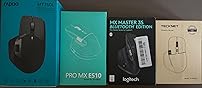
I really, really wanted to like this mouse. It was exactly what I was looking for. I compared it against the Logi MX Master 3S, Citlla Pro MXE510 and Tecknet MS029. This was the most comfortable mouse and has amazing button placement. The side scroll wheel is placed perfectly above and between the forward and back buttons, allowing you to use the pad of your thumb to go forward, your knuckle to go back and then with a slight lift, your knuckle would be on the side scroll wheel. No lifting your fingers or thumbs off the mouse to reposition. The build quality was on par with the Logi device. It connects quickly over Bluetooth, and I did not see any lag during use. However, it was missing two features that the Citlla & Logi have. They each have a thumb button that would minimize all windows and return you to the desktop. This is a cool feature with nosey neighbors around or if you are searching through numerous open windows or documents. Most importantly, the Logi & Citlla have a smoother scroll wheel (magnetic, I think) that allows for precise one to three lines scrolling or super speed when you give it a spin. The Rapoo has a click-click-click type scroll wheel. If they only changed the scroll wheel, this would be the best office productivity mouse on the market, besting anything Logi is producing right now. Adding both features, would corner the market and dominate. I ended up keeping the Citlla and returning the rest (same price as the Rapoo, $45). The Tecknet is not worth the $15 price, the Logi is not worth the $90 price (and it was sold as new but was actually used). Read more
Phill1728—July 24, 2024✓ Verified purchase
This mouse just looks awesome first of all. Second it functions almost exactly like it's mate at a fraction of the cost. Scroll wheels are both very nice and functional. Side scroll is smooth while main scroll has notches which I prefer. Plenty of options to connect to multiple devices and you just can't beat it for the price. Battery has lasted a few weeks so far and still going strong. Type-c charging makes it very convenient to charge as I have a cable already at my desk for my phone. The first one I received the left click was super loud and it drove me nuts. I emailed Rapoo and told them about this and they immediately sent me another one. The second one was silent like the listing says it is. Great experience overall and will definitely be using this mouse for years to come. And the next time I need a mouse I know which company I'm looking at first. Thanks Rapoo! Read more
Rj.Dolla—May 31, 2025✓ Verified purchase
I have recently been getting some wrist pains with my mouse hand and will be starting a new job soon with the ability to bring my own mouse, so I wanted something ergonomic and with onboard memory (something Logitech lacks). This is pretty much a Logitech MX Master without the added cost. 💓 Things I love 👇 🖱️ Super comfortable over my Logitech M650L. Slightly canted hand position is far superior and the mouse is bigger. 💡 Adjustable DPI settings. 🔉 Not as quiet as my Logitech, but clicks are quiet enough for me. 💭 Onboard memory which will allow me to use it on various devices without background software running which is why this is 4 stars and not 3 stars. 🛠️ Programmable buttons and scroll wheels allow me to work efficiently. ✌️ Comes with TWO USB receivers and the ability to do Bluetooth to switch between devices. LOVE this because I will use a receiver in my personal laptop and work laptop. 🛞 Although I don't use it for side scrolling, the side scroll wheel is super nice to have. 📃 Adjustable and near silent scrolling sensitivity makes up for the lack of ratchet Logitech scrolling. 🏷️ I personally found the price to be well worth it over Logitech for the onboard memory alone. 😐 Things I disliked or think need improvement 👇 🔽 Center scroll wheel button is really finicky. I'm not sure why, but pressing it will give physical feedback, but it won't do anything. Sometimes I have to really push it down to do what I programmed the button to do, like it's jammed or tough to press. My Logitech I can feel it press down and it gives a slight audible click for feedback. 💾 Software can be a little confusing. It took me a minute to figure out the keyboard button combos page. I don't need any crazy macros, but for a solid 15 minutes I thought I'd need to get a macro recorder because the software wasn't registering my keyboard combos. 💻 Given that I run a business, I will likely have my work laptop and business laptop running at the same time. Switching between the two with the mouse is essential for me. I really wish I could program the top DPI button to switch seamlessly between connected devices instead of having to lift the mouse and press that button on the underside. 🔋 Personal preference, but I dislike a rechargeable mouse and prefer removable batteries. 👎 Rapoo is apparently partnered with Huawei which I have mixed feelings about given the "ban". Read more



