Free shipping over $35 · 60-day returns · Price-watch guarantee

Ventari

Redragon

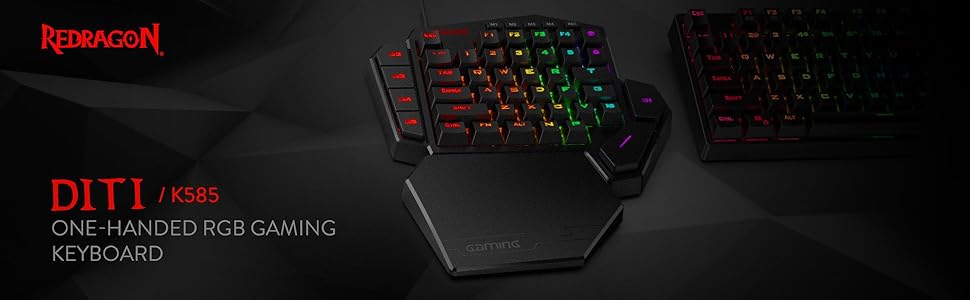
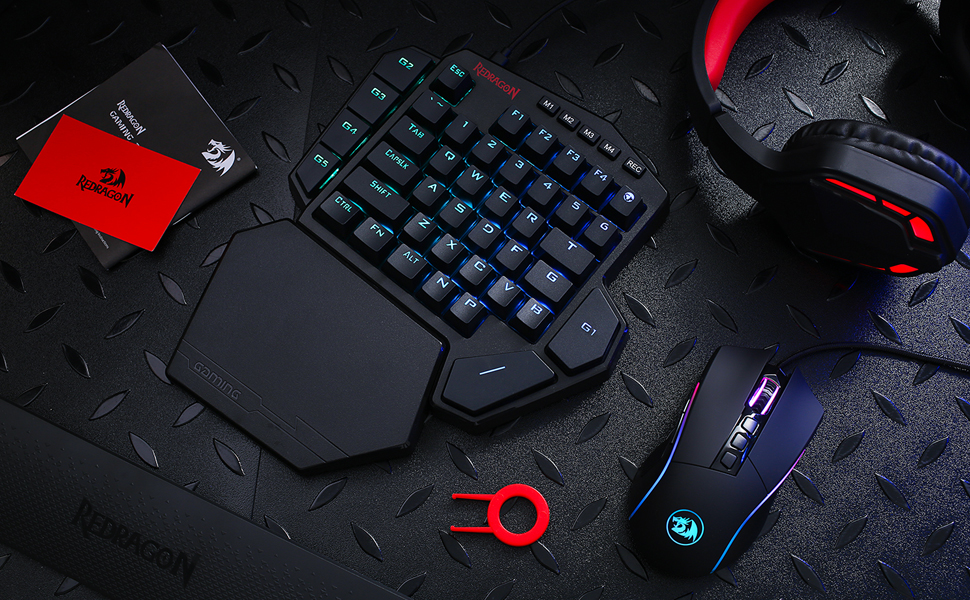
Redragon K585 DITI Wired One-Handed RGB Mechanical Gaming Keyboard 42 Keys Type-C Professional Gaming Keypad w Upgraded Hot-Swappable

$32.99$36.99

148+ bought in the past month

Sobre este artículo

  • Slim and Tactical - The K585 keyboard gets rid of those extra keys and keeps the most useful ones in a slim & portable package. All of your keyboard action keys are in one convenient place. No need to worry about misclicked keys.
  • Upgraded Hot-Swap - The upgraded socket is now available on Redragon one-handed keyboard, with more ways to mod, and more fun. The iconic Redragon Blue Switches deliver audible clicky with clear tactile feedback, original mechanical feel.
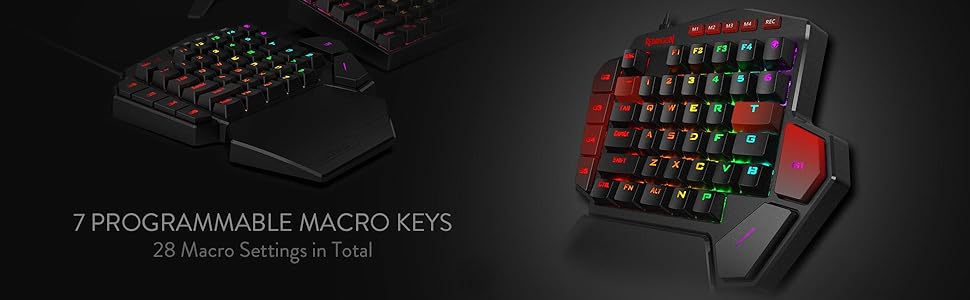
  • Play to Win - With 7 programmable macro keys, binding multiple commands and activating them instantly is simple and quick. Assign single or multiple keystrokes to any macro key to save precious time in the middle of battle.
  • Light it Up in Your Way - 5 RGB backlit modes are selectable with 16.8 Million Colors. Glorious & amazing lighting effects let the light of victory wreak havoc in the dark.
  • USB Pass-Through Port - Positioned for uninterrupted game play and ready for your mouse, headset adapter, or other USB device.
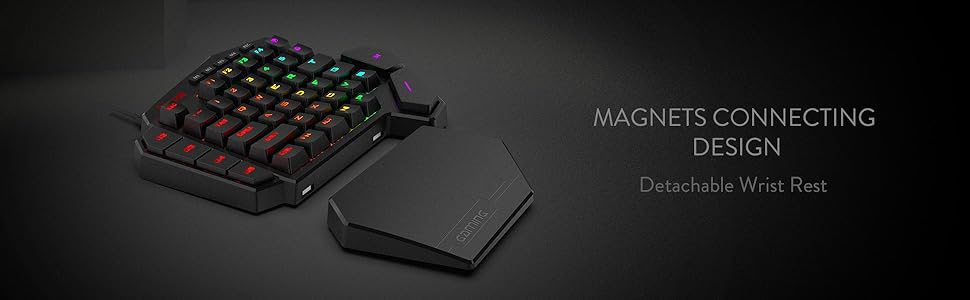
  • Form & Function - Ergonomically designed with a detachable wrist-rest section connected by magnets, the wrist-rest offers great support to make use more comfortable.

Key details

color_spec
‎Black K585
Brand
Redragon
Compatible Devices
Laptop
Connectivity Technology
USB-C
Keyboard Description
Mechanical, Gaming, Macro

Dimensions and fit

dimensions
‎11 x 2 x 9 inches
weight
‎1.3 pounds
Product Dimensions
10.3"L x 8.5"W x 2"H
item_weight
1.3 pounds
product_dimensions
11 x 2 x 9 inches
item_dimensions_lxwxh
11 x 2 x 9 inches

Technical specifications

item_model_number
K585 WIRED
power_source
Rechargeable Battery

Item information

Recommended Uses For Product
Gaming
Special Feature
42 Keys One-Handed, Compact For Gaming, Extra Onboard G Keys, Wrist Rest
Color
Black K585
Keyboard backlighting color support
RGB
Style
Modern
series
DITI
hardware_platform
PC
operating_system
Win/Mac/Linux/Unix
batteries
1 Lithium Polymer batteries required.
manufacturer
Redragon
is_discontinued_by_manufacturer
No
date_first_available
February 1, 2019
best_sellers_rank
#776 in Video Games ( See Top 100 in Video Games ) #67 in PC Gaming Keyboards
Highlights

About this item

  • Slim and Tactical - The K585 keyboard gets rid of those extra keys and keeps the most useful ones in a slim & portable package. All of your keyboard action keys are in one convenient place. No need to worry about misclicked keys.
  • Upgraded Hot-Swap - The upgraded socket is now available on Redragon one-handed keyboard, with more ways to mod, and more fun. The iconic Redragon Blue Switches deliver audible clicky with clear tactile feedback, original mechanical feel.
  • Play to Win - With 7 programmable macro keys, binding multiple commands and activating them instantly is simple and quick. Assign single or multiple keystrokes to any macro key to save precious time in the middle of battle.
  • Light it Up in Your Way - 5 RGB backlit modes are selectable with 16.8 Million Colors. Glorious & amazing lighting effects let the light of victory wreak havoc in the dark.
  • USB Pass-Through Port - Positioned for uninterrupted game play and ready for your mouse, headset adapter, or other USB device.
  • Form & Function - Ergonomically designed with a detachable wrist-rest section connected by magnets, the wrist-rest offers great support to make use more comfortable.

De la marca

Product detailProduct detailProduct detailProduct detailProduct detailProduct detailProduct detailProduct detailProduct detailProduct detailProduct detailProduct detail

Product videos

Product video 1

Customer reviews

9,839 reviewsPositive

Rated 4.3/5 across 9,839 reviews — well received overall.

Customers say

Customers find this keyboard excellent for gaming, particularly with laptops, and appreciate its solid construction and comfortable wrist rest.

Generated from the text of customer reviews

Reviews with images

Customer review image for Versatile with some nice DIY features
See all photos
★★★★★

Versatile with some nice DIY features

TLDR: Likely the best sub $50 One Handed Keyboard you'll find; decent wrist rest and good thumb button placement, nice weight and non-sliding feet, nearly entirely reprogrammable and hot swappable (see below), and for those who like to void warranties, easily disassembled. It could use a slightly stronger angle, sound dampening (the thin plastic base is pingy) and more robust software, but for the price, you can't really see those as faults. I own more OHKs than I'd like to admit, but I dislike the spacebar on a standard keyboard while gaming (don't like my thumb curled under my palm). This one isn't comparable to the likes of Razer, but for half the price and more buttons, with some DIY, you'll have yourself the best all-around gaming keyboard for under $100. SETUP/USAGE: Works straight out of the box on most anything. The usb-passthrough is a true hub, so it works with almost any (USB 2.0) device, just don't expect it to charge anything. Great for connecting a mouse when using with a laptop lacking ports or Playstation/Xbox (only tried it with a PS4, works as expected). If you have Windows 10, the software allows you to reprogram all but the profile (M1-M4), Function, and recorder buttons. The software is basic but functional. I didn't have troubles with the included braided cable or any other USB-C cable I had. Connection was firm. The base doesn't slide around, but does have a largish footprint. It has more buttons than high end OHKs; too many for straight FPS, but useful for FP/TP RPGs, Mobas, 4X, or any game that needs 'G' or 'T'. The stock switches are decent, if a bit wobbly, the keycaps are thin ABS, but not terrible. ERGONOMICS: I like the placement of the two thumb buttons, but they might be an issue for small hands. The standard staggered keys should make switching from a standard keyboard easy, even if I prefer ortholinear keys. The wristrest is hard but not uncomfortable, and while some may like padding, I find hard surfaces less irritating and sweaty. The additional Map (M) and N and P keys are nicely placed so that nearly anything you need to do can be done with one hand. SOFTWARE: the software is basic and not exactly self explanatory, but isn't hard to work once you figure it out. It only works on Windows 10, and it doesn't allow extended options (you can program any of the main keys to any key on a standard keyboard, media function, mouse action, or a macro; it has profiles (4) but not layers). The changes are saved to the board, so they'll travel with it. You can't do much with the lighting other than change speed, direction, and color of the built-in effects. Still, it's more versatile than the software (or lack of it) found on other low-cost OHKs. MATERIALS/CONSTRUCTION: The main body is, what I assume is, a single piece of ABS. The bottom is the same, as is the wristrest. The top plate is a non-ferrous metal, the switches are plate mounted (3-pin). The stabilizers are part of the body, so not replaceable and made of the same plastic. The keycaps could be better, but expected at this price. Together, it feels solid, and a good balance of weight for stability and portability (other than the size). DIY: beyond the software, most of the keys are also "hot swappable" (the exception being the G2-G5 keys, which seem to be soldered in). The sockets are *not* Kailh, which makes it harder to get the keyswitch in straight, and it has a rather tall LED; you'll need a switch that had a cutout for SMDs (I swapped mine for Akko Blue Oceans because they're available on Amazon and fit just fine). The stabilizers are built in to the plate, so aren't replaceable and are pretty cheap. Lubing helped a bit. Deconstruction means removing the bottom screws (two are under the rubber feet, but as long as your careful, they stick back on just fine),, and then a set of screws to remove the plate/pcb from the base. No foam or gasket, but, again for the price, this isn't surprising. Removing the plate from the PCB means removing all the keyswitches, but with 4 soldered into the sockets this is close to impossible, and then popping some pressure clips. I don't recommend. Since the top and sides are all one piece, I found it easy to paint (in the picture, it's a matte white spray with masked stripes and a clear coat finish). The keycaps are replaceable, but the non-standard "T" and "G" can make finding a set difficult. It worked with several cables I tried from various manufacturers. Overall, this is a great little piece of gaming tech. While not high-end, the ease of use, good button count, and versatility through software and hardware modifications, make this a great choice for an inspiring gamer/builder looking for something to play on and also tinker with, without breaking the bank. Read more

Customer review image for Versatile with some nice DIY features
M. Razzano
★★★★★

Highly Programmable, Sturdy, Very Useful

So I have to say, this thing is pretty cool. The build quality is surprisingly very sturdy with relatively heavy plastic. The Blue Switch keys sound great and press well. The magnetic palm rest is really nice. The extra USB port is handy. Couple things to note about the product. The cord is USB C into the keyboard and USB A into your PC. You can program the 7 macro keys (G1-G5, ~ and T) by using the keyboard itself (though only with keys that already appear on this left-handed keyboard), OR you can download software from manufacturer's website that allows you to program ALMOST every key (FN key, Rec key, and maybe one or two others excluded). This latter software method is good if you want to reprogram any of the normal letter keys or if you want to program a key to use a key NOT on this keyboard already (example: Windows key or Enter or any right-side characters or arrow keys). There are 4 layers or modes you can have (accessed via the M1-4 keys), so you can theoretically have a 4 sets of keys programmed. You can set the RGB LED color setting for each layer/mode as a visual clue for what layer/mode you're active on, which is really handy. It does not have a Windows key, which I wish it did, but using the software method you can program another key to be the Windows key (though unfortunately you can't reprogram the FN key for this purpose). The size of the keyboard is larger than I expected, but it's good. The optional key re-programming software is decent. The bottom space key is easily accessible for my thumb. The right top G1 key, though, is not so comfortable for thumb press and I'll need to use my index finger for that one. The top right key (right of F4) is the m character (though a few programs read it like an F5) and I guess has special meaning in some games or something. Overall, this is really quite nice. It can easily be used as a macropad or shortcuts-specific extra keyboard too, which is cool. Have to say, the ~$30 spent on it seems well worth it. Read more

AustenD.
Recently Viewed

We use optional analytics cookies to understand how visitors use Ventari and improve the experience. This banner controls analytics measurement only. See our Cookie Policy.