Free shipping over $35 · 60-day returns · Price-watch guarantee

Ventari

Ophayapen

Smart Sync Pen for Note Taking with Notebook and Writing Board Real-time Sync for Digitizing Convert to Text

$108.75

1282+ bought in the past month

About this item

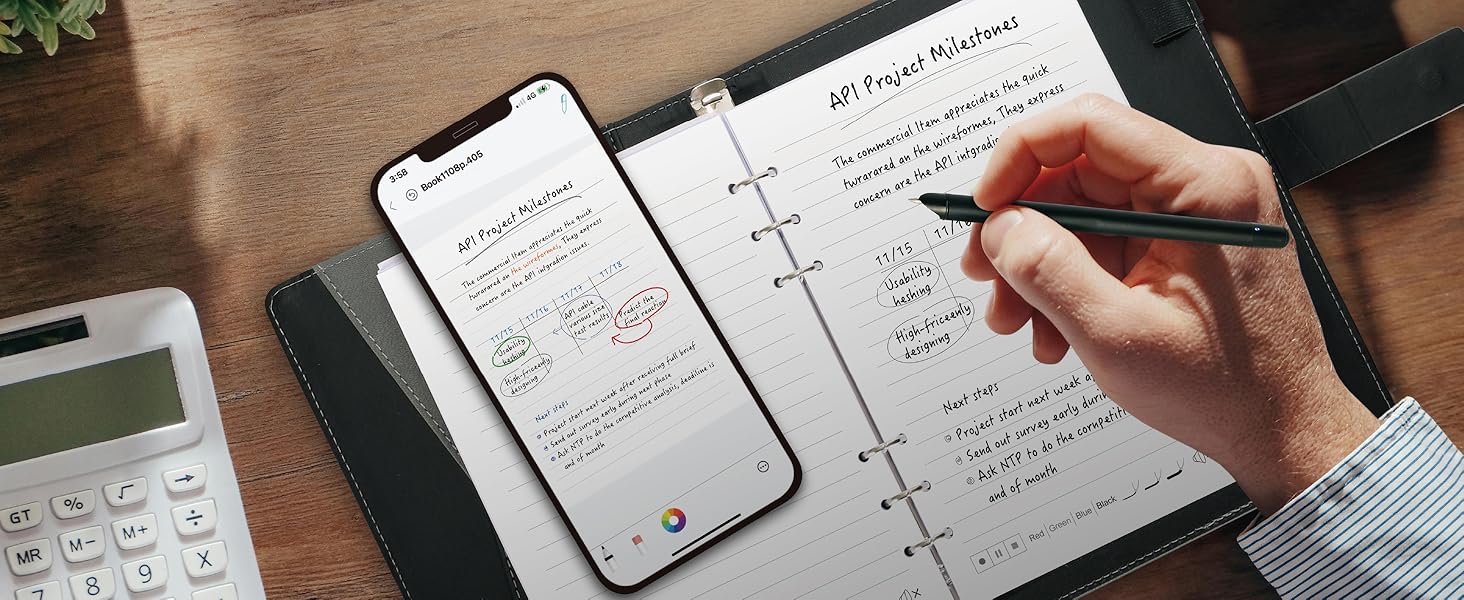
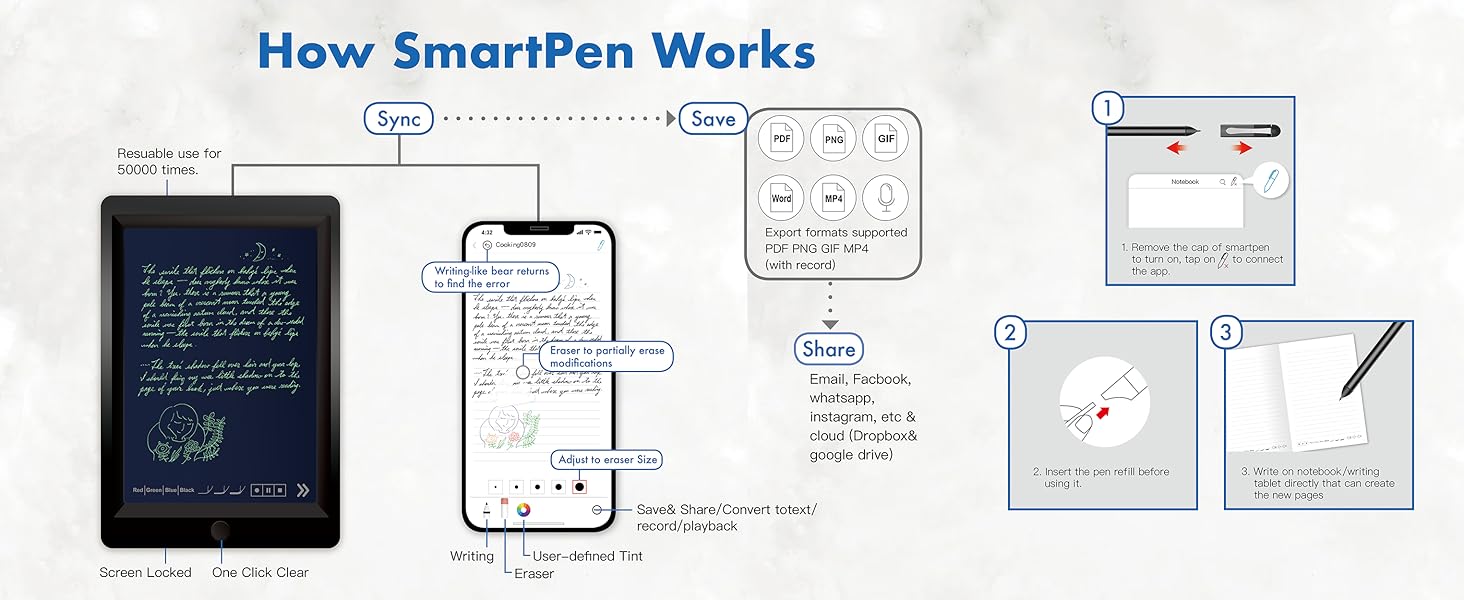
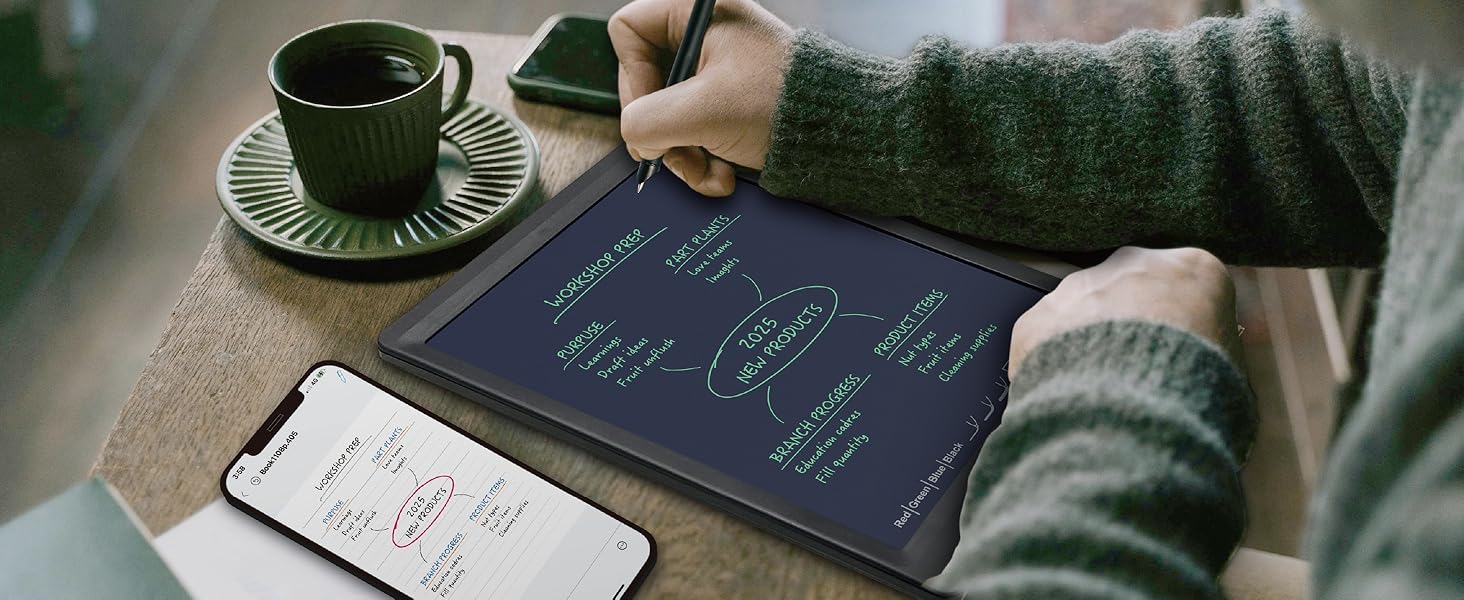
  • 【Free APP-Ophaya Pro+】 Instantly Sync,Effortlessly Captures handwritten notes and drawings with precision, synchronizing them in real-time to devices with the Ophaya Pro+ app(Suitable for iOS and Android smart phone), Never miss an idea again
  • 【OCR Handwriting Recognition】Handwritten text can be converted to digital text, which can then be shared as a word document.
  • 【Searchable Handwriting Note】Handwritten notes can be searched using keywords, tags, and timestamps, making it easier to find specific information.
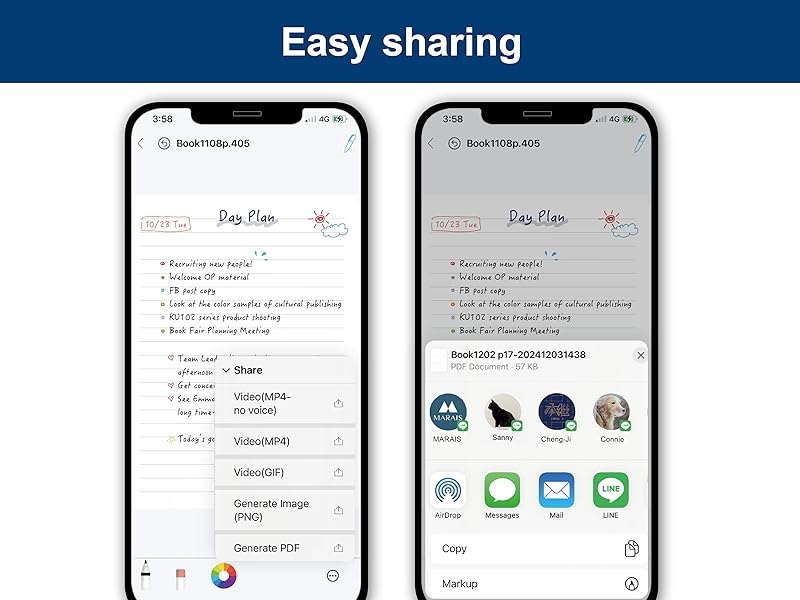
  • 【Multiple note file formats for storage and sharing】 PDF/Word/PNG/GIF/Mp4 (Note: Multiple PDF and png files can be combined before sharing).
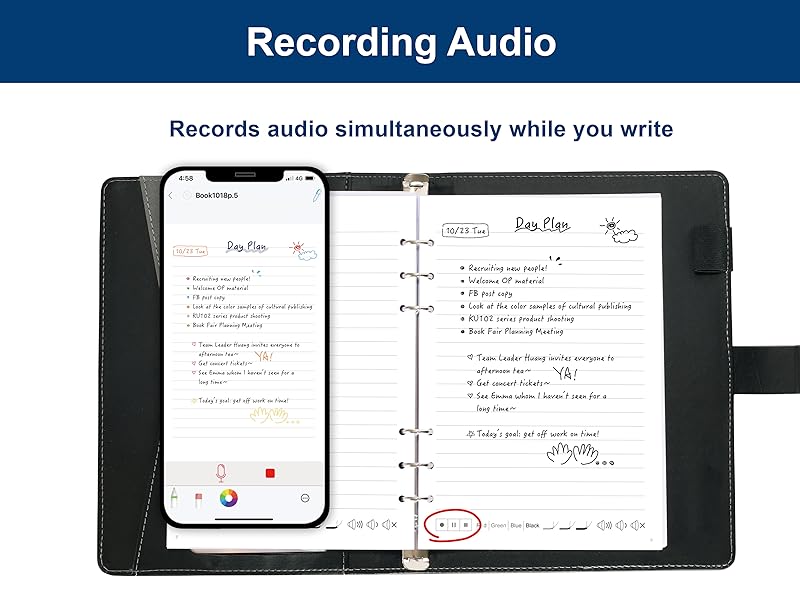
  • 【Audio Recording】 Records audio simultaneously while you write, allowing you to sync your notes with the corresponding audio for context. and Clicking on the notes allows you to locate and play back the corresponding audio content.
  • 【Offline Storage】This feature allows you to continue writing and saving content even when not connected to your phone. Once reconnected, the saved content will automatically upload to the app, which is especially useful for preventing the loss of key information during work or class, helping you review important details later.
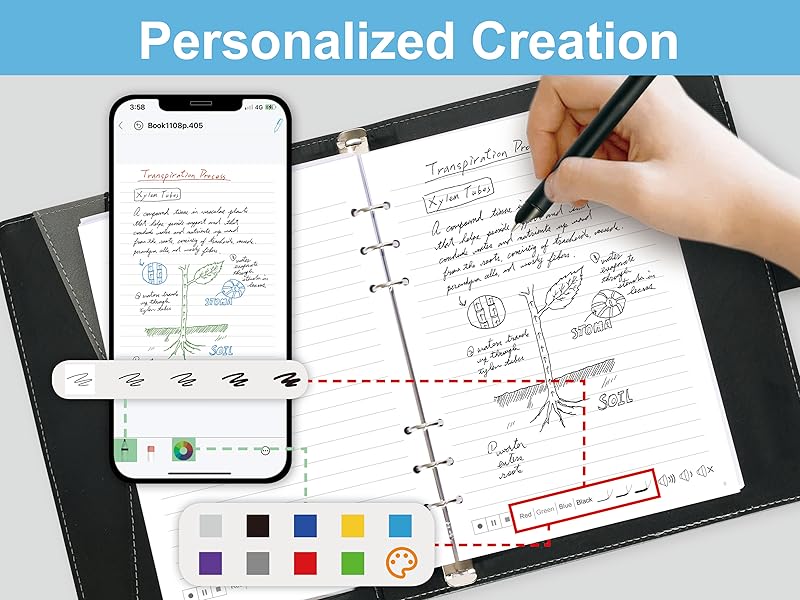
  • 【Customizable settings】 Allow users to select different pen thicknesses, colors, and other personalization options in the app, enabling eraser functionality for editing and providing a better writing experience.
  • 【What's in the box】 1x smart pen, 1x Pu Notebook (60 sheets), 4x Ballpoint Refills, 2x Plastic Pen Nib, 1x USB-C Cable

Key details

Color
Black
Brand
Ophayapen
Number of Batteries
1 Lithium Ion batteries required. (included)
Compatible Devices
Smartphone
Are Batteries Included
Yes

Dimensions and fit

Item Weight
2.4 Pounds
Item dimensions L x W x H
11.42 x 9.92 x 1.77 inches

Item information

Batteries Required?
Yes
Battery Description
Lithium-Ion
Highlights

About this item

  • 【Free APP-Ophaya Pro+】 Instantly Sync,Effortlessly Captures handwritten notes and drawings with precision, synchronizing them in real-time to devices with the Ophaya Pro+ app(Suitable for iOS and Android smart phone), Never miss an idea again
  • 【OCR Handwriting Recognition】Handwritten text can be converted to digital text, which can then be shared as a word document.
  • 【Searchable Handwriting Note】Handwritten notes can be searched using keywords, tags, and timestamps, making it easier to find specific information.
  • 【Multiple note file formats for storage and sharing】 PDF/Word/PNG/GIF/Mp4 (Note: Multiple PDF and png files can be combined before sharing).
  • 【Audio Recording】 Records audio simultaneously while you write, allowing you to sync your notes with the corresponding audio for context. and Clicking on the notes allows you to locate and play back the corresponding audio content.
  • 【Offline Storage】This feature allows you to continue writing and saving content even when not connected to your phone. Once reconnected, the saved content will automatically upload to the app, which is especially useful for preventing the loss of key information during work or class, helping you review important details later.
  • 【Customizable settings】 Allow users to select different pen thicknesses, colors, and other personalization options in the app, enabling eraser functionality for editing and providing a better writing experience.
  • 【What's in the box】 1x smart pen, 1x Pu Notebook (60 sheets), 4x Ballpoint Refills, 2x Plastic Pen Nib, 1x USB-C Cable
Close-up view of the Smart Sync Pen for Note Taking with Notebook and Writing Board Real-time Sync for Digitizing Convert to Text
Details

Materials and care

Material
Aluminum, Paper, ps

From the brand

Product detailProduct detailProduct detailProduct detailProduct detailProduct detail

Product videos

Product video 1

Customer reviews

443 reviewsPositive

Rated 4.0/5 across 443 reviews — well received overall.

Customers say

Customers find the smart pen converts handwriting to text smoothly and works well with both Android and iOS devices.

Generated from the text of customer reviews

Reviews with images

Customer review image for Great ProductCustomer review image for Great Product
See all photos
★★★★★

Smart and Easy Pen for Digital Note Taking

This smart sync pen makes taking and saving notes really easy. It writes smoothly on paper while instantly digitizing everything to the app on my phone or tablet. Converting handwritten notes to text is accurate and fast, and sharing them from the app is simple. The notebook and writing board feel good to use, and the pen connects quickly to both Android and iOS devices. Perfect for students, professionals, or anyone who wants paper notes saved digitally. A convenient tool that blends traditional writing with modern tech. Read more

KevinVerified purchase
★★★★★

Great Product

I am surprised at all the negative reviews. This was not my experience at all. I regularly read reviews and those reviews feel like someone review bombed this product. I run a lot of meetings and take a lot of notes. But typing distracts me from the flow and management of the meeting. For me, writing on paper is much less distracting. But the problem is that my notes then need to be typed up. Ophaya is the perfect solution for me as it takes my handwritten notes and, with one click, types them up on my cell phone. Then I can quickly edit through them to expand them from notes to reports or summaries. My hand writing is terrible but the first time I used Ophaya it did an amazing job recognizing my words with only a couple of misses (but I couldn’t read them either 🙄) And it did this right out of the box. It comes with a nice tablet sized notebook with paper and a very nice magnetic closing cover. The cover has space inside for spare ink cartridges, with pockets for ID, business cards, and a pen that writes on paper and on the included tablet. The tablet is perfect for sketching out ideas or diagrams like one might do on a whiteboard. It’s very simple to link your cell and the pen. When you do, Ophaya, through the free included app, automatically puts what you write on the notebook paper into the cellphone, including any doodles or diagrams. As you handwrite notes you can change the color of the digital ink with a tap to the notebook paper to keep concepts or content color separated. It’s the tool I have waited a long time for. I’m sorry I didn’t know about it sooner. Read more

Customer review image for Great ProductCustomer review image for Great Product
Kurt007Verified purchase
☆☆☆☆

Terrible app

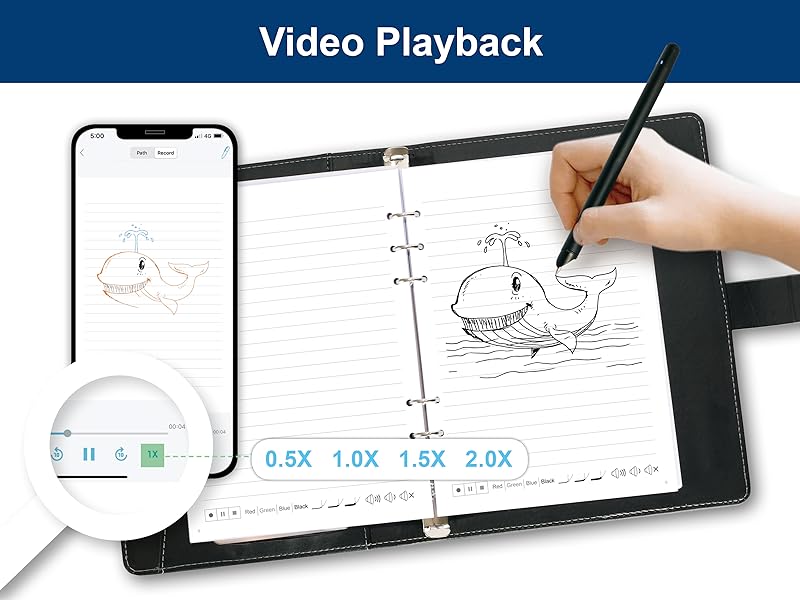
So I had previously used a Livescribe Echo and really loved it. I lost the pen and wanted to try something different. I'm really disappointed with this. A couple things to understand, the audio recording is done on your phone, via their Ophaya Pro+ app. So keep in mind that notification sounds etc will be captured in your audio. The user experience in the app for listening back to your recordings is terrible. It's extremely difficult to move through your notes and through the audio. There's no way to increase the speed of the audio (sometimes I want to listen at 1.5 or 2x speed to get to the spot I'm looking for) either. And for a recent meeting I was in, I recorded for about 2 hours, multiple pages of notes, and I couldn't navigate to different sections of my notes at all. I would expect to be able to click on a place in my written notes (in the app) and have the audio play at the point I was taking notes. Not the experience here. The tablet is a nice option for drawing or if you're just taking a few notes, but the app just falls so short of any expectations for this type of pen. Not to mention I couldn't find any way to get support for it. So if anyone from Ophaya wants to help, please let me know! I was so disappointed that my return window expired before I was able to really use this and see how terrible it was. Read more

Jason TVerified purchase
★★★★★

It's a very helpful and fun tool.

I am very much enjoying the Ophaya board and pen set. I have thus far not used the "paper" so can not comment on that. This is a very good product. I am very happy with the brightness of the new board that they gave me. They tell me now that everyone is getting this new brighter board. That's good. The fact that you can see your drawing or handwriting is a fun aspect, and the audio recording that you can append to the writing/drawing is very helpful as well. Note to those who have criticized the audio recording saying that it does not always work: I had the same experience but found a work around that works for me. Here is my way of working with this. I use the writing aspect to make a brief note on the board. Then I tap the record button on the writing board to read the note as well as any other pertinent information. Then I PAUSE the recording IN THE APP, not on the board, and write whatever I want in the board again, and then PRESS the RECORD ICON on the board to say whatever I want and PAUSE the recording in the APP to write again. Repeat till you run out of time or space or thoughts! In other words, tap to begin or resume recording only on the board, pause or conclude the recording only on the app, and write only during the pauses of audio recording and this function will work well. It's an excellent note taker when you get past that little quirk. Ophaya - when will you have a letter size board? That would be great! Original review" It works pretty well! The main thing that was not so good for me was that the writing board to me was very very dim; requiring an exterior light to see what you are writing. And then, when you use an outside light, the glare off the board made that difficult! But I contacted the company and they said that they would replace the board. Should they do that, I will report what happens when I use it, and spend some more time in the review explaining the other things that I like! I'd like to upgrade to 5 stars -- if the screen works well, I will do that. Read more

D. W. LockeVerified purchase
Recently Viewed

We use optional analytics cookies to understand how visitors use Ventari and improve the experience. This banner controls analytics measurement only. See our Cookie Policy.