Free shipping over $35 · 60-day returns · Price-watch guarantee

Ventari

StarTech.com

StarTech com Dual-Laptop USB-C KVM Docking Station Dual Monitor 4K 60Hz DisplayPort Dock 5-Port USB Hub GbE 90W

3.8(76)
$297.99$314.99

52+ bought in the past month

About this item

  • DUAL-LAPTOP KVM DOCK: Dock and Switch between two laptops at your desk / workstation and share dual 4K 60Hz monitors, keyboard, mouse and other USB peripherals; Switch between two laptops using a toggle button located on the front of the docking station
  • SIMULTANEOUSLY CHARGE TWO LAPTOPS: USB-C KVM docking station charges both connected laptops over USB-C (PD 3.0); The included 180W power adapter automatically provides 90W of power to the active host and 45W of power to the host on standby
  • COMPATIBILITY: Dual-Host KVM Dock supports mixed OS, Windows, macOS, ChromeOS, Linux; Works w/ Intel, AMD and the Apple M-Series, enabling two external displays even on laptops that natively only support one; Driver installation required on Windows/macOS
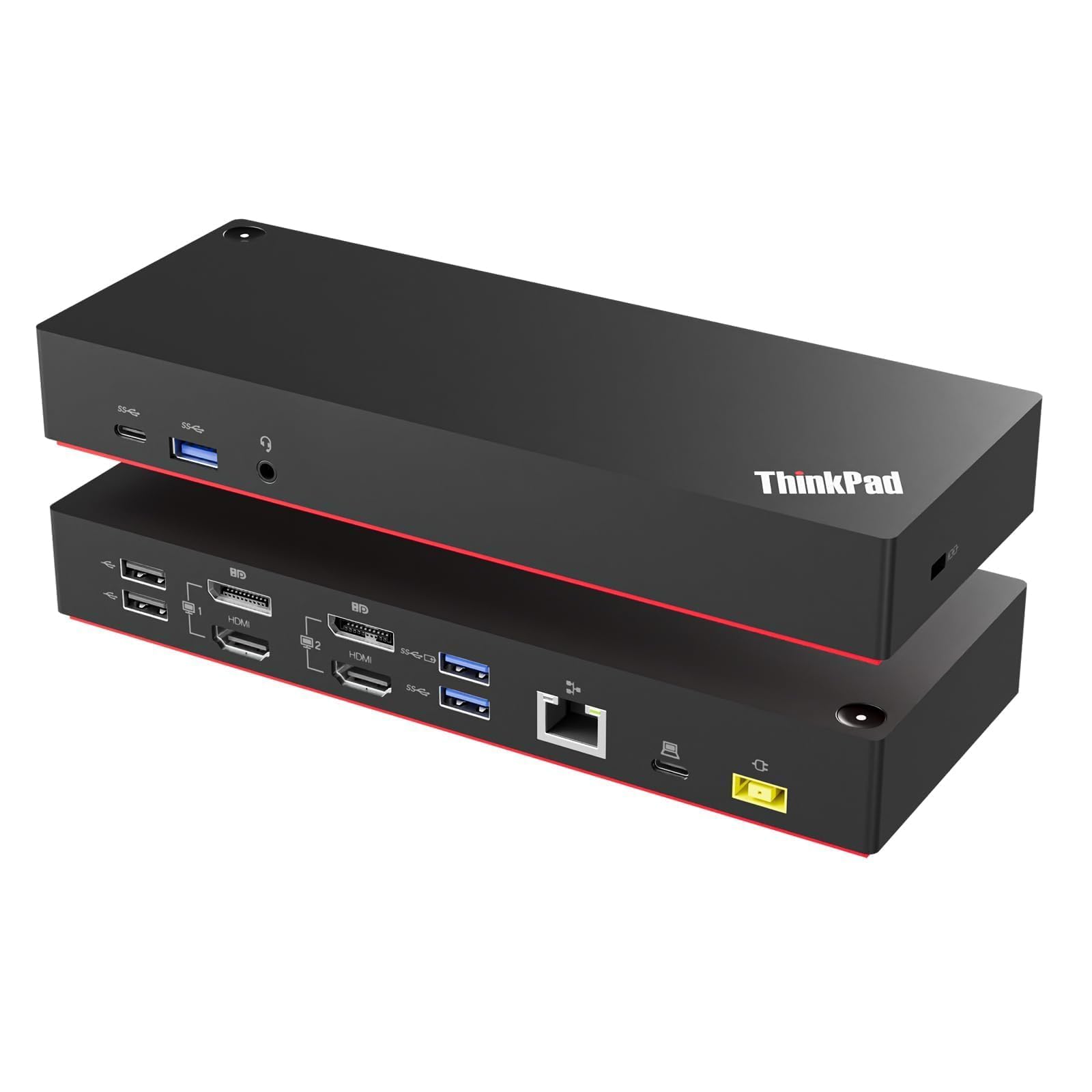
  • CONNECTIVITY: The dock features a variety of ports for device connectivity; 2x USB 2.0 Type-A HID, 2x USB-A (10Gbps), USB-C (10Gbps), 2x DisplayPort, 2x USB-C host ports, Gigabit Ethernet, 3.5mm stereo audio, 3.5mm mic, 2x K-Slots (Standard/Nano)
  • OUR ADVANTAGE: Included connectivity tools for IT Pro's and IT help-desk support teams with Network MAC Address Pass-Through for network security, WiFi Auto Switching for improved network performance, USB Event Monitoring, and Windows Layout

Key details

Brand
StarTech.com
Color
Black
Hardware Interface
3.5mm Audio, DisplayPort, Ethernet, USB 2.0 Type A, USB Type C
Compatible Devices
Apple MacBook Air M1/M2/M3/M4, Apple MacBook Pro 13 M1/M2/M3, Apple MacBook Pro 14 M1 Pro/M2 Pro/M3 Pro, Apple MacBook Pro 16 M1 Pro/M2 Pro/M1 Max/M2 Max/M3 Pro, Apple MacBook Pro 15 2019/2018/2017/2016, Apple MacBook Pro 13 2020 Intel/M1, Apple MacBook Pro 13 2021 M1 Pro/M1 Max, Apple MacBook Air 2022 M2, Apple MacBook Pro 14 2021 M1 Pro/M1 Max, Apple MacBook Pro 16 2021 M1 Pro/M1 Max, HP Spectre x360 13-aw0000/13-df0000/13-af0000/13-ap0000/13-ba0000/14-ea0000/14-df0000/14-cd0000/14-bc0000/14-bd0000/15-df0000/15-eb0000/15-bl0000/15-ds0000/15-ch0000, HP Elite Dragonfly G2 2B5G1AV/2B5G2AV/2B5G3AV, HP Elite Dragonfly G3 3B5G1AV/3B5G2AV, HP EliteBook 830 G7 Intel/AMD, HP EliteBook 830 G8 Intel/AMD, HP EliteBook 840 G7 Intel/AMD, HP EliteBook 840 G8 Intel/AMD, HP EliteBook 850 G7 Intel/AMD, HP EliteBook 850 G8 Intel/AMD, HP Envy 13-ba0000/13-df0000/13-ap0000/14-eb0000/14-df0000/15-df0000/15-cd0000/15-bc0000, HP Envy x360 13-bd0000/13-dq0000/13-cb0000/14-bd0000/14-ce000 See more
Total USB Ports
7

Dimensions and fit

Product Dimensions
8.8"L x 3.5"W x 1.6"H
Item Weight
14.24 ounces

Item information

Number of Ports
14
Wattage
90
Global Trade Identification Number
00065030897242
Highlights

About this item

  • DUAL-LAPTOP KVM DOCK: Dock and Switch between two laptops at your desk / workstation and share dual 4K 60Hz monitors, keyboard, mouse and other USB peripherals; Switch between two laptops using a toggle button located on the front of the docking station
  • SIMULTANEOUSLY CHARGE TWO LAPTOPS: USB-C KVM docking station charges both connected laptops over USB-C (PD 3.0); The included 180W power adapter automatically provides 90W of power to the active host and 45W of power to the host on standby
  • COMPATIBILITY: Dual-Host KVM Dock supports mixed OS, Windows, macOS, ChromeOS, Linux; Works w/ Intel, AMD and the Apple M-Series, enabling two external displays even on laptops that natively only support one; Driver installation required on Windows/macOS
  • CONNECTIVITY: The dock features a variety of ports for device connectivity; 2x USB 2.0 Type-A HID, 2x USB-A (10Gbps), USB-C (10Gbps), 2x DisplayPort, 2x USB-C host ports, Gigabit Ethernet, 3.5mm stereo audio, 3.5mm mic, 2x K-Slots (Standard/Nano)
  • OUR ADVANTAGE: Included connectivity tools for IT Pro's and IT help-desk support teams with Network MAC Address Pass-Through for network security, WiFi Auto Switching for improved network performance, USB Event Monitoring, and Windows Layout

From the brand

Product detailProduct detailProduct detailProduct detailProduct detailProduct detailProduct detailProduct detailProduct detailProduct detailProduct detailProduct detail

Product videos

Product video 1

Customer reviews

76 reviewsMixed

Rated 3.8/5 across 76 reviews — opinions are mixed.

Customers say

Customers find the docking station to be well-built and consider it a great product, particularly for Mac users.

Generated from the text of customer reviews

Reviews with images

Customer review image for Works w Macbook and PC w dual monitors with extended desktop on bothCustomer review image for Works w Macbook and PC w dual monitors with extended desktop on both
See all photos
★★★★★

FINALLY! Someone got it RIGHT@!

I'd been looking forever for some way to connect my Windows 10 and Windows 11 PCs (both with Thunderbolt ports, to enable a single cable for both power and data) to two monitors, external microphone, webcam, speakers and other USB drives. After I pre-ordered it, I'ld been waiting patiently for nearly a week until just today, it finally arrived. All I can say is WOW... FINALLY! It comes with a single power supply that simultaneously provides 90 watts to the active laptop and 45 watts to the standby PC, keeping both charged at all times with no issues. Again to reiterate... ONE power supply powering the switch AND both laptops, and only ONE cable to each PC... THAT'S IT. (Besides the obvious cables to all the peripherals.) Switching can be done either with the button on the front of the KVM or; if you install the Startech.com Link software, via a hotkey (double pressing the left shift button twice in rapid succession.) AND; although slightly buggy (I've already spoken to their tech support over this) you have SIMULTANIOUS mouse and keyboard control over both computers, merely by moving the mouse over to one side or the other. (But the hiccup in my case is that it doesn't ever seem to want to leave the Windows 10 machine, whether that machine happens to be the active or standby machine.) Other than that minute item, everything works PERFECT and exactly as you would expect it to. Again... FINALLY and THANK YOU STARTECH! Read more

JPVerified purchase
★★★★

Works w Macbook and PC w dual monitors with extended desktop on both

Of the 4 different dual-display KVM's that I tried , this is the easiest and most dependable. BEST SOLUTION FOR MAC. . #1 Support DIsplayLink on Mac. This is required on mac for extended desktop support. #2 ONE BUTTON PUSH to switch between computers. My setup is a 14" Macbook Pro M1 and PC Tower Ryzen 5950X/AsRock-Taichi MB/GIgabyte Titan-Ridge TB3 PCI card/RTX 3080/etc #3 Supports Huion 24" HDMI (w DVI adaptor) and its USB Pen Display input. #4 Quick recovery of display when MacBook is disconnected and then reconnected. Or when the KVM is switched off. Comparing the StarTech to the others, aside from VisionTech, all come in plain brown boxes with minimal packaging. Ordered lowest to highest price: A: VisionTek VT2900 - Nearly half the price of the others. Light weight and cheaply made feeling, Thin plastic. No support of DIsplaylink on Mac. Extended display only on PC, Mac is mirroring only. Has slower USB ports only, 1x DP 1x HDMI. B: Startech 129N-USBC-KVM-Dock - Lacking the extra HDMI port, but switching takes only 1 button push vs 2 on the others. Glowing front light is not overly bright. Plastic case, that feels solid, comparable to Targus, much better than VisionTech. Most reliable display recovery from disconnects.2x DP All other ports same between B,C,D. BEST SOLUTION FOR MAC. C: IOGEAR GUD3CDHTAA - Full metal housing, feels study and heavy weight. Has HDMI port for 3 monitor support. Macbook disconnect recovery was slower and not as reliable as the Startech, often needing to be reset. 2 button pushes (due to the HDMI port) made it confusing what PC was active. Glowing front blue LED is way too bright, and I needed to cover it. 2xDP 1xHDMI All other ports same between B,C,D. D: Targus DOCK750UsZ - Plastic case, that feels slightly more solid than Startech.. Has LED indicators on the mode switch that help reduce the confusion on 2 button presses to switch. Includes usb cables that have screws to secure them to the device. Manual provides some trouble shooting tips, something the others all lack. 2xDP 1xHDMI All other ports same between B,C,D. These are much more pricey than other KVM solutions but use far fewer cables, and offer better hub support Read more

Customer review image for Works w Macbook and PC w dual monitors with extended desktop on bothCustomer review image for Works w Macbook and PC w dual monitors with extended desktop on both
ZugokVerified purchase
★★★★★

Amazing find.

Amazing find, after a month researching, buying and returning equipment, I found this unit. I'm able to connect a MacBook Air M3 and a DELL Vostro 14 5410, drive two 4K displays flawlessly, all ports work really well, and power distribution works for both laptops simultaneously. You do need to install a set of display app/drivers for MacOS for the MacBook to be able to extend two 4K screens. Read more

David MorenoVerified purchase
☆☆☆☆

Terrible quality. Switching capabilities DoA

Had high hopes. Item DOA. Connects to both macbooks but one wont charge at all. Select button that switches the host does NOTHING despite tapping it, holding it down for 5 seconds to reset, power cycling the unit, reseating host cables on both ends, etc. Way. too expensive to be a hunk of junk like this. Glorified dock and the whole KVM aspect is garbage. Read more

MitchVerified purchase
Recently Viewed

We use optional analytics cookies to understand how visitors use Ventari and improve the experience. This banner controls analytics measurement only. See our Cookie Policy.