Free shipping over $35 · 60-day returns · Price-watch guarantee

Ventari

TESmart

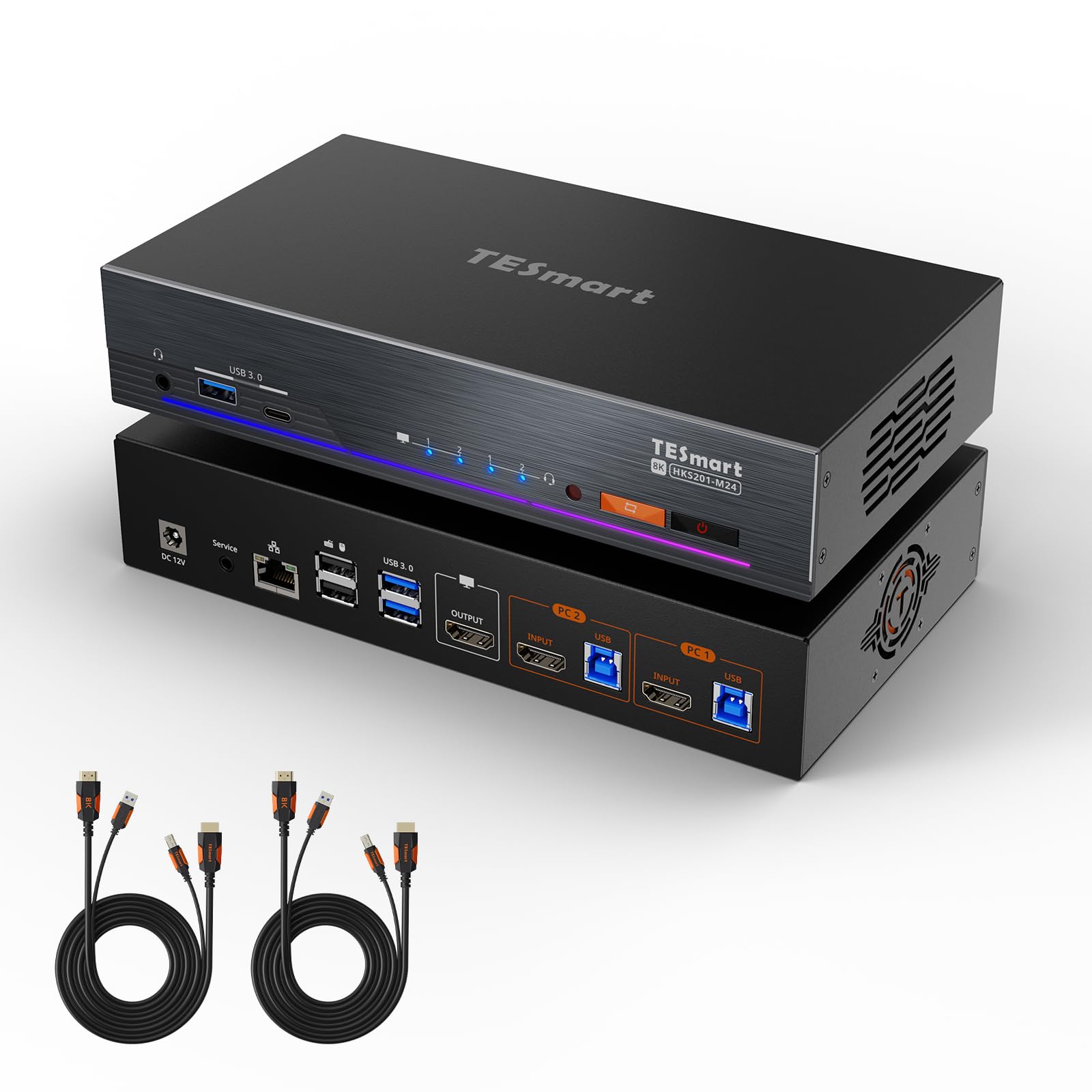
TESmart 8K 60Hz HDMI KVM Switch 2 Computers 1 Monitor USB 3 0 HDMI KVM Switch 2 Ports

4.9(17)
$289.99

1719+ bought in the past month

Sobre este artículo

  • 【2×1 KVM Switch for Dual PC Control】Control 2 PCs using just one keyboard, mouse, and monitor. Ideal for switching between a work PC and a personal device without plugging and unplugging
  • 【Stunning 8K Visuals & HDMI 2.1 Support】Supports 8K@60Hz 4:4:4 and 4K@120Hz/144Hz resolutions with HDMI 2.1 (48Gbps). Compatible with VRR, FVA, ALLM—perfect for gaming, video editing, and high-res displays
  • 【EDID Emulators for Display Stability】EDID emulators keep your resolution and screen settings intact when switching between PCs. No more screen flicker or layout resets
  • 【4 Ways to Switch – Including Custom Hotkey Support】Switch between devices using hotkeys, front panel button, IR remote, or mouse wheel. Supports custom hotkeys—set any key on your keyboard as the trigger
  • 【Shared Gigabit LAN for Dual Devices】Both PCs can access a wired 1000 Mbps Ethernet connection using just one network cable. Built-in Ethernet adapter simplifies your network setup
  • 【USB 3.2 Gen 1 SuperSpeed & Front Charging】Enjoy ultra-fast data transfer and charge your phone or tablet directly from the front USB port. Two USB 3.2 ports offer both speed and power
  • Integrated Microphone and L/R audio Output: You can listen to audio from one computer while working on the other or scan a document and save in another computer. Only need to press the front panel keys to operate audio, your headphones will stay 'active' during the switch and no longer have to stop and restart meetings

Key details

Operation Mode
ON-OFF
Current Rating
3 Amps
Contact Type
Normally Closed
Connector Type
Plug In
Brand
TESmart

Dimensions and fit

dimensions
‎ 9 x 5 x 2 inches; 4.18 Pounds
Item dimensions L x W x H
9 x 5 x 2 inches
product_dimensions
9 x 5 x 2 inches; 4.18 Pounds

Technical specifications

Operating Voltage
12 Volts
item_model_number
HKS201-M24-USBK

Item information

Switch Type
Push Button
Terminal
Screw
date_first_available
March 27, 2025
manufacturer
TESmart
best_sellers_rank
#167 in KVM Switches
Highlights

About this item

  • 【2×1 KVM Switch for Dual PC Control】Control 2 PCs using just one keyboard, mouse, and monitor. Ideal for switching between a work PC and a personal device without plugging and unplugging
  • 【Stunning 8K Visuals & HDMI 2.1 Support】Supports 8K@60Hz 4:4:4 and 4K@120Hz/144Hz resolutions with HDMI 2.1 (48Gbps). Compatible with VRR, FVA, ALLM—perfect for gaming, video editing, and high-res displays
  • 【EDID Emulators for Display Stability】EDID emulators keep your resolution and screen settings intact when switching between PCs. No more screen flicker or layout resets
  • 【4 Ways to Switch – Including Custom Hotkey Support】Switch between devices using hotkeys, front panel button, IR remote, or mouse wheel. Supports custom hotkeys—set any key on your keyboard as the trigger
  • 【Shared Gigabit LAN for Dual Devices】Both PCs can access a wired 1000 Mbps Ethernet connection using just one network cable. Built-in Ethernet adapter simplifies your network setup
  • 【USB 3.2 Gen 1 SuperSpeed & Front Charging】Enjoy ultra-fast data transfer and charge your phone or tablet directly from the front USB port. Two USB 3.2 ports offer both speed and power
  • Integrated Microphone and L/R audio Output: You can listen to audio from one computer while working on the other or scan a document and save in another computer. Only need to press the front panel keys to operate audio, your headphones will stay 'active' during the switch and no longer have to stop and restart meetings
Close-up view of the TESmart 8K 60Hz HDMI KVM Switch 2 Computers 1 Monitor USB 3 0 HDMI KVM Switch 2 Ports
Details

Materials and care

Material
Metal

De la marca

Product detailProduct detailProduct detailProduct detailProduct detailProduct detailProduct detailProduct detailProduct detailProduct detailProduct detailProduct detail

Product videos

Product video 1

Customer reviews

17 reviewsPositive

Rated 4.9/5 across 17 reviews — highly regarded by customers.

  • 88% of sampled reviews give 4–5 stars.

Customers say

Customers find the KVM switch to be of high quality and appreciate its connectivity, with one customer noting it works well with their LG GX9 5k2k monitor.

Generated from the text of customer reviews

Reviews with images

Customer review image for Works with 5k2k
See all photos
★★★★★

Fantastic product with 1 caveat.

Very good high quality KVM. No issues to report. plug and play. It works well with all my peripherals. Able to connect mouse, keyboard, microphone, and camera with no issues. Quickly switches between devices with minimal delay. One caveat is that its HDMI only and most monitors go cheap on HDMI ports while providing better performance on the display port. Wishing the output was DP1.4. Read more

Joe F
★★★★★

Perfect for anyone with lots of external connections

Far nicer than the images imply and is essentially plug-and-play. No drivers needed, no software necessary, just exchange the video cables at your computer's ends and you're basically up and running. Packaging was excellent and the unit is cool, quiet, and fast. No issues to speak of. Love the RGB strip, that was a nice surprise! Highly recommended for anyone sick of constantly swapping cables! Read more

Ian Bouslough
★★★★★

This is the one to get for 1 monitor 4 machines

This is one of the best KVM switches ever. I just retired the Tesmart HKS401-M23 which was great, but this one is awesome. The size, the style, the features and it supports and displays my MSI OLED 2K monitor at its rated 360hz with no issues. Read more

Vincent C.
★★★★★

Works with 5k2k

Works with LG GX9 5k2k monitor. HDR 10 bit at 5120x2160 165hz switching between gaming rig and laptop stakes only a second or two. Sometime there are distorted images when you switch but it is fixed after switching back and forth. Read more

Customer review image for Works with 5k2k
George Tan
★★★★

Good KVM for two computers

I'm using this between a gaming computer and a docking station for my steamdeck/laptop. It idles at around 5.5W and while in use around 6.5-7W. I'm using most of the USB ports and not using the integrated ethenet switch. On the output side is a BenQ x3100i projector and this switch is having no problem outputing 3840x2160 @ 60Hz. This KVM keeps the connection between it and the computer not selected so that the OS does not detect USB/HDMI disconnects. My only gripe is with the remote control. There is no on/off button on the remote, so if you need to turn the unit off you have to physically push the on/off button at the front of the KVM. It would be great if the manufacture made a model without the gigabit ethernet switch given I can't imagine 8k video users only having gigabit ethernet to keep the size and cost of the KVM down. Read more

TheCrazyCanuck
★★★★★

Finally! One that truly works.

We’ve tried many but this one was the first one to truly work with ease. Everything you need is included and quality is outstanding. Read more

Tissiana Bowerman
★★★★★

High-Performance KVM Switch for Dual-PC Setups

I recently added the TESmart 8K@60Hz HDMI KVM Switch to my dual-PC setup, and it has significantly streamlined my workflow. The ability to control two computers with a single keyboard, mouse, and monitor is incredibly convenient, especially when toggling between work and personal systems. The switch supports impressive resolutions, including 8K at 60Hz and 4K at 144Hz, ensuring crisp and smooth visuals. I’ve used it for both gaming and video editing, and the performance has been flawless, with no noticeable lag or screen flicker. It is compatible with a wide range of devices, including Windows, Mac, and Linux systems, as well as most HDMI-equipped monitors. Installation was straightforward, and the device comes with all necessary cables. The front panel button, IR remote, mouse wheel, and customizable hotkey options offer flexible switching methods, allowing me to choose the most convenient control for my needs. One thing to note is that it runs fairly warm during extended use. While it does not overheat or throttle, I recommend leaving it in a ventilated area to help keep the temperature manageable. The integrated microphone and audio output are useful. I can now listen to audio from one computer while working on the other, which is particularly handy during virtual meetings or when multitasking. The only minor downside is that the build quality feels a bit basic. While it functions perfectly, the plastic casing does not have the robust feel of some other equipment. Overall, this TESmart KVM switch is a solid choice for anyone looking to manage multiple computers with high-resolution displays. It is versatile, performs well, and makes multitasking much easier. Read more

Jon Siegrist
★★★★★

Seamless Switching with TESmart HDMI KVM

As someone who juggles multiple computers for work and play, this HDMI KVM switch has been a game-changer. It's perfect for my setup where I switch between four computers on a single monitor. The resolution support is top-notch, handling 8K at 60Hz and 4K at 144Hz, which makes it ideal for gaming and video editing. I appreciate that it comes with all the necessary input cables, saving me from extra purchases. The hotkey switch feature is super convenient, allowing me to switch between systems without hassle. Plus, the USB 3.0 support ensures that my peripherals are responsive and fast. I also noticed the audio and microphone pass-through works flawlessly, which is a bonus during video calls. I was worried about potential lags or delays, but the ADI chip and EDID emulators keep everything running smoothly with zero hiccups. While some users mentioned minor setup hiccups, I found the instructions clear and easy to follow. Overall, this switch has streamlined my workspace and made my multitasking much more efficient. If you're in a similar situation, I highly recommend giving it a try. Read more

Sean P. Ford
Recently Viewed

We use optional analytics cookies to understand how visitors use Ventari and improve the experience. This banner controls analytics measurement only. See our Cookie Policy.