John—March 12, 2026
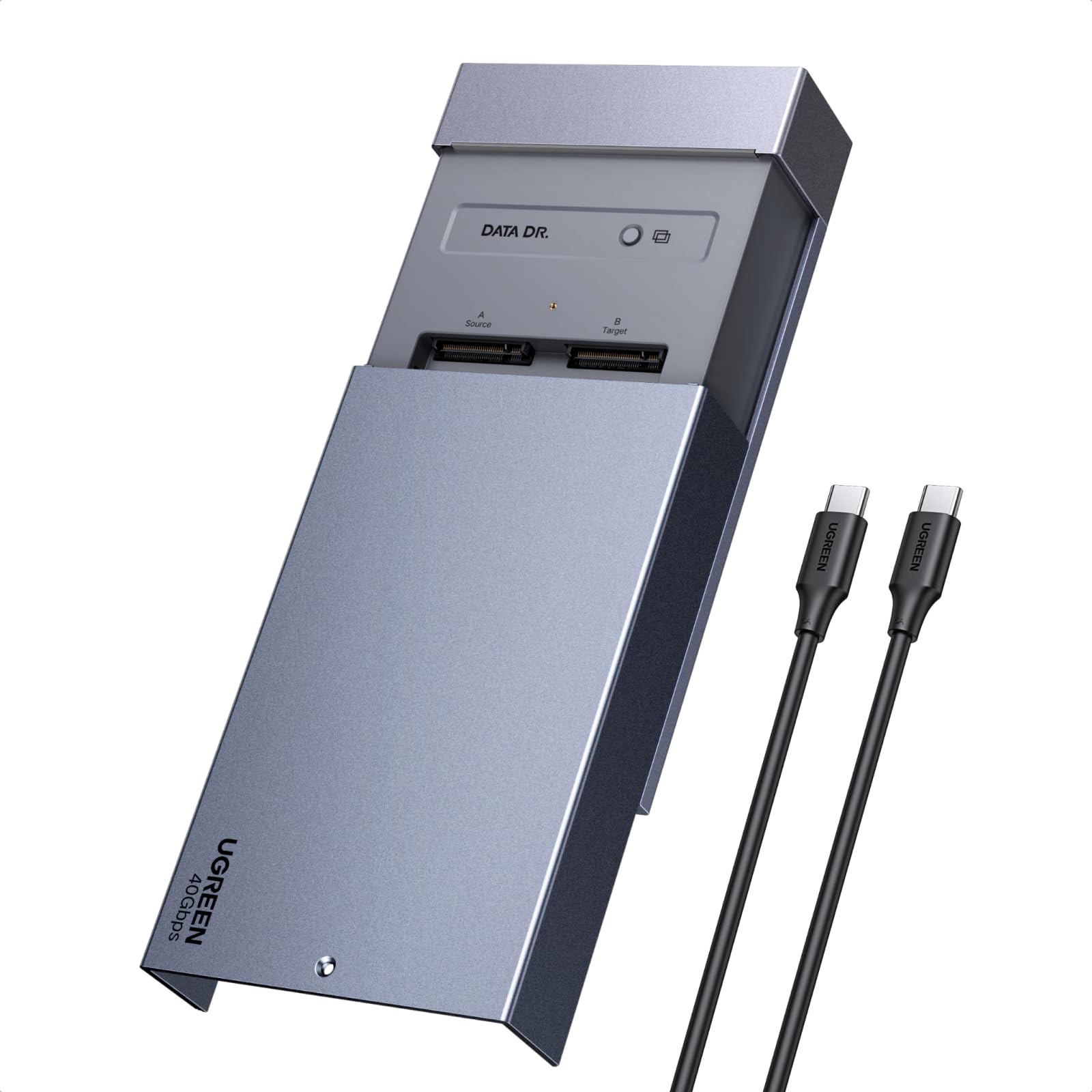
Got this dual-bay NVMe cloner to upgrade my son's drive to a bigger one without reinstalling everything from scratch. Popped the old NVMe in one slot and the new larger one in the other, hit the clone button, and it ran... which was nice. The process took a while for the full drive but went smooth with the LED showing progress. Tool-free design made swapping drives easy, and the cooling fan kept things from getting too hot during the copy. Once done, the new drive booted up just like the old one, all data there. Handy for upgrades like this, and the fast transfer speeds when connected to the PC are a bonus for backups now. Solid tool that saved a ton of time. Read more
Roger L. Hill—February 7, 2026✓ Verified purchase
Does not auto size the target drive to its full capacity in the clone function Read more
Robert Levandowski Jr.—March 9, 2026
BOTTOM LINE: Works, but it's not well-designed for any of the tasks its sold for. This is an external USB 4 enclosure for M.2 NVMe SSDs. Beyond being a drive enclosure, it also offers standalone drive-cloning capability. I couldn't test the cloning function, as I don't have a spare NVMe drive to hand and the memory shortage means they're a bit hard to come by. But for purposes of my rating, I'll assume it works as described. The trouble with that function is the physical design. As a computer professional, I see the value in a drive cloner. But this isn't a convenient tool for that job. It claims to be "tool-free;" that's not true. You absolutely need a tool; it even comes with one. To access the NVMe slots, you need to open the case, and the case is held closed with a #1 Phillips screw. While a decent, if inexpensive #1 Phillips jeweler's screwdriver is included, there's no storage for it, so it'll get lost. The screw is all that holds the cover shut, so you have to remove and install it whenever you change drives—and the clone button is underneath the cover, too. This should've been a latching design with a pushbutton. The drives are also held in place with a #1 Phillips screw, which is pretty standard for an NVMe slot, but in a cloning tool it's disappointing that they didn't engineer some sort of tool-less design. More annoying is that the case depends on adhesive thermal foam to provide cooling for your SSDs. The foam, which is thicker than that normally provided with an SSD, bridges the gap between the aluminum case and the drive. Because it's self-adhesive, it's single use. But this is a tool that a technician would use with many drives... This should have come with some form of spring-loaded heatsink so that you could easily swap drives. Okay, so how does it work as a drive case? Well, it provides good speed—fast enough to do 4K video editing with even a value-series NVMe SSD, according to Blackmagic Disk Test. It worked fine with my Mac... except for the part where it goes away when the system sleeps, causing an improper-eject warning every time you wake the Mac. This seems to be a common problem with USB 4 devices on Macs; it's not a problem for enclosures with a real Thunderbolt chipset. It's also not bus-powered; you'll need to use the included power adapter. It's also pricier than other options. You can get a more convenient NVMe cloner. You can get a cheaper and more reliable Thunderbolt 4 drive enclosure. This one just seems to be a bad bargain. Read more
Poodles and PCs—March 3, 2026
The Ugreen Dual-Bay NVME enclosure is a chunky, duam NVME M.2 ssd enclosure for SSD's. The enclosure requires power from an external adapter to operate, which limits it's portability compared to some bus powered options. The large all metal exterior case is attractively anodized in a silver and black motif and it looks good sitting on the desk. Functionally, this is a unique device. Not only does it allow for two disks to be used from a single usb-c connection (I've got two mismatched NVME drives installed, 1tb and 256gb, of different manufacturers) but it also allows for cloning disks without the need for an external PC. The cloning feature DOES NOT automatically fully allocate a larger disk from a source smaller drive, so be aware of this if you are upgrading from old SSD to larger new SSD's. It is possible of course, to adjust this after the fact, with a number of widely available utilities. The drive connects via USB-C and offers excellent transfer speeds in general testing. Dragging and dropping large files I found that windows was able to copy them quickly from the source to the target. Accessing the disks is possible of course, on both Mac and PC making it an easy to use option for those of us with both ecosystems present in our offices. The UGREEN enclosure is built well. It includes a spare fixing screw for both the lid as well as the drive retainer, and a small tool to open the drive if you don't have a spare one handy. The metal exterior appears durable, and if you need the cloning feature, this could be a good value for the 120 dollar price tag. If you're simply looking for a dual bay NVME enclosure for accessing drives externally, there are less expensive options. 4 stars. Read more


Reviewer2765—February 27, 2026
This clones NVME ssd's quick. I find almost all UGREEN's products are high quality and easy to use. The design is well thought out and works very simply. It's compatible with any computer and even works with no tools. NVME drives fit inside perfectly and copy fast. Read more
Kristen—January 20, 2026
This worked to help me duplicate several hard drives and phones in order to compile everything from my old MacBooks and iPhones that have just been sitting on them. The transfer rate is very quick, this is not only a product that is compatible with iOS but also windows which is nice because I have switched to a Windows computer. Easy to use, and was exactly what I needed. Very happy with this product and to have all of my other data and photos that I had stored locally. Read more