UtechSmart

USB C Docking Station Dual Monitor UtechSmart 11 in 1 USB C Hub Triple Display Laptop Dock with

$59.99

50+ bought in the past month

About this item

  • 【Triple Monitors Display Flexibility】UtechSmart conquers this technical hurdle to create the first USB C docking station with triple display capability on the market. the UtechSmart docking station supports single and dual HDMI monitors up to 3840x2160@30Hz or triple monitors up to 1920x1080@60Hz. Three monitors modes Boost your efficiency 3 times. Note: It does not support extend mode for macOS.
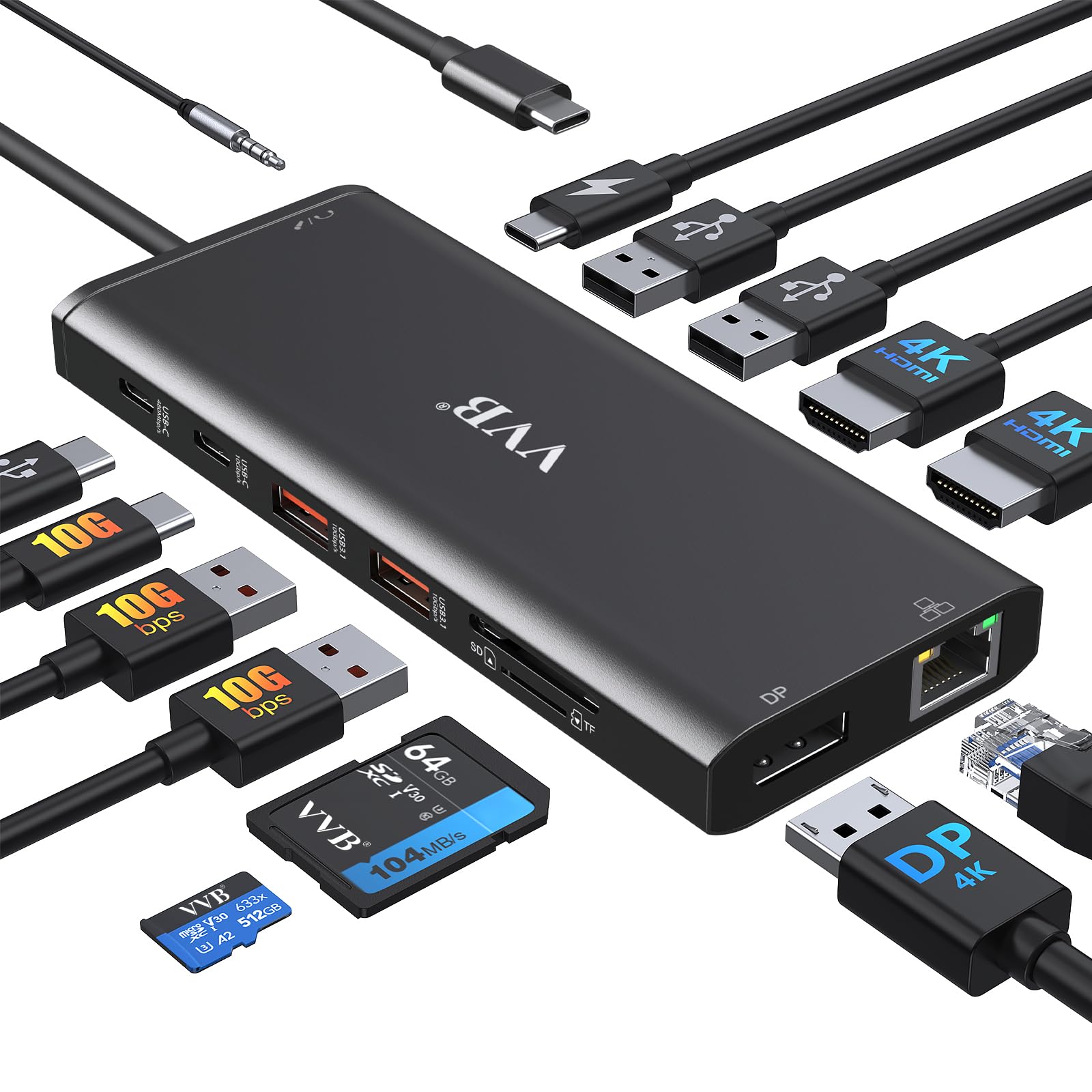
  • 【Ultra-portable & Compact Powerful Workstation】 You could easily put the docking station in your bag or pocket. Designed from rolled aluminum to be durable yet lightweight, lighten your load and ditch the extra cable adapters, and consolidate all features with this Plug and Play laptop docking station. Including 2x 4K HDMI, VGA, USB-C charging, Gigabit Ethernet, SD/TF card slot,2x USB 3. 0 Ports and 2x USB 2. 0 Ports.
  • 【100W PD3.0 Technology & Smart Safety】UtechSmart thunderbolt 3 dock help you shorten charging time by one third compared to traditional chargers. Equipped with our next generation intelligent microchip which provides a slew of safety features including: internal overload protection, short circuit protection, temperature protection and etc.*Can't provide power for your latop.
  • 【Blazing-fast Data Transfers & Advanced Networking】 The UtechSmart docking station is super fast with 2 USB 3.0 ports at 5Gbps, an SD and a TF card slot, and 2 additional USB 2.0 ports for your keyboard, mouse or charging device. The extremely fast 1000M Ethernet port helps gamers and office workers download movies or music faster, transfer files faster, and reduce latency in use.
  • 【Broad Compatibility】Our USB C docking station is widely used for laptops with Windows 10/11, Mac OS, Chrome OS, Dell XPS 13/15, Dell Latitude/Precision, Lenovo ThinkPad X1 Carbon, HP Spectre x360/ZBook or other devices with USB Type-C (Gen 2)/Thunderbolt 3/4 ports which supports "Displayport Alt Mode". UtechSmart provides with 18-month product care and 24/7 customer support!
$59.99

In Stock

Easy Returns · Return eligibility shown before checkout


How you'll get this item

DeliveryShipping details confirmed at checkout

Fulfillment

Ships fromVentari
Sold by
UtechSmart Store
Returns
Easy ReturnsReturn eligibility shown before checkout
PaymentsPayment details confirmed at checkout

Currently unavailable
Easy Returns · 30-day window
Product details
BrandUtechSmart
ColorGray
Hardware InterfaceEthernet, HDMI, SDHC, USB 3.0, USB Docking Station, USB Type C, VGA
Compatible DevicesWindows&Mac OS
Total USB Ports4
Product Dimensions6.7"L x 3.7"W x 1"H
Number of Ports11
Total HDMI Ports2
Wattage100 watts
UPC850004875094

From the brand

Product detailProduct detailProduct detailProduct detailProduct detailProduct detail

Product videos

Product video 1

Customer reviews

4.49,802 ratings
  1. 5100%
  2. 40%
  3. 30%
  4. 20%
  5. 10%

Customers say

Customers find the docking station works great right out of the box and appreciate its compact size that leaves plenty of desk space.

★★★★★

Full featured USB-C travel hub

T. YoungApril 21, 2020✓ Verified purchase

DISCLAIMER: I had bought a USB-C hub from UtechSmart in the past and they offered me this device for free if I would write a review of the device. So you can take my review with a 'grain of salt' if you wish, but I'm being completely honest in my review (if it was a piece of junk I would say so). With that disclaimer out of the way. This is a nice USB-C hub. The other version I bought was UCN3273. That version has 3 USB3 ports, 1 USB-C port (also Power Delivery), 1 HDMI port, and one Gigabyte NIC. This version, UCN3270 has 2 USB3 ports, 2 USB2 ports (marked with mouse/keyboard so you aren't using up the USB3 ports for peripherals), 2 HDMI ports, 1 VGA port, 1 USB-C port (also Power Delivery), one Gigabyte NIC, and microSD/SD slots. There is a note in the User Manual that you cannot use BOTH SD slots at the same time. Probably not a big deal for most people and I should note that the cards stick out so you would not want to transport cards in this hub. There are also limitations on using all 3 video ports that are explained in the User Guide, suffice it today that you would only want to use this hub for dual monitors (besides your laptop monitor). There are also some notes in the User Guide about incompatibility with a few devices. I plugged the hub into a Microsoft Surface Go computer using this neat little device: https://www.amazon.com/dp/B0816PV1YZ/ If your USB-C port is on the base of your laptop you probably wouldn't need such a device, but the Surface Go has the port on the screen since it's technically a table also (keyboard disconnects). Using that device allows the hub to sit flat on a desktop. I saw now performance degradation from using the connector. NOTE that a Microsoft Surface Go has ONLY 1 USB-C port, no other USB ports. So a hub like this is really nice to have if you are doing anyone 'real' work on the computer. Performance: I plugged in a network cable and disabled my wireless connection, then plugged in a USB3 flash drive and an HDMI monitor. I did not use the Power Delivery feature on this hub, but I have on the lessor hub and it works flawlessly, so I have no doubt it would on this hub also. You WILL need to use the Power Delivery port if you are running 2 monitors. I think I was pushing the limit of USB-C with what I had hooked up, but if functioned well. I then proceeded to fire up a couple Bitorrent downloads, a couple of LARGE file downloads, and playing a streaming video on YouTube. AND while all that was going on, I transferred a couple large files (more than 30GB) from the Surface to my local network storage. So about 2Mb/sec download plus video streaming and an average of 110Mb/sec upload over an extended period. Results? Everything worked fine. I did notice very-very-small 'hiccups' in the streaming video playback from YouTube (almost unnoticeable) while the large files were moving out to my network storage, but once that file transfer completed, the hiccups were no longer present. Probably one of the best considerations of this hub over the lessor hub is heat generation. The lessor hub becomes extremely warm, enough so that I wouldn't set it down on my wooden desktop, but instead would make sure it was sitting on something metal to allow heat dissipation. This newer/better hub gets warm, but not to the point where I would worry about it burning either a wooden desk or the hands of a small child that might pick it up out of curiosity. This hub (UCN3270) is larger than the UCN3273 hub, obviously because it has more connections, which may be a negative in some people's minds. It also costs more. BUT it has better thermal management AND gives you the option to run 2 monitors. I also like that it has 2 USB2 ports if you need to plug in a mouse or keyboard that won't take up precious USB3 ports. So this hub will be the one I keep in my Surface Go bag for traveling, just not sure what I will do with the smaller/lesser hub. :-) Read more

★★★★★

VERY impressive product, throwing away all my other dongles!

SlushierCashewApril 16, 2019✓ Verified purchase

I was skeptical about this product at first, given the seemingly complex nature of all the functions they put into it (dual HDMI, networking, fast charging, USB ports, card readers, YIKES!) - but, after a few days of HEAVY use and testing, I can verify that this hub is, in fact, the real deal. So much so that I am tossing my SD card reader, old USB hub, HDMI splitter, network adapter, AND charger for my HP spectre 360 and switching to just this. PROS: 1. Small. It's VERY small, particularly impressive given everything that's crammed into it. 2. Quality feel. It has a high quality feel, too, nice and solid without the usual cheap plastic feel of similiar products being sold these days. The ports are all rock solid, no wiggle, and plugs & memory cards click firmly into place. 3. Speeds are verified. USB 2.0 and 3.0 speeds match specs. This is actually quite rare in USB hubs, even high-priced models from more recognized brands. The speeds even seem to hold up during multi-card transfers (IE, copying data from an SD card, USB 2.0 stick, AND USB 3.0 external HDD simultaneously - something I do pretty frequently). As a professional photographer, this kind of speed actually makes a difference in my workflow, and enables me to simultaneously copy photos off my card and back them up to an external HDD at full speed. 4. Warranty. This little wonder has a 12-month warranty, and I actually know from experience that utechsmart stands behind their warranties (they will usually just ship you a new one, very few questions asked). 5. HDMI outs. I plug my HP Spectre 360 into this, and BAM, I am outputting on two monitors. SO COOL. I cannot verify the 4K nature of the HDMI ports, but it definitely works at 1080P without a problem. CONS: 1. Price. It is a little expensive for what, at first, appears to be "just" a USB hub - BUT, if you use this as intended (to replace a docking station for something like a HP Spectre 360), you will see that it is SO much more than just a USB hub and also VERY reasonably priced. If you are looking for just a USB hub, there are definitely cheaper options. 2. Temperature. It gets pretty hot during use, especially when charging the laptop and using 2 monitors simultaneously. Not sure if this will affect the long term effectiveness of the unit. 3. SD card speed. While the USB ports definitely transfer files at full spec speed, the SD card reader is linked to the USB 2.0 bus and is therefore slower than you might expect. If you need faster SD card transfers, find a USB 3.0 SD card dongle and plug it into this unit's USB 3.0 port. So that's about it. Great little unit! Highly recommended, if you are in a position to use all the features. Of course, they also make smaller units with less/different features, so check out their full lineup to find something that might meet your needs a little better (if this one doesn't). Read more

Recently Viewed

We use optional analytics cookies to understand how visitors use Ventari and improve the experience. This banner controls analytics measurement only. See our Cookie Policy.