It is a Cheap Knock Off, but it Works!
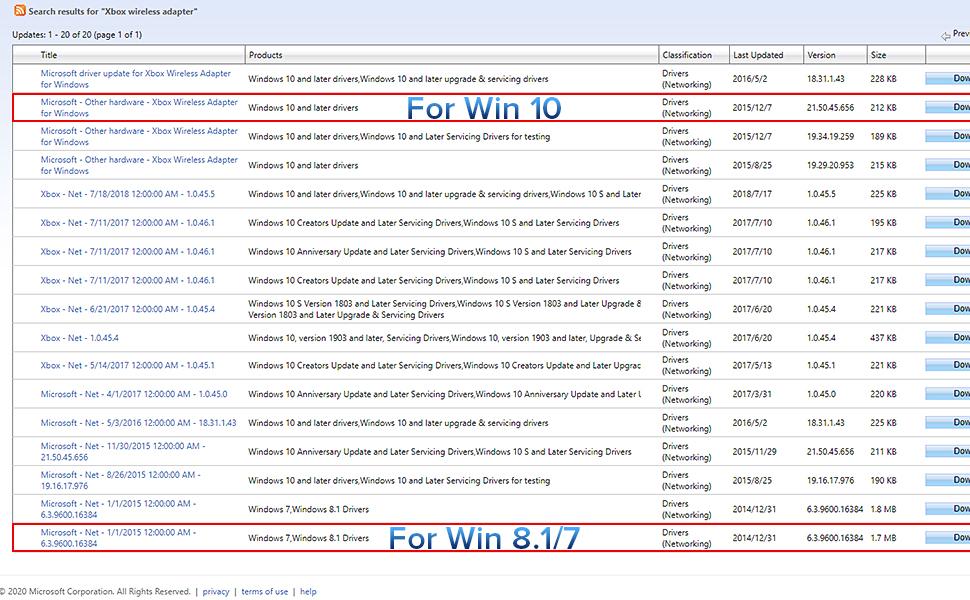
TL;DR: This is Definitely a Cheap knock off Product, but it works well for normal gaming scenarios where you are in the same room as the PC you are plugging it into. Make sure you have an internet connection so you can allow Windows Updates to install Drivers for it. 4 out of 5 stars, will be buying again. Long Form Review: I was extremely skeptical about this product, but at the time all of the Official XBox Wireless Dongles were either outrageously priced, or going to take weeks to be delivered, and I needed something within 2 days, so that a client could use the PC I just built to play games. They already had an XBox Controller, but at the last minute when I reminded them that he would need the Dongle to use his Controller on the PC wirelessly (Their Controllers were all lacking Bluetooth Support) they asked me to please get one for them. I unfortunately don't have any extra in my stock, and I wasn't about to give away the ones I use. So I went on Amazon to buy one, and found people asking outrageous prices for something that is normally a $20 Purchase. Of course the client doesn't know that, so I still would have paid $60 for it, if it meant I could get it in a day or 2, but there were no options at the time that could get the official one to me in 2 days. So I took a chance on this Knock off one. It has no branding, and is DEFINITELY NOT the Legitimate Microsoft Dongle. This is a cheap Chinese Knock off, and I was able to confirm this by taking my 2nd one apart and comparing it to the one I bought at Best Buy a year ago that got killed by a Coolant Leak I had (Long Story). However that said, what matters is whether or not it works. And I am happy to say that it works perfectly. There are 2 differences (other than the missing Logo and slightly different components inside) that I can find. 1) The Official XBox Dongle is always detected right away on a Windows 10 Machine, there is no need for a drivers update, you just plug it in, its detected and it works. With this one, your machine is unlikely to detect it right away. For most people this is a non issue, because most people don't know how to disable Windows Update, so Windows Update will automatically launch in the background and download the correct drivers, and you are up in running in minutes without having to do anything, so for most people they won't even notice this difference. However for some of us, we like to control the Updates our Machines get, and may be blocking WU by default, in which case this will not work. You have to connect to the internet and allow Windows Update to communicate with Microsoft's Server and allow it to download the Update before it will be recognized. This also may be an issue for those of you whom are in are in areas with bad internet coverage, and can't always connect to the internet. For those of you, just keep in mind that you will have to connect your PC to the internet for just a few minutes while it downloads and installs the driver. (Its literally less then half a megabyte, so it won't eat up any bandwidth, and even on the slowest internet connection that will only take a few seconds to a few minutes tops, but it is something to keep in mind for all you Offline Gamers). 2) The Second difference is the strength of the Wireless Radio. I did some Frequency and Wireless Strength Analysis verses the Official Xbox Dongle, and the strength of the signal is about 15% less on average. It also seems to have trouble traveling through obstacles, and also has more issues with Interference. This again will be a non issue for most of you gamers that are in the same room as your Gaming PC. But if you are one of those gamers whom has your PC in one Room and Your TV that you are playing on in another, this does not have the same strength as the official XBox Dongle, especially if you have more than One Wall Between you and the Dongle. The Xbox One is strong enough for me to have my Gaming PC in my Gaming Room Upstairs, but to be playing Via Steamlink on my NVidia Shield Downstairs, using the Controller that is paired to that Dongle Upstairs. This new one is not strong enough for that, and has frequent drop outs that make it a frustrating experience in that particular scenario. However my sample size was only 2, so your mileage may vary there. All In all However, I am still giving this product 4 stars. I am only taking away 1 star, and that is mainly because they are not very honest about it being a cheap clone. If people aren't paying attention they could think they are buying the official XBox Controller Dongle, and never know that they actually just got a chinese Knockoff of that Dongle. And if you are buying it to use in one of the edge cases I listed above, then you may end up being disappointed, so I do think that is worth the reduction of a star. But In Good Conscious I can't dock this product any more than that, because at the end of the day, for the majority of people who buy this, as long as the Product is not Dead on Arrival (Both of mine were ordered about 3 weeks apart from each other and both arrived in perfect working condition, I just noticed some comments of people saying theirs was dead on arrival, but take that with a grain of salt because some people might not realize they need to plug the dongle into a powered port and then assume the product is dead, when really its just their own lack of knowledge), then You will have a great experience with this. I did pretty in-depth testing on both of my units, I had to make sure that I wouldn't regret reselling this to my Client, and I am happy to say it is working perfectly for them, and they have had no issues with it. Further more the one I bought for myself I had to destroy the outer shell to open it up, but I was able to keep the PCB in tact, and it is also working great for me. Controllers Pair Just fine, I have 5 Controllers in my Gaming Room, and was able to pair all 5 at the same time without any issues. Unfortunately I do not have the high speed camera yet that I would like to do latency testing, so I can't tell if their is a latency penalty for going with this option using empirical data. But using my own senses and jumping back and forth between the 2, I am not personally able to detect a difference there. The Product does work great for normal Use cases though, so 4 out of 5 stars! Read more