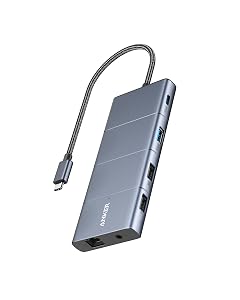
FINALLY! I have a lenovo laptop for work. I have a different lenovo laptop for personal use. My old dock was a thunderbolt 3 and with the latest teams update on my work laptop my audio would cut out when I could screen share on teams. I also noticed suddenly the keyboard and mouse got wonky on registering activity. well turns out my old doc was just dying. that's all there was to it. so I bought an expensive $$$$$ lenovo universal dock. and then all of a sudden the 2nd monitor would not display no matter WHICH laptop was plugged in. Updated drivers. Updated firmware. Power cycled. Nope. Returned. Bought another off brand dock. Monitor would work with my personal lenovo laptop but not with my work laptop. WTF am I going insane here? What happened to plug and play. Returned. Bought another off brand and now the speakerphone for conference didn't work. Bought a new conference speaker phone (which I was going to do anyways) but it still didn't work and it wouldn't charge if I hot plugged in. Returned. Bought this dock. FINALLY EVERYTHING WORKS! NO ONE BREATHE! Although admittedly now the SD card is stuck in the SD card slot.. and I fear I may need a pair of pliers later to resolve that issue.. so maybe the SD slot is not okay. It's 135w power supply that comes with the dock (nice for the price!) the USB Ports all work and there is one on the front for your keyboard/mouse - the rest are on the back. it's quiet. Anker is good about not having whining USB ports. So if you're one of those that thinks you have tenitus all the time because your electronics whine... you'll appreciate that their USB ports do not. HDMI port works!!!!!! So if you're using an old school cheap a$$ monitor that doesn't have Display Port Tech, you're good still. Power button is a nice touch because now you can power off the dock which will turn the external display off and any additional devices that have lights will turn off also.. so if you're home office is in your bedroom, this is a value add for you. It is compact enough to travel with but it's more block or brick style than slim pocket style. Rubber slip pad on the bottom is a nice touch to keep the power cord from pulling it off the back of your desk when you're not looking. Ethernet port also works Oh and my USB Hub extension that's plugged into the dock also seems to be working just fine although it has it's own external power supply so if you're daisy chaining just keep in mind you may need more than one power supply here. Read more
I have had no issues running this with my work laptop HP Laptop running Windows 10 and my Dell Inspiron 17 running Ubuntu 20.10/Windows 10. Both laptops charge, and all ports seem to work well. In general, the worst part of the USB-C format is the confusing amount of different laptops that seem to implement it in different ways. Not this product's fault; as I said, it works well with Dell and HP while my HP Laptop dock runs with both laptops, but under Ubuntu or Windows 10 on my Dell, it falls short. The HP Dock is a Thunderbolt dock, and my Dell is a Display port marked with a DP; the DP Port on my Dell does charge and allows all ports to work with this dock. I mention it because USB-C gets confusing, and mileage may vary depending on the laptop itself. My Hp is marked as Thunderbolt, and my Dell as Display Port, and this product runs wonderfully with both. I found I could get a 4k Display using the DP port on the back of the dock in Ubuntu, but I found it a little problem some and instead switched to using the two HDMI ports instead. Sometimes 4k would flicker, but that can be my older KVM Switch (1080P KVM). I don't mind the two 1080p screens as the dock makes it so easy to switch computers. I wonder why the HDMI port only seems to pump out 1080P and the display port 4k from my experience. Still, my HP dock didn't do 4k at all, so this dock outperformed it. I have even booted my Dell and HP Laptops with a live USB of MX Linux, and with no configuration, it worked. I just changed the display settings a bit. So to sum it up. 1) Easy to use - NO Drivers to install! 2) Works across Windows and Linux. 3) Affordable and better than my work HP Thunderbolt dock. 4) Works with USB-C marked PD or Thunderbolt. Finally, I would like to say the PD port can get confusing another port format for USB-C. At first, I thought it did not work as I plugged in USB-C devices, and it was not recognized. Then I upgraded to a new Samsung phone with USB-C PD charging support, and it charged and was recognized from the PD port on the dock. So the device has to support USB-C PD. As I said, USB-C is confusing. Now, what are you waiting for? Buy this best Dock on Amazon; it is excellent for Windows and, more importantly, great with Linux. If you have Thunderbolt, the big thing you get from a Thunderbolt dock is the quicker data transfer speeds, but you need to know your laptop supports it. For me, I don't care about my work laptop having maximum data transfer speed. As I said, Thunderbolt does work with this also from what I can tell. 1/26/2024 - I am updating this because I also wanted to note that this works great with the Surface Pro 7. The only exception is the built in wired network does not seem to get recognized, but I don't care. I am using WIFI anyway. So Sound, video, and all other devices work perfectly. Read more