
Anker

Anker USB C Hub with Ethernet 8-in-1 Multiport Ethernet Adapter with 4K 60Hz HDMI Port 85W Power Delivery

52+ bought in the past month

$35.99$49.99

About this item

  • Flawless 4K Video via HDMI: Enjoy crystal-clear visuals with 4K@60Hz output when using a DP 1.4 laptop, or 4K@30Hz with a DP 1.2 laptop—perfect for high-definition presentations and entertainment. (Note: Only the HDMI port supports video output. The USB-C port is for data transfer only.)
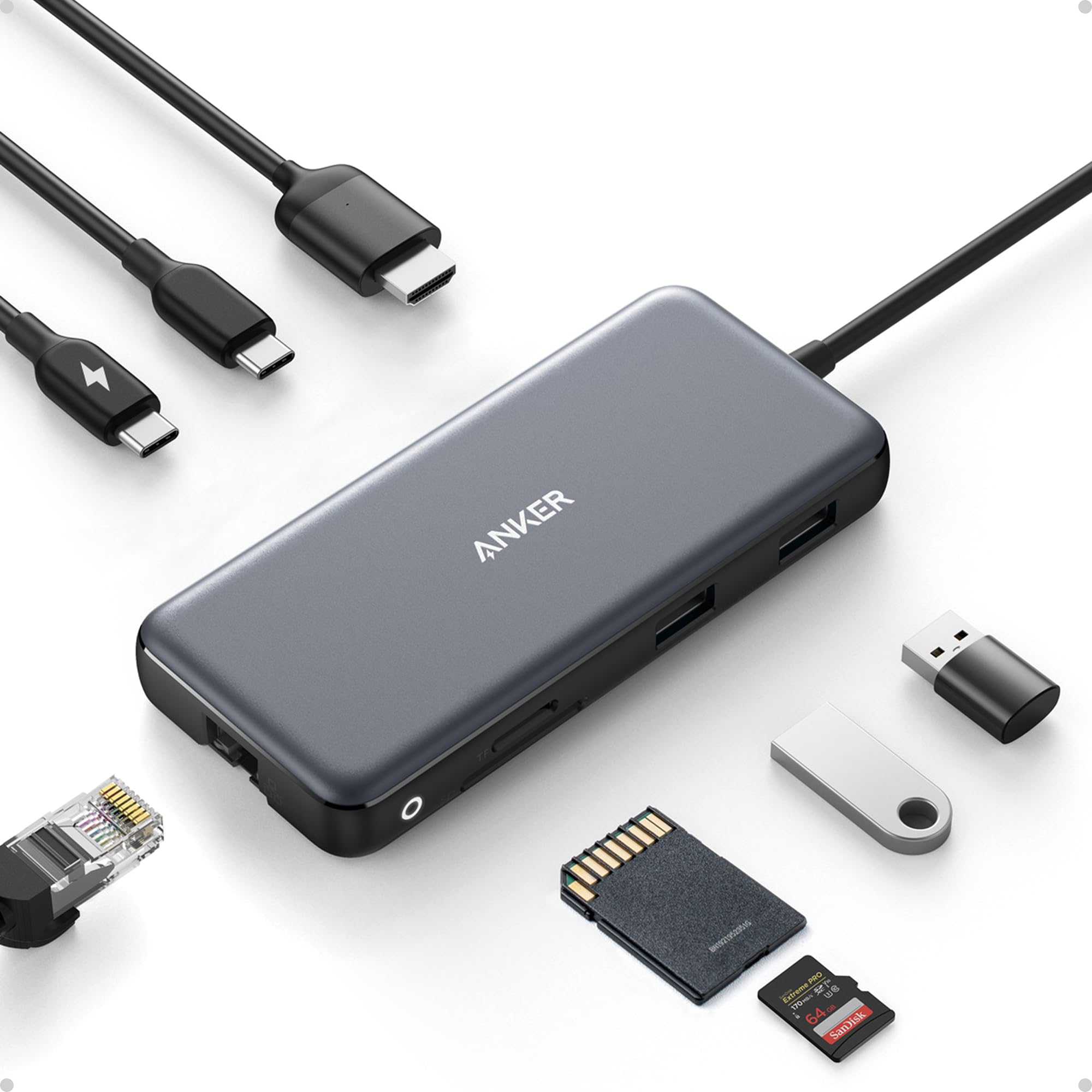
  • Massive Expansion: Equipped with a USB-C Power Delivery input port, a built-in 7.48″ USB-C cable, a USB-C data port, 2 USB-A data ports, 1 HDMI port, an Ethernet port, and a microSD/SD card reader, giving you an incredible range of functions—all from a single USB-C port.
  • High-Speed, High-Def: USB-C and USB-A data ports provide file transfer at speeds up to 10 Gbps, while an HDMI port supports media display at resolutions up to 4K@60Hz for DP 1.4 laptops, or 4K@30Hz for DP 1.2 laptops.
  • Powerful Pass-Through Charging: Compatible with USB-C Power Delivery to provide high-speed pass-through charging up to 85W.
  • Note: The hub requires 15W for operation. Please use a 100W Power Delivery charger and cable to ensure adequate power.
  • Compatibility: Supports USB-C, USB4, and Thunderbolt connections. Compatible with MacBook (macOS 12 and newer), Windows 10 and 11, ChromeOS, and laptops equipped with DP Alt Mode and Power Delivery. Note: This device is not compatible with Linux.
  • What You Get: Anker 555 USB-C Hub (8-in-1) / PowerExpand 8-in-1 USB-C PD 10Gbps Data Hub, welcome guide, our worry-free 18-month warranty, and friendly customer service.
$35.99
Was $49.99Save $14.00

In Stock

DeliveryEstimated 3–5 business days · Final delivery speed and cost are confirmed at checkout
Easy Returns · 30-day window
This order is a gift

In Stock

Secure Checkout
Free Returns
30-Day Guarantee
Secure checkoutAll transactions are SSL-encrypted. Your payment info is never stored.
Free returnsReturn or replace within 30 days
Fast deliveryOrders ship within 1 business day and arrive in 4–8 days.
Buyer protectionIf your order arrives damaged or doesn't show up, we'll make it right.
24/7 supportOur team is here to help. Reach us anytime by email or chat.
Ships fromOur Warehouse
Sold byAnkerDirect
Returns
Easy Returns30-day return window
PaymentsSecure transaction
Currently unavailable
Easy Returns · 30-day window

Product details

BrandAnker
ColorGray
Hardware InterfaceEthernet
Special FeatureFast Data Transfer, HDMI™️, Heat Resistant, Portable, Powered
Compatible DevicesLaptops, Macbook Air, Smartphones, Tablets

Technical specifications

product_dimensions4.76 x 2.17 x 0.6 inches
item_weight4.5 ounces
item_model_numberA83830A1
best_sellers_rank#12 in USB Hubs
date_first_availableApril 27, 2020
manufacturerAnker

From the brand

Product detailProduct detailProduct detailProduct detailProduct detailProduct detailProduct detail
Product detailProduct detailProduct detailProduct detailProduct detail

Product videos

Product video 1

Customer reviews

4.38,974 ratings

Customers say

Customers praise the hub's quality and port capacity, noting it has all needed connections and multiple USB ports.

★★★★★

Great 10gbps USB-C Hub, worked with Anker support through compat issues with PD4 iteration 1

AaronJune 19, 2020✓ Verified purchase

Original Review (updates below): ----- The moment I noticed this thing on Amazon, I bought it and it literally just arrived. Finally, 4K60 over just USB-C with other ports (including making up to 10Gbps available to them) for a reasonable price. Unfortunately, the first two things I've done with it were both disappointing. I'll cut to the chase, the power delivery pass through isn't working with one of their own chargers. The first device I tried connecting this with is my Anker PD4 with one USB-C cable as the only thing plugged into it so I can test the truly up to 100W (-15 for its own power) claims. I've tried connecting it with Apple's 2m USB-C charge cable (100w capable) and an equivalent CableMatters cable that also supports 100W. When plugged directly into my laptop, both of these cables immediately start charging it and show up as 100W power sources. When this Anker hub is plugged in and either of them is connected to the power delivery port on the side of it, the laptop does not charge (laptop is a 16" Macbook Pro, I've tried multiple ports just for the heck of it). My second complaint is that when absolutely nothing is plugged into it, it becomes fairly warm to the touch. Why, when it's doing nothing, is it hot? I'm clearly not running data or even power through it so I have low hopes for it under load. The fact that it doesn't work in exactly the scenario they want it to most (a MacBook Pro with one of their own chargers) seems like a pretty big fail. I've got lots of USB-C things though so I thought I'd grab a couple and try those. Using an Apple 96W USB-C charger, the device does pass through power delivery properly. It shows up as providing 79W to the laptop (siphoning off 17W in this instance). I also have a 56W Aukey charger that splits power between a USB-A port and a USB-C port that can provide 45W of power delivery. When plugged into that charger it does appear to work as well and appears in macOS as a 30W power source. Maybe the problem is the Anker PD4? But it works fine providing power to the laptop directly. Would love to hear from Anker about these two products working together and what I should actually expect. Having it be unreliable for power delivery isn't great, but power and heat aside (it is getting a little bit warmer now that it's providing power from the Apple power adapter, but still definitely holdable), the hardware looks and feels good and the cable feels durable. Worth also noting that there's a white LED ring on the side of it that appears to be always on when it's plugged in. Don't know why it needs an LED. ----- Update, June 22, 2020: I've done some more testing and Anker has reached out to me to investigate what might be the issue. I can say that the hub works as I would expect from a quick test with my iPad Pro 11" with the above functioning chargers. It was able to pass through power with the 96W Apple Charger on the other end to both the iPad port as well as a Magic Keyboard port. The ethernet adapter showed up in iOS settings and an external drive was functional. When connected via the Magic Keyboard, which is a power only connection, as expected it provided only power. Still no power passthrough of any kind when connected to the PD4. ----- Update July 1, 2020: I've written back and forth with Anker and they've sent me a replacement hub. It also doesn't work with the PD4. I've tried multiple USB-C cables but they have also shipped a cable to test with it. For now I'm increasing the review from 2 to 3 stars because I am more and more suspicious about the PD4 and less about this hub. They claim that they have tested the setup I have separately without issue, and I've sent video showing the problems I've encountered, so the troubleshooting is ongoing. Have had a chance to use Ethernet on it without issue. Still need to try to test out its throughput when trying to use a 10Gbps USB-C enclosure and a 4K60 monitor at the same time (+ ethernet). More updates to come. ----- Update July 10, 2020: I've continued to talk with Anker support and they shipped me a replacement PD4. The one I had was labeled as "Iteration 1" on its barcode, the one I got back was labeled "Iteration 2". I tested it out and it works perfectly with this hub, passing through the correct amount of power to multiple Macbook Pros and fast charging an iPad Pro. Clearly the fault doesn't lie with this hub and is instead an issue with the first iteration PD4, so I'm updating my review accordingly. Working with Anker support was great. I've also been able to test USB-C throughput (without driving a display as well so far) and it properly utilizes 10Gbps. I've attached some extra images showing various devices connected to it (keyboard dongle, SD card, USB-C 10Gbps external SSD enclosure, USB sound card, ethernet). Read more

Review image 1Review image 2Review image 3Review image 4Review image 5Review image 6Review image 7Review image 8
★★★★★

Easy and reliable

Chuck KFebruary 26, 2026✓ Verified purchase

This is a great hub. I can use 2 external monitors, use USB drives, and also have a wired connection to my network and internet for better speeds. It was so simple to connect everything. Read more

★★★★★

I use its many ports almost every day.

David DanielsFebruary 21, 2026✓ Verified purchase

If it's Anker, it's quality, we default to Anker for our cord and adapter and charger and battery needs. Its port capacity fills my needs. It fits in my workspace. It makes it easy to add other cables to my laptop. It has never failed on me. If Anker makes it, is probably the best, yet affordable. Read more

★★★★☆

Handy Little Tool Does Require Power Supply for all port functions.

JonJanuary 9, 2026✓ Verified purchase

Great Device! Hub works well in Dell Laptops, HP Laptops, and Apple computers. Hub must be powered by the computers charger for use. Monitor display port will not work without it. Could be made better to be able to use it entirely without the additional Power supply requirement. If your computer requires more than 85W of power, it will not effectively charge your computer and work at the same time. Your computer may go into a lower Power mode to offset the Wattage difference. For example My MacBook Pro will not Charge effectively since it requires a larger Charger. Read more

★★★★★

Anker is a solid product

Matthew ValentinMarch 6, 2026✓ Verified purchase

Anker is great build quality. Speed is fast. It's very portable, light weight and looks good. The plug in options are exactly what I needed Read more

★★★★★

Great as long as you know its limitations; runs warm; monitor settings may need to be changed

ChrisSeptember 1, 2020✓ Verified purchase

I reluctantly gave up MagSafe and joined the USB-C future when my employer issued me a new 2019 16" MacBook Pro. Searching for a way to connect my various peripherals I settled on this hub as a reasonable way to connect a 4K display, pass power from the laptop charger (albeit not the full 96W; macOS reports 79W after hub losses—good enough most of the time), connect 1GigE, and provide a few spare USB ports and occasionally-used SD card slots. I've learned a few things: A port that looks like USB-C does not pass video unless it is a "Thunderbolt" port (look for the lightning bolt logo, apparently); connecting a USB-C-to-mini-DisplayPort adapter to the USB-C port on this hub did not allow my monitor to work. Lesson learned. The HDMI port did work, and did pass 4K@60Hz, but only after I adjusted my monitor settings. At first I was convinced either my HDMI cable or this hub were defective, because macOS would only allow me to select 4K@30Hz. I have an LG 4K display, and from reading forums, one must enable 60Hz in the on-screen display menu before the monitor will tell the computer it is capable of displaying 60Hz video. For my monitor, that meant changing "Ratio" in "Quick Settings" to "Original" (it defaulted to "Wide", with a separate configuration for each port), as well as turning on "HDMI ULTRA HD Deep Color" from "Picture" -> "Picture Adjust." After I changed those two settings, 60Hz was not available until I unplugged the HDMI cable from the hub and plugged it in again. After that I had buttery smooth 4K video at 60Hz. The hub works as advertised, at least for my configuration. The 1GigE port works well, and is equivalent to a direct USB-C to Ethernet adapter I tried. It does run warm to the touch as other reviewers have reported. That's not problematic, but I'd prefer it pass the missing 17W to the laptop rather than dissipate it as heat. Time will tell how well the hub holds up, but for now I'm happy. In summary: if you have a new Mac this hub will likely work for you, though you may need to adjust your monitor settings. Read more

Recently Viewed