
Merry Christmas!
This was a Christmas present, and my grandson is very happy with it. Read more
BlueEnss
$102.53
Have a question about this product?


Product video 1
Rated 4.3/5 across 6 reviews — well received overall.
Customer summary is not available yet.
This was a Christmas present, and my grandson is very happy with it. Read more
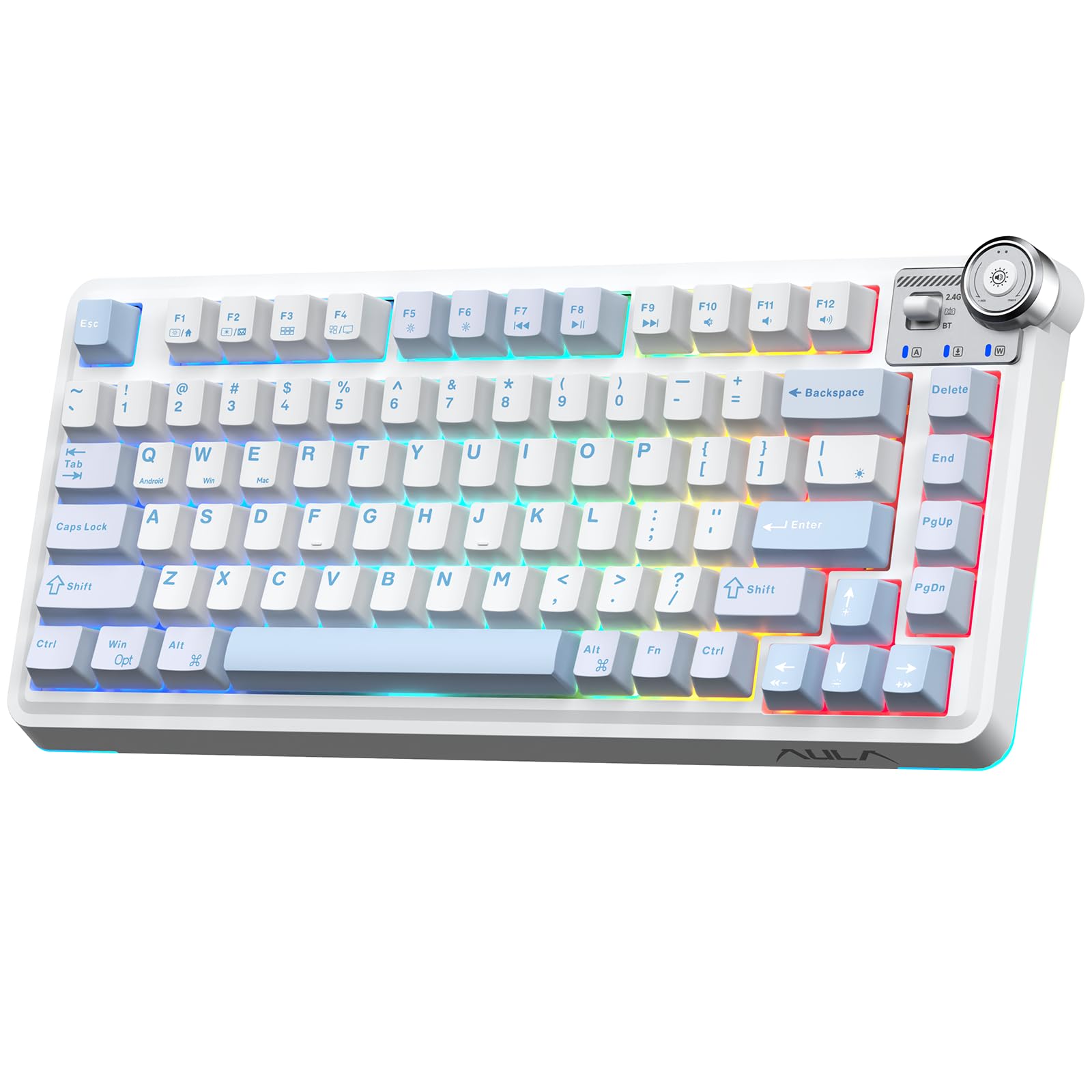
I'm really dating myself here, but I've written code professionally since really before a PC existed. The feel and the sound of a mechanical keyboard just can't be beat in my opinion. To top it off you can use this on multiple devices including your phone and switching devices by just making a couple of keystrokes. Setup can be as easy as plugging in a cable or going totally wireless being my preference as Bluetooth connected to one device and/or the included USB receiver on another. I tried all connection types and they all work. Another thing that's great about these are the built in quick keys to launch apps or whatever, plus easily switch between operating systems. You can even completely change the look by swapping out the keycaps. One place I was disappointed was the description mentioned this supported a knob, but it said it in text and didn't show it in any of the pics. Not a real biggie and could be just I misunderstood it. I've been doing this stuff for a very, very long time, but by no means do I know everything. Not even close, but there is place I have a problem with. It says that you can change the backlighting and tried everything that I knew to do it with no luck. I did some google searches, tried everything I could find including downloading a couple of apps, one called OpenRGB and another was SignalRGB. I also disabled the one that came with my system as suggested on one try and neither could find this keyboard even when I went to a wired connection. The description does say it can be done with software, but doesn't mention what app. Maybe I missed a step. That is possible. There are also different protocols and knowing that would have helped. The manual doesn't really make any mention of it that I saw. That's why I removed one star. There is another issue I have with this, but I'm not taking a star away for, it's kind of a hassle, but I'll actually use this thing and will spend a couple more bucks to get the proper charger. In the manual it suggests to only charge it from a PC and not any type of fast charger. I have so many USB devices, using a PC port is kind of a pain. It's the standard 5 volts, but the amperage is <= 500 millivolts. Some of the ones that are rated at 2A say no problem but using one may void the warranty since there are ones sold that meet with the specs. This is a cool keyboard and one I'll use all the time. I'm also one of the first nerdy types in the computer age and will eventually take time and figure out something on how this to get the backlighting to work when I get bored or something. I'm not a gamer, just an old programmer and maybe some of you all young'uns out there can point me to what I may have missed. There's a good chance it's simple and just second knowledge to some of you all out there. Read more

This item arrived exactly as described and the quality is even better than I expected. Shipping was super fast, which was a nice bonus. Overall, a really smooth and satisfying experience—I’d definitely recommend this to others! Read more
This wireless keyboard did not have the signal instability and unsmooth input issues I encountered before. The color markings are a new experience for me and quite good. Read more
This is one of the most pleasantly surprising products I’ve come across in years. The price sets modest expectations, but the moment you unbox it, those expectations evaporate. The board feels substantial, stable, and remarkably precise for the cost. Every connection mode—Bluetooth, 2.4GHz, and USB-C—paired instantly with my 2025 15-inch MacBook Air and has worked without a single issue. The red switches are smooth, linear, and deeply satisfying under the fingers, striking that rare balance between tactile enjoyment and low noise. The three height positions are thoughtfully implemented and make dialing in a comfortable angle effortless. What stands out most isn’t just that it works—it’s the feeling behind the design. This keyboard genuinely feels like it was built by people who love what they’re making. The choices feel intentional rather than perfunctory: the finish, the weight, the articulation, the lighting modes, even the lavender purple key palette all carry a sense of care and enthusiasm. It doesn’t just feel like hardware—it feels like someone cared enough to make it feel good to use, not just good enough to ship. If you want a mechanical board that feels great without spending boutique-keyboard money, this is the one. I’d happily buy another. Read more
Some positives: It comes with a keycap and switch puller, USB-A to C cable, and some extra switches. Everything you need. The 2.4ghz dongle is retained magnetically rather than by friction. It can connect over USB, or over bluetooth (with memory for 3 items) or 2.4ghz. It feels solid and heavy and like it won't move around too much on the desk. It has backlight with some apparent ability to adjust brightness and possibly pattern of the RGB LEDs. The keycap colors are pretty, and the key profile feels good. I need a numpad for the kind of work I do, and it does have a numpad even if the layout is a little eccentric. Hotswappable switches. When it goes to a low power mode in bluetooth it comes back when you press a button and inputs that button. Has modes for mac, PC, and android (but only windows caps). I can type well on it, and it has a pretty standard layout for the alphanumberic keys. Neutrals: I'm not personally a fan of red switches, but these are swappable. The layout is a little narrower than a full layout, but has most of the standard buttons and should work for almost every workflow unless you're someone who uses scrolllock in excel. Cons: The printing on trhe keycaps is a little inconsistent. The (, and ) symbols have different weights. Backspace is the only key that isn't bolded. The keycaps aren't evenly pressed onto the keys as shipped. Easy to fix, but a bit uneven off the bat. No scroll-lock key. I don't like the sound of red switches to start with, but these have kind of a hollow twang. Probably you could add some foam or something to make it sound more appealing. I dislike having to go the manual to figure out which combo to use for bluetooth pairing. At some point in the future I'll lose the manual and then I'll have get lucky finding a manual online if I want to remember how to connect on bluetooth. Read more

Aula F87 Pro Gaming Keyboard Tri-Mode BT5 0 2 4GHz USB-C Hot-Swappable RGB Wireless Mechanical Keyboard Gasket Mount

Rapid Trigger Gaming Keyboard Hall Effect Magnetic Switch Adjustable Actuation 8k Hz Polling Rate Volume Knob RGB Backlit

AULA F2088 Typewriter Style Mechanical Gaming Keyboard Wired Blue Switches Rainbow LED Backlit Removable Wrist Rest Media Control

AULA S99 Gaming Keyboard Wireless Computer Keyboards Tri-Mode Bluetooth 2 4GHz USB-C Custom Creamy Keyboard with Number Pad
Aula WIN60 HE - 60 Mechanical Gaming Keyboard Wired Magnetic Switch Hot Swappable Adjustable Actuation Rapid Trigger Mode

AULA WIN68 HE Mechanical Gaming Keyboard 60 Hall Effect Magnetic Switch Fast Trigger Mode Adjustable Actuation 8000Hz Polling

NC95 Hybrid Active Noise Cancelling Headphones with Knob Control 120H Playtime Over Ear Headphones Wireless Bluetooth 6 0

SayoDevice O3C OSU Keyboard Rapid Trigger Hall Switches Magnetic Linear Switches Keyboard with Knob and Screen Copy Paste
We use optional analytics and advertising cookies to understand how visitors use Ventari, measure ads, and improve the experience. You can accept all optional cookies, allow analytics only, or decline them. See our Cookie Policy.