Cloud Nine

Cloud Nine ErgoTKL Ergonomic Tenkeyless Mechanical Keyboard for PC Kailh Brown TKL RGB Backlit Ergo Split Key Board

1654+ bought in the past month

$179.99

About this item

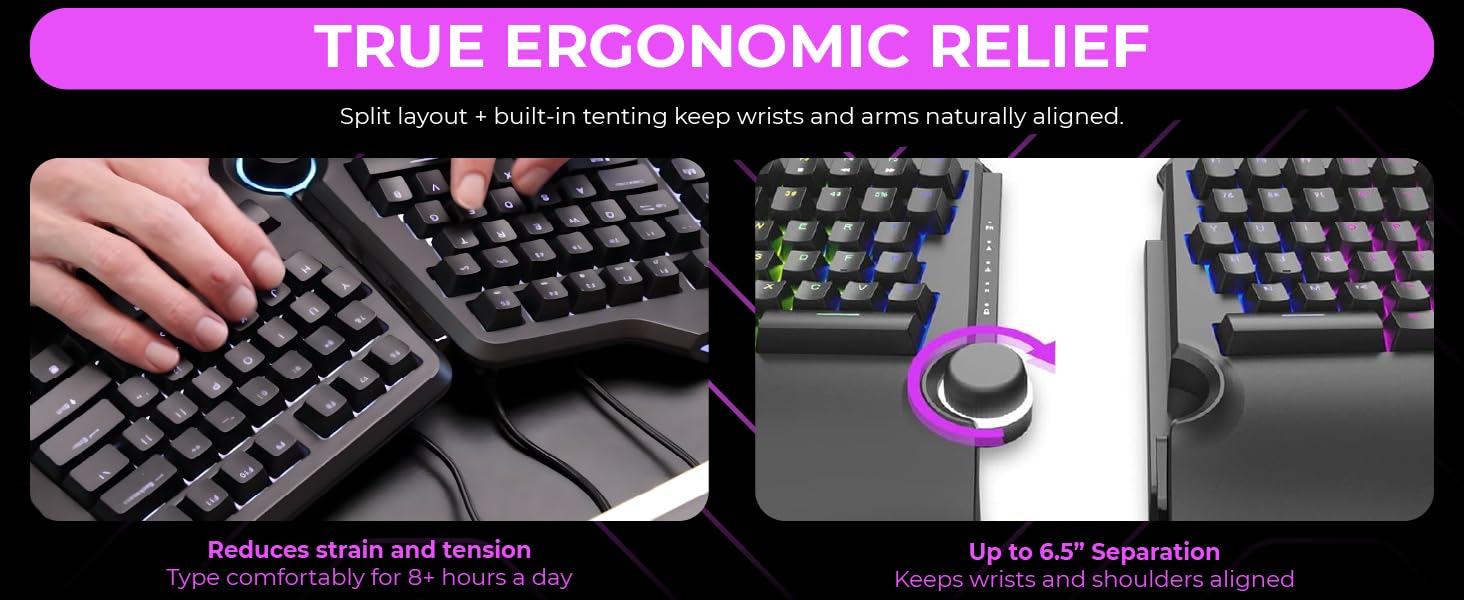
  • Split Keyboard Design – Separates Up To 6.5 Inches (16.5 cm) to help eliminate wrist and shoulder pain while you type. Keeps hands and arms properly separated and helps provide pain-free typing for 8+ hours a day.
  • Tented Palm Support – Includes built in side slope (7 degrees) keeping hands comfortable at their natural inward angle (no separate tenting kit required).
  • Aluminum Smart Wheel – Easily control volume, switch applications, scroll web pages, and more. Assign a custom function or color using the included app.
  • Kailh Switches – Professional grade mechanical switches provide a super-long life and satisfying typing experience. Switches are fully backlit and easy to read. Customize the backlight color or choose from a pre-programmed light flow.
  • For Work and Play – Features programmable Hotkeys, a USB Pass-Through port, and extra "M" keycaps. Whether writing emails, coding, or gaming, the ErgoTKL helps you do it with more comfort & efficiency.
  • Works with Standing Desks – Adjustable forward tilt ( 0 / -4 / -7 degrees) keeps hands supported while sitting or standing.
$179.99

In Stock

DeliveryEstimated 3–5 business days · Final delivery speed and cost are confirmed at checkout
Easy Returns · 30-day window
This order is a gift

In Stock

Secure Checkout
Free Returns
30-Day Guarantee
Secure checkoutAll transactions are SSL-encrypted. Your payment info is never stored.
Free returnsReturn or replace within 30 days
Fast deliveryOrders ship within 1 business day and arrive in 4–8 days.
Buyer protectionIf your order arrives damaged or doesn't show up, we'll make it right.
24/7 supportOur team is here to help. Reach us anytime by email or chat.
Ships fromOur Warehouse
Sold byCloud Nine Ergo
Returns
Easy Returns30-day return window
PaymentsSecure transaction
Currently unavailable
Easy Returns · 30-day window

Product details

BrandCloud Nine
Compatible DevicesPC
Connectivity TechnologyUSB
Keyboard DescriptionErgonomic
Recommended Uses For ProductEveryday Use
Special FeatureBacklit, Ergonomic, Hotkeys and Media Keys, Volume Roller
ColorKailh Brown (tactile)
Keyboard backlighting color supportRGB
StyleModern
Product Dimensions19"L x 16"W x 2"H

Technical specifications

product_dimensions9.9 x 16.1 x 2.1 inches
item_weight4.73 pounds
manufacturerCloud Nine
item_model_numberC959-US-BROWN
best_sellers_rank#1,055 in Computer Keyboards
date_first_availableSeptember 14, 2021

From the brand

Product detailProduct detailProduct detailProduct detailProduct detailProduct detail

Product videos

Product video 1

Customer reviews

4.2375 ratings

Customers say

Customers find the keyboard's build quality great and appreciate its ergonomic design, with one customer noting it reduces hand strain.

★★★★★

Day 1 Impressions - Everything I hoped it would be.

MissyAugust 9, 2022

Ok, so I'm only going on a few hours of typing on this beast, but I am extremely happy with it, how it was packaged, how it sounds/feels and the speed/accuracy. For reference, I am a professional writer and hit about 10k words a day - so I do A LOT of typing and don't 'settle' on keyboards. I'm coming into this having been a long-time Logitech Wave devotee, then a Microsoft Sculpt owner, followed by a brief stint with a SteelSeries non-ergonomic keyboard. Though everyone's hands and posture are different, I would not trade this for ANY of the others. 1. Packaging - The only thing I've ever seen packaged better was my SecretLabs chair. Thick foam everywhere, both halves of the keyboard securely wrapped in anti-static bags, cords, keycap puller and extra keycaps sealed in zip baggies and in cutouts in the foam. If this arrives damaged, it wasn't the mailman... unless he backed over it - twice. 2. Set-up - attach a 8" cable between the two halves, plug the micro-usb end of another cord in the keyboard and the other end into a USB end of your computer. BINGO... that's all you NEED to do... of course, you can go download the drivers and software (all of which triggers Windows Defender since these folks saved some cash on buying the license from Microsoft but doesn't hurt your system (that I know of)). I really don't think the average Joe needs to download the software as this baby is plug and play and has TONS of cool color effects that can be cycled with a press of a button on the keyboard. Everything, including the wheel and the Copy/Paste/Select/Cut keys worked without the drivers. 3. Keys - ONLY downside is when you really get humming on this thing and misstroke a key, there is a bit of a metallic 'ring' sound... not a big deal... just struck me as funny as if they keyboard is sayin', "JEEZ... slow down there killer!" I opted for the brown keys... if you are a light fingered typist, they are pretty close to silent with a NICE little tactile bump when the key actuates... very little though... if you are going over 80 wpm, there's no way you'll feel it and the air will be filled with the clacky-clack-clack of the keys bottoming out (which takes a VERY satisfying amount of pressure - not too much, not too little - the springs are set PERFECT). The wrist pad is nice (not shockingly amazing but nice) and the adjustable height is perfect and VERY stable. 4 - RGB lighting - I won't ruin this one for ya... it is PER key, customizable (thru the software), but you REALLY don't need to mess with customizing, there are some AMAZING set-ups pre-configured and they are simple. 5 - The WHEEL - probably more of a gimmick than anything... it does feel nice, it nicely made, has tactile bumps as you twist it (like the wheel on your mouse) so it doesn't just spin willy-nilly. I'm sure there are people out there that are program switching fiends, but if you have multiple monitors, this'll probably just be used for volume control and muting. 6 - Overall - I considered buying the ZSA Moonlander for $365, then decided I'd try this first... I dunno... maybe the Moonlander IS better with its fancy-schmancy key setup... but... again, only a day into this one... I think I made a great choice going with this keyboard. Yes, this is relatively expensive... but, the quality and ease of operation justifies the price. If keys fly off, it catches fire and chases my dog down the hall while typing REDRUM over and over, I'll update this review. Read more

★★★★★

Great Ergonomic Keyboard for Work/Play

JJune 13, 2024

Great keyboard. First day using it I was convinced i'd made a terrible purchase, by day 3 I was convinced I loved it. Decided on this while searching for a mechanical keyboard that was split, ergonomic, and had a media/volume knob. I use this keyboard for work (code) and play. I am dealing with RSI in both my wrists and wear wrist braces most days. This keyboard significantly reduced my strain so I rarely wear the left wrist brace. I still wear one on my right as it is my mouse hand. (Recommended a vertical mouse for fellow RSI/carpal tunnel people. I use the Logitech Lift) I do really miss having a tenkey, but the tenting and angling of the keyboard make it worth it to adapt. I've added a standalone tenkey device to my desk that I keep out of the way until I need it. I don't really make use of the macro keys on the left but i'm sure others will. Keyboard does need 3rd party software, kind of disappointing but I guess it's pretty standard. It's not Razer Synapse, at least. It seems pretty lightweight, I've had no issues with it. Havent had to touch it since first setup. Keyboard has typical RBG lighting capabilities, I just leave it on a default pattern. Ergonomics are great, the extended 'lip' at the bottom of the keyboard looks a little odd but it's there for your wrists to rest on. I keep it tented at half tent (there's 2 feet on each half that have a half tent or full tent length, no inbetweens) My left wrist in particular is doing way better. The angle of the keyboard is much more comfortable for extended use of WASD or MMO layouts. It was Wow classic killing my wrist that made me decide to jump on the ergonomic/split boat, and it's much more comfortable now. Only cons: Normal keyboards feel weird now USB cable connecting the 2 halves seems proprietary and may be very hard to replace, I have not checked if it is sold standalone. I think the keyboard will not function properly without their specific cable. Read more

Recently Viewed