
Contour

Contour Design SliderMouse Pro Ergonomic Office Mouse to Reduce Wrist Shoulder Forearm Strain Design for Productivity Ambidextrous Plug

3.1(5)

212+ bought in the past month

$234.00

About this item

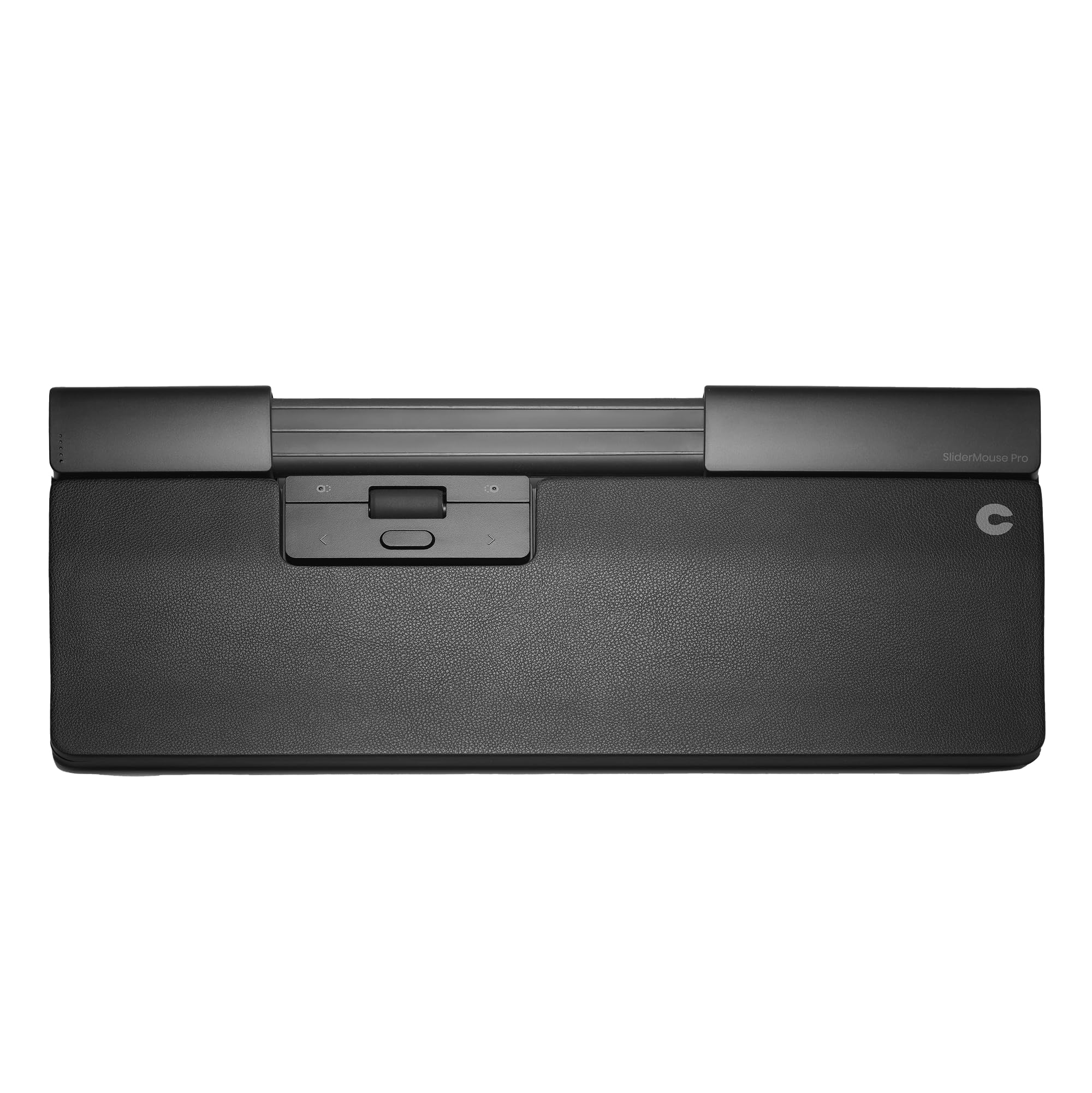
  • ✅ COMFORTABLE, ERGONOMIC & AMBIDEXTROUS DESIGN: The SliderMouse Pro sits directly beneath your keyboard, eliminating the need to reach for a traditional mouse. Its centered placement keeps your hands within shoulder width, minimizing shoulder abduction & reducing outward arm angles. This design lowers strain on the neck, shoulders, forearms & wrists while helping prevent RSI. ✅ Vegan Leather ✅ Wireless ✅ Regular palm rest that can fit to average & large desk spaces.
  • ✅ NO GRIPPING, LESS FATIGUE: The clickable slider bar sits below your space bar. Glide it left & right or forward & back to move the cursor, then tap for single or double clicks. This centered control removes reach & grip motions & lowers strain on the neck, shoulders, forearms & wrists. The large scroll wheel has been stress-tested to provide the same smooth, comfortable computing experience every day.
  • ✅ RELIEF FOR RSI & CARPAL TUNNEL: SliderMouse Pro is designed to reduce repetitive movements, offering a healthier, more comfortable alternative for users experiencing discomfort or users with carpal tunnel, tennis elbow or similar conditions. Regular wrist rest spans palm toward forearm & is perfect for average to large hands. The wrist rest is magnetically swappable for different materials & sizes. Skip one-size wrist rests that miss your fit.
  • ✅ CUSTOMIZABLE WORKFLOW & BLUETOOTH FREEDOM: SliderMouse Pro has 6 pre-programmed buttons (Left, Right, Double-click, Copy, Paste, DPI) plus a scroll wheel. Reprogram all buttons with the Contour driver for Windows & macOS. Ten cursor-speed levels from 600–2800 DPI. Adjustable click resistance & click sound. Pair with laptops or desktops as a Bluetooth mouse, quick switch when you dock or travel. Avoid dongle-only limits.
  • ✅ PLUG & WORK: No drivers required for core use on Mac/Windows. Program buttons when you want deeper control. Start simple, grow later. Use the 2.4 GHz USB receiver for steady, low-latency control in busy offices. Not the jitter you risk on crowded channels. Support is also readily available.
$234.00

In Stock

DeliveryEstimated 3–5 business days · Final delivery speed and cost are confirmed at checkout
Easy Returns · 30-day window
This order is a gift

In Stock

Secure Checkout
Free Returns
30-Day Guarantee
Secure checkoutAll transactions are SSL-encrypted. Your payment info is never stored.
Free returnsReturn or replace within 30 days
Fast deliveryOrders ship within 1 business day and arrive in 4–8 days.
Buyer protectionIf your order arrives damaged or doesn't show up, we'll make it right.
24/7 supportOur team is here to help. Reach us anytime by email or chat.
Ships fromOur Warehouse
Sold byContour Design
Returns
Easy Returns30-day return window
PaymentsSecure transaction
Currently unavailable
Easy Returns · 30-day window

Product details

BrandContour Design
ColorVegan Leather
Connectivity TechnologyBluetooth
Special Feature4 Way Scrolling, Ergonomic Design, Programmable Buttons, Soundless, Wireless
Movement Detection TechnologyOptical

Technical specifications

product_dimensions15.04 x 0.93 x 0.04 inches
item_weight1.61 ounces
item_model_numberCDSMPRO10210
batteries1 Nonstandard Battery batteries required.
best_sellers_rank#3,303 in Computer Mice
date_first_availableSeptember 8, 2023
manufacturerContour Design Inc
languageEnglish

From the brand

Product detail
Product detailProduct detailProduct detailProduct detailProduct detailProduct detailProduct detailProduct detailProduct detailProduct detailProduct detail

Product videos

Product video 1

Customer reviews

3.15 ratings
★★☆☆☆

I wanted to like it

Brad P.October 31, 2024

Long time Rollermouse user, and this design looked very appealing. However, the cylinder that is the 'slider' just never lost all of its initial stiffness, causing it to roll by itself back to its original position. Very inconvenient when trying to move the mouse to a precise spot and yet not accidentally click while it was on its way there. As an example, I would move the mouse position to a spot on the screen and them move my hand off of the slider and it would creep vertically up or down as the slider sleeve/cylinder sought to roll back to the spot that it had been originally been sitting at when unboxed. Eventually (over months) this effect diminished, but the stiffness of the cylinder resisting fine positioning was more than I wanted to deal with. I've gone back to using the Rollermouse Pro version (which I am very happy with). Read more

★☆☆☆☆

great idea but unworkable

garnoJanuary 11, 2025

The mouse was impossible to control at the edges and leapt constantly when I had to move across the monitor. Had to send it back, unfortunately. Read more

★☆☆☆☆

Do NOT purchase this.

CustomerMay 21, 2025

Terrible and unusable. It jerks the cursor around, and no matter what I do I can not get it to click on the screen where I want it. I tried altering settings, and everything else for about 4 hours, and just gave up in the end. Maybe I was missing something, so I contacted tech support, but going on 4 weeks without a response. Do NOT purchase this. Read more

Recently Viewed