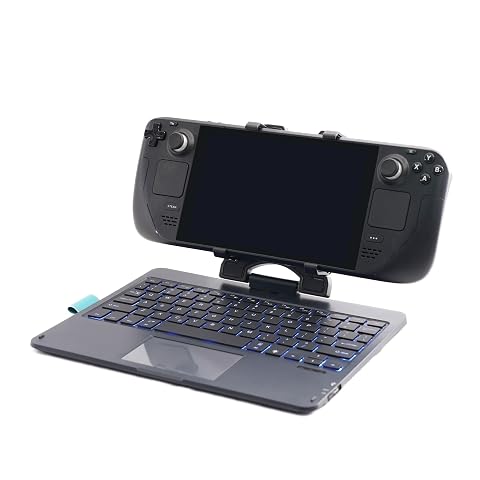
Mine did come with a different clamp than was advertised or seen in other reviewers' hands; the clamp on mine has a folding, not recessed design, that does NOT allow the deck to fold in face down, but does allow it to fold in face up. It does seem to compact a little better for travel than the one in other reviews, and the more forward position likely also helps with stability, but it would have been nice to be able to fold the Deck face down in it, I would have just stuck a cushion on the screen to keep the thumbsticks from getting mushed against the keyboard. The scissor switches are very tactile, but almost dead silent. I haven't yet typed on this for long periods, but I have a strange addiction to quality scissor switches, and out of the gate these feel like some of the better ones I've used. The trackpad has two physical click buttons underneath it for positional left and right click, I think I would have preferred the trackpad to be hard mounted and the buttons places out to the sides, but given the prominence of these "clickpad" style trackpads I can't complain too much even though I've never liked them. At least there is actually two buttons here, and not just one serving dual purpose based on where the finger clicks, albeit rarely I sometimes need to click both at the same time and most clickpads make that physically impossible. There are some complaints of Bluetooth dropouts, but while I haven't used it for long, honestly this is probably the only Bluetooth device that actually *doesn't* disconnect when I click my Deck's power button, if I want my Deck to stay asleep I have to make sure this is OFF, I've not experienced this with other bluetooth devices, USB peripherals, controllers, or the built in controller so it's quite odd, albeit very convenient in that I turn it on and it's just there, pretty much immediately. I'm not gonna lie, while this is a nice accessory, it kinda feels cheapened for the price by the obviously 3D Printed clamp that's been thrown together for the Deck, it makes the thing feel like a product meant for something else but modified to fit this purpose. There is another reviewer I saw on here who claims it's a generic modified iPad keyboard, but I can't find an exact match to it, everything I see has slightly different layouts and the Apple "Option/Command" key setup compared to the Windows key lettering here, with different locations for the rubber dimples and different designs for the lip beneath the trackpad; take that for what you will, but those differences plus the printing on the back makes me believe that while this is probably based on one of those designs in order to save time and money on either printing the whole case or making a custom injection mould, the actual hardware underneath is at least somewhat customized to better serve the purpose. Last but not least, I WANT THIS KEYBOARD BASE AS A USB KEYBOARD! Strip out the hinge, strip out the Bluetooth, strip out the battery, add a data connection onto the USB port, provide a low profile right angle cable to use it with, this would make a PERFECT workshop keyboard. Without the BT and batt, I think it could fit in the sub-$30 bracket, which would make it the cheapest all in one WIRED keyboard on the market. For context, I work in an IT shop, and for what I do, Bluetooth is too far into the OS chain, and 2.4GHz dongles are too easy to mix up and lose, so I've been looking for a relatively cheap but good quality Keyboard plus Touchpad that runs wired, so that I could get about ten or fifteen of them to help declutter my working area. It's probably not the best keyboard for the purpose, but after having used it it's really, *really* close, and I'd happily buy a fleet of a USB/hingeless one of these if they were available. When I plugged it in and couldn't get it to work over wire I was so disappointed. Read more
Pricey but works great. Very clickly, large keys, weighted and stable, works with your phone and any bluetooth device. Feels nice and sturdy and has a good battery life from what I can tell. I just wish this device could've been a dock and keyboard combo for the price but it is what it is. Read more
I got the Steam Deck for me, but my son took it away and now believes it's his. It's fine... I have a nice desktop setup with a 42" 4K tv... I'll live. But he likes some weird games that aren't necessarily Steam Deck compliant. Garten of Banban and Poppy Playtime being the worst offenders. He'll routinely come to me asking for help getting to a spot that requires him to run and jump. But there's no run button on Steam Deck. I'm too lazy to figure out game-specific custom bindings. I found this KB as a solution (well... I also needed a mouse... got a wired one that connects to the splitter cable, which allows for power to be hooked up to the Steam Deck simultaneously). Running is the Shift key, as God intended. After charging, I turned it on, put it in pairing mode, then opened the Steam Deck settings for blue tooth and it found it immediately. My son, who knows nothing of connecting to blue tooth, evidently played his game this morning without having to connect it again, so that's good news. The Deck is held securely by the clamp. This is a pretty good setup. I'm relieved that the workaround wasn't "Buy a ten year old a gaming laptop for Christmas". We were pretty close to that point. We've already spent too much on Christmas Lego sets as it is, so this is an excellent compromise. Read more
Wouldn't be useable without a separate mouse; instructions say to tap to click and two finger tap to right click, but it's more of a button-press than tap and it's somewhere between difficult and impossible to get it to register that with two fingers. Also couldn't move the cursor with the track pad while holding down a key, so I couldn't wasd-move while using mouse-look to steer. Not ideal. Keyboard seemed ok for typing, and the Deck holder held it pretty well, though I suspect I'd scratch the Deck getting it in or out sooner or later. Not very usable for me with the track pad issues. Plan to return. Read more