
Nursing team
My clinical team! Loved them. These are going to make home charting much easier for them. Read more

DHPL
$139.98
Have a question about this product?


Product video 1
Rated 4.8/5 across 6 reviews — highly regarded by customers.
Customer summary is not available yet.
My clinical team! Loved them. These are going to make home charting much easier for them. Read more
Awesome product would definitely recommend Read more
I was able to power this monitor immediately out of the box using the included cables. USB-C for power and HDMI for picture (my laptop doesn't do video output over USB). The picture is clear and bright, but the default colors are way off. Way too much green and red and just doesn't look real at all. I searched for a .icm color profile file for this monitor using the hardware ID, but I was unable to find one. I found that it produced the best colors (and best still doesn't mean great) at R34 G34 B48, by using the built-in monitor OSD settings, which were easy to figure out and use. The stand, on the other hand, is actually quite difficult to figure out. I had to read the manual to figure out what they were even trying to do with it, but I eventually got it. It's definitely overcomplicated and weird, but it does stand at basically one pretty good angle. They would have been way better off copying the Nintendo Switch 2. I do like that it does 1920x1200 and FreeSync in such a small profile, although I guess FreeSync (AMD's GSync) only works from 48 to 60 HZ, although this probably matters for my underpowered $300 laptop if I try to game on it. The audio is OK for speech, but is tinny and doesn't fill the room, even at full volume. My $300 hp laptop is leagues better on a test song that I use for audio from YouTube. So you'll definitely want to use headphones or any other audio method than this. I got another portable monitor on Amazon and it included a very lovely carrying sleeve, which is absolutely amazing. This monitor does not, which is a shame. I guess the stand turns into a magnetic cover, but it seems like it will get ripped off over time putting it back and forth into a backpack. Bottom line, this monitor is good at lots of things but great at nothing (except perhaps FreeSync). I guess it's decent at the price, but you could probably find a better one. Read more
Wonderful monitor! Read more
the first impression taking this display out of the box was how stunningly thin it is. 4/5 of the screen is REALLY small, and the bottom part is taken up by the electronics and ports which even taking this bump into account is smaller than any other portable display i've seen. make no mistake, this is an amazingly portable screen for the size. if i had a time machine and showed this to me 10 years ago i would have thought it was witchcraft the right side has your controls for osd and volume for the built in speakers, and the left side has dual usb c ports/power delivery and a mini hdmi. you use the 2 usb ports to drive your source...in most cases. you plug in your phone or whatever else you want to display in one of the ports and you're supposed to use the second port for power. the thing is, this varies by the source. i plugged in an iphone 16 pro max and it drove the display all on its own, no external power needed. when i tried to do the same thing on my shiny new pixel 10 pro xl, it kept shutting off and complaining about power. so it's definitely ymmv but it's encouraging that there are at least SOME devices you can power this display alone. very impressive. overall the connectivity options here are great. displayport/usb c and mini hdmi to hdmi cables are even included you also get a folding leather-like screen protector / stand. the bottom of the protector is magnetic and attaches to the back of the panel. after that you can either fold it over the display for protection when traveling or fold it back to use as a stand. as someone who has had to buy covers separately for these displays, this is a huge bonus so how does it perform? it claims 400 nits of brightness, which is great for just about any type of viewing. my other displays top out at 300 nits and the DHPL is noticeably brighter and more vibrant. it also supports HDR and has built in speakers, which are both kind of rare for such a device. the hdr looks as good as an hdr at 400 nits can, and the speakers are quite adequate given the thinness of the device. it can get loud enough for personal listening, but you're not filling a room with sound yeah i love this monitor. i can't get over how thin and lightweight it is while retaining great visuals and connectivity. negatives? it's only 60hz, which for me is like i'm back in the 80s. it's also "only" 1980x1200. this might not matter as a secondary (or tertiary) display, but i sure would LOVE to have seen 1440p and 120hz here. still, this is an amazing value for the price and is a very welcome addition to any portable or even desktop setup where are larger mirrored display is needed. highly recommended Read more
Finally a plug-in play item - LOL. I connected this to my laptop via the enclosed C2C cable which allows for power as well as video and sound unlike similar chords though. There are different scenarios that are explained regarding the use of the included cables and what will be used in conjunction with the monitor. It can be connected to a laptop, television, tablet, iphone, Android etc. Because the power might not be strong enough through the device that you are attaching it to, you will need an external power source via C 2 ??? An adapter which is not included. It has HDMI mini port, 2C2 ports. The on-off and function features are on the opposite end from the port side. Settings are accessed through the function buttons as mentioned above. You answer the setting mode and the process is similar to how TVs are set up. I plugged it into my laptop and turned it on and it immediately showed my desktop. I then went into my settings and told it to look for or bind to the additional screen and that worked. So I looked for a movie to watch on my laptop. My cursor was working on both screens, sound was coming through this monitor, the picture stayed the same but I think that was my error with the cable placements. The monitor is a good quality and it has built in safety to help protect the monitor screen. I love the case it is leather and magnetic closing. The case does not come off of the monitor instead it becomes it's stand. It has a unique way to fold and unfold so that it actually will hold up the monitor. This will protect the monitor when not in use. When it is in use it has a see-through covering that also remains. It is portable and a good value for the money. Read more

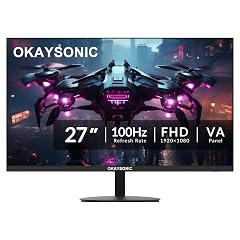
27 Inch Office Monitor 100Hz FHD 1080P Computer Screen with HDMI VGA Eye Care Frameless 100x100mm VESA Mountable

Portable Monitor 15 6 inch 1080P FHD 88 sRGB 60Hz Travel Monitor for Laptop MacBook Surface PC Xbox

15 6 Inch Portable Monitor 1080P FHD IPS Gaming Display Monitor with USB-C HDMI Light Weight Ultra-Slim External
Each item is added individually — prices and availability are confirmed at checkout.
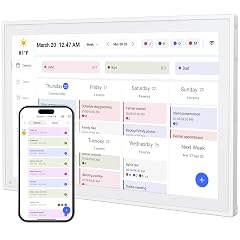
Digital Calendar 10 1inch Smart WiFi Electronic Calendar Chore Chart IPS Touch Screen HD Display for Family Schedules

ZZA 24 Inch FHD 1080P 200Hz 144Hz Curved Gaming Monitor 1ms MPRT VA Panel 2800R Curvature AMD FreeSync

Portable Monitor 15 6 FHD 87 sRGB 60Hz IPS HDR HDMI USB-C Travel Monitor for Laptop MacBook PC

Miofive Car Camera 4K Resolution WiFi Bluetooth GPS Dash Cam 3-Inch IPS Screen Night Vision Loop Recording HDR

Computer Monitor 14 Inch Touchscreen Portable Monitor FHD HDR 1080P 100 sRGB Small PC Monitor with HDMI USB-C

BUGANI Luster Bluetooth Speakers Portable Wireless Stereo Speaker with Colorful Lights Loud Sound Bluetooth 5 3 24H Playtime

Tyler 7 Portable TV LCD Monitor Rechargeable Battery Powered Wireless Capability HD-TV USB HDMI Input AC DC Remote

Packard Bell airFrame 21 FHD Monitor 1920x1080 Ultrawide VESA Mount Compatible Tilt Adjustment HDMI VGA Slim Bezel for
We use optional analytics and advertising cookies to understand how visitors use Ventari, measure ads, and improve the experience. You can accept all optional cookies, allow analytics only, or decline them. See our Cookie Policy.
