EMEET

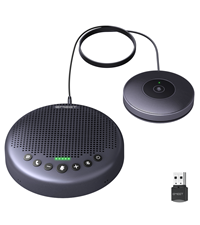
EMEET Conference Speakerphone M0 Plus 4 AI Mics 360 Voice Pickup Noise Reduction USB C Speaker Bluetooth Conference

1777+ bought in the past month

$55.99$67.99

About this item

  • Enhanced 360° Voice Pickup with 4 AI Mics - The EMEET OfficeCore M0 Plus Bluetooth speakerphone features a four-mic array, which enhances voice pickup from any direction. Powered by EMEET’s VoiceIA algorithm upgraded in 2023, the mic can filters out background noise and eliminates echos of the speaker.
  • Crystal-Clear Audio Quality - The 3W high-quality bluetooth conference speaker can spread sound evenly throughout the room, ensuring no details are missed. With full duplex audio support, our conference speaker produces natural and rich sounds, so to feel like you are talking to others in person.
  • Expandable for Larger Meetings - Room is too large? Link 2 EMEET’s Bluetooth speakerphones with the Daisy Chain, you will have 2x professional mics and speakers working seamlessly extending the conferencing space, effectively supporting up to 16 attendees. This feature supports multiple models of EMEET products, such as Meeting Capsule, M3, or M0 Plus, making it a flexible solution for setting up your conference room.
  • Easy to Set Up and Use - The EMEET Conference Speaker and Microphone M0 Plus offers 2 ways to connect: USB-C and Bluetooth 5.0. No drivers or additional software is required, simply plug and play. The speakphone is compatible with most conferencing platforms, such as Zoom, Microsoft Teams, Skype, Slack, Webex, and etc. Mobile phones applied with commonly used Bluetooth Protocol on the market can be connected to M0 PLUS through Bluetooth, and there are no restrictions on brand and model.
  • Long Battery Life for Optimal Performance - Equipped with a large capacity battery, the M0 Plus Bluetooth conference speaker with microphone supports long-term calls over 10 hours of talk time on a single charge, making it perfect for all-day meetings. The M0 Plus Bluetooth Conference Speakerphone is optimal for use in the meeting room, home office, or on business trips, ensuring that you always have a professional meeting experience.
$55.99
Was $67.99Save $12.00

In Stock

DeliveryEstimated 3–5 business days · Final delivery speed and cost are confirmed at checkout
Easy Returns · 30-day window
This order is a gift

In Stock

Secure Checkout
Free Returns
30-Day Guarantee
Secure checkoutAll transactions are SSL-encrypted. Your payment info is never stored.
Free returnsReturn or replace within 30 days
Fast deliveryOrders ship within 1 business day and arrive in 4–8 days.
Buyer protectionIf your order arrives damaged or doesn't show up, we'll make it right.
24/7 supportOur team is here to help. Reach us anytime by email or chat.
Ships fromOur Warehouse
Sold byEMEET Direct
Returns
Easy Returns30-day return window
PaymentsSecure transaction
Currently unavailable
Easy Returns · 30-day window

Product details

BrandEMEET
Speaker Maximum Output Power5 Watts
Frequency Response20 Hz
Connectivity TechnologyBluetooth, Dongle, USB
Audio Output ModeSurround

Technical specifications

input_voltage5 Volts
mounting_typeTabletop Mount
materialPc
model_nameM0 PLUS
speaker_typeTweeter
special_featureBuilt In Microphone, USB Port
recommended_uses_for_productWorkspace & Home Office, Huddle Room, Medium Room, Work From Anywhere
compatible_devicesLaptop, Smartphone, Tablet
unit_count1 Count
surround_sound_channel_configuration1.0
colorBlack
included_componentsconference speaker
product_dimensions1.6"D x 4.6"W x 4.6"H
item_weight9.2 ounces
is_waterproofFALSE
warranty_typeLimited
maximum_range10 Meters
number_of_items1
control_methodVoice
wireless_communication_technologyBluetooth
speaker_size1.57 Inches
power_sourceBattery Powered
signaltonoise_ratio60 dB
tweeter_diameter1 Inches
water_resistance_levelWaterproof
customer_package_typeFFP
number_of_batteries1 Lithium Polymer batteries required. (included)
audio_driver_typeDynamic Driver
bluetooth_range10 Meters
subwoofer_connectivity_technologyWireless
number_of_circuits1
number_of_power_levels1
series_number1
specific_uses_for_productMeetings Conferences
styleM0 Plus
indooroutdoor_usageIndoor
manufacturerShenzhen eMeet technology Co.,Ltd.
shapecube
item_model_numberM0 PLUS
batteries1 Lithium Polymer batteries required. (included)
best_sellers_rank#3,993 in Office Products ( See Top 100 in Office Products ) #1 in Telephone Audio Conferencing Products
date_first_availableMarch 21, 2023
battery_capacity2600 Milliamp Hours

From the brand

Product detailProduct detailProduct detailProduct detailProduct detailProduct detailProduct detailProduct detail
Product detailProduct detailProduct detailProduct detail

Product videos

Product video 1

Customer reviews

4.43,536 ratings

Customers say

Customers find the speakerphone's sound quality great and appreciate that it works well for Teams meetings and is easy to set up and use.

★★★★★

Strong Early Performance, Solid Feature Execution

Daniel WashburnDecember 15, 2025

I just got the device a few hours ago, but I put it through some deliberate testing and here is my initial impression: The 360° Voice Pickup works well. Voices are captured clearly from or all around the device, without needing to speak directly into it. Noise reduction is also effective. I tested this by playing a loud thunderstorm on a separate Bluetooth speaker in the same room during a call, and the person on the other end could not hear the background noise at all, while my voice remained clear. The plug and Play functionality works as expected and setup was straightforward. Bluetooth pairing with my phone was quick and stable. And the speaker volume was loud enough to be clearly heard without distortion. The claim is that it can run for 10 hours and I haven't had time to test this yet, however, the compatibility has been good so far, including successful use on my Linux computer. So, based on early use, this device delivers on its basic features and has performed reliably for calls and speakerphone use so far. I'll update again if anything negative happens, but my first impression is very positive. Read more

★★★★★

Works flawlessly

PsyopNovember 11, 2025

Great product. What used to be an insufferable meeting experience, thanks to utterly sub standard speakers and mics on the laptops, has become enjoyable. At least as far as meetings can be enjoyable. Good audio quality, good microphone, good volume. I use it regularly for MS Teams and Zoom conference calls in rooms with no AV equipment or phone. I even use it at my desk because it’s convenient and the audio is so good. I use the included usb-c cable rather than Bluetooth, and it’s an instantaneous connection and zero configuration. Highly recommended. Read more

★★★★★

Excellent value for a quality product.

KajalanoDecember 7, 2025

Excellent value on a quality product. Using now for about one month with no issues. Connections are stable and audio quality is really good. I have tested it in challenging noise conditions like a very loud stereo and tv in the background and others report good voice clarity on the other end. Volume is more than adequate. I am not using this everyday so still unable to comment a whole lot on battery life but it does seem adequate. You can also use it while it is connected via USB and charging so the battery life may not be as critical. If I am to be critical it would be on the status LEDs which I find to be too small and therefore somewhat obscure depending on your distance or angle from the unit. This is critical when for example during a meeting, you cannot easily determine whether MUTE is on or not. The 'J' Brand has much larger status LEDs so much easier to determine if on MUTE or not. Overall a good product and I would recommend them. Read more

★★★★☆

Works great, but not with docking station

ExosurfshackAugust 16, 2024

FIX FOR DOCKING STATION USE BELOW First off, it was hard to gauge the size of this device based on other user photos. Xbox Series controller next to it for reference. I was tired of using my work provided headset(Logitech H570e) because wires are annoying and I work from home, so closed audio communication isn’t needed. I was also browsing stuff like the Jabra2 line but too costly. I have the EMEET sitting at the end of my desk and people can hear me just fine. The microphone quality is comparable to the headset. Both leagues better than the laptop microphone. The speaker is plenty loud and others cannot hear themselves when i’m talking to them on Teams, or Jabber. The product itself works great overall. Plug and play use when the usb cable is directly connected to my laptop. However, I ran into issues when I plugged the EMEET into my Dell WD19S docking station. I plug everything into it, so that way all I have to plug into my laptop is the usb-c cable. When listening to audio from a youtube video, the speaker works fine. When you try to run something that requires the speaker and microphone to both be in use(teams, jabber) the speaker will continually disconnect and reconnect over and over while also trying to find a usable audio source such as the laptop speakers, making it impossible to communicate. The microphone will work, so others can hear you, but you can’t hear them due to the speaker connection issue. I tried updating the drivers on my laptop and docking station, I tried going into advanced audio settings and not allowing other audio sources to connect, I set the EMEET as priority, I googled forums from other people experiencing issues with their docking stations and similar devices, I downloaded the EMEET software provided on their website, nothing worked. IT with my company worked on it for 30 min as well with no luck. I called EMEET’s support team and with no troubleshooting, they told me it’s likely the docking station at fault but ehhhhh I don’t know about that, chief. I did not want to plug the EMEET into my laptop just for it to work. I also did not want to run strictly bluetooth as i’d have to recharge it. That defeats the purpose of why I got this(cables, handsfree, tidy, etc) THE FIX: As stated before, when the EMEET is plugged into the docking station and i’m making a call, the microphone is the only thing that works correctly. To get the speaker to work, I paired the EMEET to my laptop via bluetooth. Since the EMEET is also still plugged into the docking station, it will show two speaker sources and two microphone sources. On windows, go to system, sound, output. It should show two sources from EMEET. One labeled Speaker, One labeled headset. The one labeled headset is your bluetooth connection. The one labeled Speaker is your wired connection. Click on the Speaker source, under general, audio, select “don’t allow”. This will make it to where the Speakers bluetooth connection is your output source, and the microphone wired connection is your input source. Unit is still hardwired in so you don’t have to charge it, and it resolves the connectivity issues with the docking station. Would be 5 stars if docking station compatibility were there. Read more

Review image 1
Recently Viewed