
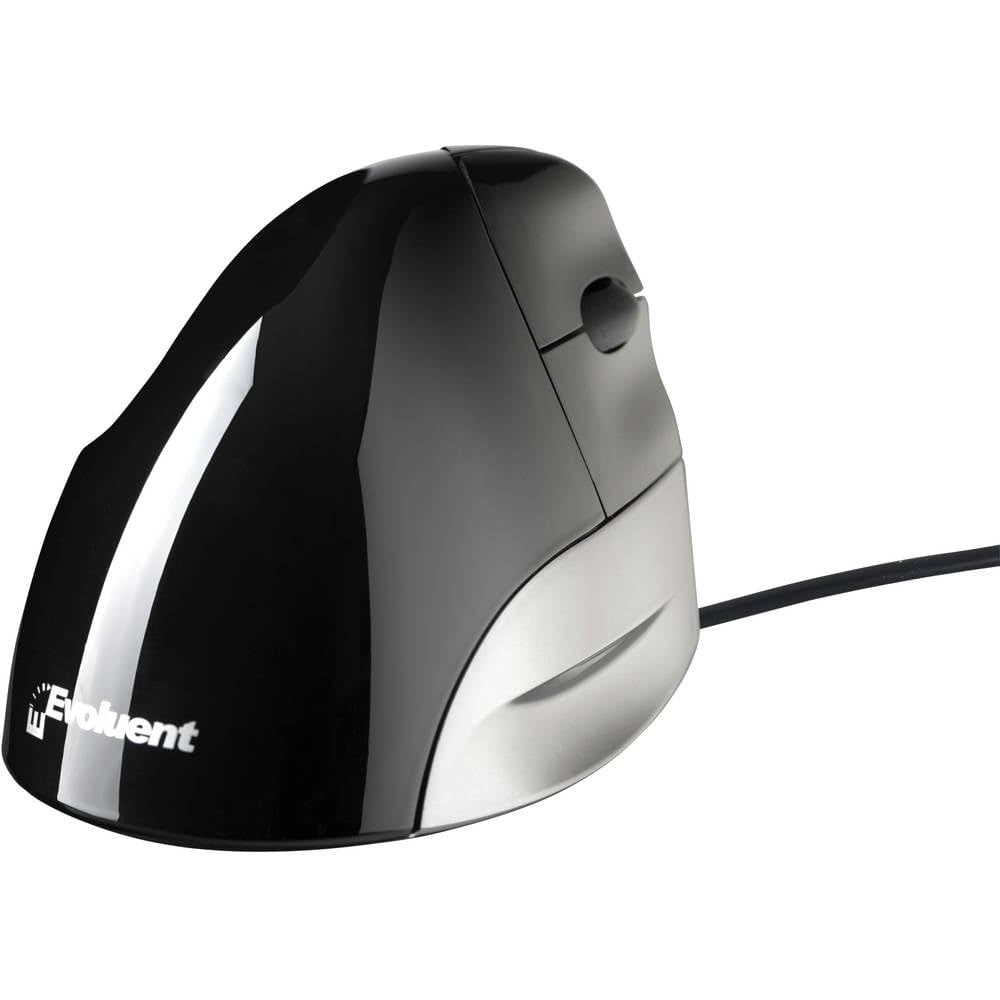
Evoluent

Evoluent Standard Right USB Black A Vertical Patented Mouse That Supports Your Hand in a Relaxed Position

1733+ bought in the past month

$104.59

About this item

  • [ Patented Handshake Position ] The mouse has a patented shape that supports your hand in a fully upright handshake position that elimites the forearm twisting required by ordiry mice, thus relieving hand, wrist, and arm pain.
  • [ Comfortable and Easy to Use ] All 3 buttons are easily operable without contorting fingers. The button force is light enough for easy clicking but firm enough to avoid accidental actuation.
  • [ Performance Tracking ] Features a 1300 DPI Red Optical Sensor for solid tracking performance
  • [ Easy Installation ] USB plug and play
  • Computer Mouse.Best Evoluent Quality.Ergonomic design
$104.59

Currently unavailable


Currently unavailable

Secure Checkout
Free Returns
30-Day Guarantee
Secure checkoutAll transactions are SSL-encrypted. Your payment info is never stored.
Free returnsReturn or replace within 30 days
Fast deliveryOrders ship within 1 business day and arrive in 4–8 days.
Buyer protectionIf your order arrives damaged or doesn't show up, we'll make it right.
24/7 supportOur team is here to help. Reach us anytime by email or chat.
Ships fromOur Warehouse
Sold byTriplenet Pricing INC
Returns
Easy Returns30-day return window
PaymentsSecure transaction
Currently unavailable
Easy Returns · 30-day window

Product details

BrandEvoluent
ColorBlack
Connectivity TechnologyUSB
Special FeatureErgonomic Design
Movement Detection TechnologyOptical

Technical specifications

brandEvoluent
seriesVMOUSSTDR
item_model_numberVMOUSSTDR
hardware_platformLaptop, Personal Computer
operating_systemLinux, Windows 7, Windows XP
item_weight3.52 ounces
colorBlack
power_sourceHand-operated
batteries2 AA batteries required.
manufacturerEvoluent LLC
is_discontinued_by_manufacturerNo
date_first_availableApril 6, 2013
best_sellers_rank#6,625 in Computer Mice

Product videos

Product video 1

Customer reviews

3.7534 ratings
★★★★★

Great mouse for tennis/mouse elbow

BwS in MinneapolisJanuary 5, 2011

I am on my computer all day long at work and using a traditional mouse contributed to tennis elbow (the doctor called it "mouse elbow" since that is one of the common causes) in my right arm. My boss suggested I try to find an ergonomic mouse to help alleviate the problem. I tried both this Evoluent Vertical Mouse and the 3M Ergonomic Mouse EM500GPL. I have been using both for nearly a month now. I work from home much of the time and I have one in my home office and the other at work. Both are great at maintaining a neutral hand position and I can now work for hours without additional arm/elbow pain. This Evoluent Vertical Mouse is very much like a standard mouse tipped on its side and, unlike the 3M mouse, includes a scrolling wheel. Right and left mouse buttons are operated by the pointer and middle fingers with the scroll wheel between them, all similar to a normal mouse. The drawback for me is that the angle is a bit too vertical to feel completely natural or neutral for my hand and arm. The 3M mouse provides a more normal, comfortable hand and arm position for me - somewhat like a joystick at an angle. Unlike a joystick, it is fixed - it does not bend but slides on a desktop/mousepad like any optical mouse. The right and left buttons are incorporated into a rocker switch operated by the thumb and I got used to that quickly and easily. The only think I miss is the scrolling wheel. It has a button that acts much as a scroll lock to allow movement to other areas of a worksheet but it seems cumbersome and I have not gotten used to it. Both this Evoluent mouse and the 3M mouse definitely make long-term mousing more comfortable and I can recommend them both. Read more

★★★☆☆

Bad drivers, good build quality, comfortable

Jobor StattensonMay 28, 2012

If you buy this mouse, download X-Mouse Button Control. The evoluent drivers are junk. For some reason, a random person giving away free mouse drivers does a better job than the company that sells the mouse. Other than that, the mouse is pretty good. I'd prefer wireless, but it's not a huge deal. There's a switch on the bottom to change the DPI that I find pretty useless. It did kind of help with my wrist problems, but seeing a good doctor helped more. It's comfortable, it's got a back button on the thumb, and the wheel is good. The only downside is other people have trouble acclimating to it. Don't put this in a public or shared workstation. It helps if you don't want someone else using your computer, I guess :) Read more

★★★★★

The only mouse I'll use for the rest of my life!

Varnayev FamilyJanuary 24, 2008

Note: Calling this a five star product is misleading. See my most recent impressions at the bottom. I cannot praise this mouse enough. I know it looks odd at first, but it is extremely comfortable and easy to use! I can't understand why anyone would use any other mouse. I bought this mouse because my wrists were in extreme pain from repetitive strain. I've been using this mouse for three weeks now, and the pain is getting much better! It works well for general computer usage as well as gaming. I like the ability to program the additional buttons to perform tasks or keyboard shortcuts. The ability to change the DPI (sensitivity) by pressing a button on the bottom is also very convenient for multiple users. I only wish Evoluent had included a carrying case for this mouse, because I always bring it along with me whenever I'm going to go use a friend's computer. Edit (November 23, 2008): While originally the pain did get better, I began to develop new pains soon afterward. I understand now that there is no computer equipment that doesn't place some kind of strain on your body. There is no piece of computer equipment that "cures" RSI. Only moderation, physical therapy, and exposing yourself to as much information as possible through books, websites, and support groups can be of help. This mouse is most likely better than your typical average mouse, but as far as vertical mice go it isn't anything spectacular. I would recommend the Zero Tension Mouse over this mouse because it has a large base to support your hand and reduce strain. I also use the Contour RollerMouse now, and I can work on it without pain for longer than I can on this mouse or even the Zero Tension Mouse. Read more

Recently Viewed