
Gamrombo

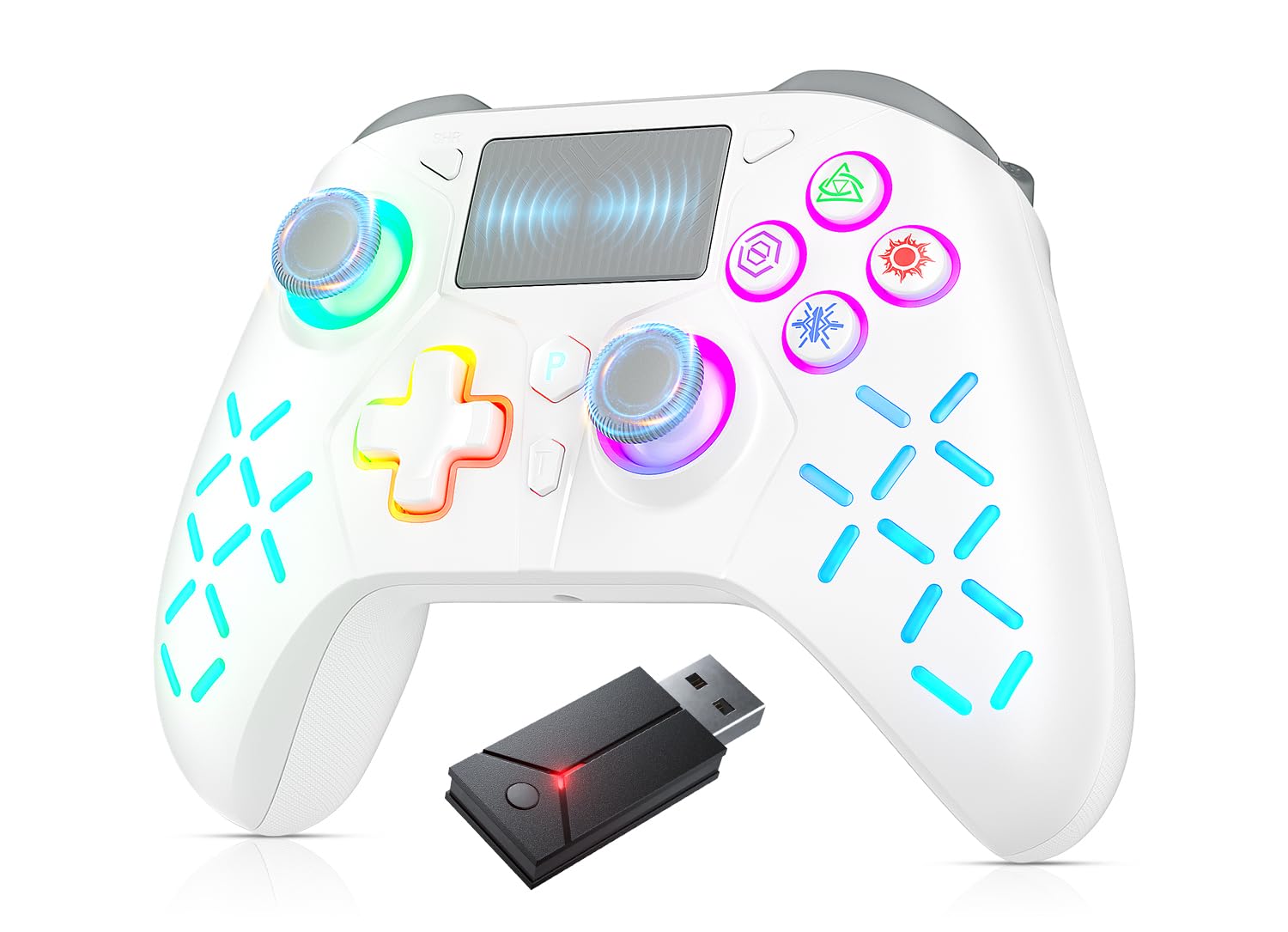
Gamrombo Gaming Controller for PlayStation 5 PS5 PS4 PS3 PC Switch Steam Deck Mac Android iOS with RGB

2.7

$66.28

About this item

  • If you're having trouble connecting to your PS5, please use this URL to upgrade the included receiver: we.tl/t-AmUFzkJhYk. After successfully upgrading the receiver, if you still can't connect, please configure your connection method in the settings-------𝐍𝐞𝐜𝐞𝐬𝐬𝐚𝐫𝐲 𝐬𝐞𝐭𝐭𝐢𝐧𝐠𝐬 𝐭𝐨 𝐜𝐨𝐧𝐧𝐞𝐜𝐭 𝐭𝐨 𝐏𝐒𝟓!!!! : Enter the PS5 system settings > Accessories > Controller (General) > Communication Metho > Use USB Cable
  • 【Compatibility】 This controller requires the USB adapter we provide to successfully connect to the PS5 console. If you do not use our USB adapter, the controller can only be connected to PS4/PS4 Pro/PS4 Slim, PC, Switch, Steam, PS3, MAC, iOS and Android.
  • 【Hyperspeed Wireless】 Delivers an ultra-fast 2.4GHz Receiver wireless connection via its included USB Type A dongle and ensures seamless performance that meets the demands of competitive gaming on PS5 consoles and PC.
  • 【Adjustable RGB lights Effects】Press and hold the SET+L3 buttons at the same time to switch between 8 lighting colors. The "P" button turns on the default RGB. Press and hold the L3+R3 buttons for 3 seconds to turn off the RGB light. Light brightness adjustment: The default brightness is 40%. Press the set button and the up key of the cross key (brightness increase)/set button and the down key (brightness decrease).
  • 【Hall Effect Technology】: Ultra lightweight and customizable controls allow players to perform better and win. The feel and sensitivity of the Hall Effect Joysticks and trigger buttons have been engineered with the special lightweight vibration system to provide a greater sense of control and realism, no matter what you play. Built-in speaker and stereo headset jack, allowing you to experience your favorite games in a whole new dimension. Besides, with unique Turbo feature, you can win faster than ever.
  • Product description 1. Why does the PS5 console prompt for an update when the adapter is plugged in? Enter the PS5 system settings: Settings > Accessories > Controller (General) >Communication Metho > Use USB Cable. Then connect the ps5 via adapter, as described in the video on the situation page. 2.Why doesn't the controller work with PS5 games? You can't use a USB cable to connect to the PS5 console, nor can you use a USB cable to charge the controller, otherwise you can't play ps5 games. 3.Why can't I connect to the PS5 after setting the connection method? (1) After the system is set up, you must connect the controller and the PS5 console through the 2.4G adapter we provide. If the connection fails, please unplug the 2.4G adapter and plug it into the PS5 console again to pair If you're having trouble connecting to your PS5, please use this URL to upgrade the included receiver: we.tl/t-AmUFzkJhYk. After successfully upgrading the receiver, if you still can't connect, please configure your connection method in the settings-------𝐍𝐞𝐜𝐞𝐬𝐬𝐚𝐫𝐲 𝐬𝐞𝐭𝐭𝐢𝐧𝐠𝐬 𝐭𝐨 𝐜𝐨𝐧𝐧𝐞𝐜𝐭 𝐭𝐨 𝐏𝐒𝟓!!!! : Enter the PS5 system settings > Accessories > Controller (General) > Communication Metho > Use USB Cable; 【Comp
Specification

Product facts

Key details

best_sellers_rank
#4,313 in Video Games ( See Top 100 in Video Games ) #399 in PlayStation 5 Accessories
manufacturer
Gamrombo
date_first_available
July 13, 2024

Dimensions and fit

dimensions
6.73 x 4.84 x 2.83 inches; 11.68 ounces
weight
11.7 ounces
package_dimensions
6.73 x 4.84 x 2.83 inches; 11.68 ounces
item_weight
11.7 ounces

Technical specifications

item_model_number
PlayStation 5
Overview

About this item

  • If you're having trouble connecting to your PS5, please use this URL to upgrade the included receiver: we.tl/t-AmUFzkJhYk. After successfully upgrading the receiver, if you still can't connect, please configure your connection method in the settings-------𝐍𝐞𝐜𝐞𝐬𝐬𝐚𝐫𝐲 𝐬𝐞𝐭𝐭𝐢𝐧𝐠𝐬 𝐭𝐨 𝐜𝐨𝐧𝐧𝐞𝐜𝐭 𝐭𝐨 𝐏𝐒𝟓!!!! : Enter the PS5 system settings > Accessories > Controller (General) > Communication Metho > Use USB Cable
  • 【Compatibility】 This controller requires the USB adapter we provide to successfully connect to the PS5 console. If you do not use our USB adapter, the controller can only be connected to PS4/PS4 Pro/PS4 Slim, PC, Switch, Steam, PS3, MAC, iOS and Android.
  • 【Hyperspeed Wireless】 Delivers an ultra-fast 2.4GHz Receiver wireless connection via its included USB Type A dongle and ensures seamless performance that meets the demands of competitive gaming on PS5 consoles and PC.
  • 【Adjustable RGB lights Effects】Press and hold the SET+L3 buttons at the same time to switch between 8 lighting colors. The "P" button turns on the default RGB. Press and hold the L3+R3 buttons for 3 seconds to turn off the RGB light. Light brightness adjustment: The default brightness is 40%. Press the set button and the up key of the cross key (brightness increase)/set button and the down key (brightness decrease).
  • 【Hall Effect Technology】: Ultra lightweight and customizable controls allow players to perform better and win. The feel and sensitivity of the Hall Effect Joysticks and trigger buttons have been engineered with the special lightweight vibration system to provide a greater sense of control and realism, no matter what you play. Built-in speaker and stereo headset jack, allowing you to experience your favorite games in a whole new dimension. Besides, with unique Turbo feature, you can win faster than ever.
  • Product description 1. Why does the PS5 console prompt for an update when the adapter is plugged in? Enter the PS5 system settings: Settings > Accessories > Controller (General) >Communication Metho > Use USB Cable. Then connect the ps5 via adapter, as described in the video on the situation page. 2.Why doesn't the controller work with PS5 games? You can't use a USB cable to connect to the PS5 console, nor can you use a USB cable to charge the controller, otherwise you can't play ps5 games. 3.Why can't I connect to the PS5 after setting the connection method? (1) After the system is set up, you must connect the controller and the PS5 console through the 2.4G adapter we provide. If the connection fails, please unplug the 2.4G adapter and plug it into the PS5 console again to pair If you're having trouble connecting to your PS5, please use this URL to upgrade the included receiver: we.tl/t-AmUFzkJhYk. After successfully upgrading the receiver, if you still can't connect, please configure your connection method in the settings-------𝐍𝐞𝐜𝐞𝐬𝐬𝐚𝐫𝐲 𝐬𝐞𝐭𝐭𝐢𝐧𝐠𝐬 𝐭𝐨 𝐜𝐨𝐧𝐧𝐞𝐜𝐭 𝐭𝐨 𝐏𝐒𝟓!!!! : Enter the PS5 system settings > Accessories > Controller (General) > Communication Metho > Use USB Cable; 【Comp

Have a question about this product?

From the brand

Product detailProduct detailProduct detailProduct detailProduct detailProduct detailProduct detailProduct detailProduct detailProduct detailProduct detailProduct detail

Product videos

Product video 1

Customer reviews

8 reviewsMixed

Rated 2.7/5 across 8 reviews — notable concerns raised.

  • 63% of sampled reviews rate 2 stars or below.

Customers say

Customers have mixed opinions about the controller's quality.

Generated from the text of customer reviews

☆☆☆☆

SCAM DO NOT BUY

DO NOT BUY !! DO NOT BUY it is a scam the controller is god awful , extremely delayed inputs you will lose whatever game your playing and it doesn’t work for ps5 unless you download some sketchy program to upgrade the converter and even then its still 💩💩 SCAM Read more

Kevin Bacon
★★★★★

Easy to use

Great product Read more

Elizabeth Larkin
☆☆☆☆

Trash controller not for PS5 games

Terrible cannot use to play PS5 games with. Bought to play COD but the controller is banned, will not operate the screen at all. Read more

Nate
★★★☆☆

Doesn’t work on all games

Couldn’t use it on call of duty Read more

Kristen K.
★★★★

Didn't work for PS5

Does not work on PS5. States it does but we haven't been able to. Read more

Eileen Allan
★★☆☆☆

Didn’t receive Usb attachment?

Ok it’s a Nice controller… however we didn’t receive the Usb attachment that’s shown in the image.. Other than that, it has good battery life, and it’s about the same built as a Xbox controller. Read more

German
☆☆☆☆

Does not work on PS5

Total scam not meant for ps5. Bought two and neither connect at all. This was for a kids birthday. Worst part is the return feature isn’t working even tho it says eligible for returns thru late November. Read more

she
☆☆☆☆

Crappy controler

States it for PlayStation 5 but a message popped up and said dual controler couldn't play play station 5 games Read more

tank welsh

We use optional analytics and advertising cookies to understand how visitors use Ventari, measure ads, and improve the experience. You can accept all optional cookies, allow analytics only, or decline them. See our Cookie Policy.