Free shipping over $35 · 60-day returns · Price-watch guarantee

Ventari

havit

havit Bluetooth Number Pad Wireless Numeric Keypad Numpad 26 Keys Portable Mini Financial Accounting Rechargeable Numeric Pad for

$19.99$49.99

1563+ bought in the past month

About this item

  • Widely Compatibility: This Bluetooth number pad is compatible with PC, laptop, desktop and computers running Windows systems. Note: This number pad does NOT support Mac OS systems
  • Multi-function 26-key Keypad: With NumLock, ESC, Delete and a shortcut key which can open the computer calculator directly etc.The number keyboard is more unique in that it can be combined into 3 currency symbols through Fn+composite keys
  • Bluetooth Number Pad Rechargeable: The wireless numeric keyboard with rechargeable lithium battery, avoid continuous battery consumption and battery replacement. This numeric keypad uses the latest stable buletooth 3.0 connection,plug and play, no delay and caton, fast data transmission, and working range is up to 33FT
  • Comfortable Numeric Pad: With quiet SCISSOR-SWITCH KEYS provides a comfortable and smooth typing experience, quick response and good tactile rebound, keep the office quiet and improve work efficiency.15° tilt design fits the human body habits, great for spreadsheets worker, accounting staff and financial officer
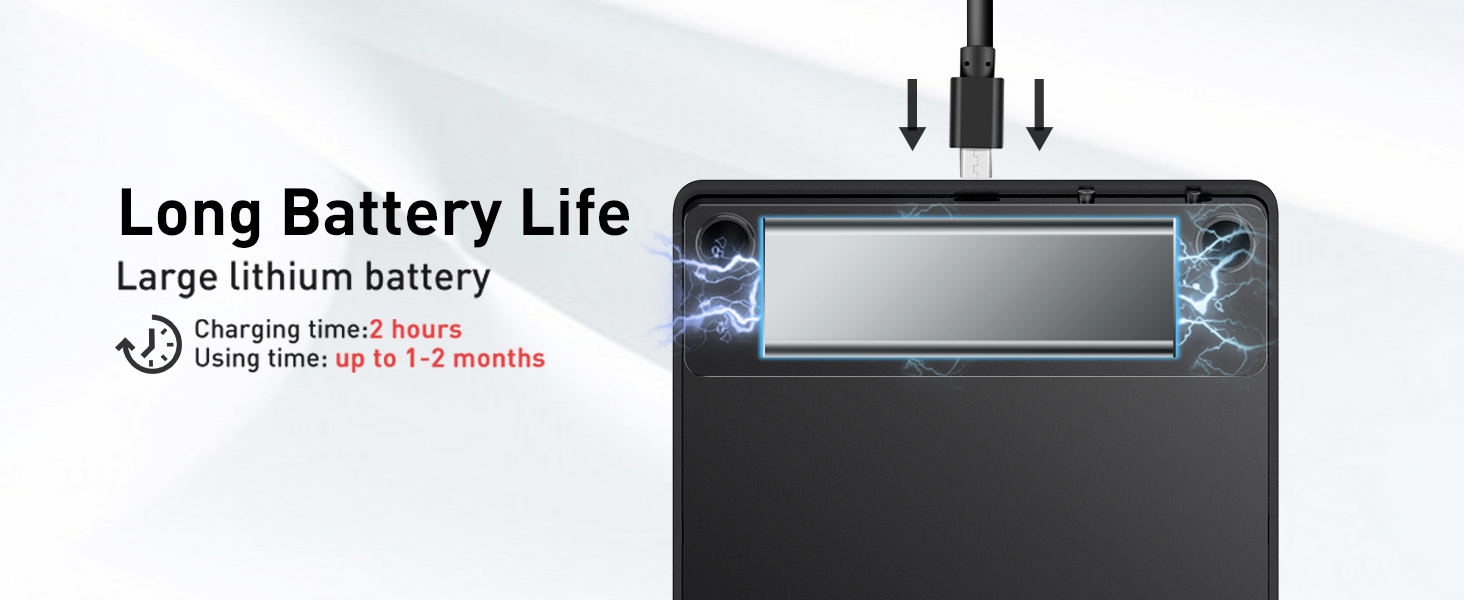
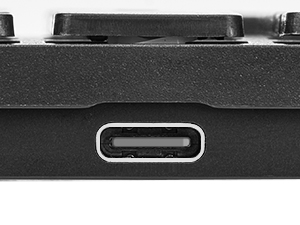
  • Long Using Time Keypad: The wireless numpad with a large capacity lithium battery, usually can use 1-2 months after fully charged (charged with the provided USB-A to USB-C cable). It will enter the sleep function after being idle for 1 hour, press any key to wake up
  • Warm Tips: Based on the USB protocol, the rated charging voltage of the product is 5V, it is recommended to use the computer USB port to charge this numpad, it is not recommended to use the other chargers or other non-computer USB port to charge it
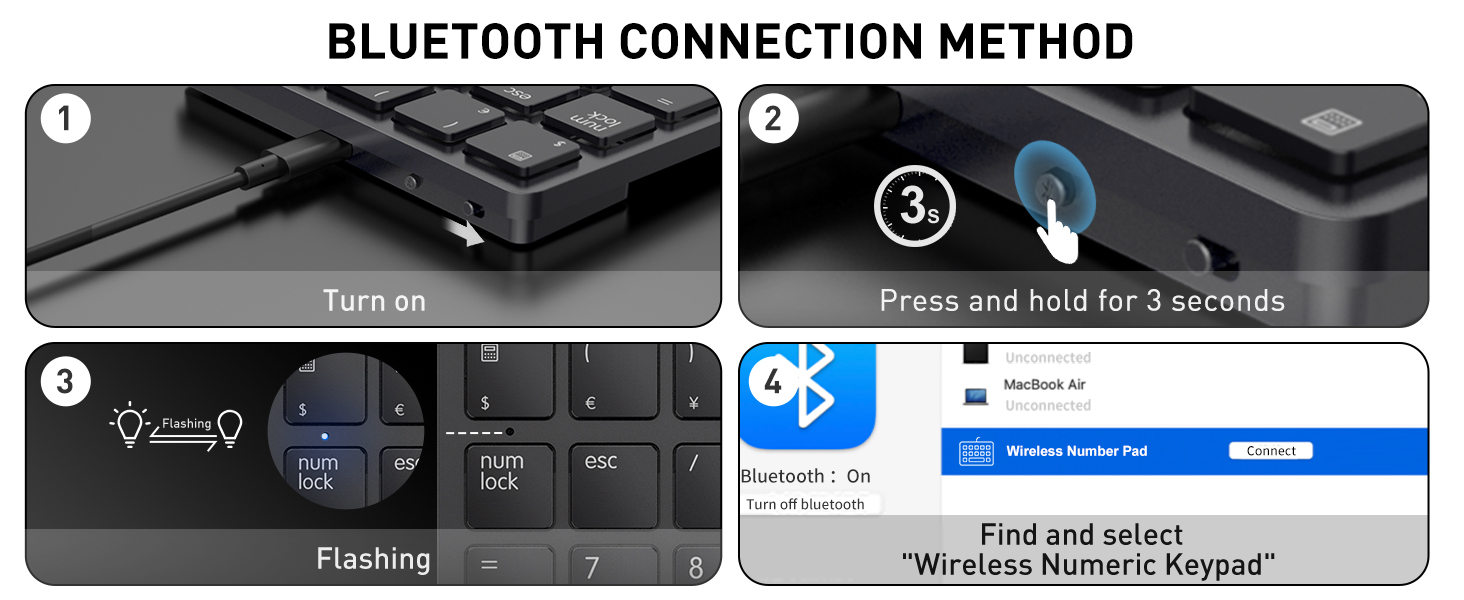
  • Easy Bluetooth Pairing in 3 Simple Steps: First, ensure the number pad is charged and powered on. Second, press and hold "Bluetooth Pairing Button" for 3 seconds until the indicator light flashes. Third, select "Wireless Numeric KeyPad" from your device's Bluetooth list to connect.
  • Quick Troubleshooting for Connection Issues: If the number pad doesn't connect, restart both the number pad and your device. Make sure the number pad is within 10 meters of your device. Check the battery level and recharge if needed.

Key details

Brand
havit
Compatible Devices
Laptop, PC, Tablet
Connectivity Technology
Bluetooth
Keyboard Description
Numeric
Recommended Uses For Product
Education, Everyday Use, office

Dimensions and fit

Product Dimensions
4.1"L x 4.8"W x 0.6"H

Item information

Special Feature
Ergonomic, Non Slip, Portable, Ultra slim
Color
Black
Keyboard backlighting color support
Single Color
Style
Contemporary
Highlights

About this item

  • Widely Compatibility: This Bluetooth number pad is compatible with PC, laptop, desktop and computers running Windows systems. Note: This number pad does NOT support Mac OS systems
  • Multi-function 26-key Keypad: With NumLock, ESC, Delete and a shortcut key which can open the computer calculator directly etc.The number keyboard is more unique in that it can be combined into 3 currency symbols through Fn+composite keys
  • Bluetooth Number Pad Rechargeable: The wireless numeric keyboard with rechargeable lithium battery, avoid continuous battery consumption and battery replacement. This numeric keypad uses the latest stable buletooth 3.0 connection,plug and play, no delay and caton, fast data transmission, and working range is up to 33FT
  • Comfortable Numeric Pad: With quiet SCISSOR-SWITCH KEYS provides a comfortable and smooth typing experience, quick response and good tactile rebound, keep the office quiet and improve work efficiency.15° tilt design fits the human body habits, great for spreadsheets worker, accounting staff and financial officer
  • Long Using Time Keypad: The wireless numpad with a large capacity lithium battery, usually can use 1-2 months after fully charged (charged with the provided USB-A to USB-C cable). It will enter the sleep function after being idle for 1 hour, press any key to wake up
  • Warm Tips: Based on the USB protocol, the rated charging voltage of the product is 5V, it is recommended to use the computer USB port to charge this numpad, it is not recommended to use the other chargers or other non-computer USB port to charge it
  • Easy Bluetooth Pairing in 3 Simple Steps: First, ensure the number pad is charged and powered on. Second, press and hold "Bluetooth Pairing Button" for 3 seconds until the indicator light flashes. Third, select "Wireless Numeric KeyPad" from your device's Bluetooth list to connect.
  • Quick Troubleshooting for Connection Issues: If the number pad doesn't connect, restart both the number pad and your device. Make sure the number pad is within 10 meters of your device. Check the battery level and recharge if needed.

From the brand

Product detailProduct detailProduct detailProduct detail
Product detailProduct detailProduct detailProduct detailProduct detailProduct detailProduct detailProduct detail

Product videos

Product video 1

Customer reviews

3,361 reviewsPositive

Rated 4.3/5 across 3,361 reviews — well received overall.

  • 100% of sampled reviews are from verified purchases.
  • 75% of sampled reviews give 4–5 stars.

Customers say

Customers find the numeric keypad to be a perfect little 10-key pad that's easy to set up and use, with good battery life and value for money.

Generated from the text of customer reviews

Reviews with images

Customer review image for Awesome Number KeypadCustomer review image for Awesome Number KeypadCustomer review image for Awesome Number KeypadCustomer review image for Awesome Number Keypad
See all photos
★★★★★

Great Keypad!

Just what I was looking for since my laptop doesn't have a keypad. Easy to set up and easy to use. No issue hooking it up to the laptop with Bluetooth. Charge provides very long life. It is a good size, nice design, and responds well. Read more

JEGVerified purchase
★★★★★

Excellent Key Pad... Works on a Computer or Android devices!

Easy to setup/bind, seems to be of good quality and works well. No issues so far, The Bluetooth seems to work as advertised. Size is perfect for easy use. There are more features than I expected for a number pad and that is a good thing. The unit is heavier than I expected and has rubber feet, so it stays where you set it. I do highly recommend this unit. Read more

SparkieVerified purchase
★★★★★

This Number Pad is Great in Every Way!

I purchased this for use with my new Dell 16 2-in-1. No dongle was a must for me. I'm tired of dongles using up USB ports. That being said, the BT was easy, fast and painless as it paired to my Dell. It couldn't be any easier. Absolutely no issue connecting immediately. As a long time professional pianist/keyboardist (and typist), I'm very picky about the feel of the keys. The key travel distance. How it feels when you hit the bottom. Is the touch too light? After testing it out thoroughly and using it a lot, it is exactly what I wanted. The keys are solid and have enough resistance so that you don't continually "tweak" a wrong key next to the one that you want. It has all the functions you could want on a numeric keypad. Every option works perfectly. I gave it the initial full charge. I've been using it for countless hours. OK. Weeks by this time. Still haven't needed to recharge it. I leave it powered on 24/7. The sleep function works nicely. In fact, I was surprised to find a nice function as I would cold boot the Dell. I use the 4 digit code on the lock screen. I type the digits on the keypad while it's still asleep. It wakes and remembers the digits I typed to unlock the computer. Pretty awesome. The unit is well built. Feels solid to hold in your hand. When it's set on a surface next to the computer, the rubber feet keep it solid and steady. No sliding around while typing. I couldn't be happier. The price is great. I've recommended it to many friends and family. They have purchased it and are as happy as I am. Unless you get a "lemon" (it happens), this is more than worth the money. I highly recommend it. I'm sure you won't be disappointed. BTW . . . I just discovered that it's on sale. Time to get one. Read more

CustomerVerified purchase
★★★★

Good, works as intended - other bluetooth devices might interfere with the signal.

Couldn't get it to pair with my Windows computer. I use multiple Bluetooth devices on my computer but this one was undetectable. Super disappointed. Update: For all those experiencing issues on Windows computers. My keypad was not connecting to my laptop and I was about to return the item and request a refund. However, after some more troubleshooting, I realized that after disconnecting my phone from my Bluetooth, it started working as intended. Windows has an app where you can connect your phone via Bluetooth to send and receive text and notifications. It was weird to me that I had multiple devices connected via Bluetooth, and this one wasn't working. So I disconnected my phone and wa-la! All of a sudden, the key pad worked. For some reason, my phone was blocking the signal. That's a first for me; luckily, I don't really need the phone to connect app I was just testing it out to see if it was useful, having the 10 keypad is more important to me. Still gave it a 4 star because even though it works great it's a little annoying that I have to hit the "num lock" if I want to use the navigation arrows. Im sure I'll get used to it, I kind of wish I got one with dedicated arrows. Read more

LGnzVerified purchase
★★★★★

Works Flawlessly with Laptop & PC — Glad I Took the Chance

I’ll be honest, my first unit showed up clearly used and didn’t work at all. That’s on Amazon, not Havit. Once I got a proper replacement, this little number pad clicked right into place (literally and figuratively). Setup was dead simple. It paired instantly with my both my PC and laptop—no hiccups, no lag, no weird Bluetooth behavior. It just works, and it works well. The typing feel is solid, and the layout is intuitive for quick data entry. My only gripe—and this is a personal quirk more than anything—is that it doesn’t take removable batteries. I prefer not having to think about charging. That said, battery life has been solid so far, so it’s a minor nitpick. Bottom line: It does exactly what I needed it to do, and it does it cleanly. If you're looking for a smooth, wireless number pad to complete your minimalist setup, this one delivers. Read more

Steven DVerified purchase
★★★★★

Awesome Number Keypad

I use this Bluetooth number keypad. It's perfect because its wireless and I use it for my laptop for work. So, I NEED my number keypad. I had it for a while, and it works perfectly. Again, its wireless and you don't have to worry about cords. And I charge it maybe 2 times a month and I use it a lot. So, the battery life is great. I recommend this Wireless numeric keypad. Oh, yea it was affordable. It's light and its compatible with my Dell laptop and my Apple Computer. Very easy to use and it looks sharp and it's thin not bulky. And easy to click the numbers. Definitely get one especially if you work from home or anywhere. It's worth it. Read more

Customer review image for Awesome Number KeypadCustomer review image for Awesome Number KeypadCustomer review image for Awesome Number KeypadCustomer review image for Awesome Number Keypad
LiannaVerified purchase
★★★★★

Very impressed works great

I needed to free up a usb port on my laptop to hook direct to ethernet. I am one of those old school people that need a 10 key on a keyboard but purchased a laptop without one. I did away with my USB 10 key and went to this bluetooth option. I am very impressed with it. The key's are soft touch (no loud clicking) when pressed. sits right next to mouse on mousepad with plenty of room for mouse to move. Big fan would recommend Read more

David S BenderVerified purchase
★★★★

Good for price

I think it works pretty decent and passed my expectations on the price point. Had a little difficulty connecting to my MacBook at first but it ended up connecting once I hooked it up with the cable. The cable was able to be disconnected and the Bluetooth works fine now. Read more

Quantae BrownVerified purchase
Recently Viewed

We use optional analytics cookies to understand how visitors use Ventari and improve the experience. This banner controls analytics measurement only. See our Cookie Policy.