
JUNHUAN

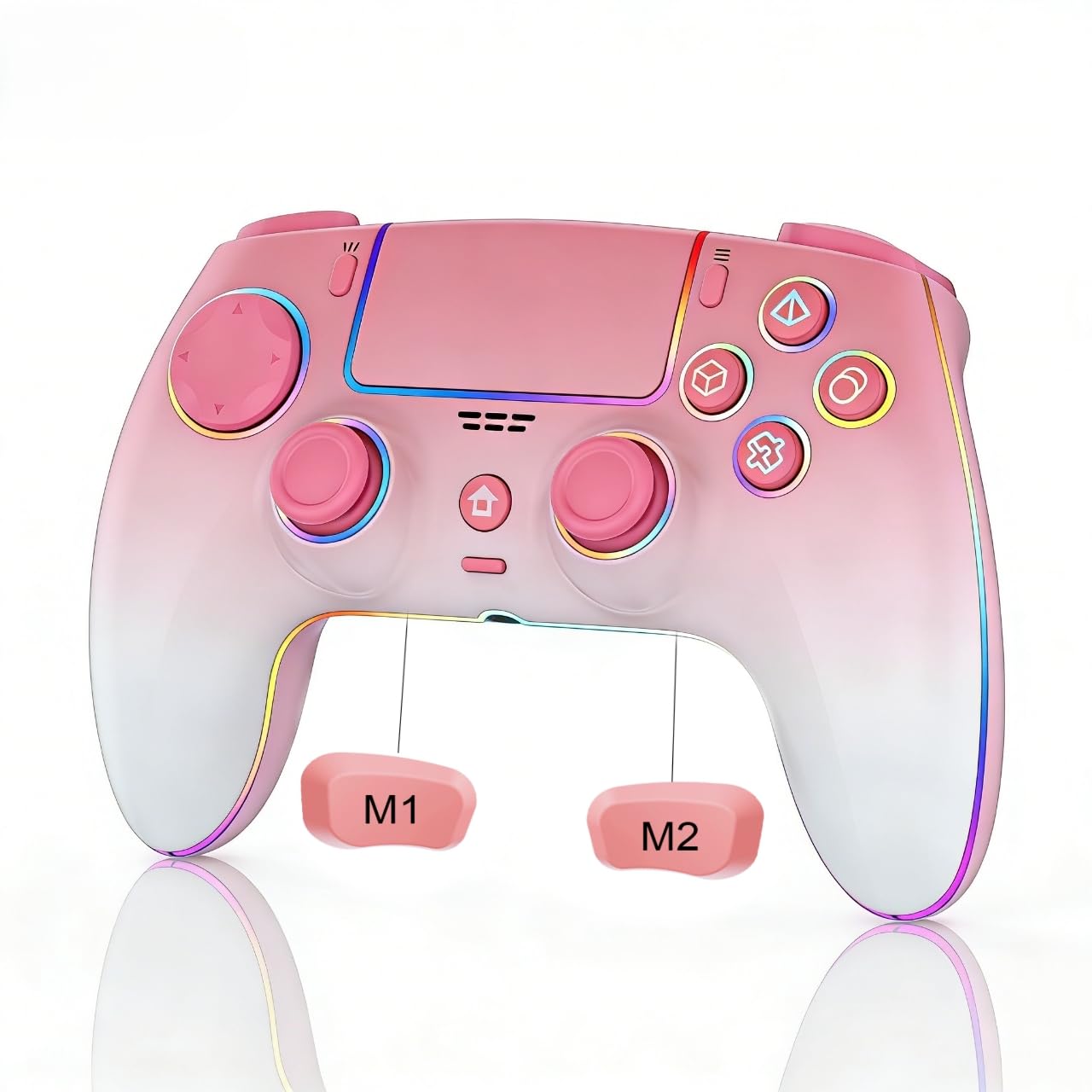
JUNHUAN Wireless Pink Controller for PS5 PC Mac Steam Deck with Hall Effect joystick trigger Cool RGB TURBO

3.9

$99.98

About this item

  • 【Compatible Devices & Battery Life】: Wlireless Controller for PS-5/Anroid/IOS/PC, Equipped with1500mAh battery to extend the game time (about 8-10 hours)
  • 【Hall Joystick and Hall Triggers】: High-precision Hall effect joystick and fast-response Hall triggers enable precise, drift-free game control, delivering more accurate control and faster response speeds to enhance the gaming experience and improve durability.
  • 【Programmable Features and TURBO】: Customize button mapping and turbo functions to suit your preferences for optimal control
  • 【Built-in speaker, Precise Control and vibration】 : The 6-axis gyro sensor allows for accurate motion control, enhancing gameplay precision, while dual vibration motors and a built-in speaker deliver realistic vibrations and sound effects
  • 【Ergonomic and non-slip design】: Based on ergonomic design, easier to grip than other controllers. Anti-slip design, so you don't have to worry about sweaty hands affecting your gaming experience.
  • Product description 1. Connect to PS5 When your controller hasn’t been paired with your current PS-5 console or has been connected to another console, Use a USB cable to connect the controller to your PS-5 console. During the connection, the system will automatically pair the controller. Once paired, remove the USB cable and press the HOME button. The controller will now connect wirelessly via Bluetooth. The LED light will stay on with a steady color, indicating it’s successfully connected to your console. 2. Connect to Windows PC Turn off the controller. Press and hold the SHARE button and the HOME button together. Hold both for 3 seconds. The LED light will flash white. On your PC, open Bluetooth settings and start searching for devices. Find and click on " DualSense Wireless Controller " in the device list to pair. When 【Compatible Devices & Battery Life】: Wlireless Controller for PS-5/Anroid/IOS/PC, Equipped with1500mAh battery to extend the game time (about 8-10 hours); 【Hall Joystick and Hall Triggers】: High-precision Hall effect joystick and fast-response Hall triggers enable precise, drift-free game control, delivering more accurate control and faster response speeds to enh
Specification

Product facts

Key details

best_sellers_rank
#6,403 in Video Games ( See Top 100 in Video Games ) #1,001 in PlayStation 5 Consoles, Games & Accessories
batteries
1 AAA batteries required. (included)
date_first_available
November 18, 2025

Dimensions and fit

dimensions
5.51 x 1.57 x 3.94 inches; 10.86 ounces
weight
10.8 ounces
product_dimensions
5.51 x 1.57 x 3.94 inches; 10.86 ounces
item_weight
10.8 ounces
Overview

About this item

  • 【Compatible Devices & Battery Life】: Wlireless Controller for PS-5/Anroid/IOS/PC, Equipped with1500mAh battery to extend the game time (about 8-10 hours)
  • 【Hall Joystick and Hall Triggers】: High-precision Hall effect joystick and fast-response Hall triggers enable precise, drift-free game control, delivering more accurate control and faster response speeds to enhance the gaming experience and improve durability.
  • 【Programmable Features and TURBO】: Customize button mapping and turbo functions to suit your preferences for optimal control
  • 【Built-in speaker, Precise Control and vibration】 : The 6-axis gyro sensor allows for accurate motion control, enhancing gameplay precision, while dual vibration motors and a built-in speaker deliver realistic vibrations and sound effects
  • 【Ergonomic and non-slip design】: Based on ergonomic design, easier to grip than other controllers. Anti-slip design, so you don't have to worry about sweaty hands affecting your gaming experience.
  • Product description 1. Connect to PS5 When your controller hasn’t been paired with your current PS-5 console or has been connected to another console, Use a USB cable to connect the controller to your PS-5 console. During the connection, the system will automatically pair the controller. Once paired, remove the USB cable and press the HOME button. The controller will now connect wirelessly via Bluetooth. The LED light will stay on with a steady color, indicating it’s successfully connected to your console. 2. Connect to Windows PC Turn off the controller. Press and hold the SHARE button and the HOME button together. Hold both for 3 seconds. The LED light will flash white. On your PC, open Bluetooth settings and start searching for devices. Find and click on " DualSense Wireless Controller " in the device list to pair. When 【Compatible Devices & Battery Life】: Wlireless Controller for PS-5/Anroid/IOS/PC, Equipped with1500mAh battery to extend the game time (about 8-10 hours); 【Hall Joystick and Hall Triggers】: High-precision Hall effect joystick and fast-response Hall triggers enable precise, drift-free game control, delivering more accurate control and faster response speeds to enh

Have a question about this product?

From the brand

Product detailProduct detailProduct detailProduct detailProduct detailProduct detailProduct detailProduct detail

Product videos

Product video 1

Customer reviews

8 reviewsMixed

Rated 3.9/5 across 8 reviews — opinions are mixed.

  • 63% of sampled reviews give 4–5 stars.

Customers say

Customers find the controller to be of good quality and beautiful. However, the functionality receives mixed feedback, with some saying it works well while others report issues with the microphone. Moreover, the battery life is poor, with one customer noting it dies quickly. Additionally, several customers mention problems with stick drift on the L side.

Generated from the text of customer reviews

Reviews with images

Customer review image for remote control for girlsCustomer review image for Cute and Functional!
See all photos
★★★★★

remote control for girls

I'm speaking from my own experience. My husband and I are a couple who spend part of our free time playing video games, and I was never satisfied with my controller. To be honest, I spent an hour looking for something that met my expectations until I found this beautiful controller, which is exactly what I was looking for. Read more

Customer review image for remote control for girls
Yoalkis Pupo
★★★★★

Lights on remote

My Granddaughter loves her new pink remote and how it lights up Read more

linda melton
★★★☆☆

Good controller but mic input doesn’t work

The controller it’s self is good just don’t use it to play any games that might need you to use the audio input for a mic bc the mic won’t work very well. But the actual controller it’s self is very good and responsive. Read more

Noah Scheibe
☆☆☆☆

Stick drift right away

Received the controller and it immediately had horrible stick drift on first use. Reset the controller and still had issues. Do not recommend. Will be returning. Read more

Erin Peck
★★★★

PlayStation 5 controller

It was for my grandsons when he has no complaints it must work according PlayStation 5 controller Read more

Vanessa Daugherty
★★★★★

Excellent

Works very well when I needed a new controller Read more

Robert negron sr
★★★★★

Would buy again!

Pretty good quality and does what I need it to! My only complaint is the symbols don’t match PlayStation’s but it’s universal so it makes sense why it doesn’t! Read more

Customer
★★★★★

Cute and Functional!

This controller is way cooler than I thought it would be! I love that it lights up in a rainbow of colors when it’s on. It also lights up Red when it’s not one, but is charging, which I thought was a cool little quirk. It was really easy to connect to our PS5, we used the included cable to connect it to the console. Then it would automatically connect wirelessly when the home button was pressed. Functions like any other controller. Read more

Customer review image for Cute and Functional!
Dot

We use optional analytics and advertising cookies to understand how visitors use Ventari, measure ads, and improve the experience. You can accept all optional cookies, allow analytics only, or decline them. See our Cookie Policy.