
Nice and compact keyboard
very nice feel when typing Read more
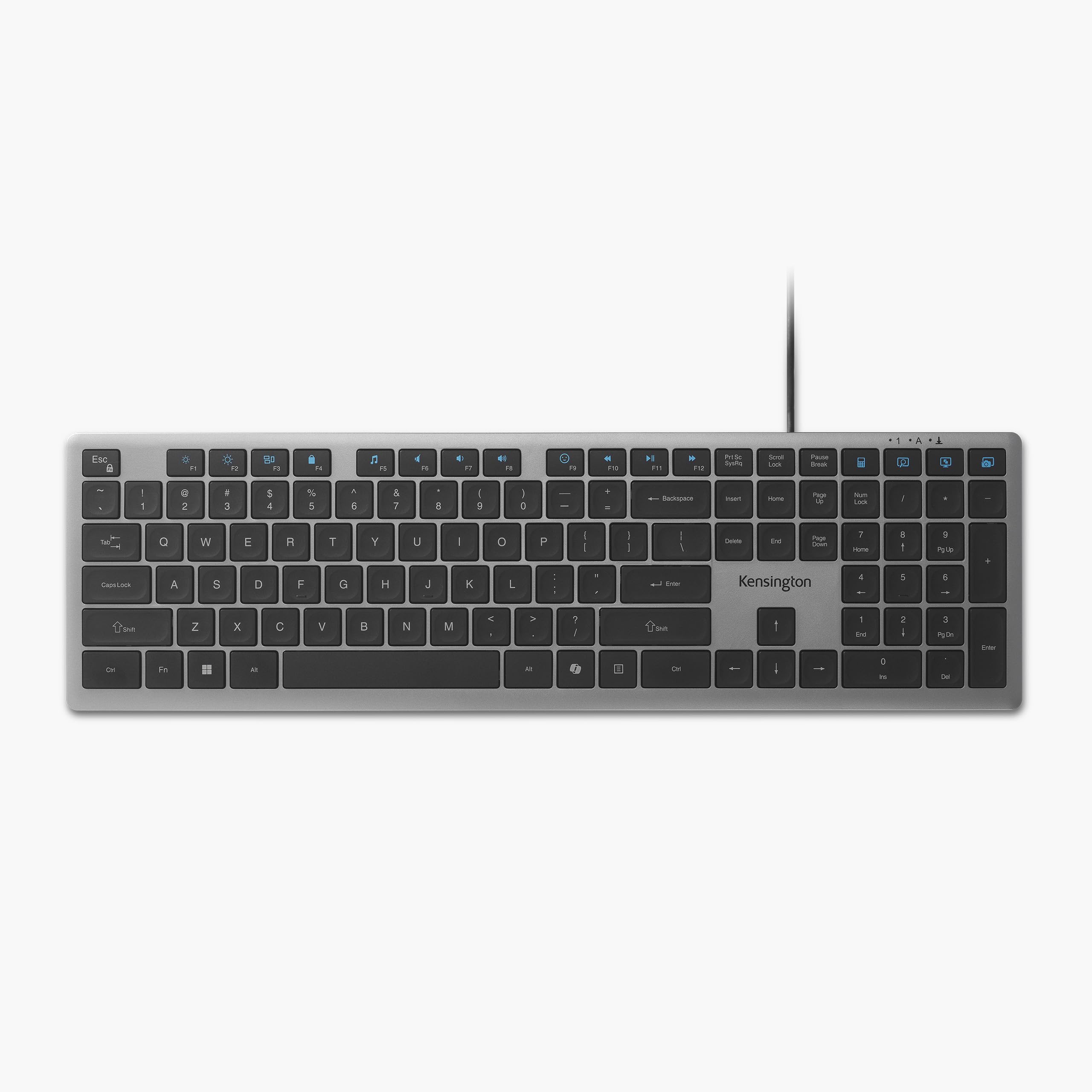
Kensington
$79.98

Have a question about this product?






Product video 1
Rated 4.4/5 across 6 reviews — well received overall.
Customers find the keyboard's quality positive.
Generated from the text of customer reviews
very nice feel when typing Read more
Typing experience feels good. The keyboard is somewhat heavy, feels premium. It is not as quiet as my laptop keyboard but it is still more quiet than my mechanical keyboard Read more
I'm writing this review using this keyboard I'm reviewing after using it for about a week. Out of the box, one thing I like for future-proofing is this keyboard is USB-C first and comes with a C to A adapter. It also looks nice and modern, though it doesn't match the black display and mouse, but those can be changed if you prefer gray or silver. I use a cheap Dell keyboard at work, and while this looks nicer, it feels, at least to me, the same, but with slightly less key travel and a little nicer "click." It's quiet though, definitely not the noise level of a mechanical keyboard. It's very flat and does not come with a wrist rest for ergonomics. They keys have shallow recesses in the middle; I'm not sure why, but they don't bother me. The bumps on F and J are very pronounced so a touch typist can easily find the home row. Overall, it feels okay, but nothing to write home about in my opinion. Hopefully these features come across in the photo I provided. Layout wise, it's the same general layout we've had for the last 30 years, with one exception. I don't like that they replaced the right "Windows" key with the Copilot key. I prefer lock my machine using the "Windows" + L key combo, so what used to be a one-handed operation is now two. Instead I'd rather Copilot replace the "menu" key with the menu function being an alternate ("Fn") function like on my laptop. The layout feels horizontally compressed. There is zero extra space between the main keyboard, center column (with home, end, etc.), and the numeric keypad. The overall width of this keyboard is maybe a half inch less than a Das Keyboard mechanical keyboard, but that has clear separation between the 3 sections. Overall I'll give this 4 stars, with one start being deducted for the combination of not having a wrist rest, personal preference for the copilot key, and the horizontal compression. Give this keyboard a try, but you might be just as well off with a less expensive one. Read more

Awesome DAC/Headphone Amp, highly recommend! Read more
This Kensington KB415 USB-C Wired keyboard is compact, which facilitates portability and is good for travel, but, when using it, I made significantly more typing errors than when using a standard/non-TKL keyboard. The increased errors may be due to the key spacing being slightly different on this TKL keyboard than a standard, so if you really want to have a keyboard that's more compact for easier storage, you may want to give this a try and just give yourself time to get accustomed to the slightly different spacing of the keys, which may lead to increased typing errors, especially at first. I don't feel like trying to learn to type with this keyboard and not willing to make increased typing errors until I'm accustomed to it so I just stopped using it. The tradeoff of increased typing errors for compactness isn't worth it to me. Though your experience may be different - you might not make more typing errors with this keyboard and I might just suck at typing. :) It'd be nice if they just made a TKL wired keyboard with the same spacing otherwise as a standard keyboard though. Read more
The media could not be loaded. I picked up this Kensington USBC keyboard because I wanted something to plug into my tablet so I could type faster. This is exactly what I was looking for. I got the full size version which includes the number pad and a few extra keys. There are 16 programmable keys that you could quite literally program them to do anything you want them to. Many people program them as macro keys which is perfectly fine but the driver that is native to the keyboard itself in its firmware allows the user to program the keys to do whatever they choose. I am an electrical engineer and I use a CAD program that I have to write redundant code And redundant wiring pathways. So far I have 14 of the 16 keys programmed to generate that redundant code and electrical pathways. Not only is this a time saver but it makes you so much more efficient. What would normally take me hours now it takes me quite literally minutes. I work from home three out of the 6 days I work and this allows me to have a better work-life balance. I know what you're thinking, how could a keyboard lead to a better work-life balance. Well, when you spend the majority of your day designing high-end equipment and you have to do redundant coding and pathways that take quite some time, it's a no-brainer to get this keyboard. It is also very important to note that it does come with a USBC to USBA adapter. So this is pretty much adaptable to any device. The keyboard itself is made out of very sturdy aluminum And ABS plastic for the back. It also has two flip up feet on the back to give it a more ergonomic feel. With the key mechanics being plastic and silicone underneath the keys that are made from a lightly textured ABS injection molded plastic gives everything a very high-end feel. This makes for a very soft touch and it feels like your hands are just gliding across the keys as you type. Since this is a wired keyboard, I would like to see a backlight but that's not a deal-breaker for me. I haven't looked down at the keyboard since I was in high school learning how to type. But the back light would still be a great addition especially because it's not dependent on battery power. Overall, I am very satisfied with this keyboard. It does everything I need and more. It's made with quality in mind as well as the consumer in mind. But I'd still get rid of that co-pilot key. In my opinion, Microsoft's AI is subpar. Therefore it should not need a special key on a keyboard. The keys are soft to the touch and not loud like a mechanical keyboard. I could do without the co-pilot key as I do not use Microsoft's AI. That is the only thing I don't like about this keyboard. I can with great confidence recommend this to anybody looking for a solution for a wired keyboard for not only USBC but also a USBA connection. The value for the money is definitely there. I would suggest picking this up because you won't be disappointed. Read more

Kensington Adjustable Aluminum Laptop Stand for Desk Ultra-Slim Lightweight Foldable Portable Notebook Holder Anti-Slip Silicone Tablet Mount for

Kensington Duo Gel Loop Wrist Rest for Keyboard Wrist Pad for Full Size Keyboard Ergonomic Wrist Pad Non-Skid

Kensington Duo Gel Mouse Keyboard Wrist Rest Bundle Set Ergonomic Keyboard and Mouse Pad With Wrist Support Keyboard

Kensington Duo Gel Mouse Keyboard Wrist Rest Bundle Set Ergonomic Keyboard and Mouse Pad With Wrist Support Keyboard

Kensington Elevated Stand Adjustable for Surface Stand for Desk on-Skid Tablet Holder Designed for Surface Pro Silver K58277WW

Kensington Expert Mouse Catalog Category Input Devices Trackballs Gamepads

Kensington Keyboard Tray Under Desk SmartFit Ergonomic Slide-Out Keyboard Drawer with Cable Management Extra-Wide Height Adjustable Keyboard Holder

Kensington Orbit Trackball Mouse with Scroll Ring K72337US 4 1 2X5 1 2X2
We use optional analytics and advertising cookies to understand how visitors use Ventari, measure ads, and improve the experience. You can accept all optional cookies, allow analytics only, or decline them. See our Cookie Policy.