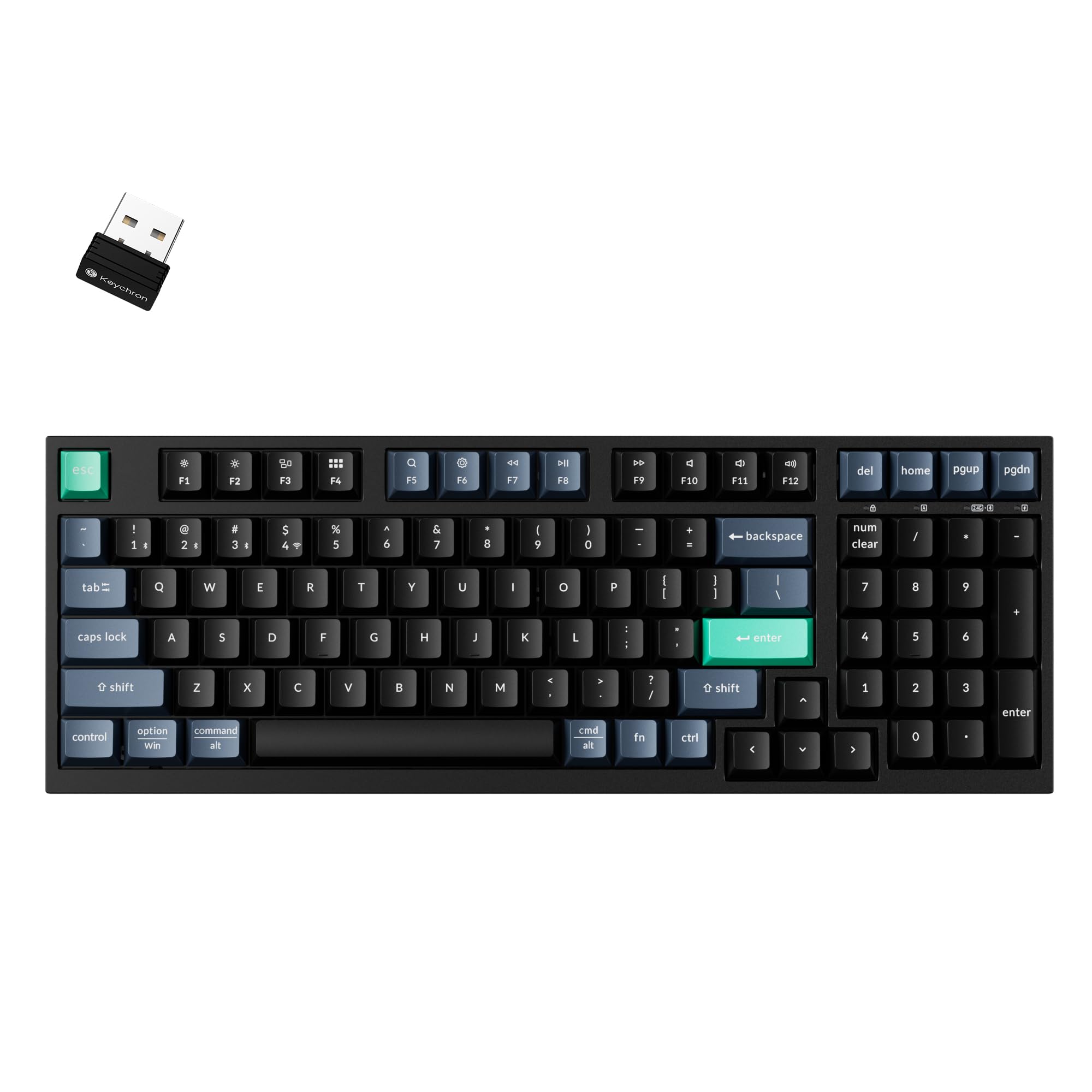
You know, sometimes you just don't need a full blown mechanical keyboard. For example, maybe you just need a basic keyboard for everyday activities like writing emails or browsing the Internet. Stuff like that. One of the advantages of looking for a keyboard that isn't a mechanical keyboard is cost. Non mechanical keyboards, generally speaking, are far cheaper than mechanical ones. So I want to talk about some of the nice features of this keyboard. Keep in mind when reading this review that I am a bit of a keyboard freak or collector is maybe a nicer term. I have dozens of keyboard laying around my computer room. I say all this because I personally feel I really know what I am talking about when it comes to keyboards. So I want to first talk about the typing experience of this keyboard. So instead of a mechanical keyboard, this keyboard uses a scissor mechanism. This was kind of the standard way keyboards were before the big mechanical keyboard explosion 8-10 years ago. When typing there is just the slightest hint of a bump when typing. Like a super subtle tactile kind of feel but again, SUPER subtle. On keypress when you bottom out the keycap it feels nicer an smooth. Itg is also quiet. This is fur sure what I would call a silent keyboard. A keyboard like this would be ideal in an office environment or anywhere where you have people sitting near you and you don't want them to hear you clacking away on your keyboard. Unlike a lot of mechanical keyboards, there is zero rattle on the larger keys like the spacebar. It doesn't matter where you press on the space bar, the entire space bar moves down evenly. All this to say I very much enjoyed the typing experience of this keyboard. I would not have known this keyboard uses a scissor mechanism. Had I not known already, I would have assumed it was some kind of basic mechanical keyboard. Connectivity is a big win on this keyboard. You can go wired or wireless with either bluetooth or use the included 2.4 GHz "nubbin". I am using this on my Mac so I went with Bluetooth and I had zero issue with connecting the keyboard. Thankfully this keyboard works with both Apple Macs and Windows machines. If you want you can remap keys or create macros with Keychron's excellent web based configurator app. This is also a lower profile keyboard. I say "lower profile" because I wouldn't say it is a "low" profile keyboard like a Keychron K3 or the Logitech MX Keys keyboards. The keycaps are a bit taller than those. However it is a lower profile keyboard that I would say is about 2/3 the thickness of a more traditional keyboard. It is also a 96% keyboard. So it's ALMOST a full size keyboard, but they have moved some of the keys around like the DEL & Page Up/Down keys to over the num pad and you are missing a few keys like INS or or Scroll Lock, keys you don't really use all that much at least in my experience. So these changes makes for a keyboard that isn't as wide as a full size keyboard but functions almost exactly like a full size keyboard. This is just an outstanding basic keyboard. The typing experience was quiet and smooth. You have many different ways to connect the keyboard to your systems. Almost all of the important things I look for in a good keyboard are here but in a inexpensive package. This is what I would call the perfect day to day productivity keyboard for people on a budget. No fancy RGB lighting here. Not a heavy keyboard with an aluminum base. Just a basic keyboard that feels great to type on and doesn't cost an arm and a leg. Read more


This is a very responsive and good looking keyboard. I love that when I hit a key it actually shows up quickly on the screen as having already connected and caused a response from the computer. Unlike my older keyboard that would take several key presses before showing an entry, this one allows me to immediately type in my pin to open the machine without having to wait for the computer to notice it is there. I've run this on a windows machine with no compatibility issues. I'm sure, based on experience with mac, that this would be just as responsive on those. The only drawback I've noticed so far is that the keys seem mushy. This might be because I'm used to using flat keys and haven't dealt with a classic keyboard like this one in a long time. As I adjust, I can see improvement. I had to look up how to connect by bluetooth. It wasn't difficult after that. With this keyboard, be sure to use the fn key on the right side of the keyboard instead of the option key on the left side that would normally hold that spot as well. With that said, bluetooth works just as well as dongle connection. I've only tried this on my windows machine so far. As far as portability, this thing is compact enough to stuff in a bag and light weight enough to carry around without noticing it much. It is lighter than other keyboards I have. Read more

Date: 27 Dec 2025 Stars: 5 Title: basic quality comfortable quiet keyboard Amazon Title: Keychron B35 Wireless Keyboard, 2.4 GHz/Bluetooth 96% Layout Keyboard with Numeric Specifics: 96%, black Usage: Used with MacBook Air 2025, MacBook Pro 2021 Summary: Would highly recommend Pros: + lightweight yet substantial + quiet, especially compared to mechanical switch keyboards + comfortable to type on + adjustable tilt feet + good battery life + multi-device - can connect 3 Bluetooth devices and hot key between them very handy if you use multiple computers + 96% provides a keypad with less desk space taken than full size Note: the keys are *not* backlit and may be difficult to see in dark conditions. Major issues: None Minor issues: None Note: All reviews expressed are solely my own opinions, based on personal experiences and preferences with the reviewed products. Some criteria used to reach my conclusions include price/value, accuracy of listing, build quality, ease of use, among others. I strive to provide honest and unbiased assessments in the hope of helping others make informed decisions when considering potential purchases. These reviews are based on my first impressions as well as thorough testing that I may have performed. If, in the future, I discover any additional issues or come to different conclusions, I will do my best to update the review accordingly. Read more
I am a huge Keychron fan. I already have a Keychron K4 HE, and I swooped this up as soon as I saw it. Keychron is the best keyboard brand in my opinion, especially if you are on Linux. I wanted a low-profile keyboard that doesn't take up the whole desk for my wife while still having the number pad. The best part is the switch on the back for Mac/Windows/Linux. It works right out of the box on my Linux machine or my wife's Windows 11 system without needing to mess with drivers. You don't have to install bloatware to configure it. You just go to their website (Keychron Launcher) and remap keys directly in the browser. It saves the settings to the keyboard, which is awesome. It uses scissor switches, so it feels like a really high-quality laptop keyboard (think MacBook or ThinkPad). It’s short-travel and very snappy. Anything is better than membrane keys! The 2.4GHz dongle is rock solid—no lag when typing. For $40, getting a Keychron that is this versatile is a steal. Read more