LIZVIE

LIZVIE Phone Charger Camera - USB-C Port WiFi Smart Charger - Motion Detection 170 Wide-Angle SD Storage Spy

4.6

$131.23

About this item

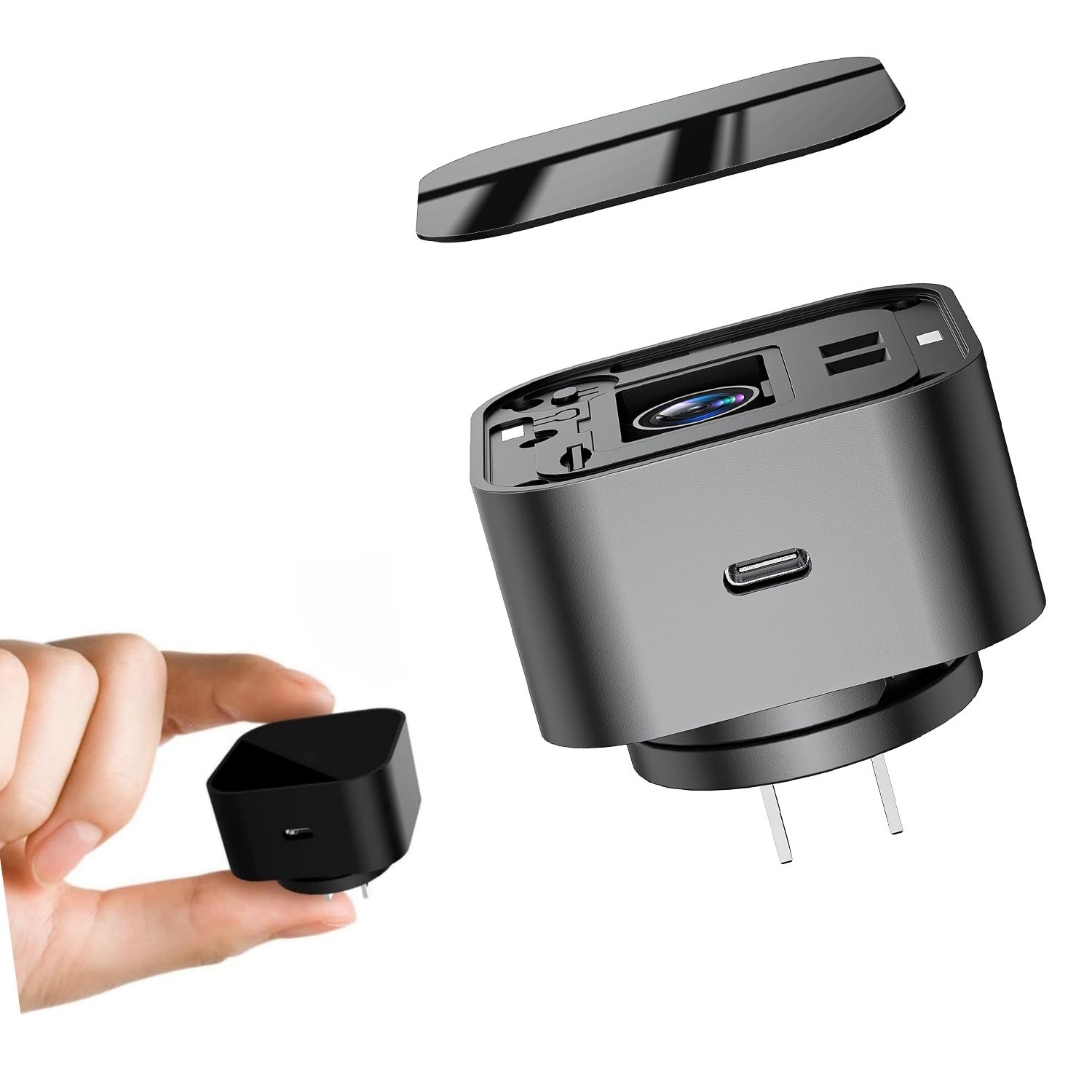
  • 【Specific Transparent Glass Panel】The charging plug appearance of the transparent glass panel, you can watch the video clearly visible, will not affect the observation effect, and LED indicators, SD card slot and lens are invisible design, will not scare the pets or damage the aesthetic.
  • 【Adjustable 170° Viewing Angle】The hidden camera charger adjustable lens allows you to freely adjust the viewing angle (170° = 110° + 30° up + 30° down, covering 110° in width) to capture more active areas.
  • 【2.4GHz WiFi Setup + Motion Alerts】This phone charger camera detects movement and sends instant app alerts. It has an automatic low-light activation function to ensure clear visual effects 24 hours a day.
  • 【Loop Storage,】Hidden camera charger supports microSD cards up to 256GB (not included). Auto loop saves files.
  • 【 Password Lock & Tech Support】The hidden camera supports setting an exclusive password to protect data privacy. For any technical issues, you can contact our technical team to help you solve them.
  • Product description How to Use (Quick Setup Guide) Step 1: Remove the Protective Film Before use, gently peel off the protective film covering the lens to ensure a clear image. Step 2: Power On the Device Plug the device into a 110V outlet and wait 30–60 seconds for it to boot up. The device will broadcast a WiFi signal named “BLink-XXXX”. Step 3: Connect via Phone’s WiFi Settings On your phone, open WiFi settings, find and connect to “BLink-XXXX”. Default password: 0123456789 “No Internet” message is normal — just ensure the connection is successful. Step 4: Open the App Launch the Lizvie Pro app. The device will appear automatically and take you to the viewing screen. Step 5: Connect to Home WiFi After about 10 seconds, a prompt will appear. Select your 2.4GHz home WiFi, enter the password, and complete 【Specific Transparent Glass Panel】The charging plug appearance of the transparent glass panel, you can watch the video clearly visible, will not affect the observation effect, and LED indicators, SD card slot and lens are invisible design, will not scare the pets or damage the aesthetic.; 【Adjustable 170° Viewing Angle】The hidden camera charger adjustable lens allows you to freely
Specification

Product facts

Key details

color_spec
Black
Recommended Uses For Product
Indoor Security
Brand
LIZVIE
Special Feature
Adjustable
Indoor/Outdoor Usage
Indoor

Dimensions and fit

dimensions
3.86 x 2.95 x 2.8 inches
weight
4.6 ounces
package_dimensions
3.86 x 2.95 x 2.8 inches
item_weight
4.6 ounces

Item information

compatible_devices
Android & IOS
controller_type
Push Button
mounting_type
Wall Mount
color
Black
number_of_items
1
wireless_communication_technology
Wi-Fi
effective_video_resolution
1080
batteries_required
No
unit_count
1.0 Count
control_method
App
best_sellers_rank
#534 in Hidden Cameras
date_first_available
May 19, 2025
manufacturer
Shenzhen Goodflys Technology Co.,Ltd
Overview

About this item

  • 【Specific Transparent Glass Panel】The charging plug appearance of the transparent glass panel, you can watch the video clearly visible, will not affect the observation effect, and LED indicators, SD card slot and lens are invisible design, will not scare the pets or damage the aesthetic.
  • 【Adjustable 170° Viewing Angle】The hidden camera charger adjustable lens allows you to freely adjust the viewing angle (170° = 110° + 30° up + 30° down, covering 110° in width) to capture more active areas.
  • 【2.4GHz WiFi Setup + Motion Alerts】This phone charger camera detects movement and sends instant app alerts. It has an automatic low-light activation function to ensure clear visual effects 24 hours a day.
  • 【Loop Storage,】Hidden camera charger supports microSD cards up to 256GB (not included). Auto loop saves files.
  • 【 Password Lock & Tech Support】The hidden camera supports setting an exclusive password to protect data privacy. For any technical issues, you can contact our technical team to help you solve them.
  • Product description How to Use (Quick Setup Guide) Step 1: Remove the Protective Film Before use, gently peel off the protective film covering the lens to ensure a clear image. Step 2: Power On the Device Plug the device into a 110V outlet and wait 30–60 seconds for it to boot up. The device will broadcast a WiFi signal named “BLink-XXXX”. Step 3: Connect via Phone’s WiFi Settings On your phone, open WiFi settings, find and connect to “BLink-XXXX”. Default password: 0123456789 “No Internet” message is normal — just ensure the connection is successful. Step 4: Open the App Launch the Lizvie Pro app. The device will appear automatically and take you to the viewing screen. Step 5: Connect to Home WiFi After about 10 seconds, a prompt will appear. Select your 2.4GHz home WiFi, enter the password, and complete 【Specific Transparent Glass Panel】The charging plug appearance of the transparent glass panel, you can watch the video clearly visible, will not affect the observation effect, and LED indicators, SD card slot and lens are invisible design, will not scare the pets or damage the aesthetic.; 【Adjustable 170° Viewing Angle】The hidden camera charger adjustable lens allows you to freely
Close-up view of the LIZVIE Phone Charger Camera - USB-C Port WiFi Smart Charger - Motion Detection 170 Wide-Angle SD Storage Spy
Details

Construction and technical details

Connectivity Technology
Ethernet
power_source
Corded Electric
connectivity_protocol
Wi-Fi

Have a question about this product?

From the brand

Product detailProduct detailProduct detailProduct detailProduct detailProduct detailProduct detailProduct detailProduct detailProduct detailProduct detailProduct detail

Product videos

Product video 1

Customer reviews

Customers say

Customer summary is not available yet.

Review summary is available, but individual reviews are temporarily unavailable.

We use optional analytics and advertising cookies to understand how visitors use Ventari, measure ads, and improve the experience. You can accept all optional cookies, allow analytics only, or decline them. See our Cookie Policy.