
Free shipping over $35 · 60-day returns · Price-watch guarantee

Ventari

Microsoft

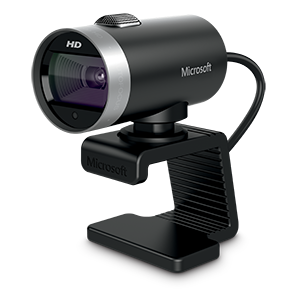
Microsoft LifeCam Studio 1080p HD Webcam - Gray

$64.99

101+ bought in the past month

About this item

  • High-fidelity microphone - For more natural, detailed audio
  • ClearFrame Technology - for smooth, detailed video
  • Auto Focus and Advanced high-precision glass lens optics
  • 1080p HD widescreen sensor - for superior sharpness and 16:9 image quality
  • TrueColor Technology - automatically delivers bright and colorful video, in virtually all lighting conditions

Key details

Brand
Microsoft
Photo Sensor Technology
BSI CMOS
Video Capture Resolution
1080p
Maximum Aperture
1.8 f
Flash Memory Type
SD

Dimensions and fit

dimensions
7.5 x 2.66 x 8 inches
weight
4.5 ounces
Maximum Focal Length
1920 Millimeters
Screen Size
3.5
product_dimensions
7.5 x 2.66 x 8 inches
item_weight
4.5 ounces

Technical specifications

item_model_number
Q2F-00001

Item information

Video Capture Format
MP4
Supported Audio Format
MP3, WAV
Connectivity Technology
USB
best_sellers_rank
#163 in Webcams
is_discontinued_by_manufacturer
No
date_first_available
September 13, 2010
manufacturer
Microsoft
Highlights

About this item

  • High-fidelity microphone - For more natural, detailed audio
  • ClearFrame Technology - for smooth, detailed video
  • Auto Focus and Advanced high-precision glass lens optics
  • 1080p HD widescreen sensor - for superior sharpness and 16:9 image quality
  • TrueColor Technology - automatically delivers bright and colorful video, in virtually all lighting conditions

From the brand

Product detailProduct detailProduct detailProduct detailProduct detailProduct detail

Product videos

Product video 1

Customer reviews

716 reviewsPositive

Rated 4.2/5 across 716 reviews — well received overall.

  • 100% of sampled reviews are from verified purchases.
  • 60% of sampled reviews give 4–5 stars.

Customers say

Customers find the webcam's picture quality excellent, with top-notch sound and video capabilities, and appreciate that it works well with Skype and Windows 10.

Generated from the text of customer reviews

Reviews with images

Customer review image for Works fine with Windows 10, settings can be adjusted via Skype!Customer review image for Works fine with Windows 10, settings can be adjusted via Skype!
See all photos
★★★★★

Works fine with Windows 10, settings can be adjusted via Skype!

This review is for the "Microsoft LifeCam Studio 1080p HD Webcam - Gray" in case you find it under another product. I was looking for a new webcam for the frequent Zoom meetings I attend. The main requirement was the camera's viewing angle had to be narrower than the wide-angle view provided by nearly every other less-expensive webcam. This can only be obtained via optical zoom (preferable but unavailable at this price point) or some form of digital zoom effect. The reason this is important for online conferencing via Zoom and related systems is that the normal wide-angle view makes your face too unimposingly tiny, especially in "gallery" view. Imagine my surprise when I found a whole slew of camera controls in the Skype settings menu (ridiculously, they aren't even available via the Windows 10 camera app.) Among the controls that are adjustable is a digital-zoom setting -- exactly what I was looking for! How to take advantage of this in Zoom: Open Skype, adjust the settings for the camera using the Skype Audio and Video settings controls. Remember to hit the "Apply" button on both settings windows. Exit Skype and start Zoom and the camera settings will have been preserved between the two applications! Using this procedure and sitting about a foot from the camera, I was able to get my face to fill at least 3/4 of the screen height, the exact effect I was after. I've only tested this with Zoom so I don't know if it works with other conferencing or picture/video software. But it's good enough for my purposes, especially since I bought this model back in 2012, way before there ever was Zoom. BTW, this camera's image quality from the start has been extremely good and it is still competitive today. Read more

Customer review image for Works fine with Windows 10, settings can be adjusted via Skype!Customer review image for Works fine with Windows 10, settings can be adjusted via Skype!
SBeckmesserVerified purchase
★★★★★

Great Webcam

Really satisfied with this webcam! Did the job and set up on Clipchamp went smoothly. So glad I made this purchase. The Solocast 2 mic was a different bad story. Returned the mic for a different one; kept the webcam. Read more

DeniHeleneVerified purchase
★★★★

Great picture, great sound, need fast machine

Been playing with the LifeCam Studio for a couple weeks now. I really like the quality of the video it produces, though calling it a 1080p camera is a bit of a stretch since it doesn't do 1080p out of the box with the software it comes with. Though, it's not like Skype or Live Messenger will do 1080p video chats anyway, so it's not that big a deal, the 720p video it captures is way better than the other cameras I've seen. If you want to record in 1080p with the lifecam studio, you'll have to use something like VirtualDub (freeware). I do like that it's Microsoft's and they have a much better track record of releasing firmware/driver updates than most vendors <cough-Logitech>. My last camera I had for 3 years with no driver updates, no firmware updates and they didn't even make a Windows 7 driver for it. This camera has had 2 firmware updates and at least one driver update. That means they're serious about improving the experience with it. The camera picks up an image very well, even in super low-light situations. I turned off all my lights and just had the monitor going, it is able to lengthen the exposure or open an iris or something to make my face really clear still. The other cameras I tried didn't fare nearly as well. The camera's microphone is also very sensitive and sounds great. Which is good and bad. While chatting, every move in your chair is caught, every throat clearing heard, and yes, people can hear you belch or break wind. Farters beware, they will hear you. "Did you just fart?" "Uh, no...that was this old chair" The reason I gave it a 4 instead of a 5 is because it needs a fast machine to get the full HD video at a fast frame-rate. I have a dual-quad core computer with 12GB of RAM and a giant radeon graphics card and I get fantastic video at over 30fps. Other people have complained about how bad the refresh rate is, which I didn't see on my computer. When I moved it to my weak-arse laptop however, I did notice a slower frame-rate at the high resolutions. I guess that's to be expected until someone creates a camera that offloads all the image processing to an on-camera chip. I don't really see this as a problem with the camera though, more a problem trying to do more than the computer is able to do. Want it to go faster, use a faster machine. It's like watching full-screen HD videos downloaded from the internet with older machines. You wouldn't blame Media Player if it's choppy, you'd blame the slow processor and weak graphics card. Same principle in my mind. All in all I think it's a great camera at a great price. Read more

Number2Verified purchase
★★★★★

Works terrific!

Works great! Very clear picture with even low lighting! Read more

Buyer of good goodsVerified purchase
☆☆☆☆

There are better Webcams

I purchased this Microsoft Lifecam Studio webcam in April 2011 and spent the last month trying to work-out the bugs. I even upgraded a great computer to a awesome computer thinking that was the problem. No, the webcam is manufactured as unusable. A grade C- at best. The software is worthless and there is no options to choose a different microphone. If you want a really, really good webcam get the Logitech HD Webcam C310. It has a great HD picture and works right out of the box. It's half the price and 100 times better! You will love-it! Thanks Read more

Wesley CurtisVerified purchase
Recently Viewed

We use optional analytics cookies to understand how visitors use Ventari and improve the experience. This banner controls analytics measurement only. See our Cookie Policy.