
Great gift
My daughter (25) loved it! Very nostalgic! Awesome gift. You can even listen without headphones. Read more

ZJchao
$30.99
Have a question about this product?
Product video 1
Customer summary is not available yet.
My daughter (25) loved it! Very nostalgic! Awesome gift. You can even listen without headphones. Read more
When I bought this, I was expecting like a good mp3 player for school cause we're not allowed to use our phone.So I thought I'll buy an mp3 player.But when I bought this, it got delayed which I didn't think was so bad.But when it came, it came with the wrong directions cant bluetooth it.There's no way to put songs on it.I'm gonna return it Read more
I love this MP3!!! It felt like Christmas Day opening the package and setting it up:) I think this is an amazing deal for the price. I’d give it a 4.5 if I could. Pros: - Super Cute -Seemingly Fast Charge -Easy to read and cute display screen - Came with ear buds and charging cable -Downloads just like a regular MP3 - Great sound quality for an mp3 - You can do soooo much on this little device: Record your own messages, listen to Radio, download pictures, have access to a calendar and time, PLAY MOVIES, I haven’t tried the Ebook part of it, but it has that too -You can turn off the display lights (has flashing red and blue lights in the device that show since it’s clear) - Lightweight - It has an equalizer and you can control the speed of the songs -Comes with test/sample songs, a music video, and pictures. Cons: - The instructions that it came with have translation issues, so it makes no sense. But it’s pretty easy to figure out if you already know how to use an MP3 - I feel like in order to use it you DO HAVE TO KNOW how to use an MP3 already - The lights are realllly bright and can be annoying but they can be turned off - The earbuds it came with hurt the ears - The lowest volume for the radio is still quite loud - The buttons are very confusing at first. I hope this makes sense. THIS IS FOR WHEN YOU’RE IN A MENU: Button Configuration: Right: Down Left: Up Down: Go Back (like pressing the back arrow on a desktop) Hold Down: Volume Up: Menu (offers a different menu for each activity you’re doing) Middle: Select/Accept - BIGGEST CON AND A WARNING: When I first turned it on it blasted the music at full volume. And since the buttons are confusing I was accidentally blasting music for a while. I’m just super lucky it didn’t blow the speakers. Overall: I love it. I think it’s just like the MP3 I had growing up (but with more functions). I do think you need to already know how to use an MP3 in order to use it because of the translation barrier in the instructions. You do need to have a computer that reads discs or figure out how to put your music onto an SD card, which can be hard for someone who hasn’t done that before. I don’t really consider it a con that you need your own CD’s/ DVD’s, disc reader/SD card reader, downloaded media just because this is very par for the course. So I wouldn’t recommend this for beginners… unless the said beginner likes a challenge. Read more
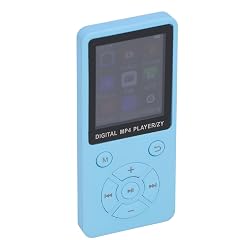
MP3 MP4 Player 1 8 Inch Color Screen HiFi Portable Music Player Blue

32GB MP3 MP4 Player 5 0 Portable HiFi Music Player for Sport Travel 1 8 Inch Screen Blue

ZJchao MP3 MP4 Player 1 8in Screen 8GB Memory 64GB Expandable 30 Hours Playback Multi Function Sports Music

ZJchao MP3 MP4 Player 1 8in Screen 8GB Memory 64GB Expandable 30 Hours Playback Multi Function Sports Music

MP4 Player Smart High Definition BT Fidelity with 64GB Memory Card 5 2inch Full Touchscreen

MP4 Player with 128GB Memory Card Full Touch Screen High Definition MP4 Portable HiFi Music Player for

ZJchao MP3 MP4 Player Portable Music Player with Speaker FM Radio Recorder Earphone Digital Music Player for Immersive

LCD MP3 Player Lossless Sound Aluminium Alloy Support Sleep Shutdown Ultra Thin MP4 MP3 Player 1 8 Inch
We use optional analytics and advertising cookies to understand how visitors use Ventari, measure ads, and improve the experience. You can accept all optional cookies, allow analytics only, or decline them. See our Cookie Policy.