NearStream

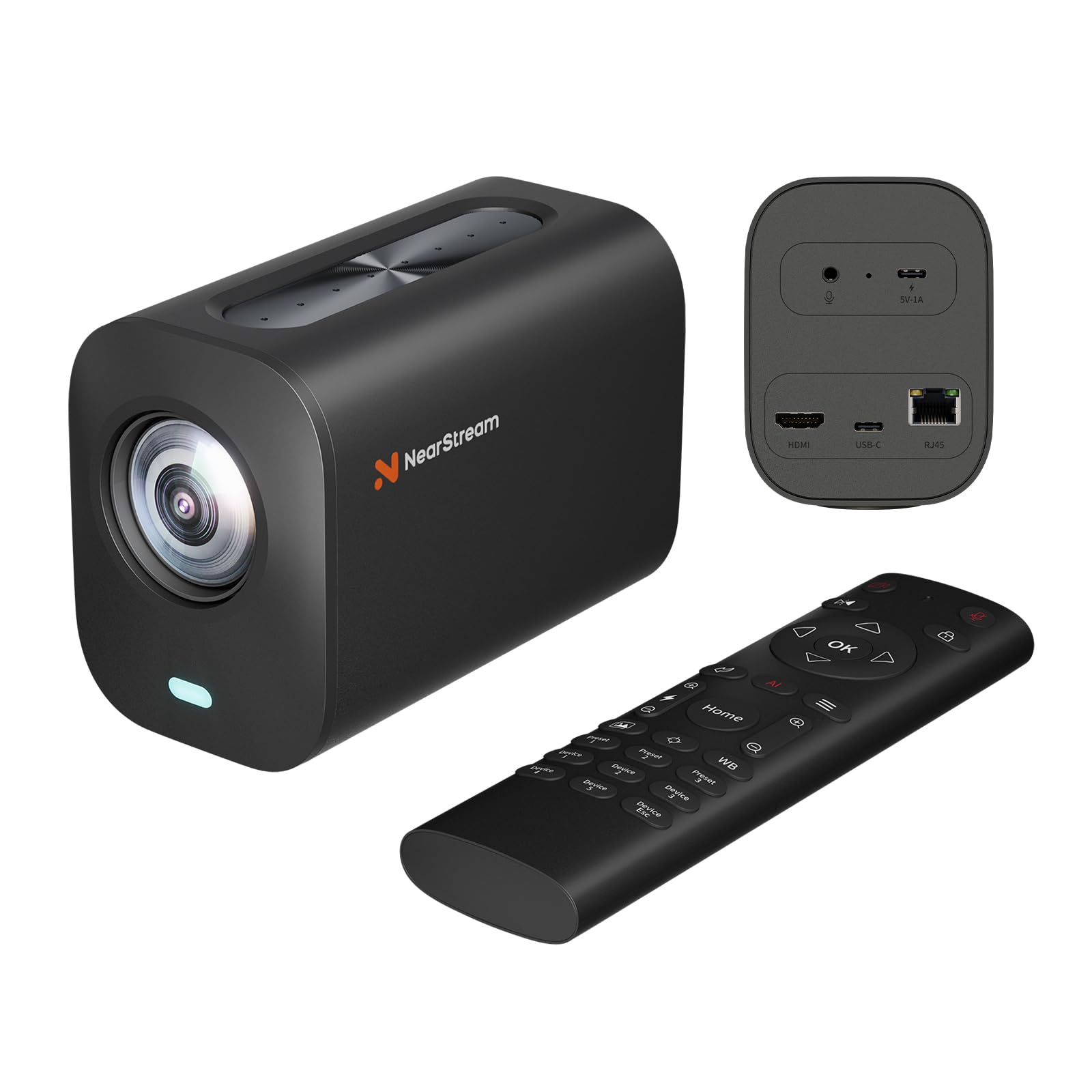
NearStream VM20 Wired Streaming Camera 4K with 40X Hybrid Zoom 8 Noise Canceling Mics Remote Control Plug Play

4.0(43)

500+ bought in the past month

$269.99

About this item

  • 【4K Crystal Clear Imaging & 40X Hybrid Zoom】: This streaming camera features an impressive 40X Hybrid Zoom (10x optical, 4x digital), ensuring crisp, detailed images from distances. Equipped with advanced sensor, it performs exceptionally well in low-light conditions, providing high clarity and detail. The camcorders video camera 4k is tailored for vloggers, streamers, and content creators seeking top-tier image quality.
  • 【Multiple Connection Options & Effortless Setup with Simple Webcam Connectivity】: The camera offers three wired connection options—HDMI, USB, and RJ45. Additionally, the compact camera supports the RTSP protocol, enabling seamless streaming to platforms like Facebook, YouTube, Twitch, and OBS. Plus, This wired webcam offers effortless connectivity with plug-and-play functionality, ensuring a seamless setup just like any standard webcam.
  • 【Support for Multi-camera Setup & Versatile Shooting Angles】: With the ability to connect multiple VM20 content creator cameras, you can easily build a professional broadcast studio that captures dynamic visuals from various angles. Besides, The VM20 webcam for PC features a 1/4-inch mounting hole, making it simple to attach to tripods or mounts for landscape, portrait, or overhead shots.
  • 【Smart Remote Control & Preset Modes】: You have complete control over your video capture settings. From zooming in and out to adjusting preset positions and customizing visual settings, the remote allows you to easily fine-tune your real-time video for the perfect shot. The 3 customizable Preset Positions allow you to quickly switch between scenes with minimal adjustments.
  • 【8-MEMS Mic Array with AI Noise-Canceling & 3.5mm Audio Input】: This YouTube camera is equipped with an 8-MEMS microphone array that captures 360° audio within a 16-foot radius. The advanced AI noise-canceling feature ensures crystal-clear sound by intelligently eliminating unwanted background noise. Plus, with support for external audio input via a 3.5mm jack, you can connect the external microphone to VM20.
  • 【Warm Tips for Using VM20】: 1. Audio Tips: Match your audio level to the camera’s Line-in, use the correct TRS/TRRS cable, and fully insert the connector. For best results, use the NearStream AWM20T microphone. 2.Video Tips: Use USB for 4K or HDMI/RJ45 for 1080p. Set App/OBS to High Quality, improve lighting, clean the lens, ensure focus, and use a wired network ≥6000 kbps. 3.Compatibility:Works with Windows and macOS only; not compatible with iPhone, iPad, or Android. 4. Software: Use NearStream NearSync on PC or Mac; no mobile app available. 5. Menu Adjustment: Hold the “Flip” button on the remote to correct mirrored text.
  • 【Firmware Update & Windows Setup】: After updating your VM20 camera to firmware V1.0.0.0.R.20251011, Windows users must uninstall the VM20 in Device Manager to ensure proper recognition (keep the camera connected via USB throughout). Steps: Open Device Manager → Locate VM20 camera under "Audio Inputs and Outputs" or "Sound, video, and game controllers" → Right-click → Uninstall → Confirm → Unplug & reconnect. Repeat buyers whose PC remembers an old VM20 should do the same for the new camera. Mac users do not need these steps. Contact us anytime if you need help.
$269.99

In Stock

DeliveryEstimated 3–5 business days · Final delivery speed and cost are confirmed at checkout
Easy Returns · 30-day window
This order is a gift

In Stock

Secure Checkout
Free Returns
30-Day Guarantee
Secure checkoutAll transactions are SSL-encrypted. Your payment info is never stored.
Free returnsReturn or replace within 30 days
Fast deliveryOrders ship within 1 business day and arrive in 4–8 days.
Buyer protectionIf your order arrives damaged or doesn't show up, we'll make it right.
24/7 supportOur team is here to help. Reach us anytime by email or chat.
Ships fromOur Warehouse
Sold byNearStream Official Store
Returns
Easy Returns30-day return window
PaymentsSecure transaction
Currently unavailable
Easy Returns · 30-day window

Product details

BrandNearStream
Photo Sensor TechnologyCMOS
Video Capture Resolution4K
Maximum Focal Length35.17
Flash Memory TypeNAND Flash
Video Capture FormatMJPEG
Supported Audio FormatPCM, AAC
Connectivity TechnologyEthernet, HDMI, USB
Special Feature40X Hybrid Zoom, 8 Noise Canceling Mics, HDMI/USB/RJ45 Port, Microphone Input, Remote Control
Optical Zoom10 x

Technical specifications

brand_nameNearStream
item_weight1.74 pounds
product_dimensions5.3 x 3.8 x 2.8 inches
item_model_numberVM20-US
special_features40X Hybrid Zoom, 8 Noise Canceling Mics, HDMI/USB/RJ45 Port, Microphone Input, Remote Control
best_sellers_rank#192 in Webcams
date_first_availableFebruary 6, 2025

From the brand

Product detailProduct detailProduct detailProduct detailProduct detailProduct detailProduct detailProduct detailProduct detailProduct detailProduct detailProduct detail

Product videos

Product video 1

Customer reviews

4.043 ratings

Customers say

Customers find the streaming camera's hardware build quality solid and appreciate its optical zoom capabilities.

★★★★★

Very solid product and trustworthy company!

Solid Rock RecordingNovember 12, 2025

The image quality is good and camera is well built and is heavy and feels substantial in your hands. Additionally, this is a fantastic company to deal with. I had a slight issue with my camera and they proactively reached out to me and got me taken care of. Read more

★★★★★

GREAT CAMERAS!! GREAT SUPPORT!!

Timothy MitchellNovember 11, 2025

We have a YouTube channel. We film in the kitchen of our home with 4 cameras. Last month we began replacing our cameras with NearStream VM-20. The first one was great. The second one had a problem with the focus. NearStream stepped up and replaced it right away. Since then we have purchased the third one. Next week we will get the fourth one. GREAT CAMERAS!! GREAT SUPPORT!! Read more

★★★☆☆

Solid hardware, garbage software and firmware

ralexNovember 14, 2025

I purchased this camera to replace the Logitech Brio for online meetings because it has mechanical zoom. I wanted to be able to zoom in on me without the loss of quality. The Brio has a wide angle lens and digital zoom, so without the zoom too much of the surrounding room is visible, and with zoom there is a loss of quality. I like the NearStream VM20 image quality, white balance, and autofocus. The mechanical zoom is great. I haven't tried the built-in microphones. Hardware build is pretty solid. The camera is a bit bulky as compared with a typical webcam. I have it mounted on an arm behind and above my monitor. My MacBook Pro can't provide enough power to the camera with everything else that's plugged in, so the camera is getting its power from the power strip. The biggest complaint here is that the camera tends to reset its settings, perhaps after the computer goes to sleep. At any rate, before the first Zoom meeting of the day I have to make sure the settings are dialed in. This involves using the remote to switch to my preset so that the camera zooms in. I also often find that the image is flipped horizontally, the focus mode is switched from Panorama to AI autoframing, and the brightness setting is reset. I can't seem to make these settings permanent despite using the lock feature on the remote. Also, the menu text is reversed. The NearSync companion app for macOS is absolute garbage. It's perhaps the buggiest piece of software I have used recently. On macOS Tahoe it's completely broken: The image preview doesn't show up, UI controls disappear after clicking the Refresh button, release notes haven't been updated since 2024, the app sometimes won't quit. Even on the previous version of macOS I still had to click the Refresh button for the app to fetch the camera settings. The app should just communicate with the camera right away. Read more

★★★★★

Great add to the live streaming

Shannon BMay 15, 2025

The video quality of this 4K HDMI webcam is great! We use it with a video switcher and primarily for live streaming, and it performs very well. The image is crisp, and the setup is smooth, making it very easy and convenient to use for live productions. We haven't tried the Ethernet option yet, but we're looking forward to exploring that feature in the future. Overall, the experience has been excellent. Customer service was responsive and helpful with our initial setup questions. Highly recommend this camera for anyone doing live streaming or professional video work. Read more

Review image 1Review image 2
★☆☆☆☆

Broken out of the box, absolutely useless.

Raul M. RojasJanuary 16, 2026

I want to know what influencer put their name on this and shame them publicly coz this camera is a piece of hot garbage! It didn't even last 20 minutes before it lost the green filter, and there's no fixing bad color filters! plus: it's zoomed in about 50% by default and doesn't let you go back to full picture. Either they sent me a broken open box camera, or it's simply hot trash. this thing is the size of a brick, too heavy for prosumer gear. did not install easily, no charging brick, y9ou need to supply your own. How anybody is finding this useable is most likely coz they're being paid. This is an absolute waste. do NOT buy this. Read more

★★★★★

Buena captura de la Luz en interiores

Jimmy VillavicencioJanuary 15, 2026

La calidad de imagen es bastante decente y los acabados están muy buenos. Probada en interiores con trípode fijo Read more

★★★★☆

Studio-Level Results Without the Studio Price

Al QuarlesOctober 28, 2025

I bought the NearStream VM20 as a brand-new content creator, and I’m honestly blown away. The image quality is crystal-clear — the 4K resolution makes my streams look professional instantly. The 40x hybrid zoom is insane for close-ups and product shots without losing detail. The biggest surprise was the audio. The 8 built-in noise-canceling mics make my voice sound clean even with background noise in the house. I plugged it in, selected it in OBS, and was streaming in minutes — zero learning curve. If you’re new to streaming, product reviews, or live teaching and want a massive upgrade without building a full camera setup, this thing delivers. Highly recommend. Read more

★★★★★

It works

Keith JosephDecember 20, 2025

It is great for the purpose intended Read more

Recently Viewed