
Razer

Razer Basilisk Essential Gaming Mouse 6400 DPI Optical Sensor - Chroma RGB Lighting - 7 Programmable Buttons -

1743+ bought in the past month

$44.95

About this item

  • The #1 Best-Selling Gaming Peripherals Manufacturer in the US: Source - The NPD Group, Inc., U.S. Retail Tracking Service, Keyboards, Mice, PC Headset, PC Microphone, Gaming Designed, Based on dollar sales, Jan. 2017- Mar. 2020 combined.
  • High-Precision 6400 DPI Optical Sensor: Offers on-the-fly sensitivity adjustment through dedicated DPI buttons (reprogrammable) for gaming
  • Customizable Chroma RGB Color Profiles: Supports 16.8 million color combinations w/ included preset profiles
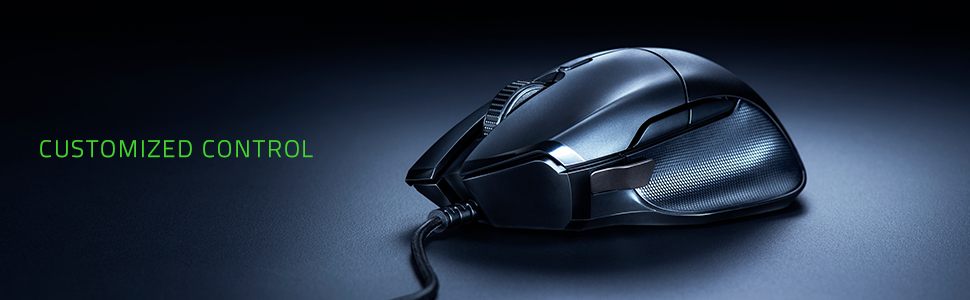
  • Quick DPI Toggle for FPS Gaming: A replaceable side button for different hand sizes allows for quick, temporary switching to lower sensitivity settings for instant sniping
  • Ergonomic Design: Rubberized scroll wheel and side grips increase accuracy and reduce fatigue over long sessions
  • 7 Programmable Buttons: Allows for reconfiguration and assignment of complex macro functions through Razer Synapse
$44.95

In Stock

Delivery13 Apr – 17 Apr
Easy Returns · 30-day window
This order is a gift

In Stock

Secure Checkout
Free Returns
30-Day Guarantee
Secure checkoutAll transactions are SSL-encrypted. Your payment info is never stored.
Free returnsReturn or replace within 30 days
Fast deliveryOrders ship within 1 business day and arrive in 4–8 days.
Buyer protectionIf your order arrives damaged or doesn't show up, we'll make it right.
24/7 supportOur team is here to help. Reach us anytime by email or chat.
Ships fromOur Warehouse
Sold bythe quality shop
Returns
Easy Returns30-day return window
PaymentsSecure transaction

Product details

BrandRazer
ColorClassic Black
Connectivity TechnologyUSB
Special FeatureErgonomic Design
Movement Detection TechnologyOptical

Technical specifications

brandRazer
seriesBasilisk Essential
item_model_numberRZ01-02650100-R3M1
hardware_platformPC
operating_systemWindows
item_weight4.5 ounces
product_dimensions2.95 x 4.88 x 1.66 inches
item_dimensions_lxwxh2.95 x 4.88 x 1.66 inches
colorClassic Black
power_sourceCorded Electric
manufacturerRazer
is_discontinued_by_manufacturerNo
date_first_availableMarch 28, 2019
best_sellers_rank#19,873 in Video Games ( See Top 100 in Video Games ) #698 in PC Gaming Mice

From the brand

Product detailProduct detailProduct detailProduct detailProduct detailProduct detailProduct detailProduct detailProduct detailProduct detail

Product videos

Product video 1

Customer reviews

4.72,431 ratings

Customers say

Customers find this gaming mouse to be a quality starter option with a smooth feel, comfortable grip, and additional buttons as a nice touch.

★★★★★

Basilisk Essential vs Basilisk

Always SharpAugust 10, 2020

I own both the Basilisk Essential and the regular Basilisk. Right out of the box, the grips were starting to peel off from the regular Basilisk. I tried to push it back down and it would stick for a while, then come back off again. I eventually used a dab of superglue and it's been holding on for about 6 months now. The build quality on both is otherwise very solid. I prefer the textured grips on the Essential as the ribbed rubber grips on the regular Basilisk get very slippery in use. The regular Basilisk has adjustable tension on the scroll wheel to allow for free scrolling without defined steps, up to a very defined and loud step. You can fine tune it to your liking in between to get it exactly the way you want. The Essential just has a normal scroll wheel with defined steps. Both mice also feature full RGB, which defaults to a color cycle when Razer's Synapse software isn't running and customized. The cable on both appears to be the same somewhat stiff braided cable. It isn't quite as bad as the stiff cables on something like the Logitech G502 Hero, though. The Essential uses Omron's 20m switches, which tend to be much more reliable than the 50m switches found in the regular Basilisk. The 50m switches tend to double-click in a short period of time. The 20m implementations also feel more solid and satisfying. The mice also come with a slot on the thumb rest area that you can use as a sniper button. I usually remove it to save weight and because I never use the button. It tends to get in my way. Speaking of weight, it does weigh quite a bit less than the G502, which feels like a brick compared to the Basilisk. The original Basilisk also has DPI up and DPI down button under the scroll wheel whereas the Essential just has one button and you have to rotate between them all to get to the one you want. The sensors are also different between the two. The Essential uses a 6400dpi sensor and the original uses Razer's 5G 16000dpi sensor. Both of those speeds are uncontrollable and pointless, with most pro gamers using 1600 or less anyway. They both feel smooth and have no issues with tracking. If you can find the Essential for less than the original Basilisk and you do not need the adjustable scroll wheel, I'd highly recommend it. I'd avoid the regular Basilisk unless you find it for cheap, due to the poor side grips and longevity issues of the Omron 50m switches used for the main mouse clicks. Read more

★★★★★

This brand sets the standard which others look to emulate.

BrunoJanuary 8, 2020

Pro: Wide Teflon feet which glide easily over surfaces. I'm using a PU desk mat which covers the entire desk area where the mouse and keyboard sit. This mouse uses top quality materials so the feel of the buttons and their responsiveness is superb. The cord had a braided cover and the connector fits perfectly. Everything about this mouse screams Premium. Gaming features include a special mapped thumb-button, which has a customizable paddle size, the paddle is metal and comes in small and large. There's also a TPU cover if you don't want to use the paddle button. That's very thoughtful of Razer to consider other use cases for their customers (a plus in my book.) Cons: The software to control the RGB and buttons is not current if you use it on MacOS. There's a newer version (3) for Windows. You have to register to use the software. Not very nice there but what can you do. It works as a basic HID device otherwise without the Razer software so you can live without it but honestly why not get a cheaper mouse if you don't want to take advantage of the RGB and mapping features... Oddly, it took several reboots on my MacBook Pro for the Razer Synapse software to work correctly and it still sometimes asks you to connect a Razer device when you open the Synapse app. Not very impressive there, but it might not be optimized for the latest version of MacOS. There is no version 3 as there is for Windows, which is a shame as is Mac users still would like a better mouse than what's typically offered by Apple or Apple-specific vendors. Plus, coming from Windows/PC, I appreciate that there's better gaming hardware available for that platform. Read more

★★★★★

Gaming mouse for medium sized hands

TammyJanuary 2, 2021

I have been an avid lover of Razer gaming equipment for just around 8 years. Normally, i just use their gaming keypads but recently i got this Basilisk mouse. I'm really glad I did!! This feels so nice in your hand, the quality is really something you can feel. This mouse has three side buttons, that can be changed to do whatever you want via the razer app on your computer, and a mouse wheel resistance changer thing on the bottom of the mouse (honestly I prefer to have it at the least resistance possible) You can also change the light colors on the mouse and i have it synced to match my gaming keypad with the 'ripple' effect - if i press a button on either item the lights ripple out like if you drop a pebble into water and jump across the two devices. It makes for a very pretty light show and cool gaming in a dark room! There are many options to choose from for the lighting on the Chroma App for Razer too, so you can pick what ever you want! Read more

★★★★☆

Nice, debouncing issues after 10 months but resolved by blowing air to clean

Ran WangMarch 15, 2021

Cool look and easy to use However, after 10 months it starts to have issues, which I am guessing it's debouncing issues, with the left click button. It first started off with breaking up a click-and-drag operation; now it's at the point that it very easily introduces unintended double clicks. And you have to press the click button super hard to do what you want. So I went to the support website and entered my serial number. The website says I am out of warranty even though it has 2 years of warranty and I purchased 10 months ago. (And this turned out to be a mistake.) So I contacted their support team through chat. The support person was very polite, and first confirmed that I was within warranty; and secondly - after some questions - suggested me to blow some air into it after learning I don't have compressed air dusters. That resolved the issue (confirmed after some quick trials of drag and drop) as it seems the debouncing issues might be caused by dust. So a bit of trouble and some misinformation from their website, but overall a good support experience that solved the problem Read more

Recently Viewed