
Redragon

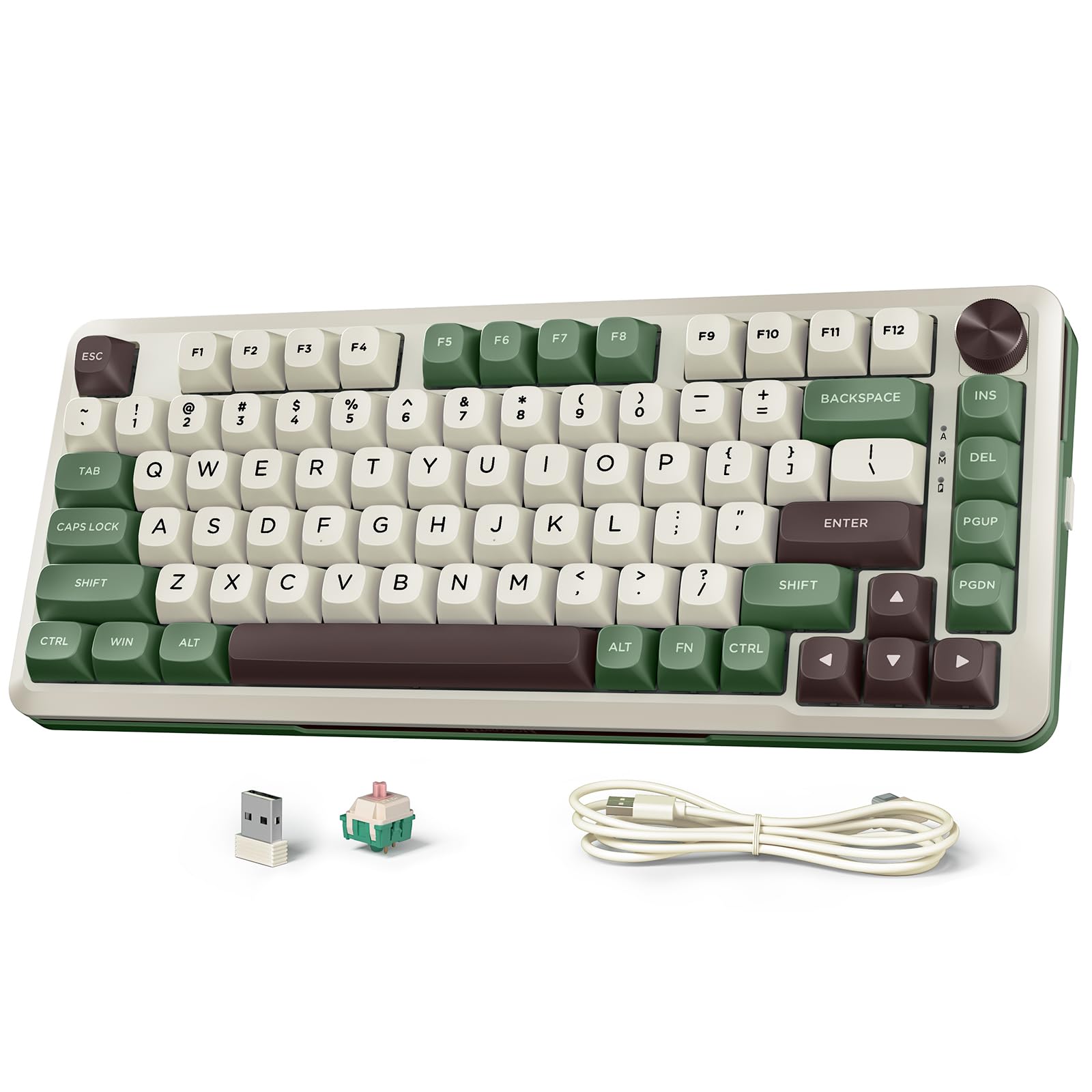
Redragon K681 Pro Wireless Mechanical Keyboard Gasket Mounted RGB Gaming Keyboard with Volume Knob MDA-Profile Pre-Lubed Linear Switches

465+ bought in the past month

$49.99$65.99

About this item

  • 【Gasket Structure & PCBA Single Key Slotting】K681 Cream keyboard adopts a gasket structure, combining flexibility and stability while using PCB single-key slotting to better optimize the rebound and stability, feel more comfortable and soft elastic, and increase Poron and silicone padding-bottom cotton between PCB and positioning board to reduce the noise of knocking and sound more pure
  • 【Hot Swappable & Customization Leopard L Switch】This wireless gaming keyboard is equipped with pre-lubricated customization Leopard L switch, these linear switches have a Personalised appearance, delicate creamy sound quality, smooth feel, advance bottom touch, giving you a wonderful keying experience; the K681 keyboard is compatible with almost all brands of 3Pin/5pin axes, you can highly customize your keyboard
  • 【16.8 Million RGB Backlit & Multi-Function Knob】The creamy sounding keyboard comes with truly customizable 16.8 million color RGB backlighting and is preset with 15 different RGB lighting modes, 7 solid colors, 5 brightness levels, and breathing speed, and the K681 is equipped with multi-functional knobs, which you can manipulate to control volume, backlighting modes, and backlighting brightness
  • 【Tri-mode Connection & 4000 mAh Battery】This 75% keyboard supports BT (3.0+5.0), 2.4GHz wireless, and USB wired connectivity, which can be easily and seamlessly connected and switched with devices up to 10 meters away via the buttons on the left side of the keyboard for efficient multitasking. In addition, this rechargeable keyboard is equipped with a high-capacity 4,000 mAh battery, which allows you to shrug off battery life anxiety
  • 【MDA Profile & Widely Compatible】MDA-Profile keycaps provide a better tactile experience and appearance, a more comfortable hand feeling. In addition, this cream keyboard is compatible with multiple devices (PC/Tablet/Xbox/PS4/PS5) and systems (Win/Android/Mac), working perfectly to your satisfaction
  • 【Fully Programmable】The programmable software can edit the RGB light, key function, and system switch. So you can DIY your own keyboard just by your preference (Software download address: redragon.com) (The keyboard defaults to WIN, long press FN+A to switch to MAC system, long press FN+W to switch to WIN system)
$49.99
Was $65.99Save $16.00

In Stock

DeliveryFriday 10 Apr – 16 Apr · Order within 2h 5m
Easy Returns · 30-day window
This order is a gift

In Stock

Secure Checkout
Free Returns
30-Day Guarantee
Secure checkoutAll transactions are SSL-encrypted. Your payment info is never stored.
Free returnsReturn or replace within 30 days
Fast deliveryOrders ship within 1 business day and arrive in 4–8 days.
Buyer protectionIf your order arrives damaged or doesn't show up, we'll make it right.
24/7 supportOur team is here to help. Reach us anytime by email or chat.
Ships fromOur Warehouse
Sold byRedragon zone
Returns
Easy Returns30-day return window
PaymentsSecure transaction

Product details

BrandRedragon
Compatible DevicesLaptop, PC
Connectivity TechnologyBluetooth, USB-C
Keyboard DescriptionMechanical
Recommended Uses For ProductGaming
Special FeatureBacklit, Hot-Swappable, Programmable Keys
ColorMatcha Green
Keyboard backlighting color supportRGB
StyleModern
MaterialPlastic

Technical specifications

package_dimensions14.68 x 7.52 x 2.8 inches
item_weight2.55 pounds
manufacturerRedragon
item_model_numberK681CGC
batteries1 12V batteries required. (included)
best_sellers_rank#523 in Video Games ( See Top 100 in Video Games ) #40 in PC Gaming Keyboards
date_first_availableSeptember 3, 2024

From the brand

Product detailProduct detailProduct detailProduct detailProduct detailProduct detailProduct detailProduct detailProduct detailProduct detailProduct detail
Product detail

Product videos

Product video 1

Customer reviews

4.42,600 ratings

Customers say

Customers find this mechanical keyboard to be of comparable quality to more expensive models, offering excellent value for money.

★★★★★

Amazing Creamy Keyboard

ShroomiFebruary 9, 2025

The media could not be loaded. Been using this keyboard for a little over a week now and I absolutely love it! A little background I really only use my computer for everyday use such as google, YouTube, etc. as well as moderate cozy gaming on my PC. I also practice touch typing which is why I was in the market for a new keyboard. I wanted something that wasn't so loud but still satisfying to type on as well as comfortable. I have to say for this price point this keyboard is a must buy for anyone new to mechanical keyboards. So here are the Pro's and Con's. Pro's: ~ Quality: The keyboard is very well built! It is a good weight and doesn't feel cheap in the slightest. I have experienced any rattling or any loose keys. ~ Sound: The sound of the keys is literally heaven. I would say the sound profile falls in the "Creamy" category for keyboard enthusiasts like me. The keys have a nice matte texture to them and are rounded off on the corners, so it just feels more comfortable to type on. I have a video included of how this keyboard sounds compared to another mechanical keyboard I have that is more in the clacky range to show the different sound profiles. ~ Functionality: This keyboard is easy to setup in which way you want to use it (wired or wireless) but I use mine as wired and have not noticed have delayed keystrokes or sticky keys. I only connected mine to wireless briefly just to see how easily it connected, which it did, but I didn't use it wirelessly so I can't attest to its wireless functionality thoroughly. I enjoy that the volume knob has a smooth turn to it. Other knobs can be loud or feel like there's notches as you're turning it? I don't know if that makes sense, but the knob is just really smooth and easy to use. My old keyboard didn't have a volume knob, and I've learned that a knob is really a key part to a good keyboard. I really like that it has 2 different heights for the flippy feet, so you have two options as to how you position your keyboard. Packaging: As you can see in the pictures the packaging is done very well and when I received it, I didn't feel any shaking inside the box like it would've been rattled around during shipping. Everything within the box was nicely padded and secure, so in my case the shipping was of no trouble and actually arrived a day sooner than expected. "Cons": (I don't even want to consider these cons to the keyboard as they are rather more personal preference. I honestly am in love with this keyboard.) RGB Lighting: This is probably the only true con to the board is that in my opinion the lighting can be just slightly brighter. The brightest setting (level 5) can be compared to some boards level 3-4. This keyboard is still beautiful and does have good lighting options but in pics I did compare it brightest setting to my old keyboard's brightest setting, and you can see the difference. Caps Lock: It's hard to tell (at least for me) to know when the caps lock key is engaged as the only indication light is a tiny little white dot to the right of the keyboard letting you know it's on. I often don't even notice the light and only realize I've knocked the caps lock on until I'm writing in caps lock. This could just be due to me being used to my old keyboard where the whole caps lock key would turn a white light contrasting the rest of the rgb across the board so this could just be a user issue lol Cord Plug-In Position: Like I said this is more of a personal thing than it is a con. In the photos you can see that the cord plugs into the side of the keyboard. While this doesn't affect the functioning of the keyboard in anyway, I'd rather it plug in at the top. Just makes the arrangement of cords feel neater. I'm just particular so I of course in no way discount this against the board. Color: The color online and on the box make the green seem richer than it really is. Go off the review pics like I did, the color is more mint green with light thyme green contrast. It's still amazing and I knew what I was expecting due to review pics it's still a nice green aesthetic just not the vibrant sage and hunter green the pics display. Overall, for being under $100 (which seems to be what most consider "budget") this keyboard is perfect from everyday use to gaming. Perfect introduction keyboard if you're looking into starting a mechanical keyboard journey. If you're someone who mods keyboards I don't know how "moddable" this keyboard is, or if you'd even want to. This keyboard out of box seems on par with many finished results of modding videos I've viewed. Would recommend this keyboard to anyone honestly! Read more

Review image 1Review image 2Review image 3Review image 4Review image 5
★★★★★

AMAZING keyboard -- creamy sounds and beautiful looks

Dina D.December 3, 2025

i LOVE this keyboard. It is smaller than your average gaming keyboard, but the sound of the keys is so creamy and the colors on it are beautiful. I don't really care about the lights, but they are there and there are a bunch of different settings. The keys feel so nice to type on and the sounds are so peaceful. I will be buying more of these in different colors bc wow wow wow. I use them on my macbook and they work perfectly well and are compatible. I have not tested out the bluetooth functionality, so I can't speak to that, but they work really well with the 2.4 GHz connection (USB wireless). Read more

★★★★★

Good keyboard if you like clicks and colors.

Patrick N.February 20, 2018

I got the Redragon K551 keyboard for my new PC with Windows 10. I wanted something with back lighting. As I did my research, I discovered that mechanical keyboards existed, and seem popular. So I write this review as someone who had never heard of such a thing until just before buying it. I've been using this keyboard for a week without any trouble. Windows 10 recognized it instantly when I plugged it in. The keyboard came in a box with a small information sheet and key puller, neither of which were needed to connect it to my PC. The keyboard is heavy, much heavier than my previous keyboard that came with my HP desktop. The cord on this keyboard is not braided, but I don't really understand why that matters, having never seen a keyboard in person that had a braided cord. Keys: The buttons are easy to press. They make a loud click, which can be good or bad, depending on whether you enjoy loud clicks. It is certainly good for letting people in other rooms know you are typing. As for the "mechanical keys", it seems like a gimmick. I can feel each click and I get plenty of audible feedback, even with headphones. I can't really say they make typing a better experience than do membrane keyboards, but they are no worse. There is a lot of travel when pressing the keys, and you can repress them without letting them reset. This keyboard has a 10-key number pad, which was an important feature for me. The key layout seems pretty standard. The function keys (F1-F12 using the FN key) are a nice way to get those functions and save space, although I could see some users preferring the dedicated volume and media buttons. Being able to lock out the Windows key is also a good idea. Lighting: It's great. I paid a little extra for RGB, and I'm glad I did. I like the different lighting settings, although I only use a couple of them. They seem plenty bright with and without room lighting, and I like having the ability to pick from a selection of colors, or have multiple colors spread across the keys. I was slightly disappointed because I saw a video review where it was possible to set different colors for individual keys, for example, having the arrow keys stand out with yellow lighting while the rest of the keys are green. That feature does not seem available in the current version. (See edit below!) Gaming: I mostly play flight simulators and driving games. For driving, I prefer a controller. For flying, I prefer the keyboard, and this one does well. I tried using the keyboard for GTA: San Andreas, but I was not so impressed, mostly because of the long travel of the keys that led to inconsistent resets when pressing the same key multiple times. EDIT: I randomly found the answer to the customization per key issue. To enter the customization mode, you use FN plus the ~ key (actually `, but that could be mistaken for ' if I didn't explain). Once there you can use FN plus right arrow to select a color and then each key you press will be that color. As for the key travel and reset issue, I am adjusting to it. EDIT 2: I have not only adjusted to the mechanical keys, I am loving them. Membrane keyboards annoy me now. I never would have expected that to happen. The clicking is a little loud, but I can live with it. In fact, I've edited the rating to 5 stars. Read more

Review image 1
Recently Viewed