
Muy buen producto
Excelente Read more
Redragon
$89.98
Have a question about this product?


Product video 1
Rated 4.4/5 across 8 reviews — well received overall.
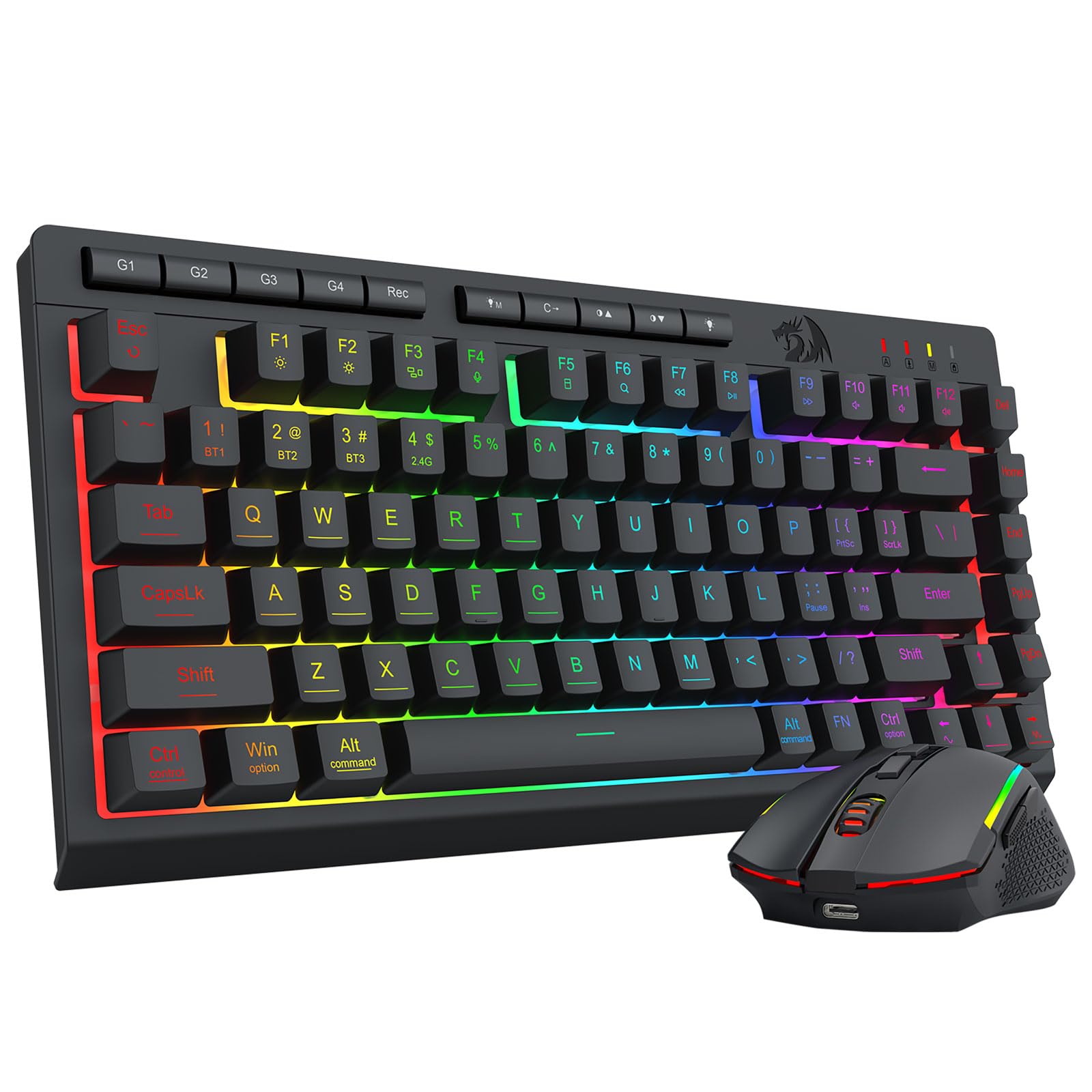
Customers like the keyboard's design and appreciate its good clicky noise.
Generated from the text of customer reviews
Excelente Read more
Decent. No issues with connectivity. Keyboard feels good and lights up well to see when it's dark in the room. For the price, it's a good value. Only con: The low battery light always blinks. Always. I could charge it for an hour, or a day, it's still blinking as if it's low. Unfortunately that means I never know when it actually needs to be charged. I need to remember to charge it at least weekly otherwise it will die on me in the middle of use. Read more
I love this thing. I bought it to replace the cheap keyboard and mouse I had for my work desk where I used a USB hub to connect the keyboard and mouse to my Macbook for work, I just connect this keyboard and mouse combo to my mac using bluetooth. It also supports a 2.4G wireless dongle as well (conveniently attached to the back of the keyboard) and I have that setup on my Xbox ROG Ally X as a keyboard and mouse for that. It's so easy to switch between the channels and keyboard layouts with the included switches on the back. They go from Mac to Win and from Bluetooth to 2.4G in a single switch. I can have both devices on my desk at the same time and easily switch between the two with ease. I also love how it feels to type on this, even though it's not a mechanical keyboard, it still feels really solid and of high quality. I would definitely recommend this product from a price standpoint and from a usability standpoint. Great Job Redragon. Read more
I originally bought this keyboard for its macro capabilities, which are impressive, though they didn’t quite suit my specific needs. It's also possible that I just haven’t figured out the right way to configure them yet. That said, the typing experience is excellent. It feels great to type on and is noticeably quieter than my other keyboard. I also appreciate its compact design, as it fits perfectly on my desk without taking up too much space. Overall, I’m very happy with it and would highly recommend this keyboard. Read more
Great! Connection options is super great to have. Lights modes are cool and price is reasonable. Read more
Please note, I did not get this for a gaming keyboard, but for an office keyboard. I wanted a keyboard that I could use macros with, that did not require that the software be on the computer I am using it from (so I could make the macros on my own computer but use the macros elsewhere). There are a few issues that are not made very clear by the product listing. -The macro buttons are purely for on the fly macros. The software that you can download will NOT let you program or edit these. You can, however, make macros for other keys in the software, and assign them to keys such as F1, F2 etc. However, I was under the impression I could edit the macros that I record in the moment on the G1-4 buttons, but this was not the case. -The keyboard software on their site is a bit difficult to find, because the keyboard name is misspelled. "Crescent" vs "Cresent". On the keyboard and in the software, it is named "Cresent" but the software page has "Crescent". I saw another user unable to find the software, perhaps this was why. -The macro editing software is ONLY ACCESSIBLE WHILE PLUGGED IN. I was extremely frustrated at first while trying to create macros, and initially thought I had the wrong software, since it only had options for changing the color of the keyboard. (See photos for example of how the software changes when you're in the different modes) Once I checked the instructions more carefully, it mentions that you can only program macros while plugged in, although the instructions appear to be referring to the on the fly macros- this is also the case for the software programmable macros. Once you plug it in and turn the switch to "off" (instead of 2.4G or BT), those options will show up. I think they could've made this a bit clearer in the software by having the options still available and maybe having it say "please plug in keyboard to edit" or something. I was under the impression I had the wrong software or something, since the options weren't even there. -the editing software has a few inconvenient things, such as if you need to edit a macro....Good luck, you're going to have to basically re-record it. You can add in keys, but you'll have the spam the "up" button to move the key to where you want it, and you'll have to do it twice for the "release" of the same key. I've used other software for macros, and they usually have a "record after here" option, so you can add on to the macro in the middle of what you've got already. -If you edit a macro in software, you have to re-assign it to the keybind. The old version of the macro will stay on the keybind until you "update" it. -I don't see a way to program in a delay in the on the fly macros. It will automatically make it very quick, which I guess for gaming might be ideal, but I'd like the option to change it. There's a significant delay when moving to wireless, as expected, so I'm not sure how these macros would be affected. On the software macros, I needed to add a larger delay between events if I was trying to use the keyboard in wireless mode. -Macros can only be up to 80 "events" long, so basically 40 characters, since letting the key go counts as another event. I may have other input later, but for now, I'll say that all in all it is a pretty good keyboard for the price for my needs, just took a lot of workarounds to get it to do what I needed. Read more


excelent portable light Read more
La sensación al tacto es excelente, no he tenido problemas con conectividad Bluetooth, es bastante hergonomico y su bateria dura mucho, los modos de programación son excelentes, y la distribución es perfecta Read more

Redragon Gamer NOTHOSAUR Mouse Black M606 Unico

Redragon K517 Pro Wireless Gaming Keyboard RGB Backlit Tri-Mode BT 2 4GHz USB-C Mechanical Feel 94 Keys Computer

Redragon K530 Pro Draconic 60 Wireless RGB Mechanical Keyboard BT 2 4Ghz Wired 3-Mode 61 Keys Compact Gaming

Redragon K552 Mechanical Gaming Keyboard 87-Key Compact LED Gaming Keyboard with Red Switches Anti-Ghosting Metal Frame for PC

Redragon K552P Mechanical Gaming Keyboard TKL with 18 Backlight Modes Hot-Swappable Red Switches 87-Key Compact Ergonomic Design N-Key

Redragon K582 RGB Mechanical Gaming Keyboard 100 104 Keys Standard Layout Gaming Keyboard with Double-Shot ABS Keycaps Dynamic

Redragon K582 SE Wired RGB Gaming Keyboard 104 Keys Mechanical Keyboard w Mixed Color Round PBT Keycaps Dynamic

Redragon K628 Pollux 75 Wired RGB Gaming Keyboard 78 Keys Compact Mechanical Keyboard w 100 Hot-Swap Socket Free-Mod
We use optional analytics and advertising cookies to understand how visitors use Ventari, measure ads, and improve the experience. You can accept all optional cookies, allow analytics only, or decline them. See our Cookie Policy.