



Been Using For Months, Still Great! Would Buy Again In A Heartbeat
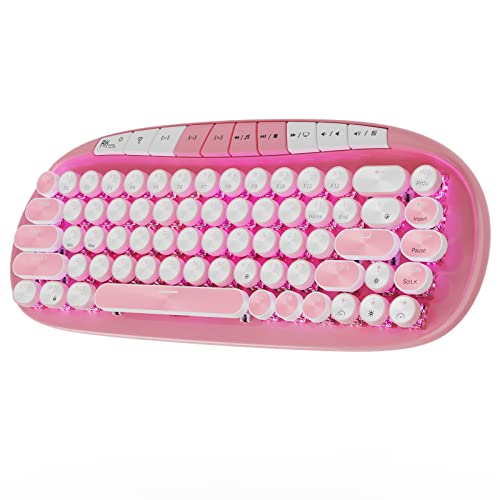
I bought this board a while back and didn't write a review. Well, I still love it. It's certainly not the nicest board; the quality difference between my friend's $130 board and mine is extreme. The Anne Pro 2, which this replicates, is also way nicer. However, for the price, it's awesome and works perfectly. ✿ 𝙁𝙖𝙫𝙤𝙧𝙞𝙩𝙚 𝘼𝙨𝙥𝙚𝙘𝙩𝙨 𝗞𝗲𝘆 𝗟𝗲𝘁𝘁𝗲𝗿𝗶𝗻𝗴 Keys have letters cut into it so the RGB lighting shines through and they don't fade. The font is aesthetically pleasing, too. 𝗣𝗿𝗼𝗴𝗿𝗮𝗺𝗺𝗮𝗯𝗹𝗲 𝗥𝗚𝗕𝘀 Individually programmable RGB LEDs beneath each key; looks great and allows a TON of customization! I had a lot of fun setting mine. Pictured is one of the generic manufacturer settings. Looks especially amazing in the dark. 𝗣𝗿𝗼𝗴𝗿𝗮𝗺𝗺𝗮𝗯𝗹𝗲 𝗞𝗲𝘆 𝗙𝘂𝗻𝗰𝘁𝗶𝗼𝗻𝘀 You can change a key to open a specific program, give it three functions, give it no function, etc. If you can think of it, you can do it. 𝗕𝗹𝘂𝗲𝘁𝗼𝗼𝘁𝗵 Connects with Bluetooth easily. 𝗣𝗼𝗿𝘁𝗮𝗯𝗹𝗲 Small and light for travel because it's not made of aluminum. 𝗟𝗼𝗻𝗴 𝗕𝗮𝘁𝘁𝗲𝗿𝘆 𝗟𝗶𝗳𝗲 The battery feels like it never dies. I've charged it like three times. It lasts for a solid two weeks minimum and I use it on a once a day basis. 𝗖𝗵𝗲𝗮𝗽 For a mechanical keyboard, this bad boy is CHEAP. I was looking at boards without RGB or bluetooth for $80+. Sure, those boards are made out of higher quality materials and have a better typing experience. But for the average user, it's perfect and the quality differences are unnoticeable. 𝗔𝗲𝘀𝘁𝗵𝗲𝘁𝗶𝗰𝗮𝗹𝗹𝘆 𝗣𝗹𝗲𝗮𝘀𝗶𝗻𝗴 I love the look of this board; I'm a sucker for white colored electronics! It looks very nice with the RGB, too. ✿ 𝘿𝙧𝙖𝙬𝙗𝙖𝙘𝙠𝙨 𝗙𝗡 𝗞𝗲𝘆𝘀 They are combined with number keys (it's a 60% board). I switched my computer to Ubuntu and needed frequent access to the FNs because I had a lot of issues. Sometimes they wouldn't work, despite me using the correct key inputs. This is my biggest issue but in months of using, it only occurred once! 𝗨𝗦𝗕 𝗖 𝗣𝗼𝗿𝘁 Doesn't work with some USB C cords despite them fitting into the port perfectly. 𝗖𝗼𝗺𝗽𝗹𝗶𝗰𝗮𝘁𝗲𝗱 𝗞𝗲𝘆 𝗜𝗻𝗽𝘂𝘁𝘀 Learning curve on the secondary key function inputs. However, this is par for the course when it comes to 60% boards, so it isn't a manufacturer issue. Make sure you're prepared to learn them before you buy. If you need frequent access to FN keys, or both the arrow keys and the ?/ keys, consider getting a 75% or larger board. 𝗛𝗲𝗶𝗴𝗵𝘁 Set just a little bit too high to be fully comfortable on my wrists. 𝗦𝗼𝗳𝘁𝘄𝗮𝗿𝗲 𝗦𝗲𝘁𝘂𝗽 The physical page explaining the keyboard's functions is a bit confusing. The software itself is easy to use if you're somewhat experienced with computers, though. 𝗟𝗼𝗴𝗼 Nitpicking, but the logo on the side of the board is a bit ugly. This is standard on knockoff electronics, though. I use this with a gaming laptop and gaming PC for both writing assignments and gaming purposes. Serves both functions well. I can't go into advanced aspects like the point of actuation because I'm not an advanced user. 𝗕𝗼𝘁𝘁𝗼𝗺 𝗹𝗶𝗻𝗲: 𝗶𝗳 𝘆𝗼𝘂 𝘄𝗮𝗻𝘁 𝗮 𝗻𝗶𝗰𝗲, 𝗽𝗼𝗿𝘁𝗮𝗯𝗹𝗲 𝗸𝗲𝘆𝗯𝗼𝗮𝗿𝗱 𝘁𝗵𝗮𝘁 𝘄𝗼𝗻'𝘁 𝗯𝗿𝗲𝗮𝗸 𝘁𝗵𝗲 𝗯𝗮𝗻𝗸, 𝘁𝗵𝗶𝘀 𝗼𝗻𝗲 𝗶𝘀 𝗴𝗿𝗲𝗮𝘁. If you have the money to spend on a nicer board, check out the Anne Pro 2. Read more


