Rocelco

Rocelco 37 5 Deluxe Height Adjustable Standing Desk Converter - Quick Sit Stand Up Dual Monitor Riser -

987+ bought in the past month

$217.99$249.00

About this item

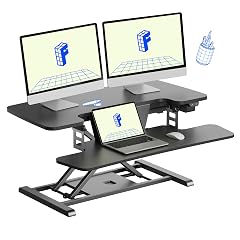
  • Large stand up desk converter - 37.5" wide by 20.5" deep desktop workstation riser holds up to two 32" monitors plus other work materials and the 29.3" by 11.6" retractable tray will hold a keyboard and mouse, or even a laptop if needed.
  • Swift and stable lifting motion - sturdy metal frame paired with strong dual piston assist and easy-grip side handles can raise or lower up to 35 pounds with smooth continuous height adjustment from 5" to 17" above tabletop.
  • Sliding ergonomic keyboard tray - extends, retracts and locks in place while keeping a 4.5" spacing between keyboard tray and desktop, which helps keep arms and wrists in a comfortable position to prevent neck and back strain while sitting or standing.
  • Convenient grommet hole - Can be used as a hassle free cable management system, or to free up desk space and install a monitor mount for multiple screens, such as the Rocelco R DM2.
  • No assembly required - Anti-skid foam pads protect your table top and allow you to simply remove from box and place directly on existing work surface. Manufacturer 1 year warranty plus a customer service and friendly tech support team ready to help.
$217.99
Was $249.00Save $31.01

In Stock

DeliveryEstimated 3–5 business days · Final delivery speed and cost are confirmed at checkout
Easy Returns · 30-day window
This order is a gift

In Stock

Secure Checkout
Free Returns
30-Day Guarantee
Secure checkoutAll transactions are SSL-encrypted. Your payment info is never stored.
Free returnsReturn or replace within 30 days
Fast deliveryOrders ship within 1 business day and arrive in 4–8 days.
Buyer protectionIf your order arrives damaged or doesn't show up, we'll make it right.
24/7 supportOur team is here to help. Reach us anytime by email or chat.
Ships fromOur Warehouse
Sold bySold by Amazon Resale and Fulfilled by Amazon .
Returns
Easy Returns30-day return window
PaymentsSecure transaction
Currently unavailable
Easy Returns · 30-day window

Technical specifications

manufacturerRocelco Inc.
brandRocelco
item_weight38 pounds
product_dimensions25 x 37.5 x 5 inches
item_model_numberR DADRB
is_discontinued_by_manufacturerNo
colorBlack
shapeRectangle
material_typeLaminate, Steel
number_of_items1
size37.5"
manufacturer_part_numberR DADRB
best_sellers_rank#51,160 in Office Products ( See Top 100 in Office Products ) #148 in Computer Workstations
date_first_availableOctober 24, 2016

From the brand

Product detailProduct detailProduct detailProduct detailProduct detailProduct detailProduct detailProduct detailProduct detailProduct detailProduct detailProduct detail

Product videos

Product video 1

Customer reviews

4.41,354 ratings

Customers say

Customers find the standing desk converter to be well-made and worth its price, with good functionality and ease of use.

★★★★★

Smooth Operation - Top Notch Quality

Bob ChickJuly 19, 2023✓ Verified purchase

What I like most about the Rocelco 32 is how smoothly it moves and up and down loaded with expensive electronic devices sitting safely on top. The brake is located under the front right corner of the its desktop. You release the brake with the palm of your right hand on top of the deck and your fingers wrapped around resting on the brake handle. To release the brake, pull up on its handle. To engage the brake, release the handle. “Brake On” is its default position or the position it is always in until you release it. The desktop can carry up to 30 lbs. of equipment, more than enough lifting power unless you plan on parking an anvil on top. The Rocelco moves smoothly and effortlessly from sitting to standing position. Release the brake, and the 2 spring/gas shocks will raise the deck with no effort on your part. Engage the brake when the desktop is at the height most comfortable for you. Keep in mind that the desktop moves up and forward. To move it down takes 2 hands, your right hand on the right side with fingers over the brake and your left hand on the other side; release the brake by pulling up on the brake handle, and push mostly backward at first, then slightly more downward. When the deck gets to height most comfortable for you, engage the brake by releasing the brake handle. The deck will stay put right where you want it. I am 6’ tall and my wife is 5’2” with eyes not blue, yet both of us find the 32” wide by 20” deep desktop easy to move up or down, with a laptop, an external DVD drive, a 27” HD monitor, and a mouse pad with a mouse. And let’s not forget that the keyboard tray with a wireless keyboard on top is along for the ride too. The Rocelco 32 desktop has enough room for all the devices that I want to move up and down. It is well engineered, ergonomically designed, balanced, and sturdy unit that you cannot go wrong purchasing IF it fits on the table you plan on parking it. I have my Rocelco 32 on a table that is 45” wide and 31” deep. I cannot recommend putting the Rocelco 32 on any smaller tabletop. The Rocelco 32 is 32 INCHES wide. Let’s do the math (45-32)/2=6.5 inches on each side. My router just fits on the left side, and my stompbox just fits on the right side. (A stompbox is a gadget that changes the sound of an electric guitar.) What about a table that is not quite 31” deep? No. Do not forget, the deck moves up and forward. If my table was 28” deep, for example, the desktop when full up would be hanging over the front end of my table. It is not in any danger of toppling over because the engineers positioned the CG far enough back over the table to prevent such a calamity. It just totally unnerves me seeing my very cool stuff hanging over nothing. Yikes! No. Another dimension we must consider is the height of the tabletop. The top of my table is 30 inches over the floor. Would you not know it! It is too high for me. I got to thinking, I work comfortably in the standing position when the desktop is all the way. What if it were 2” lower? No. I prefer standing over sitting especially when I’m playing my guitar. I am at eye level with the monitor that is no more than 18”-20” away. The music I project on the monitor is easy to see and read. And the keyboard, and the mouse are at ergonomically perfect heights for me. And even the laptop is within easy reach. BTW a nice stiff but comfy cushion on my office chair compensates for a tabletop too high when desktop is all the way down. Coming soon. Yeah, let’s rock-n-roll. Read more

Review image 1Review image 2
★★★★★

Easy and Worth It

PennJFebruary 16, 2021✓ Verified purchase

I've had the 32" model for a month now. I am very happy with my purchase. The price was reasonable (and I did a lot of comparison shopping) and the desk works perfectly. I find it very easy to raise and lower, silently and smoothly, even with my equipment on it. (I'm short and not super fit, fyi.) Set up was easy-peasy. The desk wasn't too heavy, so I was able to remove it from the box and put it on my table myself. All I had to do was remove the packaging and it was ready to use. I find it to be very sturdy-- no wobbling! The top surface easily accommodates my 27" monitor and a 13" MacBook, along with space for my phone and a notepad. The keyboard shelf fits a full-size keyboard (with numbers pad) and my mouse along with a wrist support. I like that it slides under the top shelf, too. I am very satisfied with this desk and highly recommend it! Read more

★★★★☆

I think it'll work ...

KrixeeApril 20, 2024✓ Verified purchase

I recently have come to the understanding I needed a standing desk for all of the reasons all of you have. My takeaways: 1. I bought this bc it seemed well-reviewed, affordable, and it had a sliding keyboard tray. 2. I agree that it's a little wobbly, but the desk I have it on does NOT help that situation. I bet with a sturdy desk it'd be good. (it's weird how subtle the wobble feels... probably because I'm up high like a skyscraper) 3. I wanted to get the white bc it seemed "cuter" with my room, but with this plasticky surface, I guarantee it'll look worn and grungy immediately. So "functional tech black" it is for me. 4. On day one, it feels like the adjustment launches at you (or requires an absurd amount of force), but after fiddling with it a bit, it seems like it has a lot of fine tuning available, and it doesn't seem like it'll slip height while using it. I bet with time it'll ease a bit, too. 5. I will definitely need to wear my crocs when I use this...aka, make sure you have support while standing. Just like you need a good sitting chair, you'll need good foot support and standing position. Didn't think about that until I started working at it for a bit. 6. It makes my office have a bit of an Unwelcoming Aura. In that way, it may not be aesthetically particularly small-space-friendly (practically, it definitely is small-space-friendly). But with my hybrid work now, this *does* need to tip towards being a functional room more so than "cozy" 7. Well-packaged (kinda surprisingly heavy box), and seems well-constructed. 8. Keyboard either needs to be out or IN. The tray has a lot of space to use between those two settings, but the glide between them is *super* smooth, so you'll have more tray slide. (especially noticeable if your desk has that bit of wobble to begin with) a.) I may not have been patient enough with it. I can get it stable, but depending on your typing force and angle, or if you're doing a lot of mouse work, it could be slidey) 9. My kitty doesn't have anywhere to sit now! I was hoping to keep that more succinct, but there you have it. Read more

Review image 1Review image 2Review image 3
Recently Viewed