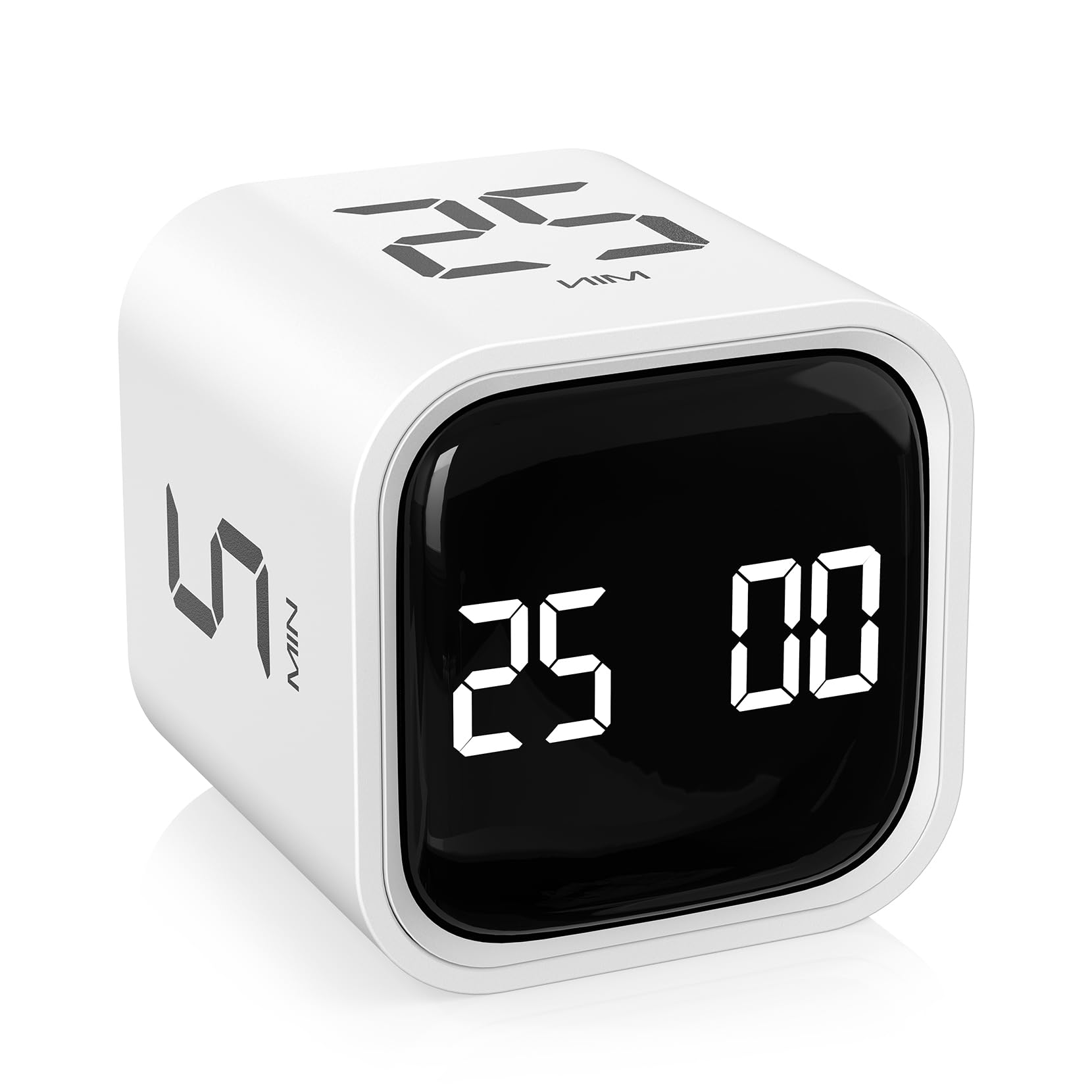
AWESOME little timer. It's smaller than it looks in the pictures. It's about 1 3/4" or 44mm on a side. It's really the perfect size. I love that it is completely usable without ever pushing any buttons. There are two modes, selectable with a switch: controlled by gravity, and controlled by buttons. There is no hybrid mode. Gravity is irrelevant in one mode, and buttons are irrelevant in the other. In gravity-controlled mode, you cannot count UP, nor can you set your own custom countdown duration. But the times they give you are excellent: 5 minutes, 10 minutes, 25 minutes, and 50 minutes. Very practical for time-boxing your activities. While the timer is counting down in gravity-controlled mode, the duration it is counting down from is displayed on the top of the timer. To pause the timer, move its display to the top of the cube. It's possible to reset the timer to zero by pointing the display at the ground. This is handy if you want to *restart*, say, a 10-minute timer before it completely expires. But you could achieve the same by starting, say, a 5-minute timer, then immediately switching back to the 10-minute timer. The timer automatically shuts itself off if paused for more than 5 minutes. It appears that battery drain while off is extremely low. I've been using this timer for about a week and I have yet to need to recharge it. I love that I don't need to push any buttons to wake it up. The gravity sensor is very sensitive. If you lightly bump into the table, you will wake it up (it beeps once when it wakes up), so if you want complete silence for some reason, and you walk heavily, you might want to take that into account. While paused with the display on top, all the numbers on the sides are upside down. This is a little confusing, but easy enough to deal with. Sometimes it takes my brain a second to figure out what side I want to put on top. (Perhaps putting the numbers both right-side-up and upside-down on each side would help, but it might not look as nice.) The display protrudes about 2mm from the cube itself, meaning that if you place the device face-down on a hard surface, you could scratch the display. But only if you do this do the numbers on the sides appear right-side up. I can't bear the thought of leaving it with the display face down. So, when I'm not using it, the display is on top, and the numbers are all upside-down. In general, a fantastic, beautiful design. Very handy. Read more
I’ve tried a lot of productivity tools, but this one actually works. The preset 5- and 25-minute modes make it a true Pomodoro timer — no fiddling with settings every time. I just flip it and get straight to work. The gravity sensor is genius — it feels intuitive and fun to use. I’ve noticed a big difference in my focus and energy throughout the day; those short breaks keep me sharp without burnout. The silent vibration mode is perfect for deep-work sessions or late nights, and I love that I can customize other times when I need longer focus blocks. The design looks sleek on my desk, and it’s so easy to carry between my home office and meetings. If you struggle with distractions or want to manage your time smarter, this little cube is worth every penny. It’s helped me save time, protect my energy, and get more done in less time — highly recommend. Read more
This is a quite simple and amazing product that helps me stay on task and manage the daily cognitive load. It has preset times that you can keep it face up and get into the task. It can be used as a timer, you can set custom timer or the pre-defined one. It's one of the devices that I enjoy using the most, especially when it comes to reading or trying something new. Read more
This Pomodoro timer is great! My boys love using it. It makes focusing on homework and study time so much easier and even a little fun. The design is simple, the timer works perfectly, and it’s been a great tool for building good study habits. Highly recommend! Read more
It's a good time that gets the job done. I do wish that one of the four countdown timers (5, 10, 25, 50 minute) was replaced with a stopwatch feature instead. So that was a simple way to just start a time without having to press a button ...like the countdown timers. Read more
I am surprised something so small can help increase your productivity so much. I use this to track the time I spend on tasks throughout the day. It is so easy, pick a number and roll the cube over. This is one of the pricier version, but after trying less expensive ones, I say this is worth the cost. It charges with USB C, I use it constantly throughout my workday and it has held a charge for over a week! The actual timer window is clear and the black background with white letters help make the time pop. It is pleasant to look at and so small, it stays out of the way. I keep it on silent, while it has three settings for when the timer is complete, I have really used the vibration setting as it is loud enough on a tabletop to get my attention. The cube will give an audible noise if you use the two settings for that. If you want to set your own timer, it is very simple: Just move the toggle on the right to the number 2. Then use the two buttons marked S (seconds) and M (minutes) to pick the timer you want. The ST/SP (start/stop) button will do exactly what it says. Read more
My new favorite gift idea. I LOVE THIS! My ADHD loves it. It's great for time blindness. It's great to start a project you don't want to do...I'lI just do it for 5 minutes and then I can stop. I bring it to work, workshop sessions, etc and everyone loves it. I use it to clean my house - (I'll just pick up for...5 minutes). I love that you can just flip the square to set or reset the timer. So much easier than setting timers on my phone. I love that I can see a visual of how much time is left. Looks clean and great. My 8 year old goddaughter absconded it, so I bought I new one. I might just keep 1 or 2 on hand to give as gifts since I get so many "where did you get that" questions. Read more