
v AV Access

AV Access KVM Switch 1 Monitor 4 Computers 3 Desktops 1 Laptop USB-C Fast Charging for Laptop 4K

126+ bought in the past month

$195.49$229.99

About this item

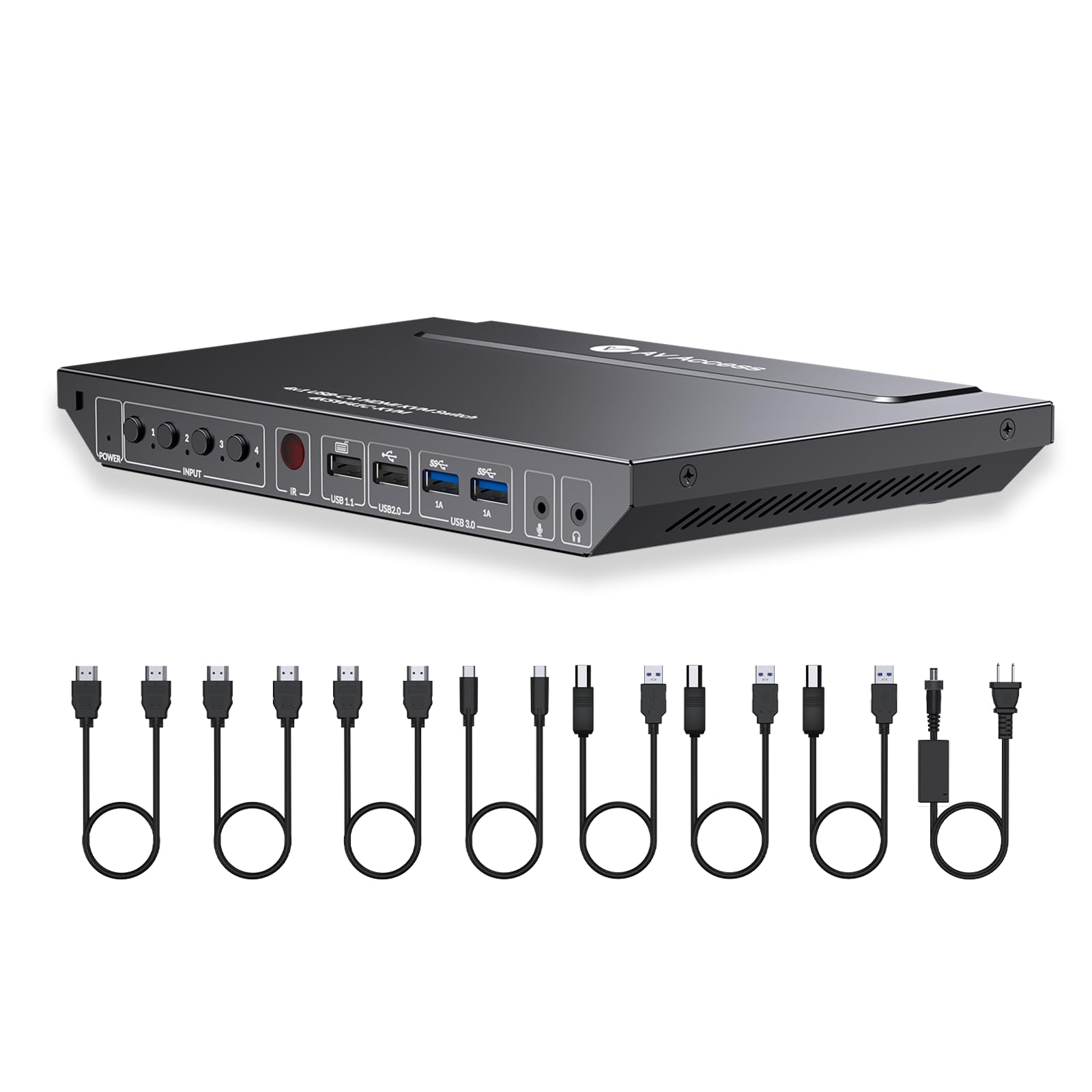
  • Package contents: 1x KVM Switch, 3x HDMI 2.0 Cable (5ft), 1x USB Type-C to Type-C Cable (3ft), 3x USB 3.0 Type-A to Type-B Cable (6ft), 1x Power Adapter (DC 24V, 5A), 1x IR Remote, 1x User Manual.
  • Effortless Multi-Computer Management: Seamlessly control up to 4 computers using one monitor, keyboard, and mouse setup.
  • Flexible Connectivity: Features USB-C and HDMI inputs and outputs for enhanced compatibility with modern laptops and PCs: MacBook, Dell, Lenovo.
  • User-Friendly Controls: Switch between computers effortlessly with the IR remote control or easy-access hotkey commands.
  • Durable and Reliable: Robust metal housing ensures durability and effective heat dissipation for long-term use.
  • Audio Integration: Includes an audio out port for connecting external speakers or headphones for immersive sound.
  • Fast Data Transfer: Built-in USB 3.0 hub ensures high-speed data transfer rates between peripherals and computers.
  • High-Resolution Video Quality: Supports stunning 4K@60Hz video resolution for crisp and clear visuals.
$195.49
Was $229.99Save $34.50

In Stock

DeliveryEstimated 3–5 business days · Final delivery speed and cost are confirmed at checkout
Easy Returns · 30-day window
This order is a gift

In Stock

Secure Checkout
Free Returns
30-Day Guarantee
Secure checkoutAll transactions are SSL-encrypted. Your payment info is never stored.
Free returnsReturn or replace within 30 days
Fast deliveryOrders ship within 1 business day and arrive in 4–8 days.
Buyer protectionIf your order arrives damaged or doesn't show up, we'll make it right.
24/7 supportOur team is here to help. Reach us anytime by email or chat.
Ships fromOur Warehouse
Sold byACTIONS GLOBAL US INC
Returns
Easy Returns30-day return window
PaymentsSecure transaction
Currently unavailable
Easy Returns · 30-day window

Product details

Brandv AV Access
ColorBlack
Hardware InterfaceHDMI
Compatible DevicesLaptops and Desktops with USB-C or HDMI ports
Total USB Ports4
Number of Ports4
Total HDMI Ports1
Wattage60 watts
Input Voltage24 Volts (DC)
ManufacturerAV ACCESS

Technical specifications

product_dimensions5.61 x 0.91 x 1.03 inches; 3.53 Pounds
item_model_number4KSW41C-KVM-NA
date_first_availableJuly 30, 2024
manufacturerAV ACCESS
best_sellers_rank#22 in KVM Switches

From the brand

Product detailProduct detailProduct detail
Product detailProduct detailProduct detailProduct detailProduct detailProduct detailProduct detailProduct detailProduct detail

Product videos

Product video 1

Customer reviews

4.2293 ratings

Customers say

Customers find the KVM switch works well, particularly with MacBooks, and appreciate its dual USB-C MST ports and ease of setup, with one customer noting it's a plug-and-play solution.

★★★★★

Great KVM if you deal with laptops at work.

Chun H. PoonMay 3, 2025

Received my package quickly from Amazon. I do have another AV Access device called the iDockB30 but it's good for two desktops and a laptop and I wanted the one that can connect to two laptops to have as my work keyboard-video-mouse (KVM). It's easy to set up. Just two USB-C cables that go to the corresponding ports on the back of the iDockC20 and power. The other ends of the USB-C cables will go to the respective laptops. I'm a big Lenovo ThinkPad fan so I have a ThinkPad T14 Gen 5 AMD from my work and a ThinkPad P14s Gen 5 AMD as my personal daily driver. Turned on the unit and works well. Though the T14 had a little issue connecting but once I rebooted it worked fine. I'm able to press the switch on the docking unit to switch between the two with no issue. Looking over the build it looks solid, and the ports are labeled clearly so you know what device to plug into what. There are a decent number of ports in the back and the SD card reader is convenient to have since at my work place, I sometimes need to use the cards to read any external data. I tested out the network connectivity between the two by switching and it doesn't seem to lose the connection which is nice. Since the power distribution is 60W I would only recommend the KVM for use on business class laptops like the Lenovo ThinkPads. It would be advisable that if you are going to be connecting a gaming laptop on it like a Asus Strix G16 or a Lenovo Legion i7 having USB-C ports it will provide enough power if you plan to game on it. I would only use it for productivity work. I hope the next iteration of the USB-C ports on the docking unit will be like USB 4 or Thunderbolt 4/5 but for right now it suits to what I need to it do at my workplace. I do have dual monitors, and they worked great on them. No issue whatsoever since the monitors I have are 27-inch 1080P and a 32-inch 1440P. I have used it for quite a number of days, and I personally like the device. It is working great so far for me and does what I need it to do. Since I do IT work, I like the fact that I can plug in a second laptop and run through items without having to plug in a monitor etc. Read more

★★★★★

Game-Changer for Dual Monitor Setups – Seamless, Smart, and Powerful!

AKAugust 6, 2025

Just two days in, and I’m already sold—this AV Access KVM Switch Dock is exactly what I’ve been searching for. If you're juggling multiple devices and want a clean, efficient setup, look no further. 🔌 Effortless Switching: I’ve connected both my mini-PC (via USB-C with display out) and my work laptop, and the switching between them is smooth and instant. It even wakes my mini-PC from sleep when I toggle inputs—huge plus! 🖥️ Dual Monitor Brilliance: I’m running two high-refresh-rate monitors, and the image quality is stunning. Whether I’m working or gaming, everything looks crisp and fluid. ⚡ Smart Design: While my mini-PC doesn’t support USB-C power delivery, that’s a minor trade-off. The dock significantly reduces cable clutter—HDMI cables go straight to the dock, keeping my desk neat and organized. 🌐 Extra Perks: With 60W PD for each PC, 1G Ethernet, and EDID emulation, this dock is packed with features that make it ideal for both productivity and play. 🎮 Verdict: Super happy customer. This dock has transformed my workspace and simplified my tech life. Highly recommended for anyone balancing work and gaming on multiple machines. Read more

★★★★★

Worked right out of the box

MS21October 31, 2025

Instead of two laptops, I connected one laptop and a Mini PC, both with the included USB-C cables. Then connected two monitors with a HDMI cable each. Plugged in Bluetooth receiver for my Logitech MX Master Bluetooth mouse and keyboard into the dock. That's it. Waited for a couple of minutes, nothing happened. So I got into a chat session with AVAccess support. Waiting for about 5 minutes, everyting came on without any help. Both monitors, plus flawless switching between the computers with the button on the dock. No support needed, but Johnny from the support desk even followed up with email. Am very happy with the setup Just one cable for each device. Very neat. No downloads or installs. The switching between two computers is seamless so far. I typically never turn off my computers, just let them go to sleep. They have been waking up just by moving the Logitech Bluetooth mouse or keyboard. Absolutely five star. Read more

Recently Viewed