
Works with your Xbox!
Looked every where for a solution to using my Xbox Series S to a portable monitor with only USB-C ports. I tried other products that should have worked, but didn't. This worked like a charm! Highly recommended. Read more

Club 3D
$77.58
Have a question about this product?

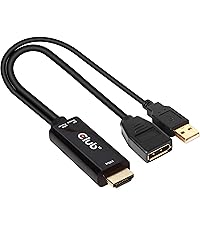
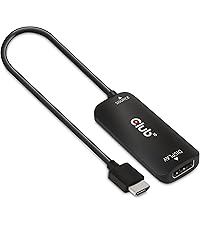

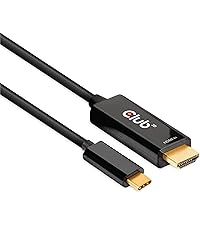


Product video 1
Rated 4.3/5 across 8 reviews — well received overall.
Customers report that the HDMI adapter works well for 4K 3840x2160/60Hz displays and is compatible with various devices, including Nintendo Switch and Apple Studio Display.
Generated from the text of customer reviews
Looked every where for a solution to using my Xbox Series S to a portable monitor with only USB-C ports. I tried other products that should have worked, but didn't. This worked like a charm! Highly recommended. Read more
I purchased this in hopes to use my Apple Studio Display with my Xbox Series S. This product essentially gives the Xbox a USB C video out. I can unplug my MacBook and plug the Studio display cable into this adapter, which is already plugged into my Xbox, and I’m ready to go. It does appear to limit the resolution to 1080p and has no audio out, but that doesn’t bother me. If you use a headset to game at your desk, this may be the solution you were looking for. Read more

The cable that actually works. Was able connect hdmi from older laptop to the monitor with C-type connection. It’s probably should be cheaper, but it was the only one that worked for my case; unsuccessfully tried few other. Read more
Cable does exactly what it's intended. It's the only one I've found that can connect my Switch to my Studio Display, albeit without sound. NOTE: THE ADAPTOR/DONGLE DOESN'T WORK to connect to Studio Display, only the cable works to connect the two. I have mine set up with an HDMI switch to toggle between my Switch and PS4 and that works just fine. But in order to receive a signal you have to get the cable. It is a little pricey in my opinion for a standard cable, but it is also the only one that works. Read more
My monitor is an M14 Lenovo monitor. It only had a USB-C port. Put the switch on its base holder charging. Plug this adapter into the HDMI port and then plug a USB-C to USB-C cable to the adapter and to the portable monitor. The monitor needs power going to it as well. I use a 65w AC-Adapter. This will display, but my monitor does not have sounds, but I just connect my AirPods to the switch. Read more
I purchased this device because in my work they changed me the laptop and the new one only have HDMI. Works perfect but only 4K60 image, the sound doesn’t work Read more

Work as advertised just to damn expensive Read more
Monitor periodically just starts flickering and flashing then clears up. No idea why it starts or stops but it's really annoying. The monitor doesn't have any issues on another computer and has a separate power supply. Read more

Club 3D Thunderbolt 4 40Gbps Portable 5-in-1 Hub DisplayPort 4K60Hz 8K30Hz USB Type-C USB Type-A 10Gbps Smart Power
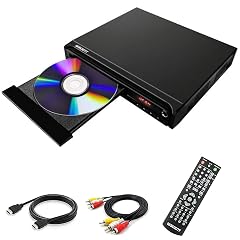
WISCENT Compact DVD Player for TV Multi-Region Free with HDMI RCA USB MIC Full HD Picture Quality Anti-Skip

NYYTGE Desk Clamp Power Strip with Nightlight 40W Fast Charging 6FT Extension Cord 4x20W USB-C 2 USB Ports

NYYTGE Desk Clamp Power Strip with Nightlight 40W Fast Charging 6FT Extension Cord 4x20W USB-C 2 USB Ports

Portable Monitor 15 6 Inch 1080P USB-C HDMI Ultra-Slim Travel Monitor with Kickstand for Laptop PC Mac Phone

DVD Player Region Free DVD Players for TV 1080P Upscaling USB Input HDMI RCA Cable Included Breakpoint Memory

1080P HD Mini DVD Players for TV All Region Free DVD Player Supports HDMI RCA USB AUX Memory

Belkin USB-C Hub 5-in-1 Multiport Adapter - USB-C Docking Station with 4K HDMI 2 x USB-A Ports SD
We use optional analytics and advertising cookies to understand how visitors use Ventari, measure ads, and improve the experience. You can accept all optional cookies, allow analytics only, or decline them. See our Cookie Policy.