
YWLRONG

for 3D PS5 Joysticks Replacement for Sony PlayStation 5 PS5 Controller Joystick Replacement for PS5 Analog Stick Replacement

3.9

$20.42

About this item

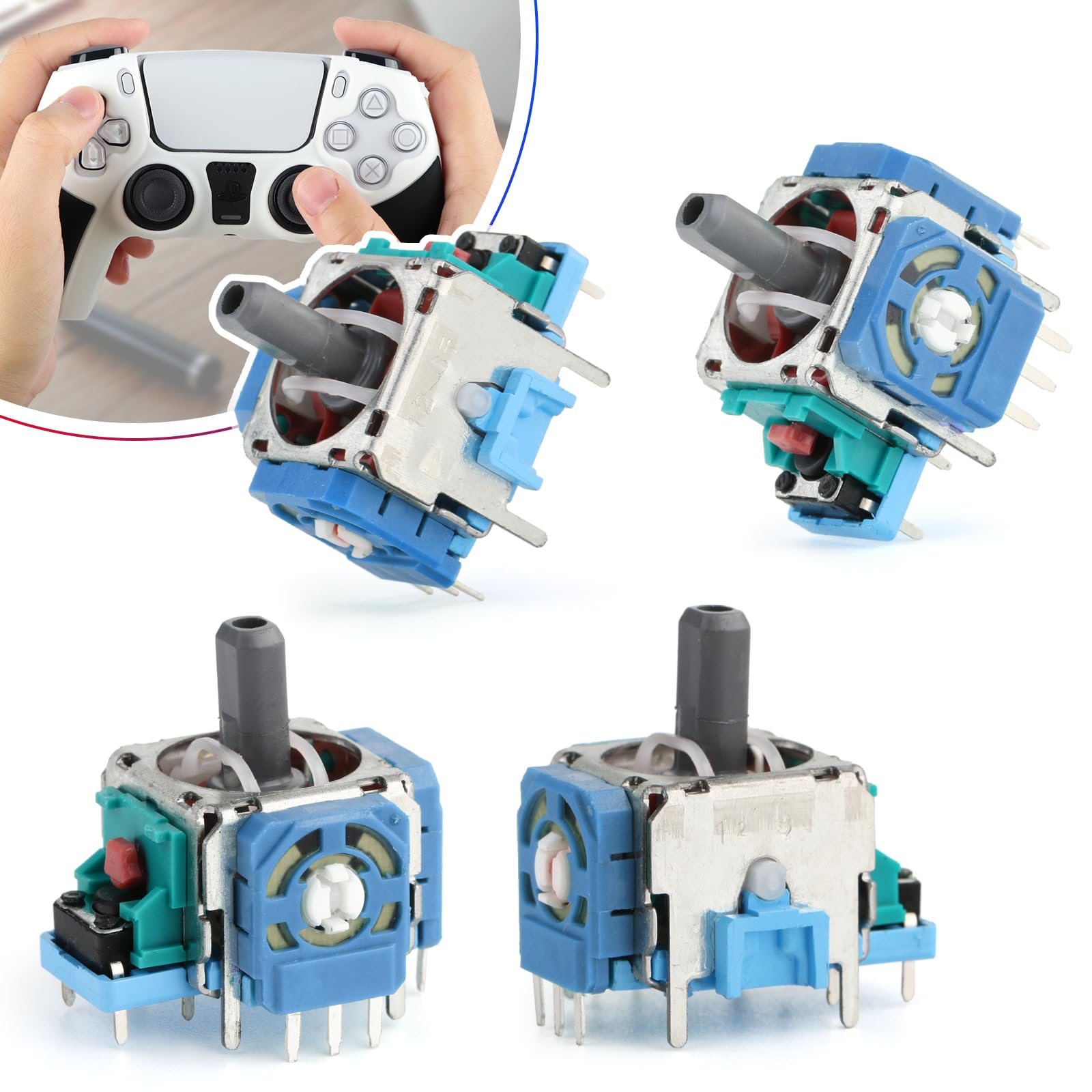
  • Compatibility: The 3D Joysticks is for Sony Playstation 5 PS5 joystick replacement. Our for PS5 analog stick replacement's model number is EL6, and the Potentiometer is 2.3Kohm, it only suits for the controller for PS5 Dualsense. Please confirm your model before placing the order.
  • Application: For ps5 controller joystick replacement are apply to the problem of the drifting, blind spots, dead spots, can't center, damaged or broken, long time to use, not sensitive, etc. The Joystick for Playstation 5 will better to solve the problem of drifting.
  • Quality Guarantee: For PS5 replacement thumbsticks was test before shipment and for PS5 joystick replacement are made of good quality, metal+ABS plastic material make it use more accurately and has longer working life. The controller will use as a new one after replacing for PS5 controller analog stick replacement, the replacement for PS5 joystick will bring a new life.
  • Installation Suggestion: Come with 4pcs joysticks. For PS5 controller joystick to replace need to weld, if do not have any installation experience, we suggest to find the professional to replace for PS5 joystick. After replacing the joystick replacement for PS5, if it show the problem of drifting not center, it means it will need to manual calibrate.
  • Suggestion Tips: Please make sure for PS5 joystick replacement package is good when you received it, if you have any problem about the product, please leave a message.
  • Product description Previous page Next page 1 Good Design 2 Accurate Size 3 Newest Version 4 Product Display Installation Guide Step 1 Please remove the middle cover of the controller edge. Installation Guide Step 2 Using opening tools to insert in the cover corner of the controller to release. Installation Guide Step3 Please Remove the controller screw of L1 and R1. Installation Guide Step 4 Remove the rear cover of controller Installation Guide Step 5 Please disconnect the battery cable and remove battery. Installation Guide Step 6 Remove the microphone ribbon cable and disconnect it from the motherboard. Installation Guide Step 7 Remove the battery bracket out of the motherboard. Installation Guide Step 8 Disconnect the left and right trigger cable; Disconnect the upper microphone cable. Installation Guide Step 9 Carefully remove the joysticks through the front cover and lift Compatibility: The 3D Joysticks is for Sony Playstation 5 PS5 joystick replacement. Our for PS5 analog stick replacement's model number is EL6, and the Potentiometer is 2.3Kohm, it only suits for the controller for PS5 Dualsense. Please confirm your model before placing the order.; Application: For ps5 cont
Overview

About this item

  • Compatibility: The 3D Joysticks is for Sony Playstation 5 PS5 joystick replacement. Our for PS5 analog stick replacement's model number is EL6, and the Potentiometer is 2.3Kohm, it only suits for the controller for PS5 Dualsense. Please confirm your model before placing the order.
  • Application: For ps5 controller joystick replacement are apply to the problem of the drifting, blind spots, dead spots, can't center, damaged or broken, long time to use, not sensitive, etc. The Joystick for Playstation 5 will better to solve the problem of drifting.
  • Quality Guarantee: For PS5 replacement thumbsticks was test before shipment and for PS5 joystick replacement are made of good quality, metal+ABS plastic material make it use more accurately and has longer working life. The controller will use as a new one after replacing for PS5 controller analog stick replacement, the replacement for PS5 joystick will bring a new life.
  • Installation Suggestion: Come with 4pcs joysticks. For PS5 controller joystick to replace need to weld, if do not have any installation experience, we suggest to find the professional to replace for PS5 joystick. After replacing the joystick replacement for PS5, if it show the problem of drifting not center, it means it will need to manual calibrate.
  • Suggestion Tips: Please make sure for PS5 joystick replacement package is good when you received it, if you have any problem about the product, please leave a message.
  • Product description Previous page Next page 1 Good Design 2 Accurate Size 3 Newest Version 4 Product Display Installation Guide Step 1 Please remove the middle cover of the controller edge. Installation Guide Step 2 Using opening tools to insert in the cover corner of the controller to release. Installation Guide Step3 Please Remove the controller screw of L1 and R1. Installation Guide Step 4 Remove the rear cover of controller Installation Guide Step 5 Please disconnect the battery cable and remove battery. Installation Guide Step 6 Remove the microphone ribbon cable and disconnect it from the motherboard. Installation Guide Step 7 Remove the battery bracket out of the motherboard. Installation Guide Step 8 Disconnect the left and right trigger cable; Disconnect the upper microphone cable. Installation Guide Step 9 Carefully remove the joysticks through the front cover and lift Compatibility: The 3D Joysticks is for Sony Playstation 5 PS5 joystick replacement. Our for PS5 analog stick replacement's model number is EL6, and the Potentiometer is 2.3Kohm, it only suits for the controller for PS5 Dualsense. Please confirm your model before placing the order.; Application: For ps5 cont

Have a question about this product?

From the brand

Product detailProduct detailProduct detailProduct detailProduct detailProduct detailProduct detailProduct detailProduct detailProduct detailProduct detailProduct detail

Product videos

Product video 1

Customer reviews

5 reviewsMixed

Rated 3.9/5 across 5 reviews — opinions are mixed.

  • 100% of sampled reviews are from verified purchases.
  • 60% of sampled reviews give 4–5 stars.

Customers say

Customer summary is not available yet.

★★★★★

Goodbye stick drift.

Aside from some bent pins on arrival, that were easily straightened out, they work perfectly. As long as you have a de-soldiering station, and are handing with an iron, this is a cheap and quick solution to stick drift. Took me about an hour to replace both sticks on my PS5 controller, and most of that was just trying to get the damn thing apart. Read more

Sean M.Verified purchase
★★★★★

Perfect replacement for originals

One of our PS5 sticks started behaving wonky - the feel was off, and it would drift or register poorly. Rather than replace the whole controller I decided to try replacing the joystick units. This operation requires proficiency in delicate opening of the case and desoldering/soldering delicate electronics. Do not attempt this if your soldering skills aren't up to it. If in doubt, read the instructions on ifixit before proceeding. Be warned that there are at least two versions of the controller. There are instructions for both, and if you find yourself forcing or breaking anything then you may be looking at the wrong one. Read more

MMVerified purchase
★★★★

You may not need to solder if you're having stick drift issues

I bought these by mistake thinking they were hall effect sticks. I was hesitant to continue with my project to fix my left stick drift, until I saw a YouTube video called "How to take apart your ps5 controller and fix Stick Drift" from a channel called Restore Technique. In the video, it shows that these sticks have these small circular discs on the x and y axis that could be the root cause of drifting, possibly due to a lubricant that was added that got mucky. The video showed how to carefully remove and clean the disc with alcohol, but instead I went ahead and swapped the discs from one of these to the one already soldered on, and everything seems to be working fine now with no soldering needed. I will repeat the step on my second dualsense hoping it also won't require soldering. The 4 star is due to the fact I had believed I was buying new parts but there were signs that this product had been recycled (some of the prongs that go into the motherboard were slightly bent and there was some slight scuffing) but it is a good value, assuming you are having the exact same issue. Read more

SarahVerified purchase
★★☆☆☆

Would not buy again

One worked out of the whole pack still using it but the only one Read more

AustinVerified purchase
★★★★★

Stick drift solution

These were pefect for my ps5 controller. Helped me fix the stick drift problem I had. Read more

RudyVerified purchase

We use optional analytics and advertising cookies to understand how visitors use Ventari, measure ads, and improve the experience. You can accept all optional cookies, allow analytics only, or decline them. See our Cookie Policy.