
Well built and worked A-OK for me!
This worked PERFECTLY on my Acer H236HL display. Nice solid fabrication with the welding, too. I am very pleased with the final solution. Read more

Gladiator Joe
$38.99

Have a question about this product?


Product video 1
Rated 4.6/5 across 7 reviews — highly regarded by customers.
Customers find the monitor arm mount sturdy, well-built, and easy to install, with one mentioning it works well at 90-degree rotation.
Generated from the text of customer reviews
This worked PERFECTLY on my Acer H236HL display. Nice solid fabrication with the welding, too. I am very pleased with the final solution. Read more
Was in need of a couple of adapters for my vesa mount Acer monitors. These are strong, well built, easy to assemble but a little pricey. Glad I didn't buy a lower cost item because these truly are high quality and super easy to assemble. I assembled everything and inserted in to my monitors first. Then i simply slid it down on the receiver of the dual monitor stand and tightened the top nut. Way too easy and very strong. Some reviewers mentioned that both monitors don't align well. I disagree. It takes a little tweaking, but these things are capable of moving up and down and also sideways. I suspect some users didn't realize that. Read more
My favorite inexpensive 4K 24 in monitor is made by Acer. I have 4 of them, 2 for me and 2 for my husband. The downside-ish side is they aren’t VESA compatible due to the ports all being where the bracket would go…so as long as you used the stand, you’d be fine. However, I needed to reorg my workspace which required my upgrading to pole mounts, but the ones I got required VESA monitors. Well, no problem with these adapters! They slot in exactly where the monitor stands do and leave enough space for all the cables to connect to the ports…even the larger stiffer HDMI ones! Heavy duty well made adapters that accept both standard VESA sizes. When my husband wants to wall or pole mount his monitors, I’ll be getting more of these adapters! 5 stars! Read more
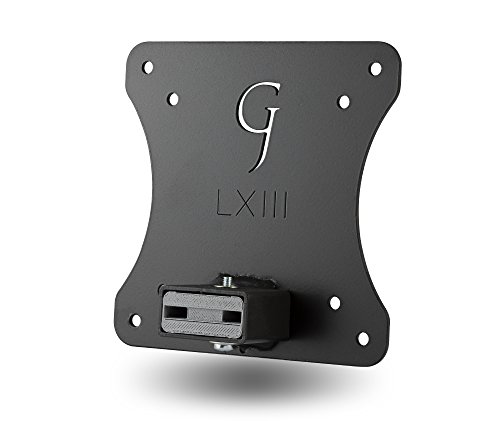
I got two Gladiator Joe VESA bracket adapters (model #GJ0A0055) for use with two Acer G227HQL Abi 21.5" monitors. The overall quality is good and the fit is excellent. I would buy them again even knowing what I do now (see below). I was happy to find out that there are adapters made to convert my Acer monitors to a VESA mount - I thought I was going to have to fabricate something myself. Now, for most people this mount will be just fine and I could easily give 5 stars. For the rest, I'll show the things I felt were shortcomings or disappointments even though some may consider it nit-picking. That's why I removed one star. 1. The top image for this model adapter on Amazon shows the monitor mount welded to the BOTTOM of the back plate. The adapters I received had the monitor mount welded to the MIDDLE of the back plate. Although the forth image down shows a monitor attached to the mount welded to the middle of the plate. I do not see any reason to have this mount welded to the middle since the mount is just as strong in the bottom position, and both HDMI and VGA connectors on the back of the monitor will not be affected. Some of their other adapters have it mounted to the bottom where it should be. Looks like someone did not update the image when a change was made at the factory. With the monitor mount welded to the middle of the VESA plate, 1.5" of the back plate will be visible below the monitor. The left monitor will be mounted to the wall above my desk, so this negative is only cosmetic. But the right monitor not only has 1.5" of the back plate visible below the monitor, it also takes up space on my desk since this monitor is situated 5" above my desk. I corrected this by cutting 1.5" off the bottom of the back plate so the monitor mount is now flush with the back plate. Grinding the welds off and welding the monitor mount to the bottom would also have been an option. I drilled two holes at the bottom of the back plate, next to the monitor mount since I removed the bottom portion. This modification removes the full VESA mount, but it doesn't matter for me since I have them installed on custom mounts. 2. The monitor mount is 2" deep to the back plate. That does not leave much room for a straight HDMI connector. It will fit, but a sharp 90° bend has to be made right at the connector. My thin (0.215") cables are easy to connect, but my thick (0.375") cables are a little more difficult, but will certainly fit. A much cleaner installation is to use a left (90°) or right (270°) connector. When an HDMI socket is orientated so the shorter length is on the bottom then looking at a socket this way, a "left" cable will go to the left (90°). A "right" will be 270°. Search Amazon "left HDMI cable" or "right HDMI cable" for their selections. This is not to be confused with an HDMI right-angle adapter for "bottom" being referred to as 90°, and "top" is referred to as 270°. A "top" would exit to the top of a monitor in this case, a "bottom" would not fit since the monitor mount is in the way. 3. One adapter had cold welds. This means that during welding, not enough amperage was used to create enough heat to melt the metal, which results in poor penetration. A weaker joint is the result although it is still strong enough in this application. My other adapter had good welds. 4. The paint was not dry (hard) on both adapters. Upon receipt (both packed VERY well), there was a strong petroleum smell and slightly tacky - not to the point where fingerprints would be left, but it was VERY easy to scrape the paint off with somewhat light fingernail pressure, leaving bare metal. If an adapter was left on paper, it would stick to it. No primer was used. After two weeks there was not much change so I stripped the paint so I could repaint them (this time with primer). Read more
[ I will return back with a better review once both monitors are mounted ] .. I was hesitant to purchase this because I spent $60 for two. Was trying to find a more reasonable alternative, but the reviews from that other brand scared me away. I was in the middle of looking for two-brand new monitors, until i just decided to a little more research, and stumbled across this. I just bought the brackets before buying the mount stand to make sure that it would actually fit for my monitors [ ACER S232HL ] ... AND IT WORKED! It was worth the $60 & it was easy to install which is why i gave both of those ratings 5 STARS. I will be back with an update review once i purchase a mounting stand for my desk, and complete the installation and my results after for sturdiness etc. UPDATE 09/06/23: We are still standing strong. The mount works perfect and I’ve moved it more than once. Only gripe is that, it’s not 100% even but you can’t notice it if you don’t have the detail eye. My ratings still stand on 5 Stars. Read more

I have a pair of Acer G227HQL monitors that I was looking to mount to a desk-mount arm setup with VESA mounting plates. Of course, I had ordered and received the mount before confirming that I could use the monitors on it! That is when I found these adapters. They were finished in a durable black powdercoat finish and have a decent bit of weight to them. Installing them was pretty easy too. Some have noted that the HDMI connections are a tight fit, and I will admit that they were in my case too. However, with a decent HDMI cable and a gentle touch, I had no problems with getting things set up. One tip - before setting the monitor on the adapter, thread the power and HDMI cables through the hole on the bottom part of the bracket. This will make plugging it in easier. The monitors sit nice and stable on these adapters, and while it might not be quite as secure as a VESA mount, it suits my needs well and is much cheaper than buying new monitors. Read more
Locks in fantastically, zero flex. I'll warn you if you have extremely bulky cables, you might have some difficulty plugging them in, but otherwise I had no issues. It will technically hold the monitor in portrait mode, but it's not at the center of gravity, so unless you're monitor stand has locking rotation or is incredibly stiff, the monitor will rotate. Read more

Gladiator Joe Monitor Arm Mount VESA Bracket Adapter Compatible with 32 Curved Display Monitor CF397 and 24 Curved

Gladiator Joe Monitor Arm Mount VESA Bracket Adapter Compatible with Dell S2218 S2318 S2418 S2718 Monitors - 100

Gladiator Joe Monitor Arm Mount VESA Bracket Adapter Compatible with Dell S2340L S2340M S2240L S2240M - R1

Gladiator Joe Monitor Arm Mount VESA Bracket Adapter Compatible with HP Pavilion 27xi 27bw 27vx 27Vc 25bw 25vx

Gladiator Joe Monitor Arm Mount VESA Bracket Adapter Compatible with MSI Optix Series Monitor AG32C AG32CQ G24C G27C

Gladiator Joe Monitor Arm Mount VESA Bracket Adapter Compatible with Samsung 27 Curved Display CF591-100 Made in North

Gladiator Joe Monitor Arm Mount VESA Bracket Adapter Compatible with Samsung CH711 27 32 inch Laser Cut 100

Gladiator Joe Monitor Arm Mount VESA Bracket Adapter Compatible with Samsung S24B240BL S24B240KL S27B240B S27B240K S24C230BL S24C230JL S24C230L
We use optional analytics and advertising cookies to understand how visitors use Ventari, measure ads, and improve the experience. You can accept all optional cookies, allow analytics only, or decline them. See our Cookie Policy.