HUION

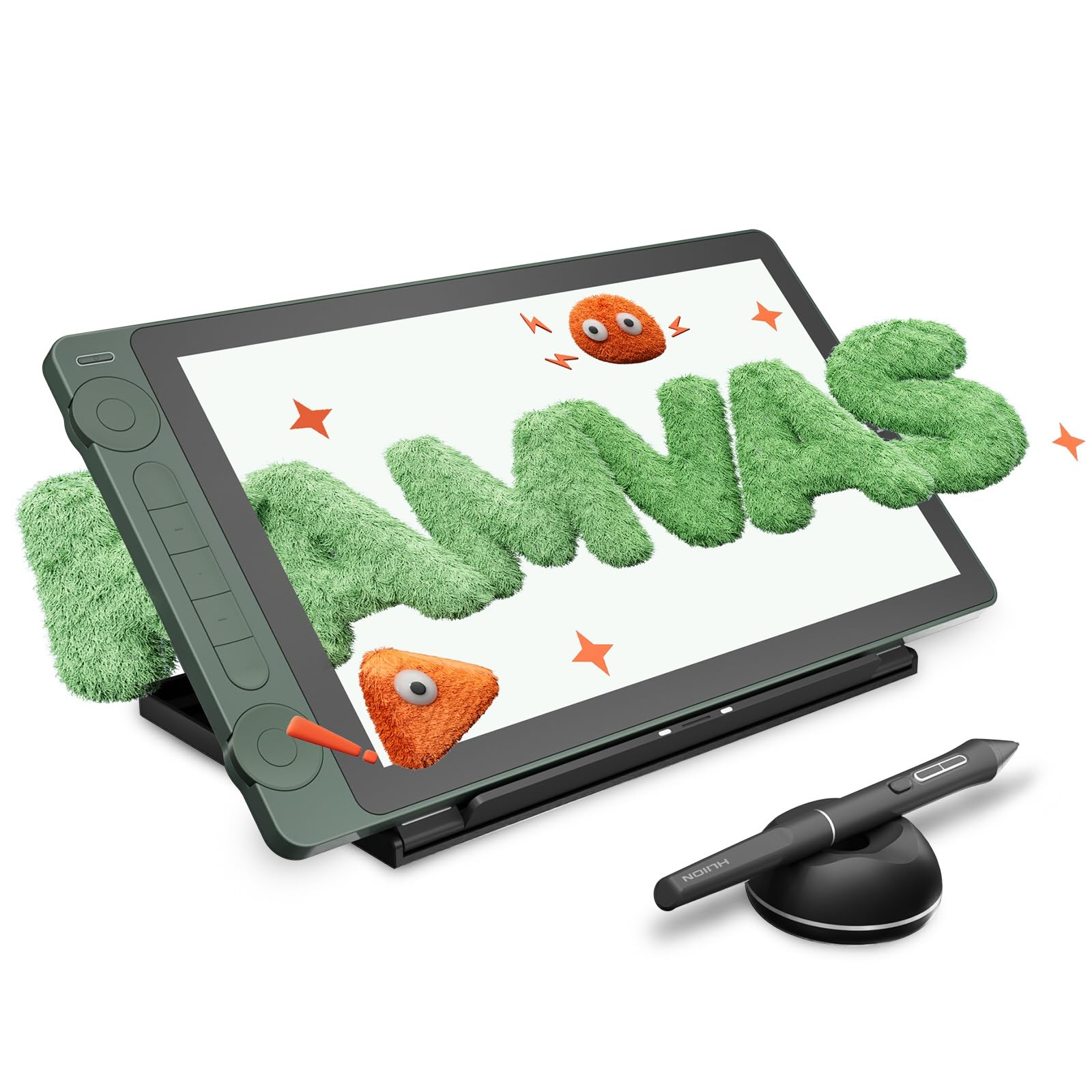
HUION Drawing Tablet with Screen Full-Laminated Art Tablet Kamvas 13 Gen 3 SE Graphic Tablet with Anti-Glare Canvas

120+ bought in the past month

$229.00$269.00

About this item

  • Advanced PenTech 4.0 Technology: The digital art tablet features the latest PenTech 4.0 with 2g IAF for accurately captures stroke, and 16K pressure sensitivity for natural line variation. The thinner nib and tilt auto-alignment ensure accurate tracking with minimal parallax. 3 side customizable keys and dust-proof grip enhance both comfort and productivity.
  • Upgraded Canvas Glass 2.0: This computer graphics tablet features an advanced nano-etched glass that evolves general anti-glare with anti-sparkle, which effectively reduces image noise under a white background. The graphic tablet with screen also provides a better paper texture to match full-lamination, enhancing clarity for better immersion during creation.
  • Professional Color Accuracy: Kamvas 13 (Gen 3) SE graphic design tablet screen that covers 99% sRGB, Rec.709, and 90% Adobe RGB color gamut, 16.7 million display colors, delivering true-to-life color reproduction for professional creative work. The wide color gamut ensures vibrant, accurate hues that stay consistent from screen to final output.
  • Factory Color Calibration: Each Kamvas 13 (Gen 3) SE SE animation tablet undergoes rigorous factory color calibration to achieve ΔE<1.5, ensuring accurate color representation. It also includes a factory calibration report, enabling you to use the correct colors to enhance your artistic expression.
  • Workflow Accelerator: Kamvas 13 (Gen 3) SE digital drawing pad features 2 dial controllers and 5 silent keys for instant control over brushes, opacity, canvas, and workflow parameters, putting professional customization at your fingertips.
  • USB-C Single Cable Connection: The computer drawing pad retains the convenient dual-interface design and optimizes the connection stability. Also, you can use your own USB-C to USB-C cable to connect the display to your computer or mobile device. Note: Please ensure it supports USB 3.1 Gen1, DP 1.2, and above standards.
  • Board Compatibility: The computer drawing tablet is compatible with Windows 10 or later, Mac OS 10.12 or later, Android devices that support USB3.1 GEN1 and DP1.2, and Linux OS(Ubuntu 20.04 LTS). And it supports most mainstream software like PS, AI, AE, Blender, CSP, Toon Boom, and so on.
  • Please note: Kamvas 13 (Gen 3) SE Pen Display is not a standalone product; this device must be connected to a computer/laptop/Android device to work
$229.00
Was $269.00Save $40.00

In Stock

DeliveryEstimated 3–5 business days · Final delivery speed and cost are confirmed at checkout
Easy Returns · 30-day window
This order is a gift

In Stock

Secure Checkout
Free Returns
30-Day Guarantee
Secure checkoutAll transactions are SSL-encrypted. Your payment info is never stored.
Free returnsReturn or replace within 30 days
Fast deliveryOrders ship within 1 business day and arrive in 4–8 days.
Buyer protectionIf your order arrives damaged or doesn't show up, we'll make it right.
24/7 supportOur team is here to help. Reach us anytime by email or chat.
Ships fromOur Warehouse
Sold byHuion Official Store
Returns
Easy Returns30-day return window
PaymentsSecure transaction
Currently unavailable
Easy Returns · 30-day window

Product details

BrandHUION
Connectivity Technology3-in-1 Cable, USB-C to USB-C cable
Operating SystemAndroid, Mac OS 10.12 or later, Windows 10 or later
Special FeatureCanvas Glass 2.0, Dual Dials, Full Lamination, PenTech 4.0, Programmable Press Key
Model NameKamvas 13 Gen 3 SE

Technical specifications

product_dimensions15.55 x 9.25 x 0.04 inches
item_weight5.48 pounds
item_model_numberRDS-130
best_sellers_rank#36 in Computer Graphics Tablets
date_first_availableOctober 10, 2025
manufacturerShenzhen Huion Animation Technology LTD.

From the brand

Product detailProduct detailProduct detailProduct detailProduct detailProduct detailProduct detailProduct detailProduct detailProduct detailProduct detailProduct detail

Product videos

Product video 1

Customer reviews

4.51,711 ratings

Customers say

Customers find the graphics tablet to be an amazing device that's easy to set up and use, with a crisp display and excellent color accuracy.

★★★★★

Honest review and economical setup ❤️

T. ReyesApril 25, 2023

Okay so I have the Huion Inspiroy q11k pen tablet. That is a decent tablet but the pen is a bit glitchy and the customizable keys never worked. Still I'd give it 4.5 out of 5 so when I started to get the itch for a display tablet, I researched so many brands that I got sick of research 😔 Ultimately, I decided to go with the brand I was familiar with, Huion so I took the leap and got this. Here is my experience. I just got the tablet today and the first thing is that the delivery even came earlier than was announced ✅ It was packed in a huge Amazon box to protect the smaller product from damage ✅ Now for the unboxing and initial experience. Note that I will change my rating once I paint on this or if there's any trouble down the line. I was very nervous because of some bad experiences that others had, so I started up my tablet with a bit of concern. Prayed so hard and I was so happy when it actually worked first without the display. There was a little difficulty when I connected the HDMI cable for the screen though because first it was showing that there was no signal but then after toggling the HDMI cable it started to show the screen and everything. Another reviewer had said that it worked right out of the box and I was skeptical about that but it's true 😯 And I think that happened for me because I have the other tablet with driver installed. I had just tried it for fun before uninstalling the driver and was so pleasantly surprised that it works with my old Huion driver for my q11k pen tablet. I suspected that there would be some unity between drivers but still! But as the driver for the pen tablet was most likely outdated, I went to the website and downloaded the newest driver which was a 15.132 (or something) version when I was using the 14.1 version ( the newest driver was updated in 2022 so I got that and uninstalled the old one) The test: I did a few circles and lines in CSP to test the pen and it is working well 😏 The screen is a bit bright but it can be adjusted. The colors are nice too. I can't wait to paint on it but not tonight...I'm tired after pulling an all nighter to paint yesterday 😩 I also customized the keys on the side of the tablet and stuck the stickers they provided to identify which key is which. These stickers are such a nice touch for me ✅ because with my other pen tablet there weren't any stickers and it was always confusing to remember which key was which. And since I work in a darkened space that's even worse so I never used the keys. I'm grateful for this now. My laptop doesn't even have a battery but it works with it. I thought that would have been an issue but I use the adapter that comes with the display tablet just in case. I'm good to go and that's it I don't think I need to buy anything else because this is perfect. Even my setup is perfect for me because now I don't regret not buying a tablet stand at all. I am using the box that the Huion kamvas tablet came in as a stand 😅 How I do it is use half the box to rest the tablet and the other half the rest my laptop and I am as happy as ever because it has elevated the laptop and the tablet and is comfortable to use. So the box gets a 4/5 ⭐⭐⭐⭐ for being sturdy and having a recyclable purpose 😅 As my bed is my workspace, I only have a small space to sleep on now though but that is something I can work around. Do artists sleep anyways? 🙈 So that's it. Fast delivery. Very easy to use. No disappointment.... If I think of anything else or my experience changes I'll update this 👍 Update: 03/July/23 I have done a few paintings on this so far. The only problem I've experienced with it is how sometimes the hot keys will reset, particularly the long one that you can use to scroll / zoom in or out. But that isn't a huge issue for me because everything else is great. I love painting on this without the delay of making sure my pen tablet and my hand is cooperating. It's a lot less of a headache than what I was using before. Oh and I didn't buy a remote for extending the shortcut keys. I simply bought a wireless keyboard and mouse and that has been the best thing ever in using this. This display tablet is perfect for me. I use it for everything: watching movies, my writing, art and video editing. It's just so convenient to be able to recline with it on my lap. And let me say, I never thought that I'd be painting on a tablet while lying down! Works for the days when I'm tired after work or just woke up and I don't want to sit down and paint. Good for the back! So this encourages me to paint more since using it is painless. Plus it's already in my hand when I'm using it for something else so I'd just open CSP and start working on one of my many procrastinations. It doesn't get ignored like my pen tablet that would be to the side of my bed crying out to be used for art and getting used as a coaster instead 🙈 Conclusion: I love this display tablet. Painting is a whole lot more precise, fun and a tad bit easier. Will update with more as time goes along! Read more

Review image 1Review image 2Review image 3Review image 4
★★★★★

Great Budget Digital Drawing/Painting Experience

Matthew S.January 27, 2020

The media could not be loaded. I had an old Wacom Intus3 6x11 for many years and had always wanted a screen tablet to draw on. I finally found one for the price I can afford in the Huion and ordered the Kamvas Pro 16 after seeing such glowing reviews. This tablet has made drawing and painting fun on the computer again. I feel like this is a good middle of the road size as if it's too small, your view might be blocked by your hands on the screen. The product seems well built with a premium feel to it. The experience is very good, strokes are mostly accurate (see below) and responsive. I had to contact support on a few occasions and they were very responsive which is great. My Wacom had 1024 levels of pressure sensitivity, this one has 8092. I thought it would make some difference but I was not able to feel the difference. I do wish that the driver allows you to tweak the pressure sensitivity curve better. I would like to make it more like a S curve, but it is not possible. The accuracy of the pointer is off as you move towards to edges. So if you maximized your window for example, and you want to hit the window controls at the edge, it's a bit of a "struggle" but it is manageable. Hopefully this is a driver issue that can be fixed. At time, I can hear the stylus drag over the screen and sometimes click. Not sure why that happens or if it's by design. Related to this, the screen may make a sound if you lean on it too much. I didn't think I had applied too much pressure with my hands, hopefully this is a non-issue. If the tips were more rubberized instead of being plastic it will help. The driver is not too stable and freezes or crashes sometimes. You also need to make sure you start it as an administrator else certain features may not work; like customizing buttons per app. I work primarily with Photoshop and when you enable tilt in your brushes, there is always a warning icon in the GUI (see the screenshot) and it doesn't seem to work very well. However, if you use the older legacy brushes that has tilt support but does not show the tilt enabled it seems to work better. Tilt does work in Krita. So I'm not sure if this is an issue with Photoshop and Huion, I don't have the Wacom to compare with anymore. When you see the reviewers on YouTube using it with the laptop screen on and connected to this tablet, they usually have the desktop mirrored on the tablet, and more likely than not, the laptop screen has the same resolution as the tablet. Otherwise it will look weird because one of the screens will be stretched. My ideal use case is to use it in a extended mode, so the Huion is an extended screen. However, to do that, you have to go into the driver to manually map the drawing surface to the Huion. This should be the default on the driver, or at least a button/checkbox to automatically enable it. Because of this, I now close the laptop screen and just have that one screen (the Huion). It would be nice to have this addressed so I can leave the laptop screen on and keep other apps in view like a reference photo, emails, chats etc. Overall, great product with great promise. Hoping that the drivers will keep improving and the product holds up well (see the notes about the click noises). Read more

Review image 1
★★★★★

Very pleased

Fernando KurkaMarch 7, 2023

I've been using the Huion Kanwas Pro 16 (1920x1080) for a couple of weeks, now, and I'm thrilled by it. I bought it to replace my 12 inch Xp Pen Artist. The size is just about right. I considered buying a larger version, but came to my senses. A larger version would have taken up all the available space. I was a bit aprehensive about the resolution but it's fine. Unless your eyes are about two inches from the screen you won't see any pixels. Also, the pen is really good. It looks, and feels, very much like a Wacom pen. The button are just right, the lines are good. Pressure sensitivity is fine, and it's a nice size. The laminated screen is great. I use, mainly, for Clip Studio, and it's nice to have room for the menus, tabs, etc. It works a treat. also, if you use clip Studio, you can use the Companion app to zoom and scroll, etc. Othewise, the buttons can be customized at will. My only con is the that instructions for adjusting the screen brightness, contrast,and color, are a bit opaque. This is not much of an issue because it really it was fine out of the box. Having spent decades worrying about color cast as a product photographer, I' happy to say, good enough. The driver allows you to assign various functions to the buttons, and these can be saved for different applications. You will need a stand for this. The stand that Huion sells is not all that good. Parblo sells an adjustable stand for the same price, and it is way better. You can find it here on Amazon. And, finally, the price is great. Wacom must be feeling the hea Read more

Recently Viewed