
Portable, easy setup, and convenience!
Works perfectly! Extremely portable and always take with me for sales call for large display formats. Easy setup and no drivers needed. Perfect size! Read more
Kensington
$48.99

Have a question about this product?





Product video 1
Rated 3.8/5 across 8 reviews — opinions are mixed.
Customer summary is not available yet.
Works perfectly! Extremely portable and always take with me for sales call for large display formats. Easy setup and no drivers needed. Perfect size! Read more
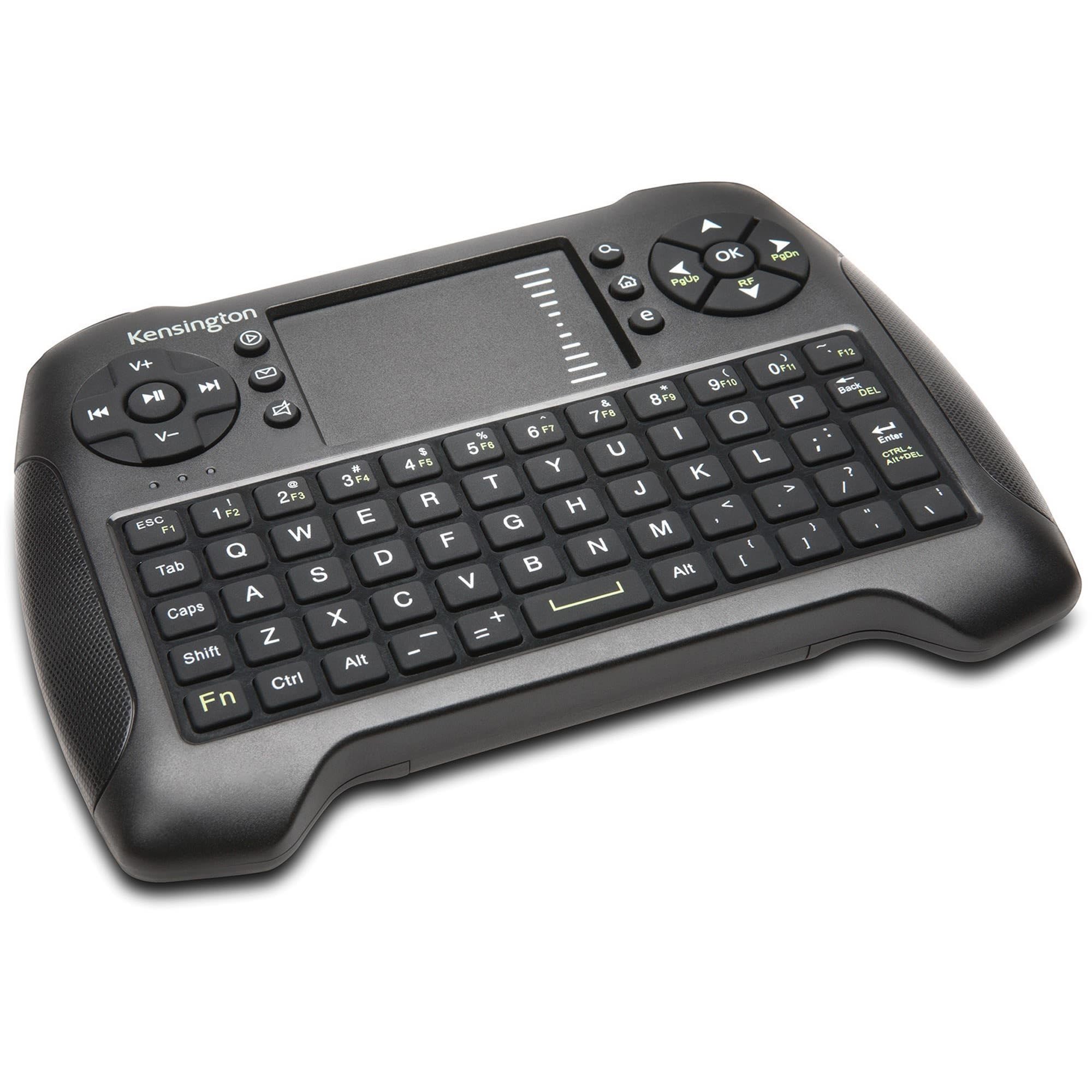
Hand-held kdyboard/trackpad works very well. I find the trackpad and the left and right "mouse keys" to be the most useful items. Text input works, but is tedious with very small keys, which is my only complaint. Otherwise, and excellent product for remote operation of your laptop. Read more
Bought this for a budget HTPC. When I first started using it, it had some issues. The touch pad was laggy, the scroll bar would barely work, the first keypress would consistently not register when typing, and mouse clicks would get stuck. The remote would randomly make clicking noises too, almost sounding like there is a hard drive in the remote. Not sure if this is caused by some interference due to a weak bluetooth radio or something, which is strange because I'm only about 5 feet from my PC case. Then a few days later it started working, and now it seems like the above are intermittent issues now. When it does work it works fine, but I plan on upgrading at some point. Works fine as a remote for Kodi, but when I need to do something more involved in the OS I whip out a keyboard and mouse. I also cant find the product on Kensingtons website, so I'm assuming its discontinued. Read more
Easy to set up. Using it as a keyboard and mouse combo for a Microsoft Surface Hub 2s in my office. Read more
I bought this keyboard to use with my HTPC because the manual online showed it to be backlit. The manual I got with it shows it to be backlit. IT IS NOT BACKLIT. While the keyboard does function fine, and has a decent tactile feedback, the layout doesn't work well, unless you don't mind pecking out letters one at a time, and no, I don't have fat fingers. The trackpad is also lacking to say the least. It can never decide if it wants to right click, left click, move the cursor, or drag something on screen, when all I want to do is scroll down - in the scroll area mind you. Move too slowly, and it wants to drag everything. Move too quickly, and it makes four or five single taps. It's a chunky piece of plastic that honestly doesn't feel very well made. I've used Kensington products for years and never had an issue until this. I'll be buying something else, and relegating this to a backup. EDIT: This has now developed an issue where using the arrow keys to go forward or reverse in media, it generates multiple button presses when I tap the button once. Sometimes it will fast forward to the end of the video. Rating updated to reflect this. Read more
Have bought two others for friends Read more
Awesome tool! I use it daily in my classroom! Read more
Its radio is abysmally weak, barely making it two meters through the air. The case is flimsy. If you manage to take it from 2.00m to 2.01m away from its receiver and it stops working... whatever key button was held down will keep repeating, or more frequently, keypresses will not register until you contort your body back into range. Something in the electronics has gone "microphonic", making oddball noises when scrolling around the touchpad. The keyboard layout is unnatural. Its lack of a backlight makes it unsuitable for dimly lit rooms, such as where a TV would be... the sort of thing that may have a home theater pc attached to it... the sort of thing where you would want a handheld keyboard/trackpad combo. That being said, I still prefer it to a full-sized wireless keyboard for poking at the browser to watch videos, which is typically Airplane! on endless repeat streaming from this here internet web site. Sometimes I think it's actually worse than nothing, but then I try to use the full-sized keyboard again and remember why I bought this thing. Read more

Kensington Duo Gel Keyboard Wrist Rest Ergonomic Support with Ventilation Channel Universal Compatibility K62397AM Blue

Kensington Duo Gel Loop Wrist Rest for Keyboard Wrist Pad for Full Size Keyboard Ergonomic Wrist Pad Non-Skid

Kensington Duo Gel Mouse Keyboard Wrist Rest Bundle Set Ergonomic Keyboard and Mouse Pad With Wrist Support Keyboard

Kensington Duo Gel Mouse Keyboard Wrist Rest Bundle Set Ergonomic Keyboard and Mouse Pad With Wrist Support Keyboard

Kensington Wired Ergonomic Mouse - Pro Fit Ergo Wired Mouse for Your Home Office - Laptop Desktop PC

Kensington Adjustable Aluminum Laptop Stand for Desk Ultra-Slim Lightweight Foldable Portable Notebook Holder Anti-Slip Silicone Tablet Mount for

Kensington Dual Monitor Mount for Desk C-clamp Vesa Monitor Stand Fits 2 Ultrawide Monitors Up to 27 Inches

Kensington Duo Gel Mouse Pad with Wrist Rest Ergonomic Wrist Support for Pain Relief Comfortable Non-Skid Gel Pad
We use optional analytics and advertising cookies to understand how visitors use Ventari, measure ads, and improve the experience. You can accept all optional cookies, allow analytics only, or decline them. See our Cookie Policy.