KODAK

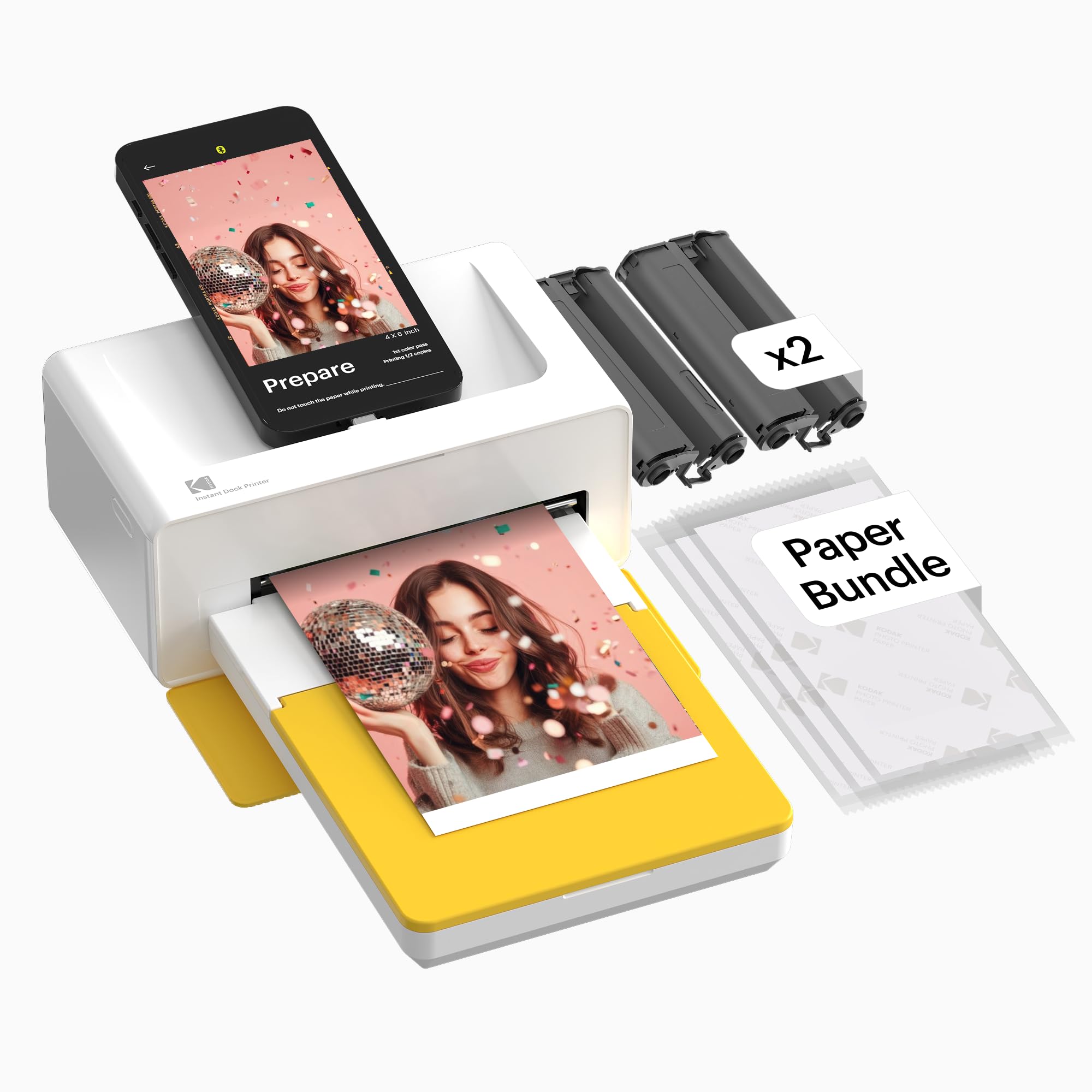
KODAK Dock Plus 4PASS Instant Photo Printer 4x6 Portable Picture Printer Bluetooth Dock 2-in-1 Home and Gift Printer

4.2

$239.98

StylePrinter + 50 Sheets

About this item

  • Simple to use; With the Kodak Dock Plus photo printer, you can dock and charge your phone, print your favorite photos instantly, and enjoy the convenience of using it at home, school, or anywhere
  • Easy to connect; The Kodak Dock Plus is compatible with Apple iPhone, iPad, and Android devices, supports wireless Bluetooth connection, and also offers convenient docking and charging
  • Print more, save more; With the Kodak Dock Plus, you can enjoy the most affordable way to print your memories right at home, and the Value Pack offers great value when purchased in a printer bundle
  • Superior photo quality; Kodak 4PASS technology to print flawless photos in layers of color with a laminating process, making them fingerprint proof, water resistant, and lasting for generations
  • Two photo types; You can choose between border and borderless photos, where you can write down your memories in the border type to make them last forever, or print larger sized photos in the borderless type, available in 4x6 inches
  • Product description The video showcases the product in use. The video guides you through product setup. The video compares multiple products. The video shows the product being unpacked. Kodak Dock Plus Merchant Video Previous page Unbeatable Affordability Extraordinary value with a price lower than others and 7 times more photos for your money! How to Replace? We'll tell you how to replace the cartridge! Next page 1 Best Price 2 What's in the box 3 Unbeatable Affordability 4 How to replace Cartridges Previous page Next page 1 Size 2 Customization 3 Collages STEP 1 Open the cartridge door on the side of the printer. STEP 2 Remove the old cartridge and insert the new one, aligning it with the correct shape. (Press above ‘PULL’ for easy removal.) STEP 3 Push the cartridge in until you hear a “click” sound. What Simple to use; With the Kodak Dock Plus photo printer, you can dock and charge your phone, print your favorite photos instantly, and enjoy the convenience of using it at home, school, or anywhere; Easy to connect; The Kodak Dock Plus is compatible with Apple iPhone, iPad, and Android devices, supports wireless Bluetooth connection, and also offers convenient docking and chargin
Specification

Product facts

Key details

Brand
KODAK
Connectivity Technology
Bluetooth, Wireless
Printing Technology
4PASS Dye Sublimation
Special Feature
Borderless Printing
Color
White, Yellow

Dimensions and fit

dimensions
4"D x 7"W x 3"H
weight
4.4 pounds
Item Weight
2 Kilograms
product_dimensions
4"D x 7"W x 3"H
maximum_media_size
4x6 inches
sheet_size
4x6 Inches
supported_media_sizes
4 x 6 inches
item_weight
4.4 pounds

Technical specifications

Model Name
Dock Plus
Maximum Print Speed (Color)
1 ppm
Max Printspeed Monochrome
1 ppm
max_copy_speed_black__white
1 ppm
model_series
Dock Plus
item_model_number
CAR-PD460Y

Item information

Printer Output
Color
controller_type
Android, iOS
included_components
IPhone Lightning Adaptor, Initial Cartridge, Photo Papers, Power Adapter,, User Manual
print_media
Glossy photo paper
scanner_type
Portable
max_input_sheet_capacity
80
compatible_devices
Smartphones, Tablets
maximum_color_print_resolution
1200 x 1200
maximum_black_and_white_print_resolution
1200 dpi
warranty_type
Limited Warranty
color_depth
36 bpp
dualsided_printing
Yes
maximum_copies_per_run
1
max_copy_resolution_color
1200 x 1200
max_copy_resolution_blackwhite
1200 dpi
duplex
simplex
hardware_interface
USB Type C
ink_color
Yellow, Magenta, Cyan, Black
additional_printer_functions
Print Only
control_method
App
output_sheet_capacity
50
number_of_trays
1
number_of_usb_2_ports
1
total_usb_ports
1
specific_uses_for_product
Home, School
upc
192143002628
printer_ink_type
Solid dye-sublimation ink
global_trade_identification_number
00192143002628
memory_storage_capacity
64 MB
batteries
1 D batteries required. (included)
best_sellers_rank
#228 in Office Products ( See Top 100 in Office Products ) #1 in Desktop Photo Printers
is_discontinued_by_manufacturer
No
date_first_available
May 16, 2020
manufacturer
Prinics Co., Ltd.
Overview

About this item

  • Simple to use; With the Kodak Dock Plus photo printer, you can dock and charge your phone, print your favorite photos instantly, and enjoy the convenience of using it at home, school, or anywhere
  • Easy to connect; The Kodak Dock Plus is compatible with Apple iPhone, iPad, and Android devices, supports wireless Bluetooth connection, and also offers convenient docking and charging
  • Print more, save more; With the Kodak Dock Plus, you can enjoy the most affordable way to print your memories right at home, and the Value Pack offers great value when purchased in a printer bundle
  • Superior photo quality; Kodak 4PASS technology to print flawless photos in layers of color with a laminating process, making them fingerprint proof, water resistant, and lasting for generations
  • Two photo types; You can choose between border and borderless photos, where you can write down your memories in the border type to make them last forever, or print larger sized photos in the borderless type, available in 4x6 inches
  • Product description The video showcases the product in use. The video guides you through product setup. The video compares multiple products. The video shows the product being unpacked. Kodak Dock Plus Merchant Video Previous page Unbeatable Affordability Extraordinary value with a price lower than others and 7 times more photos for your money! How to Replace? We'll tell you how to replace the cartridge! Next page 1 Best Price 2 What's in the box 3 Unbeatable Affordability 4 How to replace Cartridges Previous page Next page 1 Size 2 Customization 3 Collages STEP 1 Open the cartridge door on the side of the printer. STEP 2 Remove the old cartridge and insert the new one, aligning it with the correct shape. (Press above ‘PULL’ for easy removal.) STEP 3 Push the cartridge in until you hear a “click” sound. What Simple to use; With the Kodak Dock Plus photo printer, you can dock and charge your phone, print your favorite photos instantly, and enjoy the convenience of using it at home, school, or anywhere; Easy to connect; The Kodak Dock Plus is compatible with Apple iPhone, iPad, and Android devices, supports wireless Bluetooth connection, and also offers convenient docking and chargin

Have a question about this product?

From the brand

Product detailProduct detailProduct detailProduct detailProduct detailProduct detailProduct detailProduct detailProduct detailProduct detailProduct detailProduct detail

Product videos

Product video 1

Customer reviews

8 reviewsPositive

Rated 4.2/5 across 8 reviews — well received overall.

  • 75% of sampled reviews give 4–5 stars.

Customers say

Customers find the printer easy to use, with an intuitive app and straightforward phone printing process.

Generated from the text of customer reviews

★★★★★

Great printer!

Absolutely loved it! Definitely worth the money! The pictures come out the same as taken no color distortion! Super easy to setup and get started! I love the Bluetooth feature the app is super easy to set up and use! Made scrapbooking a lot easier! Read more

Shyann
★★★★★

If you're looking for a photo printer, buy this one.

This is a really cool product, I like how easy it is to setup and use. Bluetooth is a really great feature and I get to print out so many cool pictures for cool people. Read more

Zachary Friedman
★★★★★

Love this little printer

I love this little printer. I use to go to our local WM, wait on an instant photo printer to open, then feel rushed the whole time I was printing. Now I sit at my desk and print photos on my time! I think it’s important to know, the ink cartridge do not last long. They are 40, 80, and 120 prints. Read more

Edward Johnson
★★★★

WONDERFUL KEEPSAKE AID!!!

Worked beautifully when first printing my pics. However, after printing 12 pictures, I needed to replace the ink cartridge AND that's when the problem began. I put in the new cartridge, and it jammed, and a clear yellow film bunched up in the printer. I removed the yellow film and inserted another new cartridge. Now, the paper will not feed when printing. I removed all the paper and reinserted 10 new papers as instructed. Still will not feed the paper when activation of printer. CAN YOU PLEASE HELP ME!!! I love this device and need some help. Hope I will not have to replace it as my budget will not allow it. Thank you. Read more

sharon c
★★★★★

Excellent Photo Printer

I bought this printer for my 13yr old daughter for Christmas. She has printed several pictures from her IPhone 16 with no complaints. It easily connects through Bluetooth or plug you phone right into the usb-c plug. Setup was a breeze for her. Picture color quality is the same as you get from the big name stores. Overall design, size and fit of the printer makes it the perfect choice. Would recommend. Read more

Philip
★★★★★

Nice product, easy to use!

Very nice compact unit, prints came out very nice, had to adjust the brightness of the picture a little. Quality of paper and finish is excellent! Read more

Josh Miller
★★★★★

this was the highest rated for a reason. buy it!

took a couple minutes to figure out. assemble all the pieces. insert paper gloss up. came with an ink cartridge already installed the instructions are wrong for the bt setup. you have to skip thru the bt tutorial on the app, and it will automatically find it for you after. the printer does not show up in bt menu, like the instructions show. storage case is tight, but the stuff does fit ok. could use another pouch for the stickers and other stuff. 10/10 cool Read more

fromalexsmith
★★★☆☆

Just okay

I've had this for about 2 years now. The photos are okay, not the best quality. They come out blurry and the images aren't very sharp and the colors come out washed but they look okay from a distance and if you don't look closely. The app is glitch, constantly needs updates and I am no longer able to print 5 at a time (you don't want to do this anyways because the printer over heats) I have to exit out of the app everytime to print one picture, and reconnect to Bluetooth each time which is annoying. Overall, it's just okay but I'm activly looking to buy a better quality printer. Read more

Sarah Lewkowicz

We use optional analytics and advertising cookies to understand how visitors use Ventari, measure ads, and improve the experience. You can accept all optional cookies, allow analytics only, or decline them. See our Cookie Policy.